





.avif)
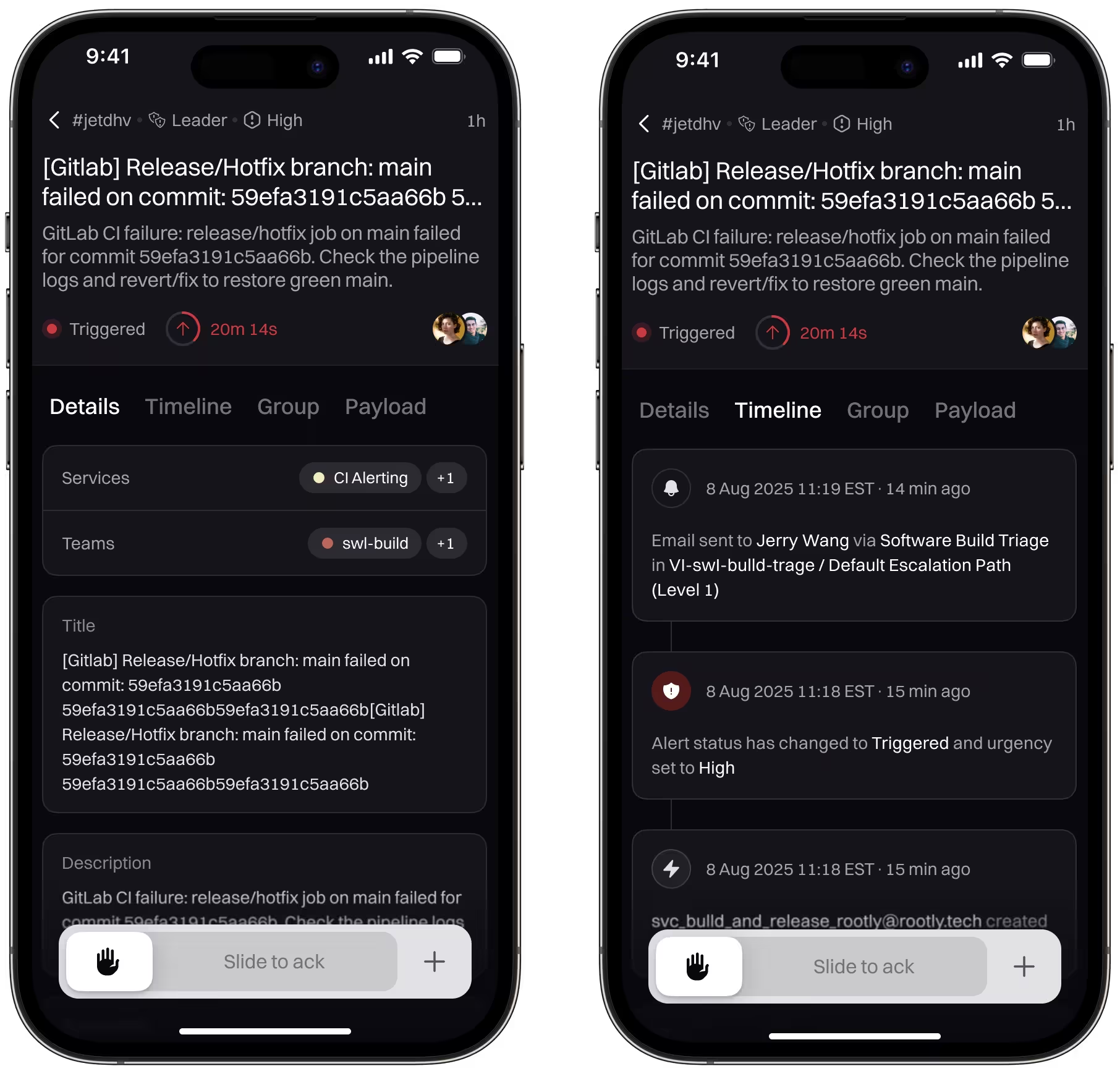
Rootly Mobile 2.8.0 introduces a redesigned Alert Details page that aligns with the app’s new look and feel and makes alert response faster and more intuitive. You can now review all alert context, take action with simple gestures, and escalate issues on the go—without bouncing between screens.
What’s new
Redesigned Alert details experience
- Swipe to acknowledge or resolve: Quickly take action with natural swipe gestures designed for mobile-first response.
- Full alert context in one view: Review alert details, metadata, and timelines directly in the app.
- Faster escalation: Escalate alerts to incidents or responders with fewer taps when you’re on the move.
- Consistently up-to-date alerts: Alert data and timelines now refresh reliably, ensuring you’re always seeing the latest state.
- Cleaner org switching: The org switcher now displays organizations in alphabetical order for easier navigation.
- Improved status filtering: Refreshed status filter UX makes it faster and clearer to find what you’re looking for.
Why it matters
When you’re on call, mobile interactions need to be fast, predictable, and low-friction. This release makes alert response more actionable and reliable by pairing a cleaner UI with gesture-based actions and more consistent data updates—so you can confidently respond wherever you are.
Getting started
Update to Rootly Mobile 2.8.0 from the App Store or Google Play to start using the new Alert Details experience.
New & Improved
New Features
- Added alert description as a liquid variable in workflows and alert templates
- Exposed notification_type field in the notification rules API to enable filtering rules by type
- Added ability to render alert payload images as Slack image blocks instead of plain URLs
- Implemented fuzzy search for accented characters in the escalation dialog
- Added support for overwriting existing schedule overrides via API and Terraform
Bug Fixes
- Resolved liquid syntax in incident summaries causing workflow failures when posting to Slack
- Fixed alert source field attributes being incorrectly restricted to users without alert fields enabled in API documentation
- Resolved issue where services created via API were not immediately searchable in the web interface
- Resolved issue where escalation policy quiet alert paths were not being respected on re-triggered alerts
- Fixed live call routing alerts incorrectly displaying as created via Web UI instead of showing proper source
- Corrected broken redirect links in alert email notifications containing special characters
- Fixed Sentry alert source integration expiring daily by updating token refresh schedule from daily to every 6 hours
- Corrected schedule rendering showing incorrect shift handoff dates