






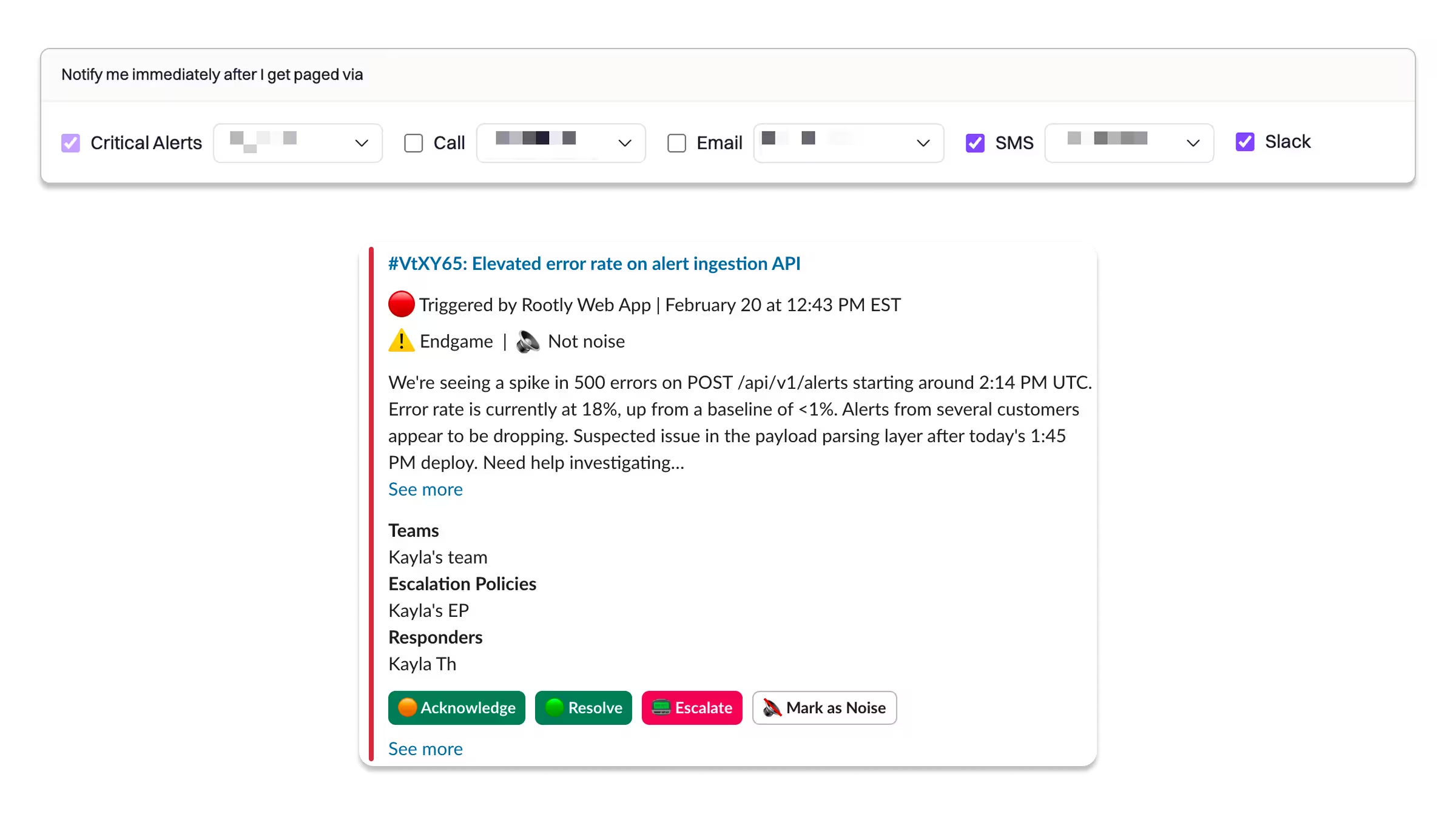
Responders can now configure their on-call notification preferences to be paged directly in Slack by Rootly. When you’re paged, you’ll receive a direct message from the Rootly bot containing alert context—so you can acknowledge, resolve, or escalate the alert instantly, without switching tools.
Why it matters
On-call response speed often breaks down at the handoff between notification and action. Jumping between apps to acknowledge a page or escalate an alert adds friction at exactly the wrong time. With Slack-native paging, Rootly brings the entire alert interaction into the place responders already work.
This means:
- Faster acknowledgment with fewer clicks
- Lower cognitive load during high-stress moments
- Consistent responder experience across web and Slack
- Less context switching, especially on mobile or during off-hours
How it works
- Configure once: Responders set their on-call notification preferences to receive pages in Slack.
- Get paged via DM: When an alert triggers, Rootly sends a direct message with key alert details.
- Take action immediately: From the DM, responders can acknowledge the alert, resolve it, and escalate to additional responders or teams.
All actions are synced back to Rootly in real time.
Getting Started
- Go to On-Call → Notifications in Rootly.
- Enable Slack as a paging destination in your notification preferences.
- When paged, respond directly from your Slack DMs.
Check out the docs to learn more.
This release turns Slack into a first-class on-call interface, letting responders move from page to action in seconds—without ever leaving the tools they already use.
New & Improved
New Features
- Pagination was added to the shifts API, allowing shift data to be fetched in configurable date windows across selected schedules.
- Users can now view and copy an incident's UUID directly from the incident page in the UI.
- Added a "Generate AI Summary" button on incident resolution form's summary field.
Bug Fixes
- Fixed an issue where repeating workflows were intermittently stopping without explanation or only executing once instead of on their configured repeat schedule.
- Fixed the Liquid Variable Explorer returning a 408 timeout error.
- Fixed SMS notifications failing to deliver to users in Turkey.
- Fixed the Rootly AI bot failing to join Zoom meetings when the meeting has the "requires sign in" setting enabled.
- Fixed postmortem documents failing to save for certain incidents.
- Fixed a bug where the Live Call Routing escalation timer continued running after a responder picked up the call, causing calls to incorrectly forward to the next responder.
- Fixed an application error thrown when the Live Call Routing escalation timer was configured to 30 or 45 seconds.
- Fixed an issue where inbound email alerts failed to process when the email contained multiple
X-Original-Toheaders. - Fixed a bug where the alert routing PUT API endpoint was creating new alert routes instead of updating the existing one.
- Fixed an issue where on-call rotation Slack groups were not updating with the correct members.
- Fixed a bug where the Rootly transcript bot was failing to be invited to Zoom meetings in production.
- Updated Terraform documentation to correctly mark the
urgencyparameter as required and to clarify that alert source field attributes are only available to organizations with alert fields enabled.