
Go beyond paging
at 1/2 the cost with Rootly.
Our reliability experts migrate your PagerDuty on-call schedules, escalation policies, and integrations. They also help you establish an AI-native incident response program.
Last verified · All comparisons
Already switched from PagerDuty to Rootly.




















PagerDuty launched a year before the first iPhone.
PagerDuty has stayed the same, but engineering and incidents are completely different in the age of AI.
“PagerDuty is a very expensive notification.”
“Constant upsells and price hikes.”
“Teams as services, dummy users… so many workarounds.”
“Dated UI. A nightmare to configure.”
“Getting on-call coverage is too complicated.”
“PagerDuty’s AI is a wrapper at best.”
“PD wakes me up, then leaves me in the dark.”
“We’re just a number, with no help improving.”
“Too hard for anyone outside engineering.”
Why teams choose Rootly.
PagerDuty’s outdated platform gets in the way.
Rootly makes reliability easier.
On-call without the workarounds
Who are you paging?
General Schedule
Web App Service
Security Team
 Jane
Jane Joseph
 Jamie
JamiePage beyond just “Services”
No more using services as a workaround. Page teams, services, and more.
Shadow users
 Jerry WangShadowing JJ Tang · Jul 18 – Jul 31
Paged alongside the primary. Ends on its own.
MonTueWedThuFriNative shadow rotations
No extra rota, no manual cleanup when shadowing ends.
Payments (Secondary) 24/7 coverage
!

Gap on Thursday, 2 AM to 6 AM
Covered by schedule owner Ashley S.
Automated gap detection
Never get caught with no one on call.
Incoming alert




Escalate to next level
Cycle-based round robin
Automatically rotate on-call responsibilities, so no single team member is overwhelmed.
Better responder experience
Allow partial override
General on-callJan 11, 4:30 PM – 4:30 PM
General on-call Partial overrideJan 11, 4:30 PM – 4:30 PMJan 11, 4:30 PM – 6:30 PM
General on-callJan 12, 4:30 PM – 4:30 PM
Request coverage
Overrides and requesting coverage made easy, including your PTO and holiday schedule.
- Jane
Paged Jan 4, 13:52
Outside work hours 6 hrs 32 mins
Compensation $512
On-Call pay calculator
No more manually calculating who should get paid with spreadsheets.
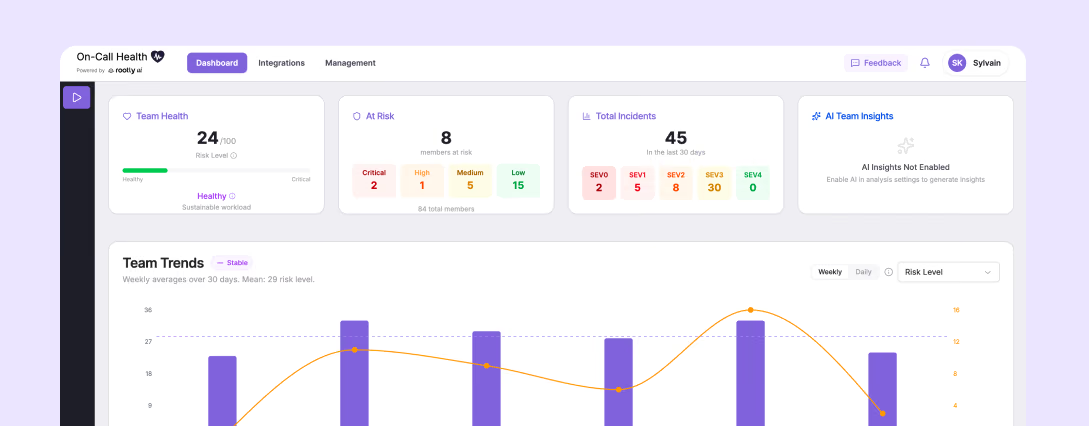
On-call Health
An open source tool that looks for early warning signs of overload in your on-call engineers.
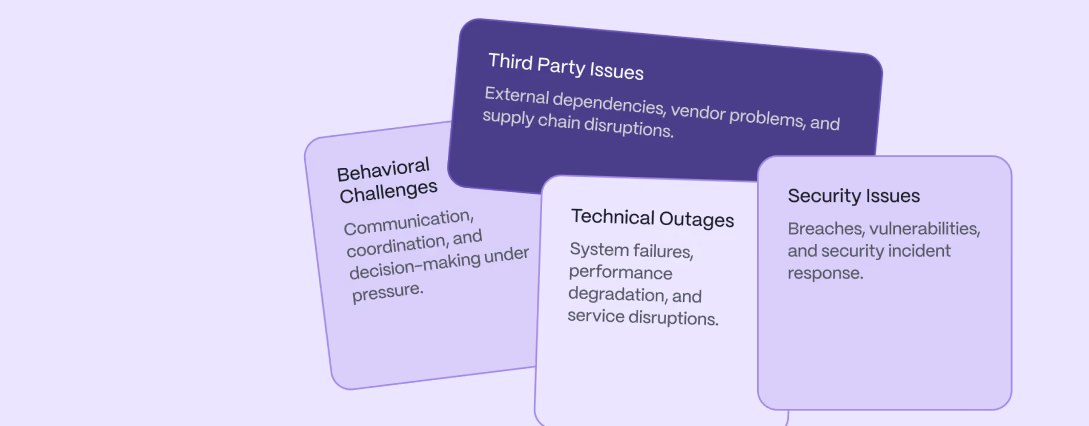
Rootly Academy
Equip responders with the skills, confidence, and experience to succeed when it matters most.
Incident response for the whole team
 slack
slack# alerts 1
#

Rootly APP 11:46 PM
🚨 A new alert was just triggered
Website is down!
Service: Platform, Checkout · Team: Backend
👀 Acknowledge✓ Acknowledged🟢 Resolve📟 Escalate🔥 Create Incident
Native to the tools your team uses
Run incidents together in Slack, Microsoft Teams, and Google Meet.
Triggered High CPU on production-redis-002
Summary
CPU spiked to 96% after a queue storm. Mitigations are landing and CPU is falling.
Catch me upAcknowledge
Mobile App with AI
Ask questions and direct actions right from your finger tips, from anywhere in the world.
Status
All systems operational
ChatOperational
Beautiful Status pages, included
Inform customers in real time, reduce support noise, and build trust during downtime.
Recording in progress
Rootly Scribe


Meeting Scribe
A dedicated meeting scribe that captures all context so nothing slips through the cracks.
Faster resolution with AI that takes action
Ellis 1 minute ago
@Rootly what's going on?
Rootly APP 1 minute ago
We're seeing 503 errors above threshold in the payments service, likely from an integration error with a new ACME Payments service. Auth tokens are being regenerated to resolve it.
Just ask @Rootly Agent
Mention @Rootly to get answers and drive actions without leaving the channel.
Here are your suggested actions:
Crash log analysis+ Add✓ Added
Check for recent updates+ Add
Third-party service review+ Add
Proactive nudges and suggestions
Stay a head with suggested troubleshooting, actions, and who to page.
- Rootly App
What I've found so far
Likely root cause
A transient spike in message production is the primary trigger, at 23:09 UTC within the alert's 5-minute window.
AI SRE for RCA and suggested fixes
Automated root cause analysis complete with alert correlation and suggested fixes.
Related incidents
Payment Gateway TimeoutAug 22, 2025
Checkout API Serialization ErrorJul 14, 2025
Feature Flag Rollout RegressionMay 9, 2025
Header Injection Bug in Order-ServiceMar 3, 2025
Related incident matching
Quickly understand historical incidents, how they relate, and how they were resolved.
Learning made easy
Incidents › API Latency Degradation (INC-2034)
API Latency Degradation (INC-2034)
Summary
Between 14:03 and 15:45 UTC on July 9, the public API saw elevated latency and intermittent 5xx errors across all regions.
Auto-generated retrospectives
AI-powered retrospectives from contributing factors to timeline generation.
- 3 levels 3 levels 3 levels
Policies and scorecards
Consistency matters, ensuring escalation policies have enough levels.
Pager load for the last 90 days
Insights in one place
Reporting and metrics from alerts to on-call readiness and everything in between.
Switch from PagerDuty without the migration headaches.
DoorDash, Brex, and thousands of others moved over to Rootly with our complimentary migration service.
1/2 the price
Stop paying for expensive legacy software. Rootly comes with everything you need.
Contract buyout
Rootly buys out up to 12 months of a remaining PagerDuty contract, so you do not pay for both tools while you move.
99.99% uptime
Demanding teams like NVIDIA and SoFi trust us to be there when they need us most.

We moved 10 years of PagerDuty to Rootly in two weeks, and now the whole company can take part.
 Saag PatelHead of Platform
 Poll Everywhere switched from PagerDuty, cut on-call tooling costs and made response faster with Rootly.
 Achievers switched from PagerDuty and productized reliability on Microsoft Teams with Rootly.
 KnowBe4 switched from PagerDuty and turned Incident Response into a repeatable, predictable system with Rootly.
 Webflow shutdown PagerDuty to use Rootly to build a proactive reliability culture.
Thousands of engineering leaders choose Rootly.







We scan and audit your environment.
You share a read-only API key.
We automatically audit everything from schedules, escalation policies, orchestration, automated actions, integrations, and unknown unknowns that have long been forgotten about.
You get a full assessment and findings report to make informed decisions with the inventory in front of you.
You get a tailored plan that starts with a trial.
Based on the audit, we create a tailored migration plan, complete with complexity, timelines, and phases that run in parallel: account setup, alerting sources, routing, integrations, onboarding, and final go-live.
We migrate you.
We work side-by-side with two or three teams of mixed complexity first. We test everything with live traffic in a trial, then go live.
We work with you to cut over the remaining teams in scheduled batches, under an hour each, fully trained end-to-end.
PagerDuty gets turned off when your teams trust the page.
Agentic incident management: from alert to retrospective.
Bring AI into your incident channels, investigations, and retrospectives—with the context of your tools and control over every feature.
You’re in control, with fine-grained control.
Rootly AI is built with the highest standards of privacy and security in mind to support your incident process, from response to learning.
Get paged with all the info you need to know.
Get automated summaries, related incidents, suggested actions, and more wherever you’re responding.
9:41
Rootly · now
High: Redis Engine CPU High
production-redis-002 · You're on call for Messaging
‹ #jetdhv · Leader · High
Redis | Engine CPU High production-redis-002 [PRODUCTION]
DetailsTimelineGroupPayload
Summary Generated 10:22 AM
Redis CPU on production-redis-002 spiked to 96% after a message queue storm from one customer's rescheduled jobs. Messaging updates are delayed for several customers, and CPU is falling as mitigations land.
Source link
See in Datadog ↗
Redis Engine CPU High
What's the customer impact?
Messaging updates are delayed for several customers on the shared queue. No messages are lost, and delivery is catching up as CPU falls.
Catch me upEscalateHand off
Reply to Rootly AI
Manage the incident with the Rootly Agent.
Ask questions about your systems or what’s been done, and have the agent take actions on your behalf.


#inc-2304-checkout-latency
Priya S. 2:16 AM
@Rootly have we seen this before?
Rootly APP 2:16 AM
Yes. Three related incidents:
Simplified learning with AI retrospectives.
Turn incident context into summaries, timelines, and root cause analysis with AI blocks built into your retrospective templates.
Retrospective AI blocks
Executive summary
Checkout p99 latency reached 4.2s for 22 minutes after deploy #1294 exhausted the connection pool. About 18% of US checkouts timed out until the rollback.
Timeline
2:09 Deploy #1294 to checkout-api
2:11 p99 latency alert fires
2:15 Dana K. acknowledges
2:33 Rolled back, latency normal
Root cause
The deploy halved the pool size while checkout traffic peaked.
More context, more power.
Connect the tools you use for observability, infrastructure, and knowledge management through AI connectors.


Connect Rootly to your harness.
Use the Rootly MCP or the Rootly CLI to connect your incident data to the rest of your AI workflows.
 Incident context connected
 Use our Claude and ChatGPT plugins.
Bring Rootly to everyone’s AI agents while following your workplace’s rules.


How does Rootly compare to PagerDuty?
| Rapid incident response and resolution | PagerDuty | Rootly |
|---|---|---|
| Native alert integrationsDatadog, Grafana, Prometheus, Honeycomb, etc. | ||
| On-call schedulingCreate and manage rotation schedules. | ||
| Predictable pricingPre-negotiated year one, two, and three; no surprise increase on features you thought were included. | ||
| AI Agent in SlackAsk questions about live and historical incidents | ||
| Dedicated customer successNamed CS partner for onboarding and ongoing support. | ||
| Slack-native incident managementRun incidents end-to-end without leaving Slack. | ||
| Native shadow rotationsNo extra rota, no manual cleanup when shadowing ends. | ||
| Mobile app with AINative mobile app for paging and response, incl. AI. | No AI, difficult UX | |
| Simultaneous pagingPage a Team level and Slack channel in one step. | ||
| Bulk overrides across multiple schedulesCoverage changes across every affected schedule at once. | ||
| Automated gap detectionNever get caught with no one on call. | ||
| Sync with Slack user groups automaticallySync Slack user groups like @team-infra with on-call schedules. | ||
| Escalation policies for teams, individuals, servicesEscalations that page the right person, every time. | ||
| Paging escalation policiesPage an escalation policy directly without needing to attach a service. | ||
| Native service catalogTeams, services, and ownership modelled once. | ||
| Conditional branching and cross-tool triggersWorkflows can branch on conditions and reach across tools. | ||
| Config maintenance overheadHow much effort to maintain as your org scales. | High - legacy UI, compounds at scale | Low - abstracted logic, flexible workflows |
| AI summaries + RetrospectivesAuto-generate incident summaries and retrospectives. | ||
| Mobile AINative AI to ask questions about live and historical incidents while on the go. | ||
| MCP ServerMCP server to connect your IDE and CLI. | ||
| AI SRE (generally available)AI that automates root cause analysis and suggests fixes. | as of 2026-05 | |
| SSO / SAMLSingle sign-on via SAML | Paid add-on | |
| SCIM provisioningAutomatic user provisioning and de-provisioning. | ||
| Team-scoped permissionsRestrict access and actions by team. | ||
| Edge connectorOutbound agent for internal systems that cannot accept inbound internet connections. | ||
| Audit loggingTrack changes and actions across the platform. | Paid add-on | |
| Uptime commitmentReliability you can count on. | up to 99.9% | up to 99.99% |
Focus on proactive reliability, not legacy tooling workarounds.
Frequently asked questions
Everything you need to know about Rootly vs. PagerDuty.
What is the difference between Rootly and PagerDuty?
PagerDuty is a legacy paging tool, it notifies a person when something breaks. Rootly is an all-in-one incident management platform that covers the entire lifecycle: on-call and alerting, incident response and coordination in Slack or Teams, AI SRE investigation, retrospectives, and status pages. The core distinction is PagerDuty handles a page. Rootly handles the page and everything that happens after; coordination, resolution, communication, and learning — in a single platform with no per-feature add-ons. For where Datadog fits alongside both tools, read Datadog vs PagerDuty vs Rootly.
Is Rootly more affordable than PagerDuty?
Yes. PagerDuty's base license looks competitive, but core capabilities are gated behind expensive add-ons like AIOps for alert grouping (~$699/mo), PagerDuty Advance (~$415/mo), and Status Pages (~$89/mo), and over $14,400/year in add-ons before you've covered the full lifecycle. Rootly includes every major feature in each product, regardless of team size: AI agents and status pages come with Incident Response, and alert grouping comes with On-Call, with no separate SKU for any of them. AI SRE is an additional product, and Enterprise includes it.
How much does Rootly cost?
Rootly typically comes in at half the cost of PagerDuty. Incident Response is $20 and On-Call is $20 per user per month, or $40 for both at list price. AI SRE requires Incident Response and is priced on request, Enterprise pricing is custom, and the free trial typically lasts two weeks. See Rootly pricing.
Does PagerDuty count non-pageable users as paid seats?
Yes. In PagerDuty's model, users who never receive pages still count as licensed seats. This inflates cost as organizations grow. Rootly offers a free user tier for non-pageable stakeholders, people who need visibility into incidents but never carry a pager don't consume a paid license.
Can PagerDuty page a team or user directly?
No. PagerDuty only pages Services, not teams or users directly. Organizations build workarounds like fake "Nobody" users and shim paging services to route alerts to a team. It's a widely shared frustration among PagerDuty customers at scale. Rootly pages teams, users, schedules, and Slack channels natively, with no workarounds required.
What's the difference between an alert and an incident in each platform?
PagerDuty's data model conflates alerts and incidents, there's no clean native way to promote an alert into a coordinated incident without forcing non-incident statuses into the incident object. Engineers adapt with workarounds, and terminology bleeds across teams. Rootly treats alerts and incidents as distinct objects: an alert can be acknowledged and resolved, or escalated into a fully coordinated incident with roles, comms, and a retrospective.
Does Rootly support migration from PagerDuty?
Yes. PagerDuty migration support is handled for you. Rootly scopes your current configuration; schedules, escalation policies, integrations, routing rules, and executes the migration end to end with a tailored plan including post migration support and training. Most teams are fully live within a week.
How does Rootly's on-call compare to PagerDuty's?
Rootly covers the full on-call experience natively; schedules, escalation policies, shadow rotations, cover requests, holiday calendars, live call routing, and on-call pay tracking, with a mobile app built for fast acknowledgment and resolution. Rootly also pages teams, users, and Slack channels directly, where PagerDuty requires shim services to route to a team. Both handle core scheduling and escalation; Rootly removes the workarounds PagerDuty customers accumulate over time.
Does PagerDuty include AI? How does it compare to Rootly AI SRE?
PagerDuty's AI capabilities are gated behind paid add-ons like AIOps for alert grouping and PagerDuty Advance; while focusing primarily on noise reduction. Rootly's AI agents are included with Incident Response: they draft stakeholder updates, transcribe incident calls, and generate retrospectives. Rootly AI SRE, an additional product that Enterprise includes, starts investigating the moment an alert fires, runs parallel hypothesis checks, and surfaces root cause with confidence scores and visible reasoning.
Why do companies switch from PagerDuty to Rootly?
The most common reasons are add-on costs that compound at renewal, non-pageable users consuming paid seats, paging workarounds that require specialized institutional knowledge, and the fact that coordination, communication, and follow-up still happen outside PagerDuty in most deployments. DoorDash, for example, fully displaced PagerDuty with Rootly, replacing both their internal incident bot and paging bot, with no specialized tool knowledge required. Teams switch when they realize paging is necessary but not sufficient, and they're paying for and maintaining workarounds to cover the rest.
Does Rootly work inside Slack and Microsoft Teams?
Yes. Rootly runs the full incident lifecycle natively in both Slack and Microsoft Teams, declaring incidents, coordinating response, running workflows, updating stakeholders, and closing retrospectives, without switching to a separate interface. PagerDuty's coordination and communication typically happen outside the platform, in Slack and docs, with the page as the entry point.
What uptime does each platform guarantee?
Rootly guarantees 99.99% uptime. PagerDuty publishes 99.9%. The difference matters: 99.9% allows for up to roughly 9 hours of potential downtime per year, while 99.99% reduces that to under one hour. When your systems are down, your incident platform needs to be the most reliable thing in your stack.