The Rootly MCP Server
Give AI assistants real-time access to your incident management workflows.
On this page
Rootly’s MCP Server is seeing strong adoption across the AI and SRE communities, with nearly 10,000 downloads per month. Today we’re excited to announce it is now generally available, enabling AI assistants and agents to interact directly with your Rootly environment.
Using MCP-compatible tools, teams can query incidents and alerts, automate response workflows, configure platform resources like schedules and workflows, and build AI-driven investigation and remediation workflows.
Why it matters
AI tools are increasingly part of the SRE toolkit, but historically they lacked direct access to live operational systems. The Rootly MCP Server closes that gap by exposing incident operations through a standardized interface that AI assistants and agents can safely interact with.
This unlocks new workflows for reliability teams:
- Investigate incidents directly from AI-native environments such as Claude, Codex, or Cursor.
- Run AI-assisted root cause analysis using live incident and alert data.
- Push suggested fixes or operational changes back into Rootly workflows.
- Automate reliability operations through programmable infrastructure and AI agents.
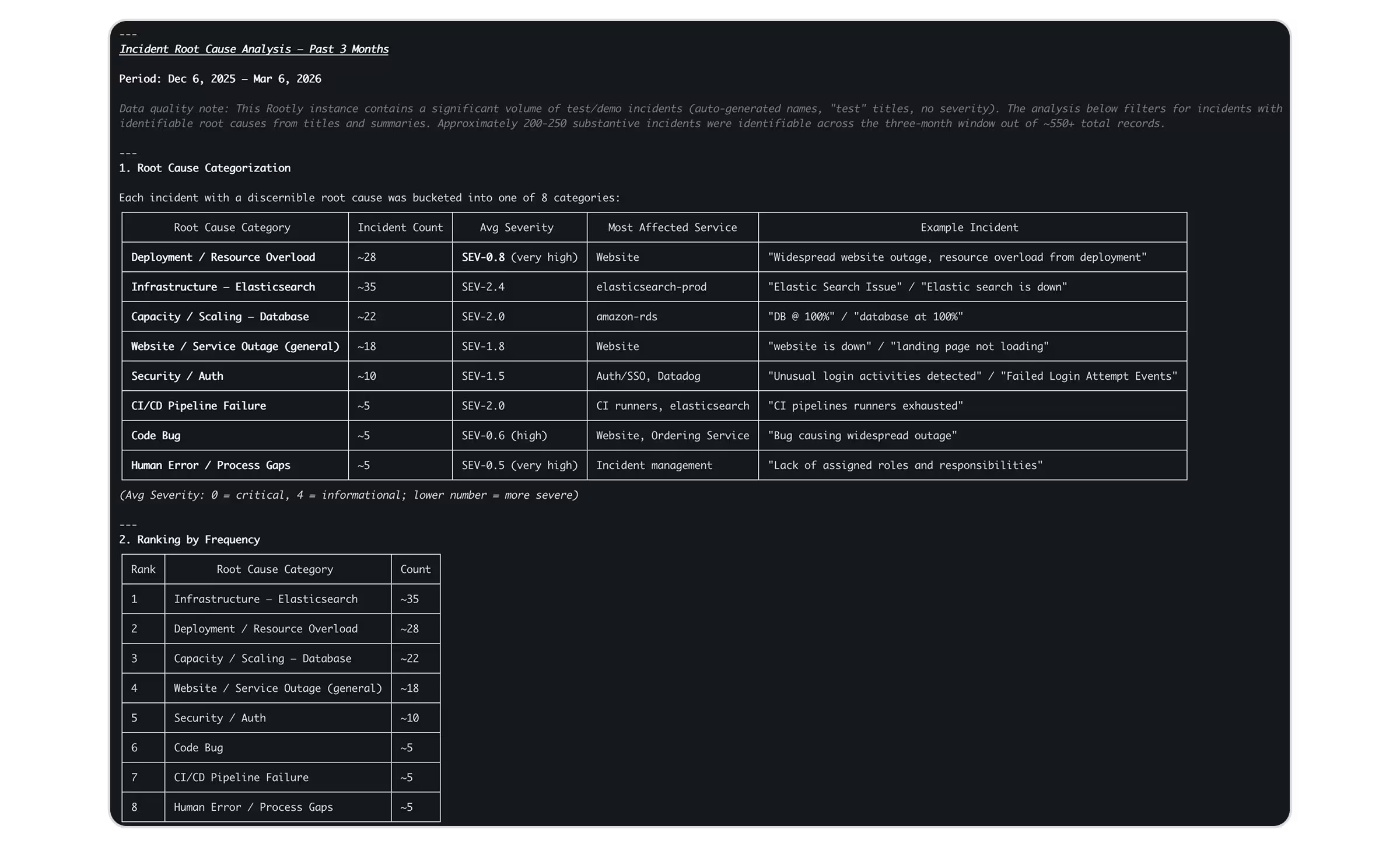
Rootly MCP Server RCA results across 3 months.
Flexible deployment options
The Rootly MCP Server is designed to fit a variety of environments:
- Self-hosted deployment for teams that want full control over their infrastructure.
- Hosted MCP service for teams that want to get started quickly without managing the server themselves.
Real-time streaming for AI agents
The MCP server now supports SSE (Server-Sent Events), HTTP streaming transports, and Code Mode, allowing AI clients and agents to stream responses and receive updates in real time using standard HTTP-compatible networking environments.
This improves compatibility with modern AI runtimes, IDE assistants, and enterprise network environments while enabling faster AI-driven incident workflows.
Use Code Mode for improved reliability—avoid intermittent tool schema loading and multiple calls just to identify the right tool.
Getting started
- Deploy the Rootly MCP Server from the public repository or use the hosted version.
- Configure your Rootly API token and connect it to your MCP-compatible client.
- Start interacting with Rootly resources from your AI assistant or development environment.
Check out the repo and docs to learn more and get started.
What else shipped
Improvements
On-Call
- Functionalities can now be used as paging targets: attach an escalation policy, page via the manual paging modal, and route through workflow actions
- When a functionality is paged, the owning team is automatically assigned to the alert
- Services can now be added as conditions on escalation policy paths
- On-call schedule Slack notifications now include shadow users alongside the primary on-call person
- All Slack schedule notifications now show the full user in context
- Alert timeline events now render with markdown formatting
- Improved voice calling reliability for China numbers
Incident Response
- Multiple retrospective exports can now be configured from the same provider
- Auto-set configuration is now available for native form fields
- The form field placement editor now shows an indicator when a field has auto-set rules configured
- The “Checklists” drawer on catalog entity pages now lists all checklists with a detail view
- “Start review” now supports selecting from multiple checklists per entity
- Checklist review UI has been refreshed with updated row layout, close button, and post-create navigation
- Slack command labels have been updated from “Slack Command” to “Manual Trigger” for clarity
API & CLI
On-Call
- The On-Call API now supports filtering by
group_ids
Incident Response
- Teams, routes, and other assets can now be referenced by name or slug in API requests, removing the need to look up IDs
- API keys can now act on behalf of their associated user, enabling user-scoped API access
Terraform
On-Call
- Updated documentation for the
delayparameter inrootly_escalation_level - The Opsgenie integration now accepts an empty
priorityfield via Terraform
Incident Response
- Fixed an issue where alert routes could not be updated via Terraform
- Improved provider retry and backoff behavior when rate-limited during
terraform plan
Fixes
On-Call
- Alert Slack blocks now post correctly when the “Alert created → Create incident channel” workflow is enabled
- HTML form attributes no longer leak into escalation path names when names contain special characters
- After deferring and re-evaluating an alert, the system now correctly routes to the urgency-matched escalation path
- The escalation policy edit page now warns when navigating away with unsaved changes
- Time restriction inputs now display times consistently in 24-hour format
- Time restriction UI components are now consistent across escalation path and deferral path editors
- Saving an escalation policy with default paging now redirects to the correct page
- Deleting an escalation path now shows a confirmation dialog before proceeding
- Escalation path conditions no longer allow blank or empty values on creation
- Breadcrumbs now truncate long escalation policy names correctly
- Urgency option display no longer breaks with very long strings
- Tooltips on the escalation policy edit page are now functional
- The “Proceed after minutes” field now only accepts valid positive numbers
- Users now see a success confirmation after saving escalation policy changes
- The time slot dropdown no longer appears as a ghost when “All day” is enabled
- Fixed invalid timestamps being accepted by the notification system, causing retry loops and DLQ alerts
- The currently selected escalation path is now clearly indicated in the sidebar
- Countdown timer now appears for short defer durations, and alert status correctly updates to Triggered
- Callers now hear the correct message when a responder is unavailable
- Voice call responses are no longer cut off when a responder takes longer to respond
- Fixed an RBAC issue where users could delete alerts without the Alerts Write permission
- Slack user group on-call tags now update reliably on Sundays
- Coverage request UI no longer selects the wrong shift when a time window overlaps another user’s shift start
- Alerts now auto-resolve correctly in all configurations
- Alerts no longer send duplicate Slack messages
- Manually creating an alert with “deferred” status now works correctly
- Acknowledge and Resolve buttons now appear on deferred alerts in the UI
- Deferred alert status now displays correctly on the web
- Slack smart defaults no longer fire on deferred alert creation
- Preferred names now display correctly on email alerts
- Email alert sources now reliably create alerts
Incident Response
- Fixed an error when removing a group from sync and attempting to resync
- Invalid service account credentials now show a meaningful error instead of silently closing the modal
- Long incident titles no longer break the Slack channel topic URL
- Fixed an incomplete incident announcement Slack block
- Updating a custom form name now correctly updates the linked fields list
- Fixed incorrect reporter being set in Jira workflow runs
- Fixed a timezone parse error
- Integrations and webhooks now correctly receive “deferred” status before “triggered”
- Fixed the “IS NOT” workflow operator not being passed correctly in workflow conditions
- Status page templates now correctly map template titles to public titles in updates
- Fixed the inability to edit the severity native form field in certain cases
- The “mark as private” visibility checkbox for form fields now behaves consistently across Slack and web
- The payload condition editor is now visible for alert workflows when multiple payload conditions are enabled
- Alert workflow Slack messages are no longer overwritten by default context blocks on status changes
- Fixed Backstage URLs returning errors on integration pages
- Fixed SAML ACS URL mismatch in identity provider configuration
- Fixed the public status page SAML endpoint returning 404 for custom domains
- Fixed
rootly oncall listCLI command returning a 404 error - Slack channel link now appears on the alert block immediately when an alert is created
- Fixed Azure AD SSO login returning an error on the public status page
Editor’s note: Atlassian is retiring Opsgenie, with end-of-life scheduled for April 2027—factor a migration path into any evaluation.
Related changelogs
Control AI output across your organization.
AI Instructions guide Rootly Agents on how to carry out tasks and respond to requests, so every automated interaction works the way your teams do.

Never lose the call transcript.
Scribe joins your incident call, transcribes live with speaker labels, and makes every call part of your incident record.
Related Incidents detected automatically.
Rootly's agent posts the most relevant past incidents into your incident channel, before anyone thinks to go looking.