








.svg)










The Rootly MCP server has become a default install for engineering teams moving into the agentic world. It's now downloaded more than 13,000 times over the past month, and the number keeps climbing.
Connecting your AI agents to your incident data, schedules, and on-call history opens up a lot of possibilities, and it's not always obvious where to start. So we’ve gathered some of the most common ways our customers are using the Rootly MCP server today.
1. Get answers from past incidents
When something breaks, the instinct is to start from scratch: check the logs, trace the error, work through the problem as if it's new. But most incidents aren't new.
They're variations of something the team has already seen and resolved. The fix might be sitting in a past incident record that nobody has time to go look for under pressure. A responder dealing with a database timeout doesn't need to remember the incident number from last month.
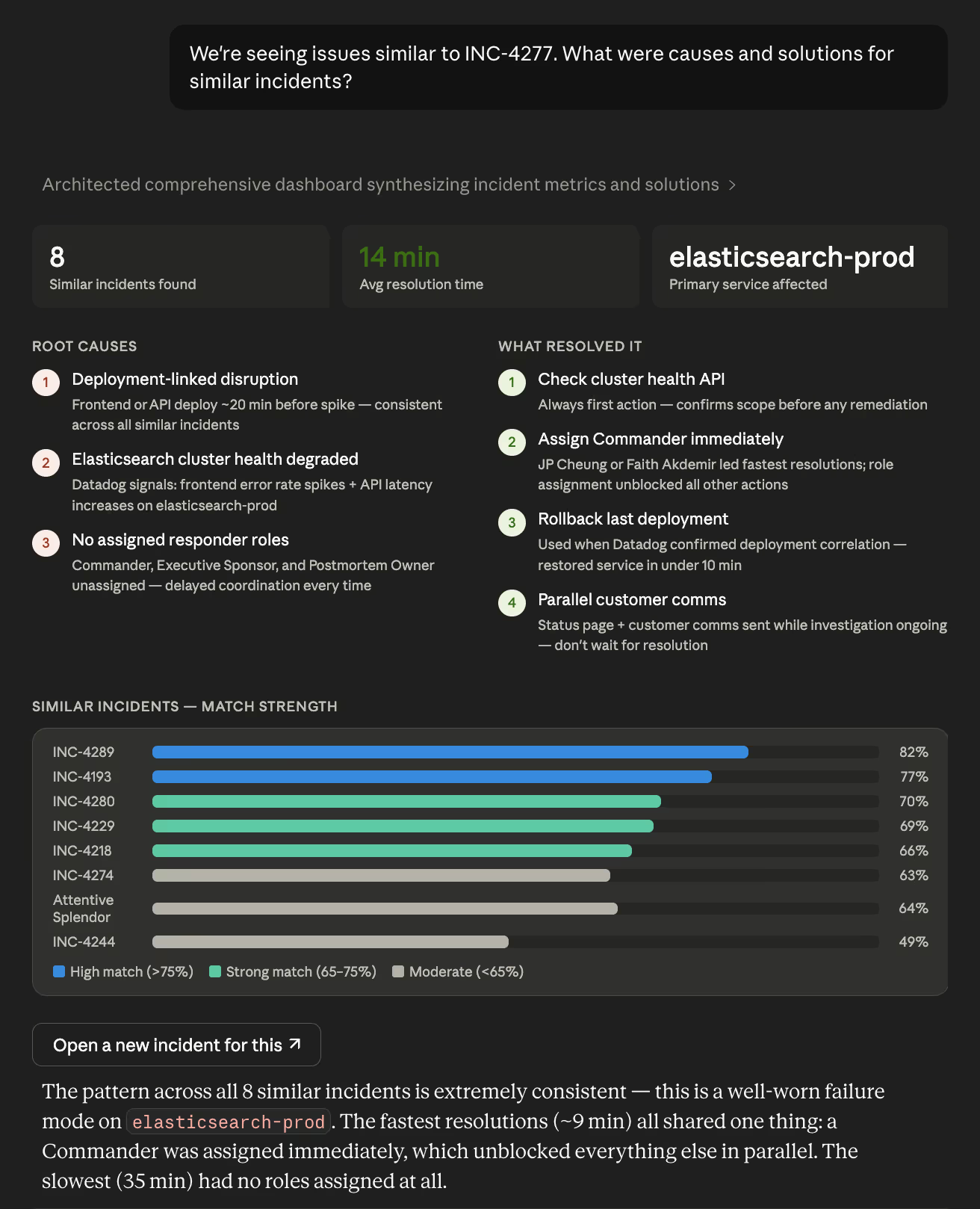
The Rootly MCP server can search incident history by description and surface the most similar past incidents automatically. And it can bring, not only what happened, but how it was resolved, how long it took, and what action items came out of it.
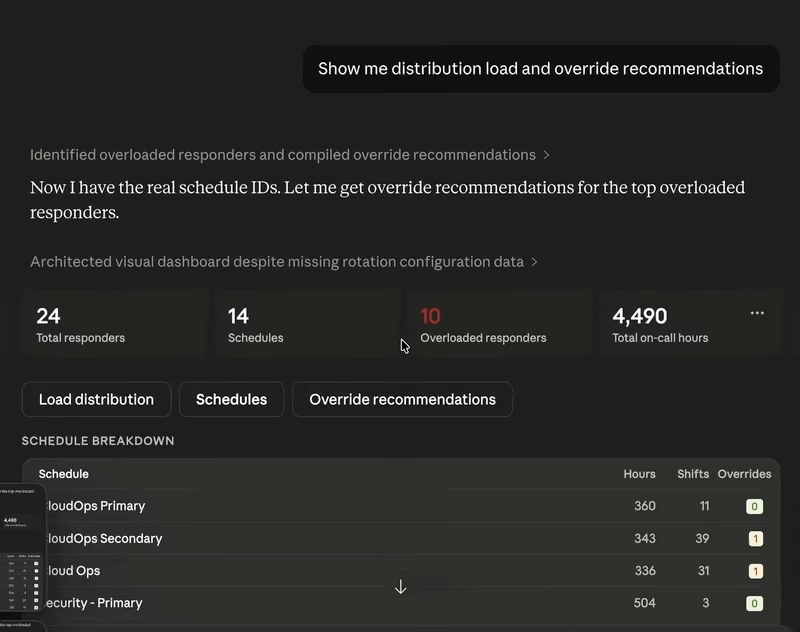
2. Suggest the right override before burnout becomes a problem
On-call load does not always distribute itself evenly. The same people end up covering extra shifts, absorbing nights and weekends, and becoming the default escalation path not because it was planned that way, but because it's easier to keep relying on whoever already knows the system. By the time it shows up as a problem, the human cost is usually higher than just fixing the schedule.
The hard part isn't spotting that someone is overloaded. It's figuring out who can step in without creating a gap somewhere else. That requires knowing who's scheduled, who isn't, how many hours each person has accumulated, and whether the person you're thinking of covering is already stretched.
The Rootly MCP server gives AI the context to answer those questions directly. It can look across every schedule, compare responder load over any period, identify who's carrying too much, and find a less-loaded teammate with the right coverage window.
Paired with On-Call Health, it can flag responders at elevated burnout risk before they hit a wall and generate a ready-to-use override recommendation rather than just surfacing the problem. That's the difference between a dashboard that shows you something is wrong and a tool that helps you fix it in the same conversation.
3. Close the loop after the incident
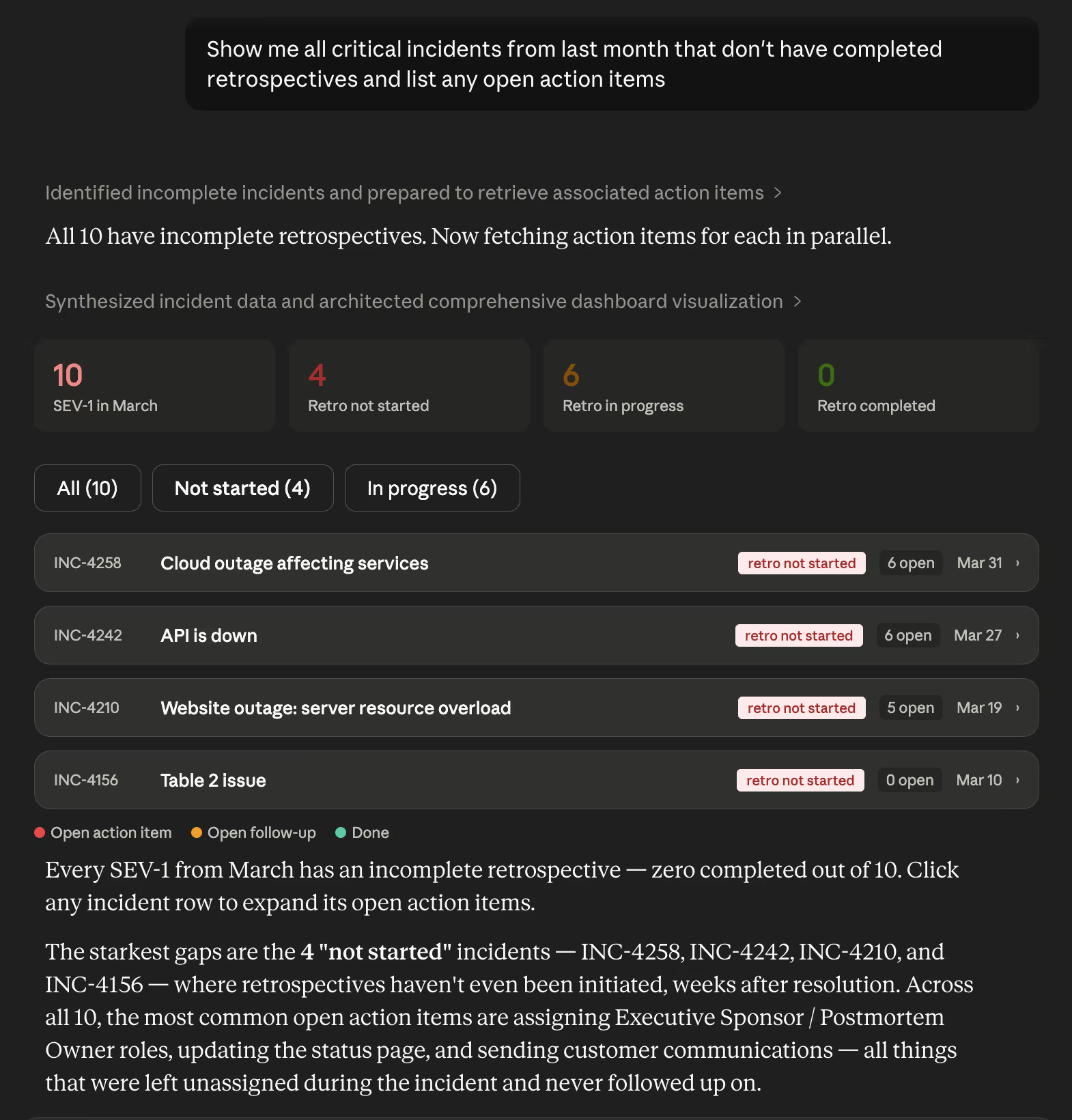
Resolving an incident is only part of the work. The follow-up tends to scatter quickly: action items live in Slack, the retro doc link never gets added, and nobody is fully sure which incidents still need cleanup.
The Rootly MCP server gives an agent enough context to audit that work directly. It can pull incidents across a team or time range, check which ones are missing retros, surface unresolved or untracked action items, and identify gaps in the follow-up record.
Instead of manually chasing that work down, teams can ask for the missing pieces in plain language and get a clear list of what still needs attention. That makes post-incident follow-through easier to manage and much harder to lose.
4. Shift handoffs with better context
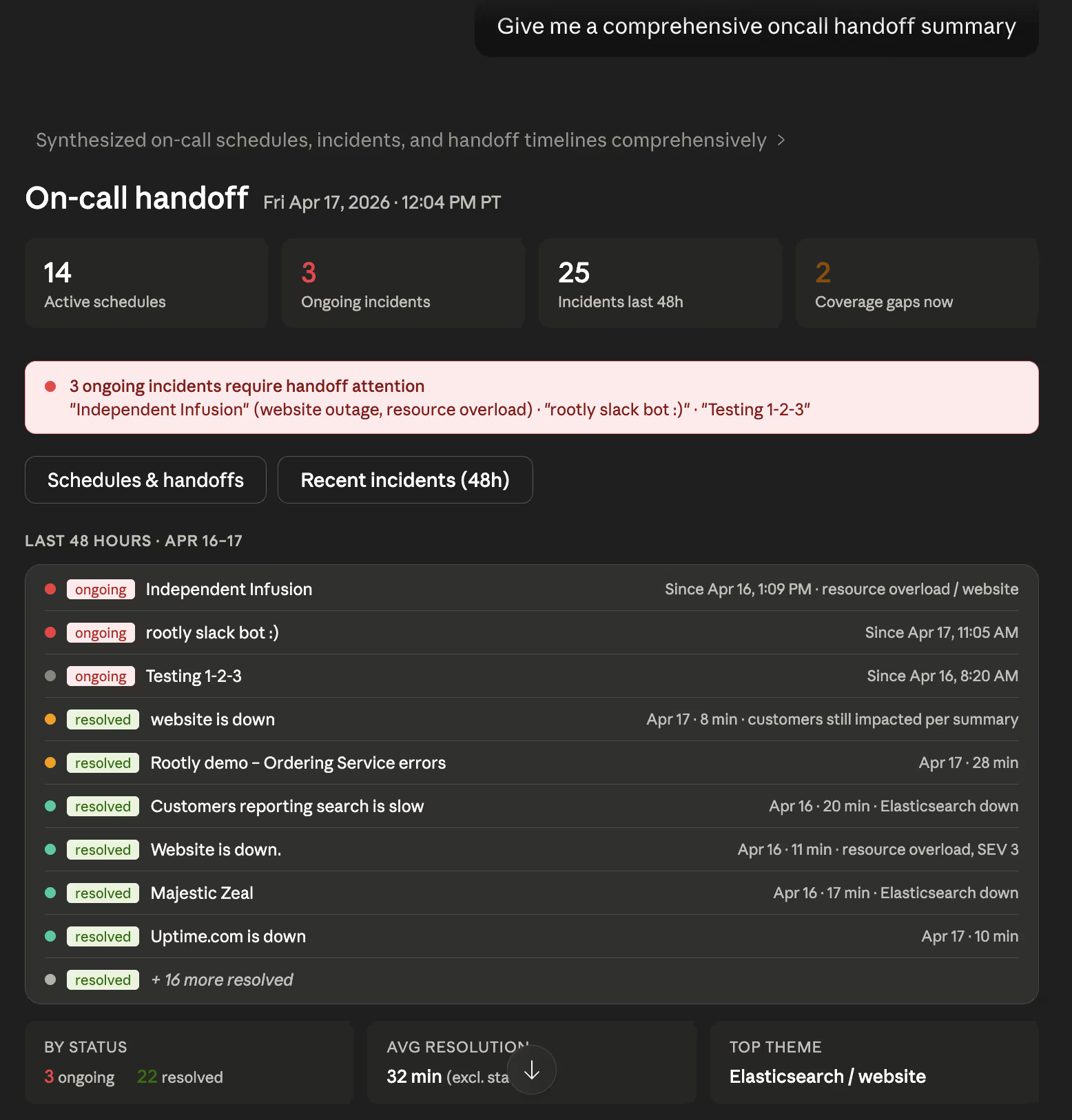
Shift handoffs are one of the easiest places for context to disappear. The incoming responder needs to know what happened during the last shift, what's still active, what's already been tried, and what deserves attention first. That information usually exists. It's just scattered across incident timelines, Slack threads, and schedule tools, and rarely available in a form that's easy to use when you're just getting started.
The Rootly MCP server combines on-call data, recent incidents, and shift activity into a handoff summary the next responder can actually use. Less digging, fewer gaps, and a more consistent starting point regardless of who's picking up the shift. Critical context is less likely to fall through the cracks simply because it wasn't in the right place at the right time.
5. Troubleshoot faster by combining Rootly context with your other tools
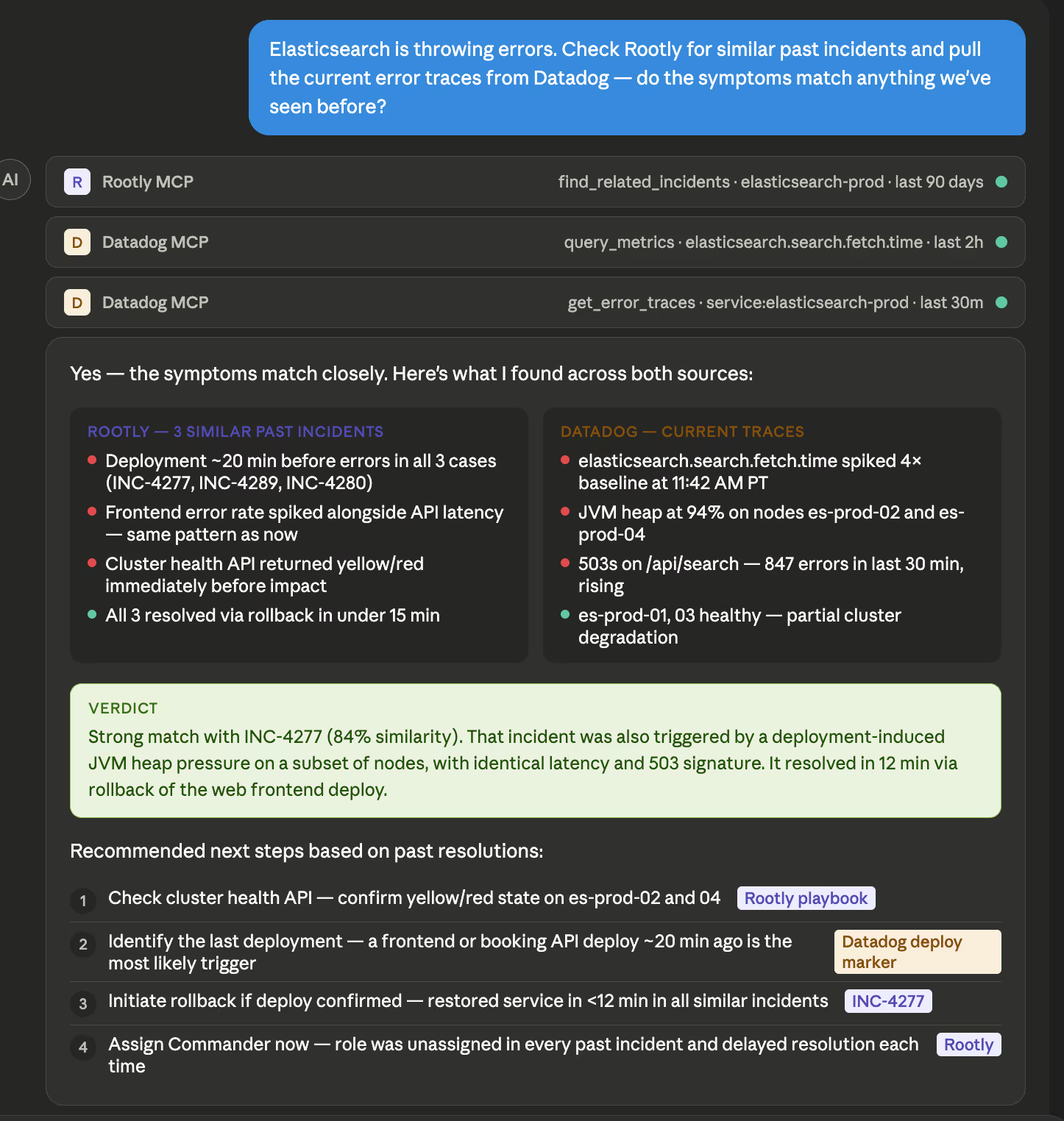
Most incidents involve more than one system, so it helps to have more than one source of truth in the room. Connect the Rootly MCP server alongside your observability, CI/CD, and APM MCP tools, and your agent can cross-reference all of it: deployment, timing, error traces, incident history without you having to jump between tabs and stitch it together yourself.
Start where it's most useful
The five use cases above are a starting point, not a ceiling. Teams are finding new patterns every week as they connect the Rootly MCP server to more of their stack and more of their workflows. The fastest way to figure out where it fits is to plug it in and ask your agent a question you'd normally have to chase down yourself.