🔐 Granular Role-Based Access Control Settings for On-Call
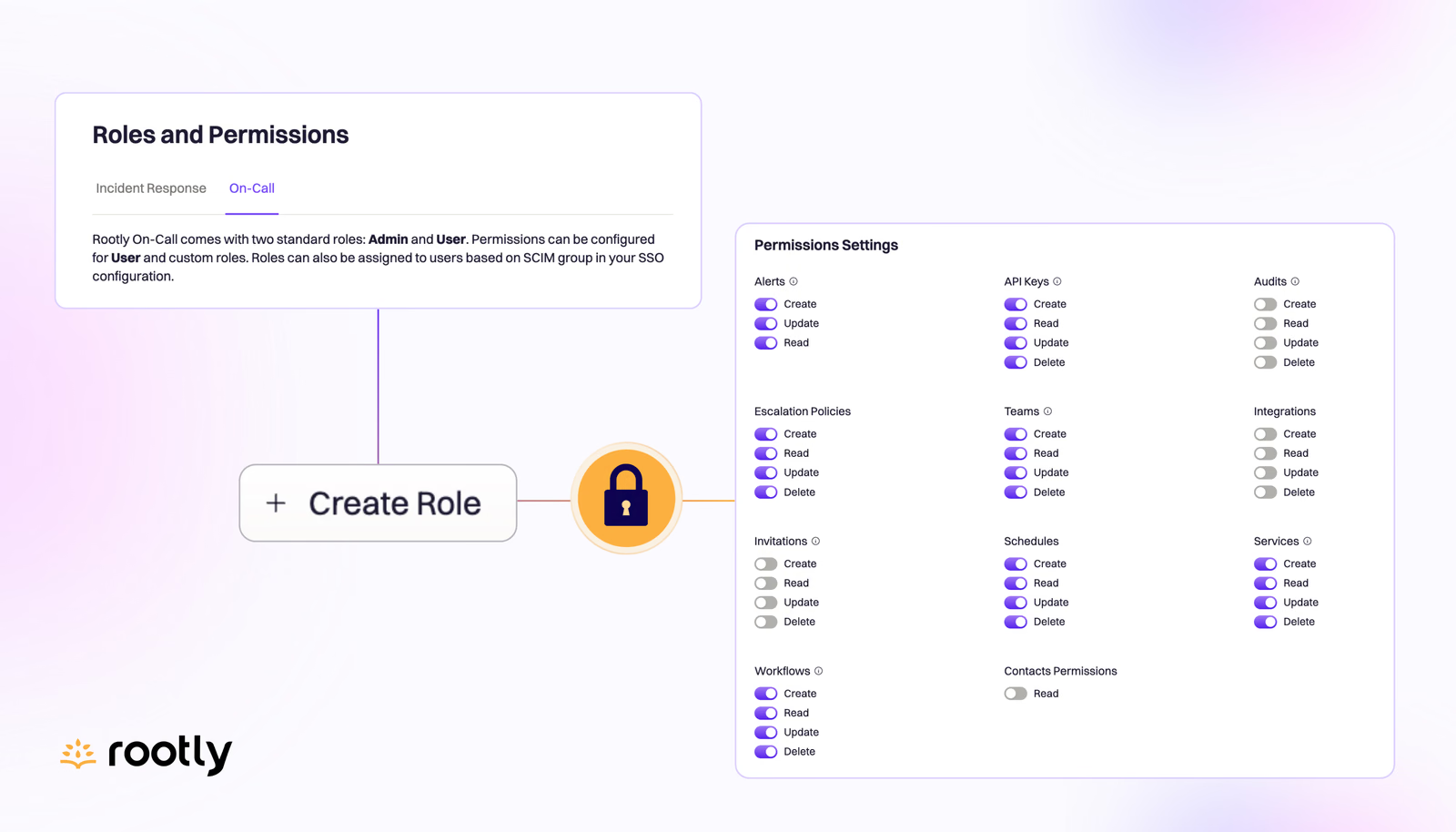
Rootly adds a full set of On-Call permissions, so you can control access at a granular level and save permission sets as custom roles beyond Admin and User.
On this page
🔐 Granular Role-Based Access Control Settings for On-Call
Our Roles and Permissions settings make it easy to manage user permissions at a granular level through a simple UI or via your SSO/SCIM provider. If you’ve wondered if we bring this same level of control to Rootly On-Call, the answer is yes!
We’ve created a full new set of permissions specifically for On-Call. In addition to the default roles of Admin and User, you can save any set of permissions as a New Role for consistency and ease. Not only can you control access to over 10 different pieces of On-Call functionality, you can specify between multiple access levels within each.
These settings are accessed in the same screen as your general Roles and Permissions (click your organization name/icon in the top left > Organization Settings > Roles and Permissions > On-Call). If you’d like to use SCIM to manage permissions via your SSO provider, visit our help docs for instructions to set that up.
What else shipped
🆕 Added rotation details to shift popover on the Edit Schedule screen. Now it’s easier for admins to see which rotation each calendar block originated from. 💅 Saving an on-call schedule during editing will no longer reset the calendar view back to today’s date. This will save users the need to cycle back to where they left off. 💅 Last used filters on Escalations Policies page will persist after user navigates away and return to page. 💅 Expanded confirmation modals to appear in configuration drawers (in addition to incident forms). Now all forms and drawers will warn users if they attempt to leave without saving their updated inputs. 🐛 Fixed issue with converted incident channels not being able to display in triage status. 🐛 Fixed intermittent issue with 📌 emoji command not adding the pinned message to the incident timeline. 🐛 Fixed incorrect navigation of follow-up action items links.
Related changelogs
Rootly MCP supports OAuth 2.0.
The Rootly MCP server now supports OAuth 2.0, so AI agents sign in and get scoped, short-lived tokens instead of long-lived API keys.

Bulk delete Alerts (for On-Call admins).
On-Call admins can now bulk delete alerts in Rootly, making it quick to clear test data and noise left over from onboarding and configuration.

Empower anyone to page with an On-call Observer Role.
The new default Observer role gives cross-functional teammates read-only access, with the ability to create alerts and page on-call teams from web and Slack.