Planned maintenance, made easier.
Maintenance Incidents give you a structured, auditable way to plan scheduled work, notify teams, update status pages, and track timelines.
On this page
Maintenance Incidents gives you and your teams a structured, auditable, and automated way to plan and coordinate scheduled work. Whether you’re performing upgrades, migrations, or infrastructure changes, Maintenance Incidents help ensure clear communication, predictable execution, and full visibility across engineering and stakeholders.
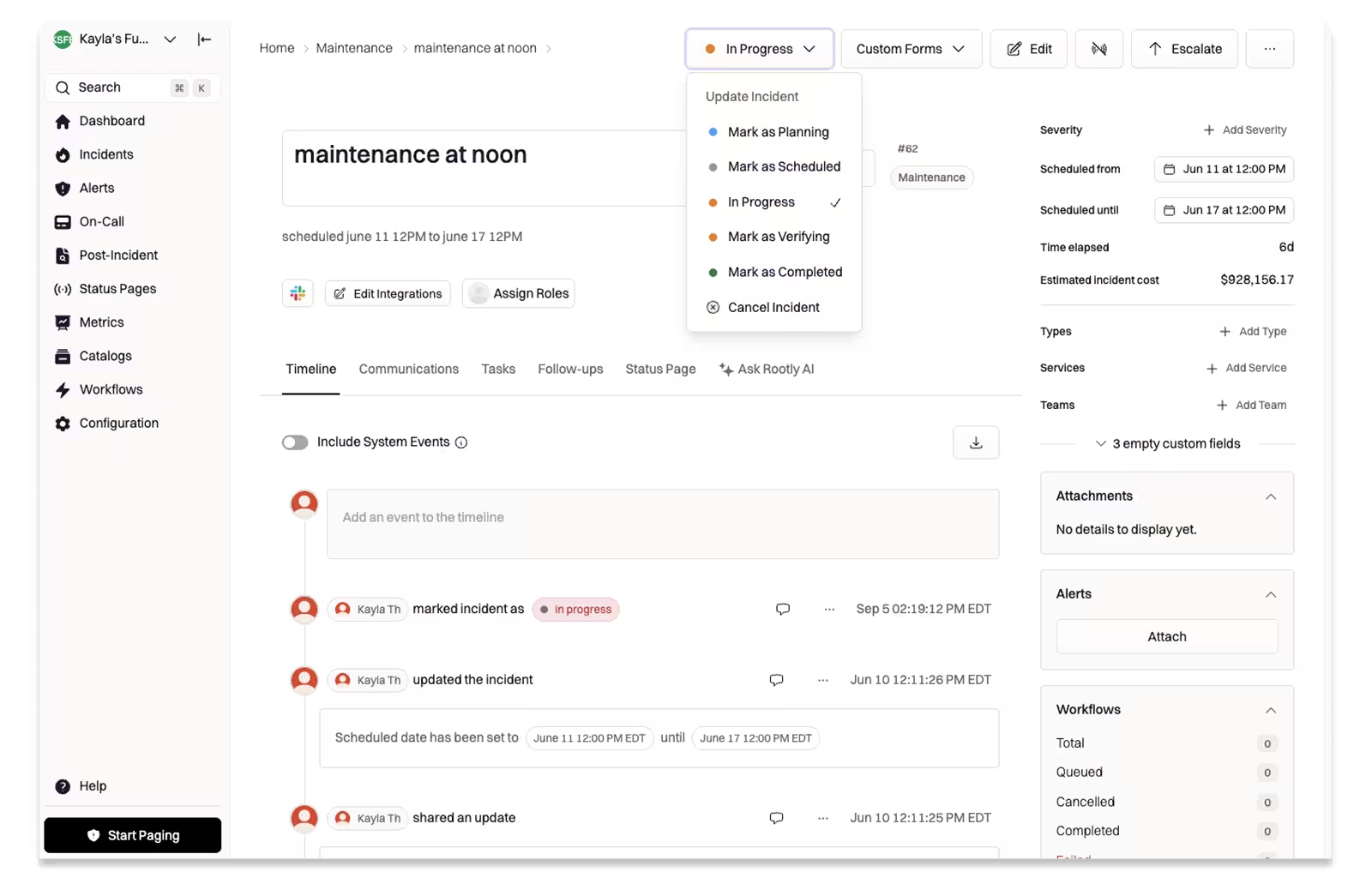
Rootly’s Maintenance Incidents UI.
Why it matters
Planned maintenance often requires the same coordination as an unplanned outage: notifying teams, updating status pages, capturing timelines, and ensuring that responders know who is involved. Instead of relying on manual Slack messages, scattered calendar invites, or ad-hoc processes, Maintenance Incidents provide:
- A dedicated workflow for scheduled changes
- Consistent communication to internal and external stakeholders
- Better coordination across services and teams
- Auditability for compliance and change management
And because it uses the same incident engine you already rely on, your team’s process stays consistent—just applied to planned work instead of emergencies. Now, with all new maintenance statuses.
It’s perfect for:
- Planned upgrades and deployments
- Infrastructure or network maintenance
- Database migrations
- Scheduled downtime or service tests
- Regulatory or audit-driven change processes
This release gives engineering and operations teams a repeatable, reliable framework to manage planned work—ensuring that maintenance receives the same clarity, automation, and accountability as real-time incident response.
Check out the scheduling a Maintenance Incident docs to learn more.
What else shipped
New Features
- Alert template customization now supports Liquid variables in manual alert messages, allowing teams to create dynamic, context-aware alerts when escalating incidents or triggering pages through the platform.
- Enhanced alert grouping banner logic to prevent errors when leader alerts are missing, improving the reliability of grouped alert displays in the UI.
Related changelogs

Keep every stakeholder informed without leaving the incident.
Use Rootly Status Pages to update customers, executives, and internal teams in real time, right from the incident.
SLA driven follow-up tasks.
SLA policies for incident follow-ups set deadlines for assigning and completing action items, scoped by severity or service, and notify managers when late.
Unlock AI assistance for security-sensitive response.
Rootly AI now works inside private incidents, so security-sensitive teams get features like /rootly catchup while keeping access tightly controlled.