
Best Incident.io Alternatives for Modern Incident Management Teams in 2026
Compare the best Incident.io alternatives for incident response, automation, on-call management, AI workflows, and scalable reliability.

Best Incident.io Alternatives for Modern Incident Management Teams in 2026
On this page
Modern incident management has moved from reactive alert handling into a structured discipline that blends automation, communication, and continuous improvement. While Incident.io remains a widely adopted Slack-native solution, many teams are now exploring alternatives with deeper orchestration, stronger automation, and better scalability as systems become more complex.
Choosing the right platform requires understanding how each tool supports the way your engineering team detects, escalates, resolves, and learns from incidents. Some organizations prioritize fast setup and simple coordination, while others need advanced workflows, AI-assisted response, on-call management, and full lifecycle visibility.
Learning about the best Incident.io alternatives in 2026 means comparing each platform across automation depth, incident lifecycle coverage, integrations, adoption, scalability, and long-term reliability needs. The goal is to find a solution that fits how your team operates today while giving you enough structure to improve incident response as your systems grow.
Key Takeaways
- The best incident management tools support the full incident lifecycle, from detection and escalation to response, resolution, and post-incident review.
- Automation is a major differentiator because it helps teams reduce manual work, standardize response, and avoid mistakes during high-pressure incidents.
- On-call management is essential for making sure alerts reach the right responders quickly through clear schedules, routing, and escalation policies.
- Slack-native workflows can improve response speed by keeping incident coordination inside the communication channels teams already use.
- Scalability matters when choosing a platform because growing teams need stronger workflows, integrations, reporting, AI support, and reliability practices over time.
What to Look for in an Incident.io Alternative
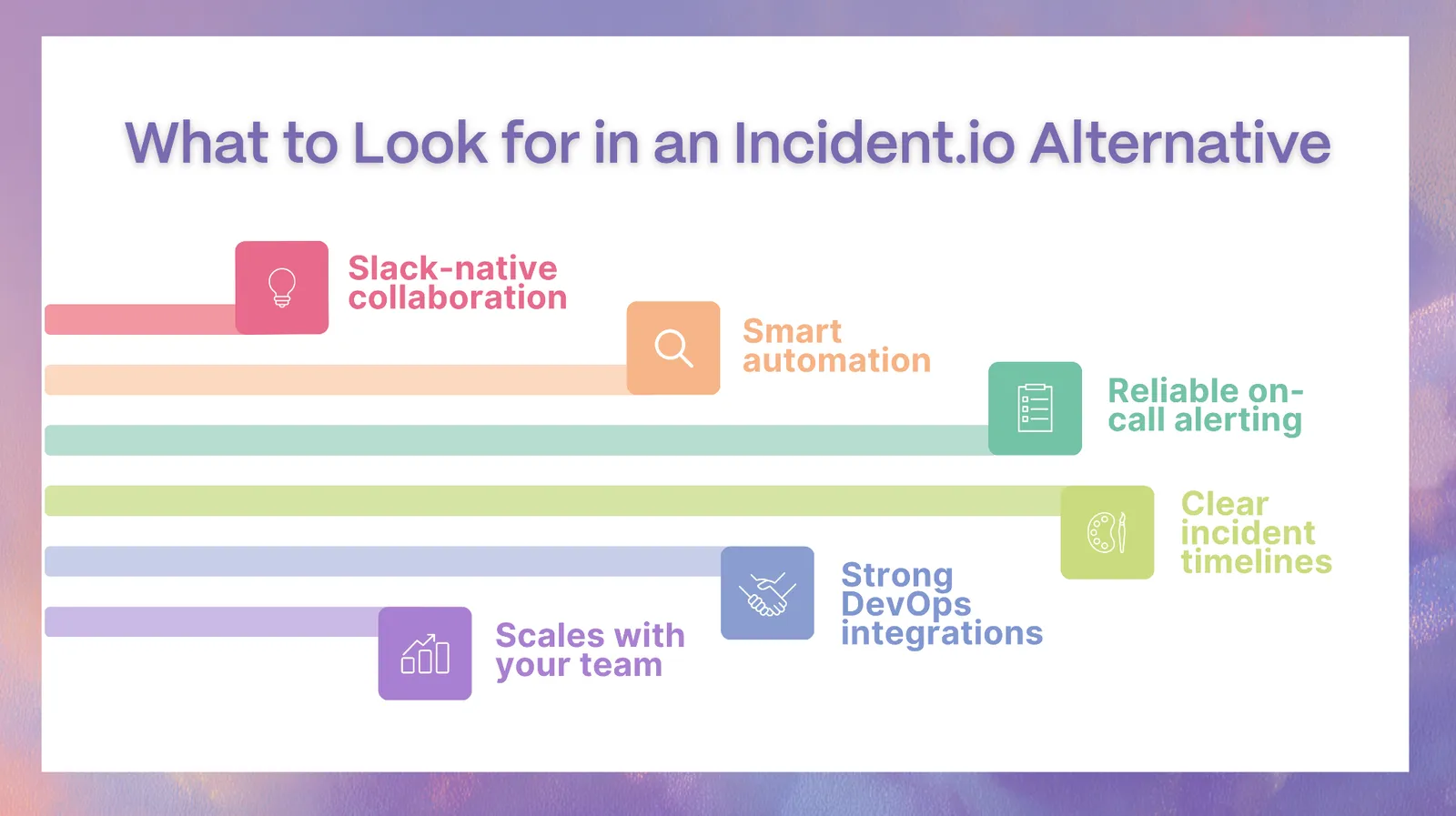
Choosing the right incident management platform requires understanding how incidents flow across your organization — from detection to resolution and beyond.
Slack-native vs standalone platforms
Slack-native tools allow teams to manage incidents directly within communication channels, reducing friction and improving response speed. Standalone platforms, on the other hand, centralize workflows in dashboards, which can provide structure but often introduce context switching.
The right choice depends on whether your team prefers real-time collaboration inside Slack or more formalized processes within a dedicated interface.
Automation and workflow orchestration
As systems scale, manual coordination becomes a bottleneck. Look for platforms that support automated runbooks, role assignments, escalation triggers, and workflow orchestration across services.
Automation is not just about speed — it is about consistency and reducing human error during high-pressure situations.
On-call management and alerting
A strong incident response starts with reliable alerting. Tools should provide flexible on-call schedules, intelligent routing, and escalation policies that ensure the right person is notified immediately.
Without this foundation, even the most advanced incident management features lose effectiveness.
Post-incident reviews and reporting
The incident does not end when systems recover. Post-incident reviews help teams understand what happened, why it happened, and how to prevent it in the future.
Look for tools that automatically generate timelines, support structured postmortems, and provide actionable insights.
Integrations with DevOps and SRE tools
Incident management tools sit at the center of your infrastructure. Seamless integrations with monitoring tools, cloud platforms, CI/CD pipelines, and communication systems are essential.
The more connected your tools are, the faster your team can move from detection to resolution.
Scalability for growing teams
What works for a small startup may not work for a growing engineering organization. As your systems become more distributed and incidents more complex, your tooling must scale accordingly.
This includes handling multiple services, teams, and simultaneous incidents without breaking workflows.
How We Evaluated the Best Incident.io Alternatives
To ensure fairness, every platform in this list was evaluated using the same criteria.
End-to-end incident lifecycle coverage
We assessed how well each tool supports the full lifecycle: alerting, response, coordination, resolution, and post-incident analysis.
Slack and Microsoft Teams integration depth
Not all integrations are equal. We looked at whether tools provide native workflows or simply send notifications.
Automation and orchestration capabilities
We evaluated the ability to automate runbooks, coordinate workflows, and reduce manual intervention.
On-call and alerting capabilities
Alert delivery reliability, escalation flexibility, and scheduling features were key factors.
AI and incident intelligence features
We examined whether platforms leverage AI for summarization, pattern detection, or response assistance.
Integration ecosystem
Breadth and depth of integrations across DevOps and SRE stacks were considered.
Ease of setup and adoption
We looked at onboarding time, learning curve, and usability for engineering teams.
Pricing and scalability
Finally, we evaluated how pricing evolves as teams grow and requirements expand.
Best Incident.io Alternatives
1. Rootly — Best Overall Alternative for Scalable Incident Operations
Why teams choose Rootly
Rootly is built for teams that are moving beyond basic incident coordination into structured, scalable incident operations. Instead of treating incidents as isolated events, Rootly enables organizations to standardize response processes, automate workflows, and manage incidents as part of a broader reliability strategy. Its Slack-native approach ensures teams can operate directly where communication already happens, reducing friction during high-pressure situations.
For teams experiencing increased system complexity, Rootly provides the level of control needed to maintain consistency without slowing down response times. It is particularly effective for organizations that are transitioning from reactive incident handling to proactive incident management practices.
Standout capabilities
- Workflow orchestration across the full incident lifecycle
- AI-assisted summaries, timelines, and coordination support
- Automated runbooks and structured response playbooks
- Deep Slack-native execution with minimal context switching
Where Rootly goes beyond Incident.io
While Incident.io emphasizes speed and simplicity, Rootly extends into orchestration and automation. Teams can define multi-step workflows, trigger actions automatically, and ensure consistent execution across incidents. This becomes critical as organizations scale and need repeatable, reliable processes rather than ad hoc coordination.
Best fit teams
- Scaling engineering teams
- SRE and platform organizations
- Teams prioritizing automation, consistency, and operational maturity
2. Jira Service Management — Best for Enterprise Service Management
Why teams choose Jira Service Management
Jira Service Management is a natural choice for organizations already embedded within the Atlassian ecosystem. It extends incident management into a broader IT service management (ITSM) framework, allowing teams to connect incidents with tickets, changes, and service requests in a unified system.
This level of integration is especially valuable for enterprise environments where incidents are not handled in isolation but are part of larger operational processes involving multiple teams and stakeholders.
Standout capabilities
- Integrated incident, ticketing, and change management workflows
- SLA tracking and enterprise-grade reporting
- Deep integration with Jira Software and other Atlassian tools
How it compares to Incident.io
Jira Service Management offers significantly broader functionality than Incident.io, but it lacks the real-time, Slack-native coordination experience. It is better suited for structured environments rather than rapid, chat-based collaboration.
Trade-offs and complexity
- Higher setup and configuration complexity
- Requires well-defined processes to operate effectively
Best fit teams
- Enterprise IT and operations teams
- Organizations already using Atlassian products
- Teams requiring full ITSM coverage
3. PagerDuty — Best for Enterprise-Grade Reliability
Why teams choose PagerDuty
PagerDuty has established itself as a standard in incident response for organizations operating at scale. Its platform is designed to handle high volumes of alerts, reduce noise through event intelligence, and ensure incidents are escalated appropriately across large teams.
For enterprises managing critical infrastructure, reliability and redundancy are key, and PagerDuty delivers on both fronts.
Standout capabilities
- Advanced alerting, escalation, and incident routing
- Event intelligence for noise reduction and prioritization
- Extensive integration ecosystem across DevOps tools
How it compares to Incident.io
PagerDuty offers more mature alerting and enterprise-grade features but is less focused on Slack-native workflows. Incident.io provides a more streamlined, communication-first experience, while PagerDuty emphasizes infrastructure-level reliability.
Trade-offs
- Higher cost as usage scales
- Greater complexity compared to modern, lightweight tools
Best fit teams
- Large enterprises
- Teams managing mission-critical systems
- Organizations requiring high reliability and redundancy
4. In-house Incident Management Systems — Best for Full Customization
Why teams build their own systems
Some organizations choose to build internal incident management tools to achieve complete control over workflows, integrations, and data. This approach allows teams to design systems that align perfectly with their infrastructure and operational requirements.
It is often considered by companies with highly specialized workflows that cannot be supported by off-the-shelf platforms.
Capabilities you can customize
- Fully tailored workflows and automation logic
- Deep integration with internal systems and infrastructure
- Custom dashboards, reporting, and analytics
Comparison to Incident.io
In-house systems provide unmatched flexibility but lack the immediate reliability and feature depth of established platforms. Building and maintaining these systems requires ongoing investment and dedicated engineering resources.
Risks
- High development and maintenance costs
- Slower iteration compared to SaaS tools
- Risk of technical debt over time
Best fit teams
- Large organizations with dedicated platform teams
- Companies with highly specific operational requirements
- Teams willing to invest in long-term infrastructure ownership
Feature Comparison of Incident.io Alternatives
| Feature | Rootly | FireHydrant | Jira SM | Opsgenie | PagerDuty |
|---|---|---|---|---|---|
| Slack-native workflows | Strong | Strong | Limited | Limited | Moderate |
| Automation depth | Advanced | Moderate | Moderate | Limited | Moderate |
| AI capabilities | Advanced | Limited | Limited | Minimal | Emerging |
| On-call & alerting | Strong | Moderate | Moderate | Advanced | Advanced |
| Integration ecosystem | Broad | Moderate | Broad | Broad | Extensive |
| Ease of use | Balanced | Structured | Complex | Simple | Moderate |
Rootly vs Incident.io: Key Differences
- Core difference: Rootly is better suited for teams that need scalability, automation, and deeper workflow control, while Incident.io is strong for teams that prioritize a single workflow.
- Setup and adoption: Both are designed for quick setup with minimal configuration, making it easier for smaller teams or less complex organizations to get started quickly. Rootly continues to scale with growth without workarounds.
- Automation depth: Rootly offers more advanced automation for incident response workflows, runbooks, escalations, stakeholder updates, and post-incident processes.
- Workflow flexibility: Rootly gives teams more flexibility to design incident workflows around their exact internal processes, which is valuable for organizations with more complex reliability operations.
- Service ownership and routing: Incident.io emphasizes its Catalog for mapping services, teams, and ownership in one place. Rootly, on the other hand, does have a native catalog too, is stronger for teams that want customizable orchestration across services, responders, and workflows.
- Slack-native experience: Both platforms support Slack-native incident management, but Rootly gives teams more control over how workflows run inside Slack.
- AI capabilities: Both platforms include AI-assisted incident features, but Rootly is especially useful for teams that want AI to support summaries, timelines, workflow automation, AI across web, mobile, Slack/Teams/Google Chat, and post-incident learning.
- Incident lifecycle management: Rootly provides broader lifecycle coverage across incident response, coordination, resolution, reporting, and postmortems.
- Best fit: Incident.io works well for teams that want lightweight incident coordination and a single workflow setup, while Rootly is a stronger fit for scaling engineering, SRE, and platform teams that need more structure, flexibility, automation, and long-term operational maturity.
Which Incident Management Tool Should You Choose?
Best for startups and small teams
Incident.io or Rootly provide quick setup and ease of use.
Editor’s note: Atlassian is retiring Opsgenie, with end-of-life scheduled for April 2027—factor a migration path into any evaluation.
Best for scaling engineering teams
Rootly offers the automation and flexibility needed for growth.
Best for enterprise environments
PagerDuty and Jira Service Management provide reliability and structure.
Best for automation-heavy workflows
Rootly stands out due to its orchestration capabilities.
Best for Slack-first teams
Rootly and Incident.io both offer strong Slack-native workflows.
Common Questions About Incident.io Alternatives (FAQ)
What is the best alternative to Incident.io?
Rootly is often considered the strongest alternative for teams that need automation and scalability, while other tools serve more specialized use cases.
Is Rootly better than Incident.io?
Both start fast — Rootly ships opinionated defaults that get a first incident running the same day. The difference is what happens after that: Rootly treats a default as a starting configuration you can change, while a more prescriptive tool turns the defaults that made month one easy into the thing you work around in year two.
Which tool is best for Slack-based incident management?
Rootly and Incident.io are the leading Slack-native platforms.
Do I still need PagerDuty with modern tools?
Some teams still use PagerDuty for alerting, but many modern platforms include built-in alerting features.
What is replacing Opsgenie?
Teams are moving toward platforms that combine alerting with full incident lifecycle management.
Should you build your own incident management system?
Only if you have the resources to maintain and scale it effectively.
What should teams compare before switching from Incident.io?
Teams should compare automation depth, Slack workflow flexibility, alerting coverage, integration needs, post-incident reporting, and how well each platform can support future growth.
Can Incident.io alternatives replace separate on-call tools?
Some platforms can replace separate on-call tools if they include alert routing, escalation policies, scheduling, and incident response workflows. For larger teams, the decision depends on how complex their alerting setup is.
Why do engineering teams move from lightweight incident tools to platforms like Rootly?
Teams often move when manual coordination becomes difficult to scale. As incidents involve more services, responders, and workflows, platforms like Rootly help standardize response, automate repetitive tasks, and improve post-incident learning.
Choosing the Right Incident Management Platform for Long-Term Reliability
Selecting an incident management platform is not just a tooling decision — it is a strategic investment in how your team responds to failure, learns from it, and improves over time.
As systems grow more distributed and incidents more complex, the need for structured incident response becomes more critical. Teams are no longer just reacting to alerts; they are coordinating across services, automating workflows, and continuously improving through detailed incident postmortem practices.
At Rootly, we see incident management as an evolving discipline. It is not limited to handling outages — it extends to building reliable systems through better on call practices, smarter automation, and the integration of AI SRE capabilities that reduce manual effort and improve decision-making during high-pressure situations.
The best platform for your team depends on where you are today and where you want to go. If your focus is simplicity and speed, lightweight tools may be enough. But if you are scaling, managing complex systems, and aiming for operational excellence, investing in a platform that supports automation, orchestration, and continuous improvement will deliver long-term value.
Ultimately, the goal is not just to resolve incidents faster, but to build a system where incidents become opportunities to strengthen reliability, improve collaboration, and move your engineering organization forward with confidence.
Related articles
incident.io Enterprise Compliance in 2026: DPA, Data Residency, HIPAA, ISO 27001, RBAC, and SCIM
An evidence-based review of incident.io enterprise compliance: DPA and subprocessors, EU data residency, HIPAA status, ISO 27001, RBAC, SCIM, and how Rootly compares.

Best Incident Response Software Platforms for 2026
Compare the best incident response software platforms for 2026, including Rootly, Incident.io, PagerDuty, Jira Service Management, Better Stack, and more.
Enterprise Incident Management Solutions: 5 Proven Tools
Compare 5 enterprise incident management solutions for faster MTTR, alerting, on-call, automation, status updates, and postmortems.