Sync your catalog, and mute pages during Alert storms.
A new CLI syncs your catalog from GitHub, Backstage, and more. Plus: mobile alert muting and an Upwind integration.

On this page
Catalog Sync in CLI
Catalog Sync is a new command-line tool that keeps your Rootly Catalog matched to the systems you already treat as the source of truth. Point it at GitHub repositories, Backstage, CSV files, REST or GraphQL APIs, local files, or the output of any command, and it reconciles services, teams, and metadata into Rootly on its own. No manual upkeep, no copy-paste drift.
It works the way infrastructure tools should. Run plan to preview every change before it happens, apply to execute, and status to verify the result. A single sync command does plan and apply in one step, watch keeps the loop running continuously, and tui opens an interactive view.
What’s included
- Eight source types: inline entries, local files, GitHub repositories, Backstage, GraphQL endpoints, CSV files, HTTP REST APIs, and command output
- A Terraform-style workflow with
plan,apply, andstatus, plussync,watch, and an interactivetui - Safe-by-default operations: deletions are opt-in, an empty source aborts the run instead of wiping your catalog, and configurable prune thresholds stop accidental mass deletions
- Automatic creation of custom properties on services, teams, and other resources
- Reference linking between native Rootly resources and custom catalogs
- Install with Homebrew, Go, Docker, or Kubernetes Helm
Why it matters
A catalog maintained by hand goes stale the week after it is written, and a stale catalog quietly breaks the things built on top of it: alert routing, service ownership, and impact analysis during an incident. Catalog Sync makes your existing systems the single source of truth and keeps Rootly mirrored to them automatically. Get started with the Catalog Sync documentation.
Mute alerts on mobile
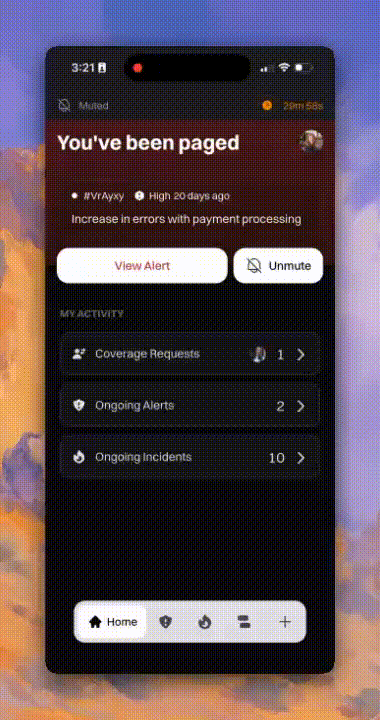
The Rootly mobile app now has a mute option to silence pages during alert storms. Muting disables push notifications, phone calls, and text message paging for a duration you choose, so your phone is not exploding with Alerts, and you can focus on your investigation. Alerts still fire and still escalate through your escalation policy; they just stop notifying you until the mute period ends.
What’s included
- Mute straight from a notification with a long press, from the alert in the app, or from the icon on alert banners
- A mute duration you choose, after which notifications resume on their own
- Alerts keep firing and escalating while muted, so nothing is dropped and your team’s escalation path still runs
- Available now for all customers on iOS and Android
Why it matters
During an alert storm, the flood of pages becomes its own incident: every new push, call, and text pulls you away from the thing you are trying to fix. Muting lets you quiet your own device without silencing the alerts themselves, so you keep your focus and your team keeps its safety net.
Upwind integration
Rootly now integrates with Upwind, the runtime cloud security platform. Set up Upwind to create alerts and incidents in Rootly based on runtime findings in Upwind, then page the relevant responder by routing the alert with alert routes and escalation policies.
Security findings are incidents too, but they often live in a separate tool with a separate process. Sending Upwind’s runtime findings into Rootly pages the right on-call responders and puts security events through the same response process the rest of your organization already uses.
What else shipped
Improvements
On-Call
- Round robin paging within a schedule now pages people in the same order as the schedule’s rotation, so the paging order is predictable.
- The paging repeat control is now labeled “Repeat cycle X times before escalating to the next level” to make its behavior clearer.
- The repeat control now only offers choices that make sense for the size of your schedule.
Incident Response
- Disabled actions in the workflow preview are now greyed out, so you can tell at a glance which steps are turned off.
- Pages and API responses that show custom field values now load faster.
API & CLI
On-Call
- The
rotation_scopeandrepeats_modefields on escalation levels can now be read back through the API, and invalid values are rejected instead of accepted silently. - Team-scoped API keys can now create override shifts on schedules owned by their own team.
- Team-scoped API keys now have read access to org-level alert settings such as alert urgencies and alert fields.
- The Terraform provider now supports the
sourcerule type on alert routes.
Incident Response
- The retrospective update API now returns a clear validation error instead of a 500 when sent timestamp fields that belong to the incident.
- API keys with full team permissions can now update team membership, matching what the same role can already do in the app.
Fixes
On-Call
- Re-escalating an acknowledged or resolved alert now records timeline events and triggers the
alert.updatedwebhook. - Exporting alerts now respects filters applied after the page loaded, instead of exporting the whole list.
- Slack permission requests for alert actions now go to On-Call admins instead of Incident Response admins.
- Auto-resolution keeps working after an alert source’s resolution rule is deleted and recreated.
- Alertmanager alerts now auto-resolve even when they are the last firing alert in their group.
Incident Response
- Fixed an error that blocked editing the built-in Severity field in the form editor.
- Clicking “Open in browser” on a Slack follow-up now opens the Follow-ups page instead of the Tasks tab.
- Bold channel mentions from Slack no longer leave stray asterisks in exported documents.
- Retrospectives exported to Google Docs no longer start with blank lines when using custom templates.
- The “Manually Triggered” workflow option now appears even when Slack is not connected.
- “Contains” and “does not contain” dashboard filters now work on custom fields that hold users.
- Form field conditions on catalog fields now show the catalog’s entries to pick from, instead of the list of catalogs.
- The button to disconnect the Backstage integration is back on the Catalogs page.
- Statuspage.io updates posted from Slack now show the real error when the update is rejected, instead of reporting success.
Related changelogs
ServiceNow CMDB is now your Rootly catalog.
Import your ServiceNow CMDB into Rootly and keep it in sync, so you run incidents off one source of truth.

Build incident response around your live Cortex catalog.
Sync Cortex entities into Rootly so responders always work from the current state of your services, teams, and owners.
Automatically sync incident fields from Catalog data.
Catalog custom fields now cascade automatically, so updating one incident field fills related fields from relationships already defined in Rootly Catalog.