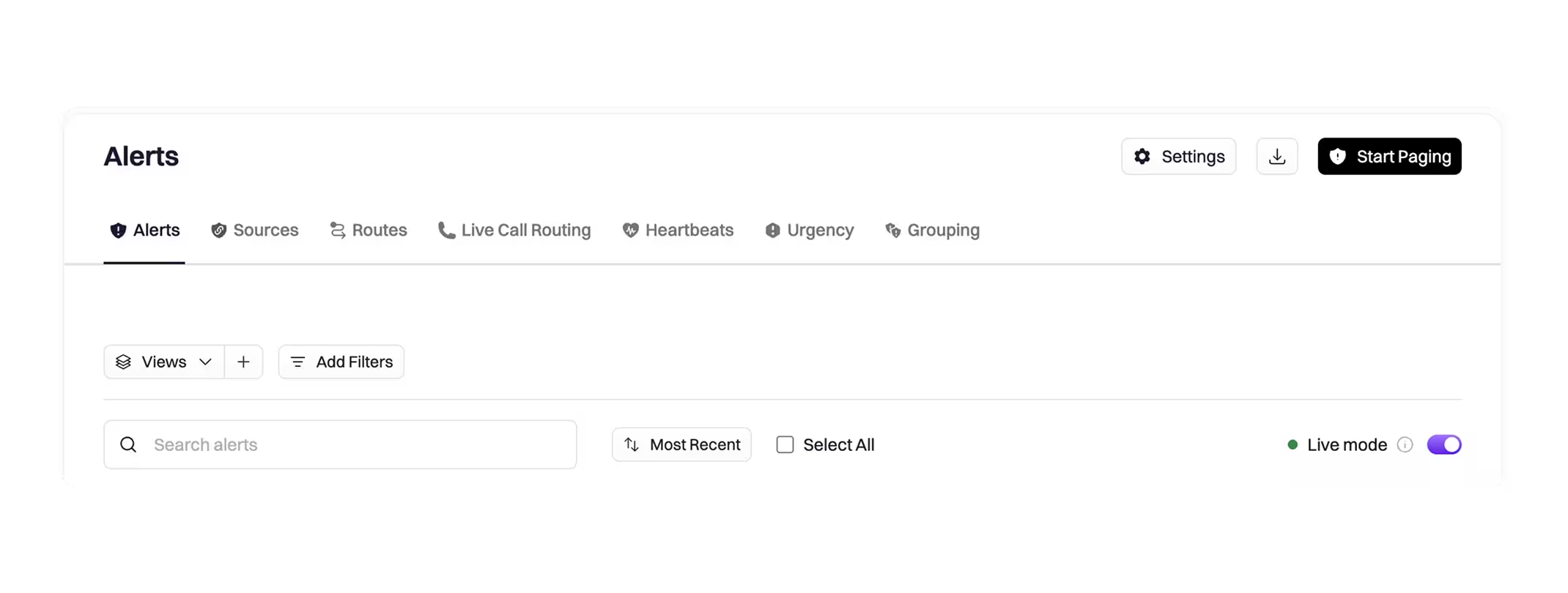
Live mode on the Alerts view.
A new Live Mode toggle on the Alerts view streams incoming alerts in real time.

On this page
The Alerts view now has a Live Mode toggle that streams new alerts directly into the table as they arrive—no full page reloads, no lost filters or selections.
Why it matters
During active incidents and high-volume alert storms, the Alerts page has always required manual refreshes to see what’s new. That trade-off forced responders to choose between staying current and keeping their filter state intact. Live Mode removes that trade-off.
With Live Mode on, you get a true operational view: alerts appear as they’re created, updates apply in place, and your UI state stays exactly where you left it. When you want a controlled review experience—for triage, bulk actions, or filtering—turn Live Mode off and new alerts queue behind a refresh button so you choose when to load them.
How it works
A Live Mode toggle now appears on the Alerts view.
- Live Mode on: When you’re on the Alerts page, new alerts stream directly into the table. Updates to visible alerts apply in real time.
- Live Mode off: New alerts queue behind a refresh button. Load them when you’re ready.
When to use it
- On-call monitoring and NOC views where real-time context is essential
- Active incident response where you need to see what’s firing now
- High-volume alert streams where staying current matters
Turn Live Mode off when you want a static view for triage, filtering, or bulk actions.
Check out the docs to learn more.
What else shipped
Improvements
On-Call
- Shift and override reassignment can now be restricted to users within the same team. When enabled, team members can only assign overrides or reassign shifts to other users on the owning team—preventing accidental cross-team assignments.
- Asana task types are now available in alert-kind workflows, so Asana ticket updates can be triggered directly from alert workflow conditions.
Incident Response
- AssemblyAI Universal-3 Pro speech model support has been added for meeting transcription via Recall, improving transcription accuracy for incident calls.
API & CLI
On-Call
- A new endpoint is available to escalate or reassign an existing alert, with support for escalating to a specific level or reassigning to a user or schedule.
Terraform
On-Call
- The Terraform
rootly_scheduleresource now supports shift notification settings, allowing notification preferences to be managed alongside schedule configuration in Terraform.
Fixes
On-Call
- Snoozing an alert for 24 hours no longer throws a validation error; the 1-day snooze option now works correctly.
- Users without the Alert Sources Read permission can now create alert routes using their own team’s alert sources, as intended.
- Alert urgency Read permission no longer blocks users from seeing available urgencies when creating an alert—the permission now correctly scopes only the admin urgency configuration page.
- Generic webhook close events are no longer deduplicated when they should trigger auto-resolve; resolve payloads with a matching unique identifier now correctly close the alert.
- Resolved alerts no longer appear in
--status acknowledgedfilter results due to a stale OpenSearch index entry. - Alert workflows no longer fire twice for a single inbound Datadog alert.
- Hyperlinks in condensed Slack alert blocks are now formatted correctly.
- The API Playground in the docs no longer returns a content-type error for valid API calls.
Incident Response
- Creating an incident from an alert via Slack no longer fails with an expired trigger ID error when the response takes longer than 3 seconds.
- Undo (Ctrl+Z) in the retrospective editor now works correctly after concurrent editing sessions.
- The Microsoft Teams Meeting integration section now appears on incident pages again.
- The Mitigated At timestamp now propagates correctly from the retrospective gather data form to the incident record.
- PagerDuty integration incidents now populate the PagerDuty incident URL in Rootly.
- Workflow IS NOT conditions now evaluate correctly and no longer produce false matches.
- Dashboard alert counts now match the Alerts tab when using the same filters.
- The
{{ incident.mitigated_at }}Liquid variable now returns the correct value when the incident uses sub-statuses. - Star and pin reactions on Slack messages now correctly create tasks or timeline notes in incident channels.
- The Audit Log menu item is now visible in the navigation for users with On-Call-only seats.
- “Team Added” workflow triggers now fire correctly for incidents created via the Chrome Extension API.
- GitLab integration now registers webhooks and sends pulses correctly when the repository selection field is left blank.
- Saving a team no longer returns a 500 error for orgs with the Cortex integration installed.
- Dynamic forms now populate correctly for sub-status transitions.
Related changelogs
From sign up to incident-ready in minutes.
One command sets up your team, on-call, alerting, and status page, then pages your phone to prove it works.

The Rootly Edge Connector
Connect your internal systems to Rootly without exposing them to the public internet.

Templates for manual alert descriptions.
Ensure every page includes the right context, every time.