Automatically sync incident fields from Catalog data.
Catalog custom fields now cascade automatically. Your catalog already knows that a product area owns certain services, that a region maps to specific clusters, that a customer tier corresponds to a set of accounts. That context lives in Rootly Catalogs—but until now, none of it carried over into inc
On this page
Your catalog already knows that a product area owns certain services, that a region maps to specific clusters, that a customer tier corresponds to a set of accounts. That context lives in Rootly Catalogs—but until now, none of it carried over into incident forms automatically. Responders had to bridge that gap themselves, pulling from memory or looking things up mid-incident.
Catalog fields now support automatic cascading based on the relationships already defined in your Rootly Catalogs. When a responder updates one field, any related fields that can be inferred from your catalog structure are populated automatically—no lookups, no cross-referencing, no manual entry.
What this looks like in practice:
- Update Product Area → affected Services populate automatically based on your catalog relationships
- Set the Region → related Clusters fill in based on how your infrastructure is mapped
- Add a Customer Tier → the list of Customers that need communication updates automatically
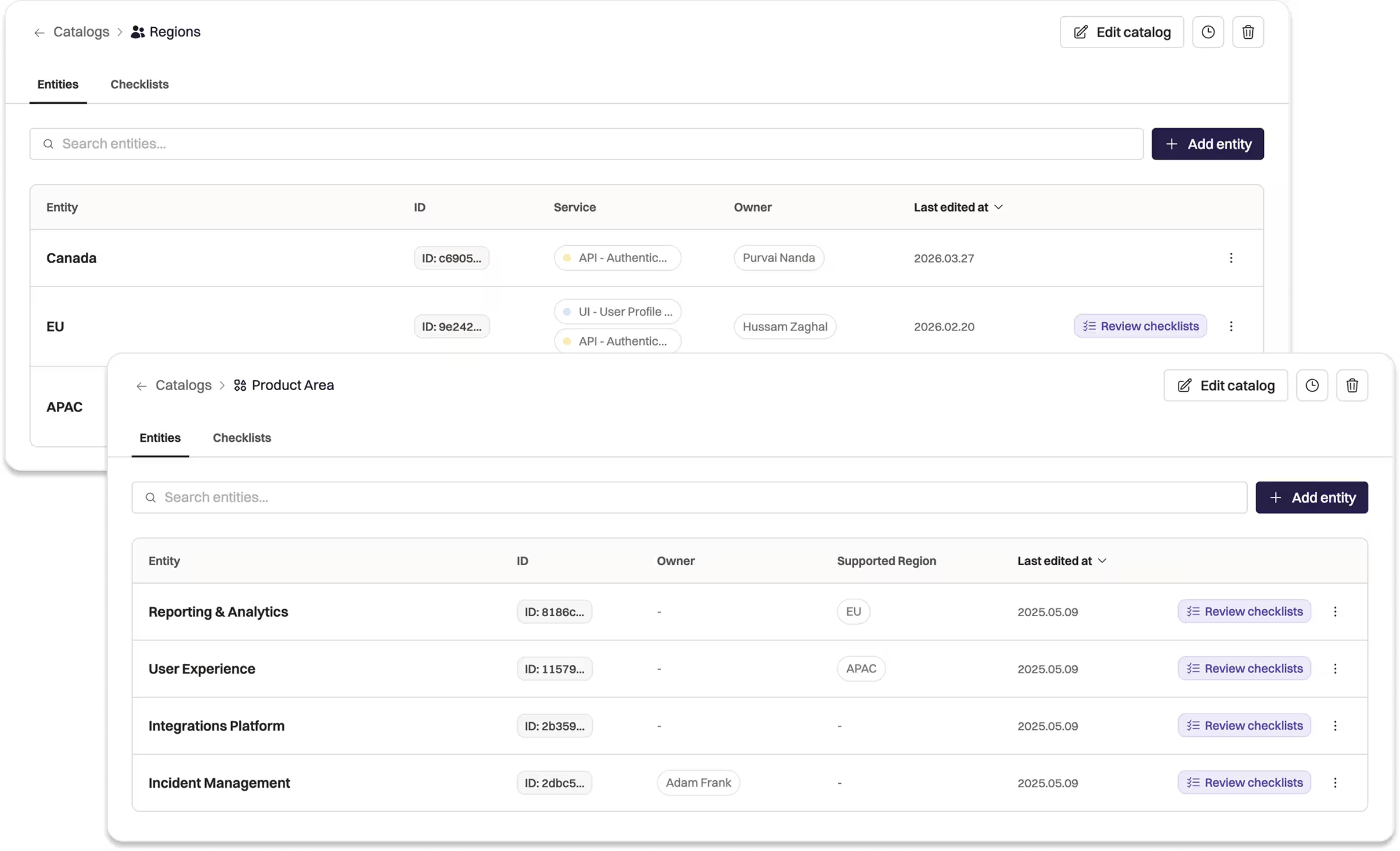
Rootly Catalogs UI showing a Product Area and Region catalog.
The data your team enters during an incident gets more accurate, and your responders spend less time filling out forms and more time resolving the problem.
Check out the docs to get started and learn more.
What else shipped
Improvements
On-Call
- Alerts can now be filtered by a specific user directly from the alerts index page.
- Rootly no longer sends “failed to update Slack user group” error emails for non-24/7 schedules during off-hours gaps — this is expected behavior, not an error.
Incident Response
- Schedules and escalation policies can now be filtered by live or inactive status, making it easier to manage large sets of policies.
- Incident forms can now show the alert’s owning team alongside the service, with a clarified “Service Teams” label.
- Users editing a communication that uses email as the channel are now redirected to the web editor instead of the Slack form.
Fixes
On-Call
- Datadog webhook alert sources now resolve exclusively through the configured alert source, eliminating a fallback path that caused inconsistent behavior when alert sources were removed.
- Fixed a DynamoDB error that occurred during alert grouping when publishing events with oversized payloads.
- Fixed a DynamoDB error triggered when alert lookup was called with an empty event ID.
Incident Response
- Status page subscriber signup is no longer blocked when reCAPTCHA challenges are inaccessible.
- Status page subscription confirmation emails now correctly link to the custom domain instead of the default Rootly URL.
- Fixed a missing template error when loading service, functionality, and group status pages after a system restart.
- Fixed a redirect that sent users to the forms index instead of the edit view when accessing a form field base URL.
Related changelogs
ServiceNow CMDB is now your Rootly catalog.
Import your ServiceNow CMDB into Rootly and keep it in sync, so you run incidents off one source of truth.
Sync your catalog, and mute pages during Alert storms.
A new CLI syncs your catalog from GitHub, Backstage, and more. Plus: mobile alert muting and an Upwind integration.

Build incident response around your live Cortex catalog.
Sync Cortex entities into Rootly so responders always work from the current state of your services, teams, and owners.