From sign up to incident-ready in minutes.
One command sets up your team, on-call, alerting, and status page, then pages your phone to prove it works.

On this page
Meet the Rootly Wizard: a guided command-line interface tool that takes a Rootly workspace from empty to incident-ready in minutes. Run one command, npx @rootly/wizard@latest, sign in, and the wizard walks you through the whole setup: creating a team, putting people on call, wiring up escalation and alerting, connecting Slack, and standing up a status page. No install, no clicking through a dozen screens.
The wizard ends with proof, not promises. It fires a real test alert that pages the on-call person’s actual phone and opens a real test incident, complete with a link to its Slack channel. You watch the whole flow work end to end before your team ever needs it.
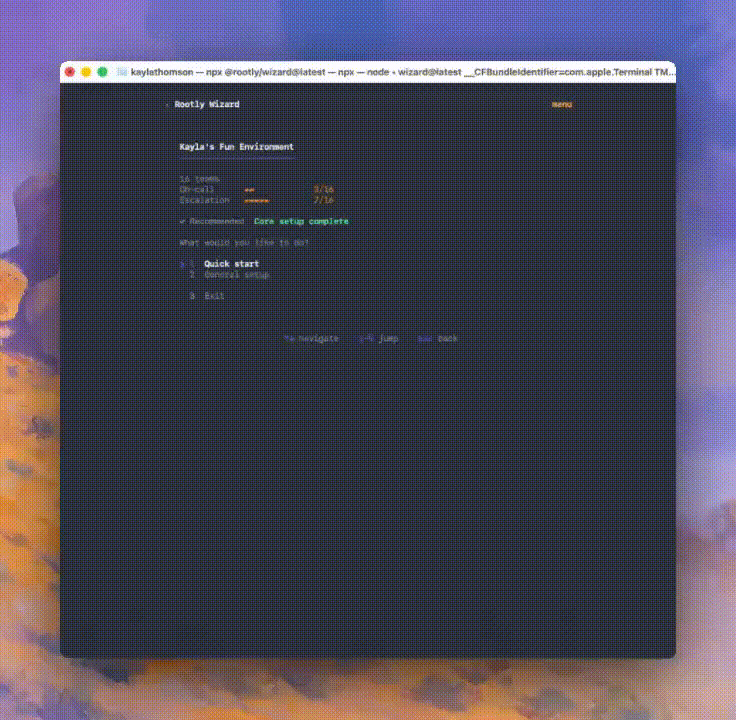
What’s included
- One-command setup with
npx @rootly/wizard@latest. Sign in with your browser or a Rootly API token; your session is stored securely in the OS keychain. - A recommended one-shot flow that sets up everything, or individual tasks: teams, on-call, status pages, integrations, and verification.
- An on-call schedule and escalation policy created and wired together automatically, so the policy pages the schedule from day one.
- A public status page with a live URL, with control over which components appear.
- A real test alert and test incident at the end, including a live phone page to whoever is on call.
- Safe to re-run: anything that already exists is reused, never duplicated.
- Built for automation: every step is also a JSON-in/JSON-out action with a dry-run option, ready for CI, scripts, or AI agents. The wizard can even write your Rootly MCP server config for your editor.
Why it matters
Setting up an incident management platform usually means bouncing between screens where each step depends on data from the next. The wizard collapses all of that into a single opinionated flow and finishes on a moment you can feel: your phone rings. It’s a free, open-source npm package, works with any Rootly account, and isn’t gated by plan tier.
Run npx @rootly/wizard@latest from any terminal with Node.js 18+ to get started, and see the documentation to learn more.
What else shipped
Mobile
Rootly Mobile 2.15.0 (iOS & Android)
What’s new
- Muted-alerts countdown — muting alerts now shows a live countdown with one-tap unmute (iOS Live Activity, Android notification card)
- One-tap bridge access — join an incident’s conference bridge straight from the incident
- Non-paging alerts — open alerts can now show in the alerts list and be resolved directly (flag-gated, rolling out)
- 12/24-hour clock — app now follows the device clock preference everywhere
Improvements
- Shifts list opens on today instead of the 1st of the month
- Muted banner shows how many alerts arrived while muted + mute status syncs across devices
- Mute alert notifications directly from alert details
- AI summary & chat on private incidents + chat history now syncs across devices
- Comment field on negative AI chat feedback
- Shadow on-call shifts render on schedule/shifts views
- Alert detail fields selectable & copyable
- Alerts visible to IR roles with alert permissions
- Pre-login Intune enrollment for BYOD app-protection tenants
- Settings “Teams” renamed to “Organizations”; My Performance removed from home; tab bar hidden when only one tab
- Muting settings hidden when on-call is disabled
Fixes
- Crash on alerts with object-shaped labels — broke alert load + ack
- Clear message when ack/resolve is blocked by a live call
- Schedule filter selection saved on swipe-dismiss
- “No shifts available” flash while shifts paginate
- Mute time-window dropdown appearing after unmute
- Deep links no longer stack the splash screen over the target page
Improvements
On-Call
- Improved UX to display Escalation policy timers more clearly.
- The Alert timeline now records when an escalation level is skipped if no one on that level could be paged.
Incident Response
- The retrospective editor now supports text color.
- AI blocks in the retrospective template builder now show a customized chip when custom instructions have been added.
- Form field conditions support custom yes/no fields.
- Retrospective docs synced to Notion are now updated in place, making syncs faster and more reliable.
- Workflows can now replace the content of a retrospective document, and will skip the update if someone has already viewed the doc.
API & CLI
On-Call
- The API now supports filter operators, including
eq,not_eq,in, andnot_in, so one request can do what used to take several. - The new filter operators are available across all API endpoints.
Incident Response
- Timestamps with a Z UTC suffix now work in
filter[updated_at]on the incidents API instead of silently returning zero results. - Paginating past page 100 on
GET /v1/incidentsno longer returns a 400 error. - A new endpoint,
POST /v1/incidents/{id}/meeting_recordings/import, imports meeting recordings and transcripts onto incidents. - The rootly-python SDK now includes
owner_group_idson heartbeat schemas, so team-owned heartbeats can be created through the SDK.
Fixes
On-Call
- Alert descriptions written in HTML now show as formatted text in Slack notifications instead of raw tags.
- Slack notifications now handle preformatted text in alert content correctly.
- Fixed last names being duplicated for some users signing in through SSO.
- Newly created Slack user groups now appear in the schedule sync picker.
- Schedule-synced Slack user groups now trim to just the current on-call user, even when the group started with all rotation members.
- The shifts API now returns historical override shifts even if the override record was deleted after the shift took place.
- Fixed duplicate resolution rules and hidden conditions on email alert sources that silently blocked auto-resolve.
- Fixed shift reminder text messages failing for some recipients.
- Workflow trigger search now returns the complete list of matching triggers.
- Deferral paths now correctly suppress the Level 1 Slack channel target when an alert is routed through a team.
Incident Response
- Fixed duplicate incident role assignments causing errors in the Edit Incident Details form.
- Status pages served on custom domains no longer return Not Found after configuration.
- The redesigned public status page shows scheduled maintenance start and end windows again.
- Subscriber emails now keep single line breaks in status page updates.
- The Slack status page update form no longer truncates the public title to 75 characters.
- The Mitigated At validation is no longer enforced when the Started At field is disabled.
- The workflow builder now returns a proper not-found page instead of an error for unknown workflow types.
- Cancelled workflow runs no longer reset the inactivity timer for repeating workflows.
- The Rename Microsoft Teams Channel workflow action no longer reports a failure after a successful rename.
- The Freshservice ticket action no longer fails when an incident status has no mapping.
- Fixed a broken avatar image showing during initial account setup.
Related changelogs

Live mode on the Alerts view.
A new Live Mode toggle on the Alerts view streams incoming alerts in real time.

The Rootly Edge Connector
Connect your internal systems to Rootly without exposing them to the public internet.

Templates for manual alert descriptions.
Ensure every page includes the right context, every time.