Page only when it matters with Deferred Paging.
Deferred paging lets you hold low-urgency alerts outside business hours and surface them when your team is actually working.

On this page
Rootly now supports deferred paging. A brand new UX that adds a deferral path to any escalation policy to define when certain alerts should wait instead of page—and exactly what happens when the window ends.
Why it matters
Not every alert that fires at 2am on a Saturday needs to wake someone up. But suppressing it entirely means it might never get seen. The only tools teams have had for this are workarounds: routing low-urgency paths to Slack channels with no deterministic mechanism to resurface them, or just accepting the noise.
Deferred paging gives you a third option:
- Low-urgency alerts arrive, get logged, and appear in Slack—without paging anyone
- Responders rest through the night without alert fatigue
- When business hours start, the alert pages the right on-call path automatically
- Alerts that are acknowledged, escalated, or resolved before the window ends are never re-paged
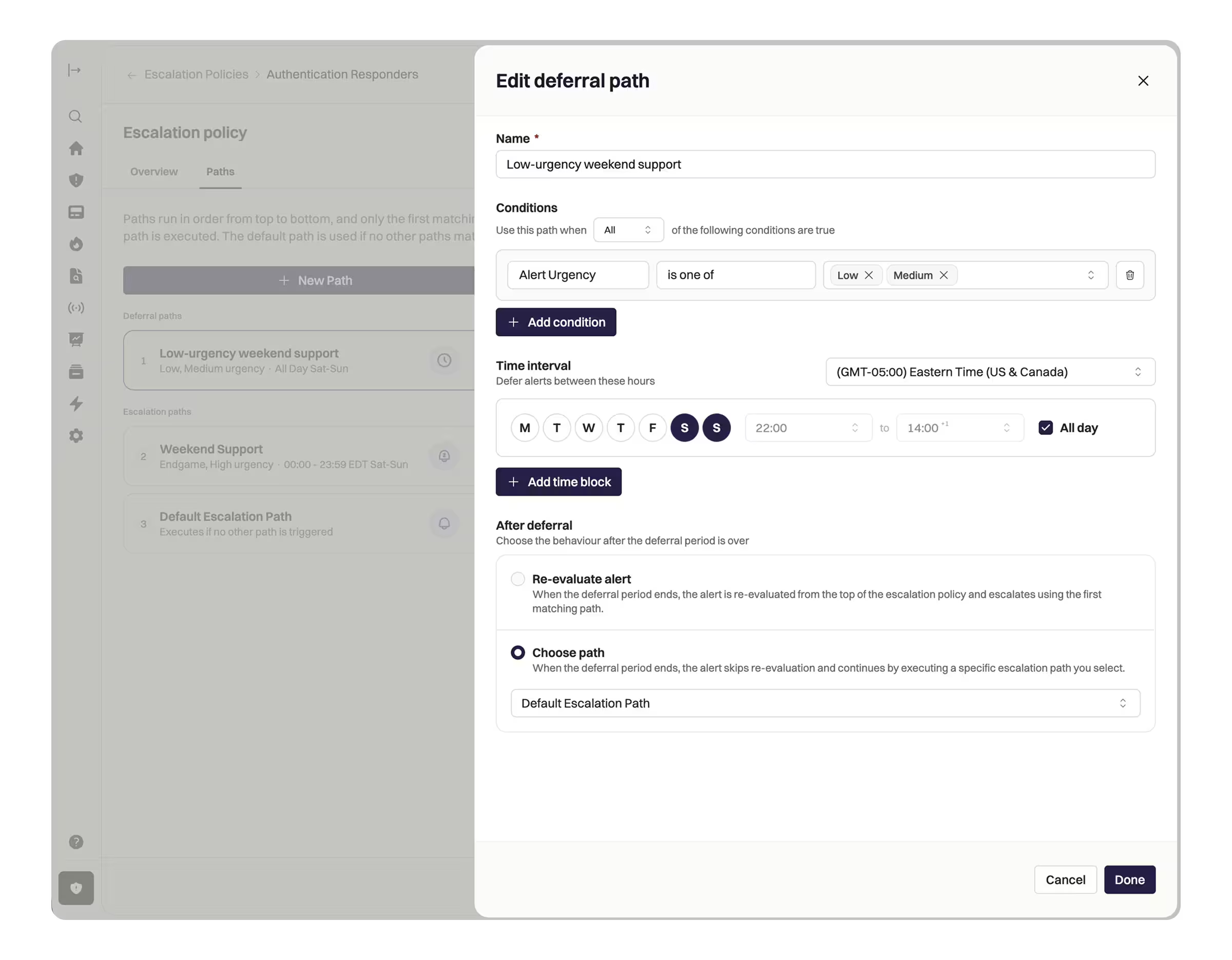
How it works
Deferral paths sit on escalation policies alongside your existing escalation paths, and are always evaluated first. Each deferral path has a time-based condition—you define the window when paging should be held (nights, weekends, or any custom schedule) and which escalation path fires when that window closes.
When the deferral window ends, the alert is replayed through your escalation policy as if it arrived fresh. If you’ve configured a specific path to activate at business hours, it follows that. If you’ve configured re-evaluation, it picks the best-fit path automatically. Either way, only alerts that are still active get paged—resolved ones are left alone.
Manual pages are never deferred.
Getting started
- Open an escalation policy and add a deferral path.
- Set the time window when paging should be held and the conditions that determine which alerts qualify.
- Choose what happens when the window ends—a specific escalation path, or full re-evaluation.
Deferred paging is now available for all Rootly On-Call customers. Check out the docs to learn more and get started.
What else shipped
Improvements
On-Call
- Users can now shadow a shift even when they already have upcoming shifts scheduled.
- Alert email notification subjects now include the alert source name, making it easier to scan and group emails by source.
- The “Template an Alert Title” toggle is now available in the v2 alert paging modal when both paging functionalities and templated alert descriptions are enabled.
Incident Response
- Slack channel dropdowns for escalation policy targets now filter to only channels the user is a member of, preventing accidental routing to the wrong channel.
- The Shortcut integration now uses the Teams field instead of the deprecated Projects field when exporting action items.
API & CLI
On-Call
GET /v1/oncallsnow supports anotification_typesfilter, making it possible to return on-callers from audible (non-default) escalation paths.GET /v1/shiftsnow returns historical override shifts even when the override record has been deleted after the shift occurred.linksmetadata is now included in alerts API responses.
Incident Response
GET /v1/incidentswithfilter[updated_at]now correctly handles RFC 3339 Z-suffix timestamps instead of silently returning empty results.
MCP Server
- The MCP tool surface has expanded from 124 to 150+ tools, reflecting the latest Rootly API specification.
- Tool descriptions now include contextual “WHEN TO USE” guidance to improve AI agent decision-making.
- Five predefined tool subsets are now available, optimized for specific workflows: Incident Response, Schedule Management, Monitoring Setup, Retrospectives, and Administration.
- Configure via environment variable to focus your AI agent on the right surface.
- Two new MCP resources are available for real-time operational context:
rootly://oncall-statusfor live on-call status across teams, androotly://workflow-guidefor step-by-step workflow guidance. - 54 non-destructive write operations have been added, including create and update support for workflows, schedules, escalation policies, services, teams, dashboards, playbooks, and retrospectives.
- Self-hosted deployments can now restrict the MCP surface to an exact allowlist of tool names using
ROOTLY_MCP_ENABLED_TOOLSor--enabled-tools.- Use
--list-toolsto print the effective tool names before narrowing the surface.
- Use
Fixes
On-Call
- Escalation options are no longer grayed out when an escalation policy pages two users who each have multiple notification levels.
- Alert field condition values on escalation paths can now be edited in place without deleting and recreating the condition.
- Schedules no longer fail to load when their owner user has been deleted.
- The Slack incident update modal no longer fails to open when rich text form fields contain HTML formatting.
Incident Response
- Slack actions such as pinning a message to the incident timeline no longer incorrectly trigger permission requests for users who already have incident update permissions.
- The new incident form no longer breaks when removing a service selection.
- The status page inactivity reminder snooze button now works for non-admin users.
- Confluence retrospective exports no longer strip newlines from wiki-markup templates.
- Workflow edit saves no longer return 404 for workflows that previously failed to save.
- “Subscribe to updates” on internal status pages no longer returns 404.
- Multiple users typing simultaneously in a retrospective no longer causes page delays or unexpected scrolling.
- Alert field previewer now correctly renders line breaks in multi-line alert field values.
Related changelogs
On-Call Paging in Microsoft Teams.
Rootly On-Call now pages responders, posts alerts, and lets them acknowledge, escalate, and resolve right in Microsoft Teams.
The on-call widget, 24-hour time, and a new Alerts table.
Three new features for responders: 24-hour time, a live on-call widget in the sidebar, and a customizable Alerts table.

Pay calculator for global teams.
Calculate on-call pay for teams anywhere in the world, in one place.