@Rootly AI Agent in Slack.
Your incident scribe and commander, inside Slack.

On this page
The @Rootly Agent is now available in Slack. Mention @Rootly during an incident and it reads your Rootly incident data, the channel discussion, and bridge call transcripts (Rootly Meeting Scribe) in real time. It answers questions, takes actions, and reports back in the thread, so everyone stays up to speed without leaving the channel.

Why it matters
During an active incident, the response work is only half the job. A responder joins twenty minutes late and has to scroll back to catch up. A comms lead needs a customer update while the commander is still triaging. Leadership wants status without interrupting the people fixing the problem. Each of these is a context switch: a question dropped in the channel, a jump into the Rootly web app, a DM that breaks someone’s focus.
The @Rootly Agent lives in the channel where the incident is already running. Instead of switching tools to find who’s on call, change a severity, or draft an update, you ask in plain language and it does the work. It’s grounded in the real incident: your Rootly data (services, on-call, roles, action items) plus the discussion in the channel and on the bridge call (Rootly Meeting Scribe) where decisions get made. Instead of a generic chatbot, you get a responder that’s caught up on what’s happened, what’s been tried, and what’s been decided…and ready to act on it.
How it works
Mention @Rootly in an incident channel and ask. A few examples you can try below:
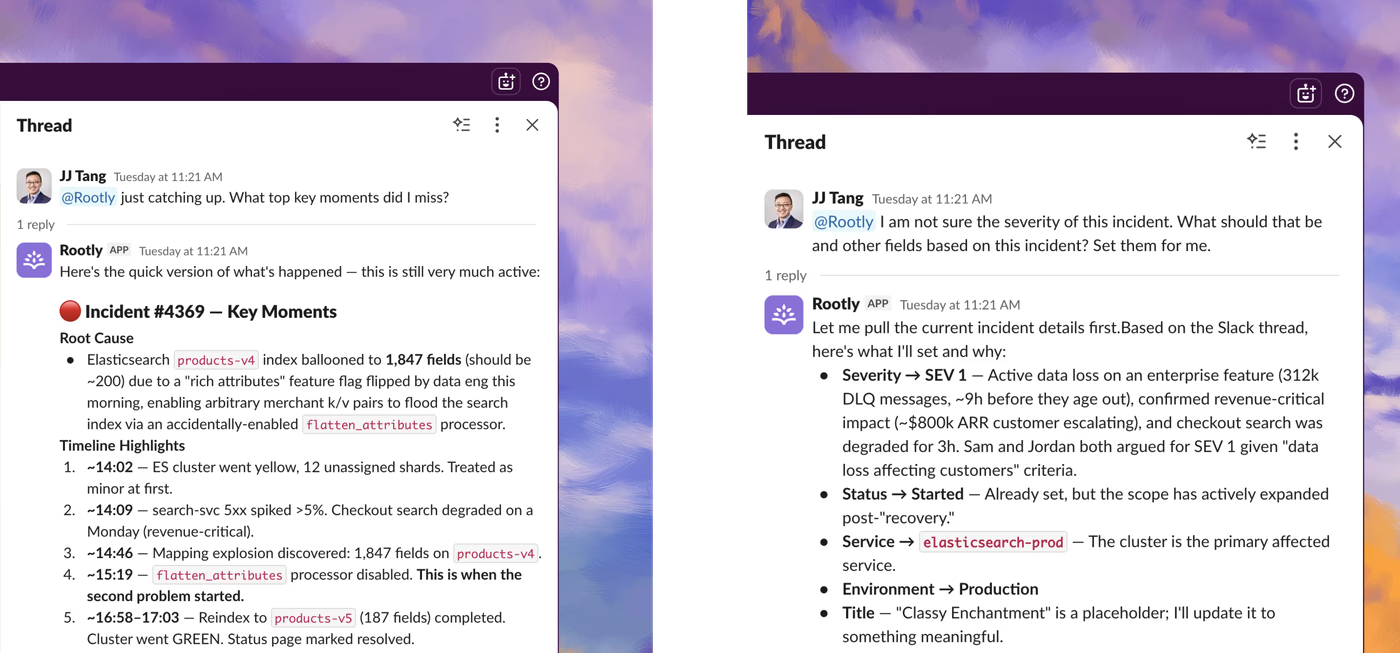
@Rootly AI Agent in Slack displaying the “Catch up” and “Set fields” use case.
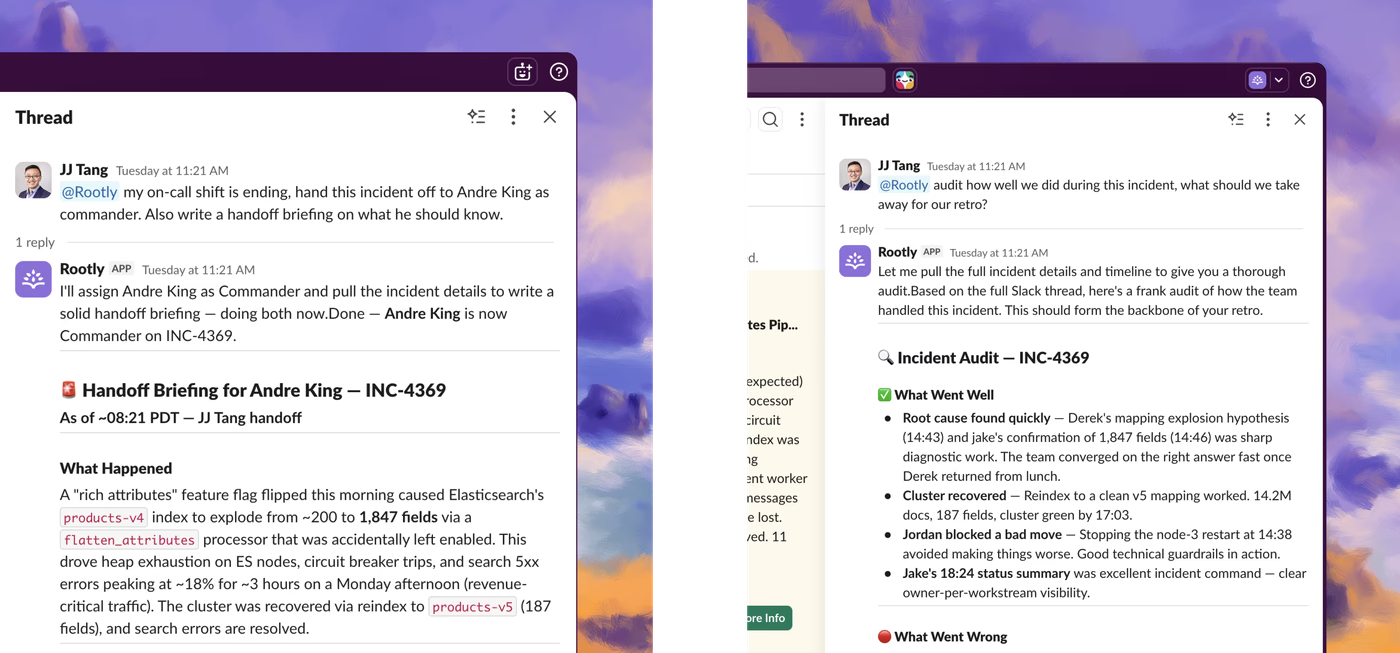
@Rootly AI Agent in Slack displaying the “On-call hand-off” and “Finding areas for improvement” use cases.
The things teams reach for most:
- Catch up. “Catch me up” returns a structured brief: current status, the leading theory, affected services, open action items, and who’s involved.
- Find who’s on call. “Who’s on call for payments?” answers across teams, services, schedules, and escalation policies, including who was on call when the incident started.
- Catch what’s slipping. “Did I miss any action items? Assign them to me.” It cross-references the channel discussion against what’s already tracked, surfaces commitments that were said but never logged, and assigns them to you.
- Take action. Change severity, status, title, roles, and custom fields; create and manage action items, page through Rootly On-Call, and draft or publish a status-page update.
- Ask for a recommendation. “I’m not sure what severity this should be: set it for me.” It weighs the situation against your team’s own severity definitions, recommends a level, and makes the change.
- Learn from the past. “Find similar incidents” surfaces related incidents so your team isn’t solving a problem from scratch.
Every action runs as you, under your existing Rootly permissions. The @Rootly Agent can’t do anything in Slack you couldn’t already do in the web app, and each change is attributed to you in the audit trail. You can also talk to the Rootly Agent in the Slack side-pane or message it directly if you’re mindful of adding noise to the incident channel.
Getting started
Rootly Workspace Admins can enable the @Rootly Agent in Slack from Configuration → Rootly AI → Enable @Rootly in Slack. After toggling it on, a Slack workspace Admin reconnects the Slack integration so the new permissions take effect.
See the documentation for setup steps and the full list of what you can ask.
What else shipped
Improvements
On-Call
- Schedules now sync on-call users to Slack Enterprise Grid org-level user groups, with support for targeting a specific Slack workspace per schedule.
- Slack search results for service lookups during alert routing are now ranked by relevance instead of alphabetically, making it easier to find the right service quickly.
- Escalation path levels now support time-of-day conditions, giving teams more control over when each level triggers.
Incident Response
- Users can now display timestamps in 24-hour (military) format across the entire product, including incident timelines, version history, and Slack notifications. This is a per-user preference set in account settings.
- Organizations can now hide the “Create Rootly Document” button from the incident UI for teams that manage retrospective documents outside of Rootly.
- Incident search now supports regular expressions for more precise filtering across large incident histories.
- Catalog sync error details can now be expanded and copied inline, replacing a Sentry link with an in-product view.
API & CLI
On-Call
- The Alerts API now accepts
Teamsas a valid source and notification channel in alert route configurations.
Terraform
- Fixed a bug where running
terraform applyto update alert field mappings on an alert source deleted all existing field mappings for past alerts, causing historical alerts to lose their field data. - Fixed a bug where adding users to a schedule rotation via Terraform silently reset the current on-call user’s position, sometimes inserting the same user twice.
- Fixed a bug where consecutive
terraform applyruns against schedule rotations created duplicate user records that were invisible in the UI but caused downstream inconsistencies. - Fixed a bug where
rootly_escalation_level.delaycould not be set to0without causing a permanent diff on subsequent plan runs. - Schedule notification settings (the Notifications tab within a schedule) can now be managed via the Rootly API and Terraform provider.
- Improved schedule shift rendering performance by limiting shift calculations to the minimum required window.
- Fixed incorrect validation on
rootly_live_call_routerwherecountry_codeandphone_typewere listed as optional in the docs but caused errors when omitted.
MCP Server
- The write tool surface for hosted deployments has been expanded to include alerts, alert events, alert routes, alert sources, custom forms, form fields, workflow runs, status page templates, and related resources.
- MCP tool names are now normalized to
snake_case, with a compatibility bridge that continues to accept legacycamelCasenames so existing integrations keep working during the transition. - Fixed a bug where missing or misnamed path arguments caused opaque 404 errors; the client now returns a clear validation message naming the missing parameter.
- Fixed a bug where tenants with Advanced Alert Routing enabled were hitting repeated 403 errors; responses now include a structured hint pointing to the correct replacement tool.
- Fixed a bug where date ranges larger than the upstream cap caused 422 errors; the client now validates window size up front and returns a clear recommendation to split the request.
- Hosted MCP deployments now expose the full tool surface by default; a slim profile of ~70 high-usage tools is available by opting in with
?tool_profile=slim.
Fixes
On-Call
- Fixed a bug where auto-resolution was not firing for email alerts deduplicated by subject line.
- Fixed a bug where alerts created from Slack incidents were being routed to the wrong escalation path.
Incident Response
- Fixed several issues in the bulk-add users flow: the modal no longer opens to a blank page when launched via direct URL, users exceeding the 100-person cap now see a warning instead of silent truncation, the success confirmation now lists any skipped users, and the submit button is disabled when no users are selected.
- Fixed a bug where the version history diff showed timestamps in a mix of 12-hour and 24-hour formats when multiple users with different time format preferences had contributed to an incident.
- Fixed a bug where uploading an invalid logo file to a status page wiped the entire status page configuration.
- Fixed a bug where alert blocks for non-paging alerts were rendering incorrectly in the condensed view.
- Fixed a bug where the catalog types filter disappeared when a deprecated Cortex service-sync integration was enabled.
Related changelogs
Control AI output across your organization.
AI Instructions guide Rootly Agents on how to carry out tasks and respond to requests, so every automated interaction works the way your teams do.

Never lose the call transcript.
Scribe joins your incident call, transcribes live with speaker labels, and makes every call part of your incident record.
Related Incidents detected automatically.
Rootly's agent posts the most relevant past incidents into your incident channel, before anyone thinks to go looking.