SLA driven follow-up tasks.
Follow-ups that actually get done. Rootly now supports SLA policies for incident follow-up tasks. Admins can define when action items need to be assigned and when they need to be completed; scoped by severity, service, incident type, or custom fields, and Rootly handles the reminders automatically.
On this page
Rootly now supports SLA policies for incident follow-up tasks. Admins can define when action items need to be assigned and when they need to be completed; scoped by severity, service, incident type, or custom fields, and Rootly handles the reminders automatically.
Why it matters
Follow-up tasks are where incident learning turns into prevention. But without deadlines and accountability, they accumulate. Some teams can have hundreds of follow-up tasks sitting unowned in their backlog, not because the work doesn’t matter, but because there’s no system enforcing that it gets done.
SLA policies close that gap. When an incident is mitigated or resolved, the clock starts. If a follow-up isn’t assigned or completed in time, Rootly notifies the manager. No manual tracking, no weekly triage meetings just to figure out what’s overdue.
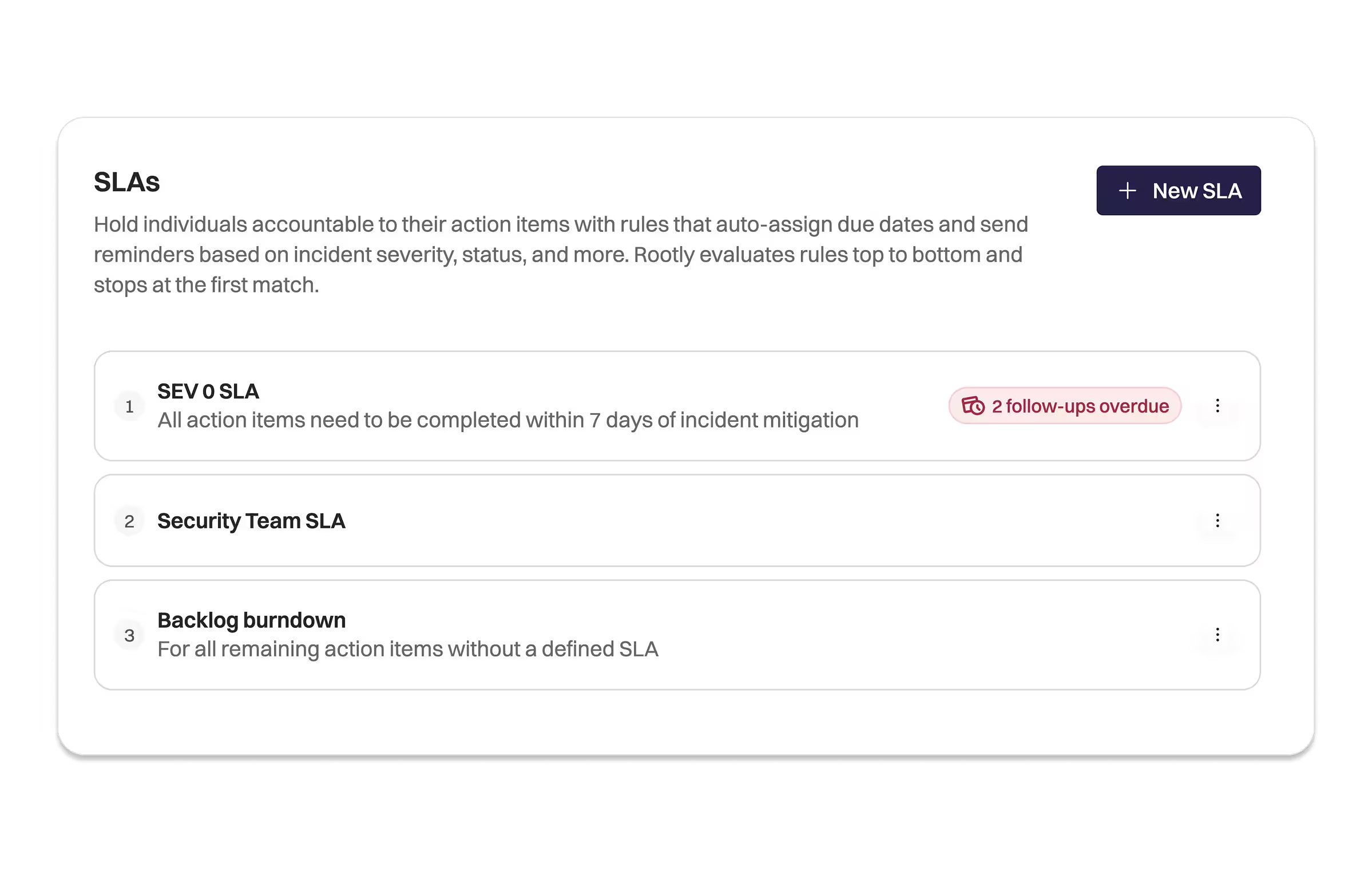
3 SLAs within the Rootly SLAs configuration UI.
How it works
Create an SLA policy from the Configuration → SLAs settings page. Each policy defines:
- Assignment deadline — how many days after a trigger status (e.g. mitigated) a follow-up must be assigned
- Completion deadline — how many days after a trigger status (e.g. resolved) a follow-up must be completed
- Conditions — scope the policy to specific severities, services, incident types, or custom field values
- Manager — the user or role responsible for receiving violation notifications
When a follow-up is created on a matching incident, its due date is automatically populated based on the active SLA. If the deadline approaches without action, Rootly sends reminders. If it’s breached, the manager is notified.
Weekend skipping is supported — deadlines calculated with “skip weekends” enabled display as business days.
Getting started
Go to Settings → Configuration → SLAs and create your first SLA. SLA policies are also fully manageable via API and Terraform using the rootly_sla resource.
Learn more in the docs.
What else shipped
Improvements
On-Call
- Escalation path conditions now support “is set” and “is not set” operators, making it possible to route alerts based on whether a payload field is present, not just its value.
- Slack channel dropdowns now show workspace names only when multiple Slack workspaces are connected. Single-workspace setups no longer show the workspace ID next to every channel.
Incident Response
- Slack channel dropdowns for escalation policy targets now filter to channels the current user is a member of, preventing accidental routing to channels outside their access.
- Real-time meeting transcription now supports non-English languages. When enabled, language detection automatically identifies the language being spoken during incident calls.
API & CLI
On-Call
GET /v1/escalation_policiesnow supports filtering by team ID, bringing API filtering to parity with the UI.
Incident Response
GET /v1/incidentspagination no longer returns a 400 error when paginating beyond page 100 with large page sizes.
Terraform
Incident Response
- SLA policies are now manageable via Terraform using the
rootly_slaresource and data source. Supports all policy fields including assignment and completion deadlines, conditions, manager assignment, and weekend skipping.
Fixes
On-Call
- Slack user group names created from schedules now support the full Slack character limit instead of being truncated at 21 characters.
- The monthly schedule view no longer shows inconsistent shift overlap or hanging shifts at midnight handoffs.
- The random paging strategy in the escalation policy editor now displays the correct label on schedule targets and includes the missing “or” separators between targets.
- The escalation note field in the “Page Rootly On-Call” workflow action now correctly surfaces the note during paging.
- Alert notifications sent to Slack channels via team default settings now appear in the alert timeline.
- Schedules created via Terraform using user-less API keys no longer incorrectly set the API key as the schedule owner.
Incident Response
- Team members with Team Read permission disabled can now select their own team when assigning ownership.
- Updating action item properties, such as exporting to a ticketing system, now correctly fires “Action Item Updated” workflow triggers.
- The Share button on Workload dashboards now appears correctly for owners and admins.
- Status page APIs on custom domains no longer return 403 errors when called from a server.
- Sub-status custom form fields now appear correctly in Slack when transitioning an incident using
/rootly status. - The Statuspage.io API key is now masked on the integrations page instead of displaying as plain text.
- Metric dashboard share settings now apply correctly, dashboards with identical permissions no longer give some users unexpected access errors.
@Rootlymentions and emoji reactions now work across all connected workspaces in Slack Enterprise Grid setups.