The on-call widget, 24-hour time, and a new Alerts table.
Three new features for responders: 24-hour time, a live on-call widget in the sidebar, and a customizable Alerts table.
On this page
This week’s release is all about the responder experience. Three new features make it easier to know where you stand, jump on a page the moment it lands, and find the alerts you care about, faster.
The on-call widget
A new widget in the web app sidebar shows the most important information you need to respond, at a glance, from any page in Rootly. It answers the questions responders ask most: Am I on call right now? When am I next on? Have I been paged?
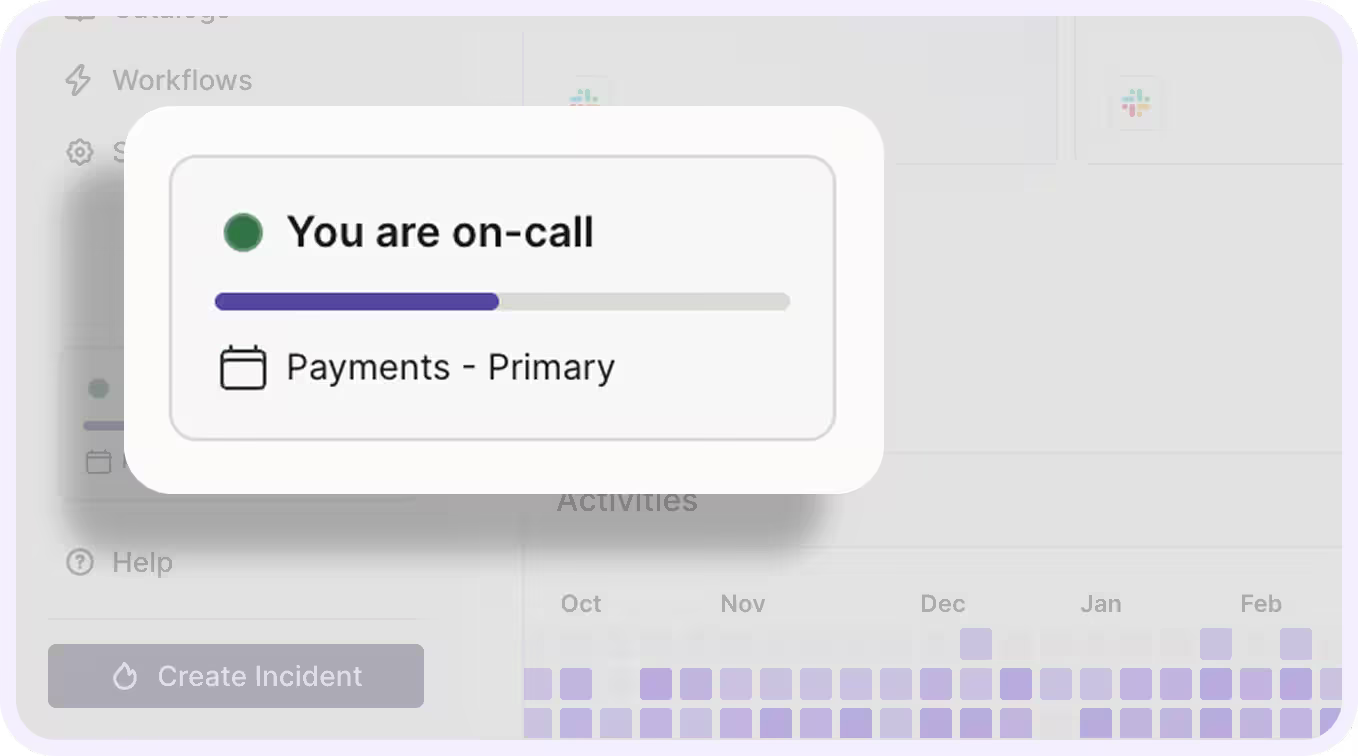
A zoomed in view of the new on-call widget, found in the bottom left nav.
What’s included:
- When you’re being paged, the alert is surfaced on whatever page you’re on, so you can jump in right away.
- When you’re on call, a live progress bar counts down your current shift and shows the schedule you’re covering.
- When you’re off call, you see your upcoming shifts, soonest first.
- If Rootly can’t page you, no verified phone or mobile app, the widget tells you before it matters.
- Updates in real time, as shifts hand off and pages arrive, nothing to configure.
Read more in the on-call widget docs.
24-hour time, per user
You can now switch Rootly to 24-hour time. It’s a single setting on your user profile, and it changes how times are displayed across the platform—on-call schedules, shift times, and timestamps. Because it’s per user, each person picks the format they read fastest:, someone in Berlin sees 18:00 while their teammate in Denver sees 6:00 PM. International teams can configure and run Rootly together, and set up their schedules using the time format they care about, with no conversion needed in anyone’s head.
The new Alerts table
The Alerts table is now yours to shape. Add and remove columns to put the alert details you care about front and center, apply filters to quickly find the alerts that matter, and bulk manage alerts directly from the view. Less clicking into individual alerts to find the one detail you need , it’s on the table.
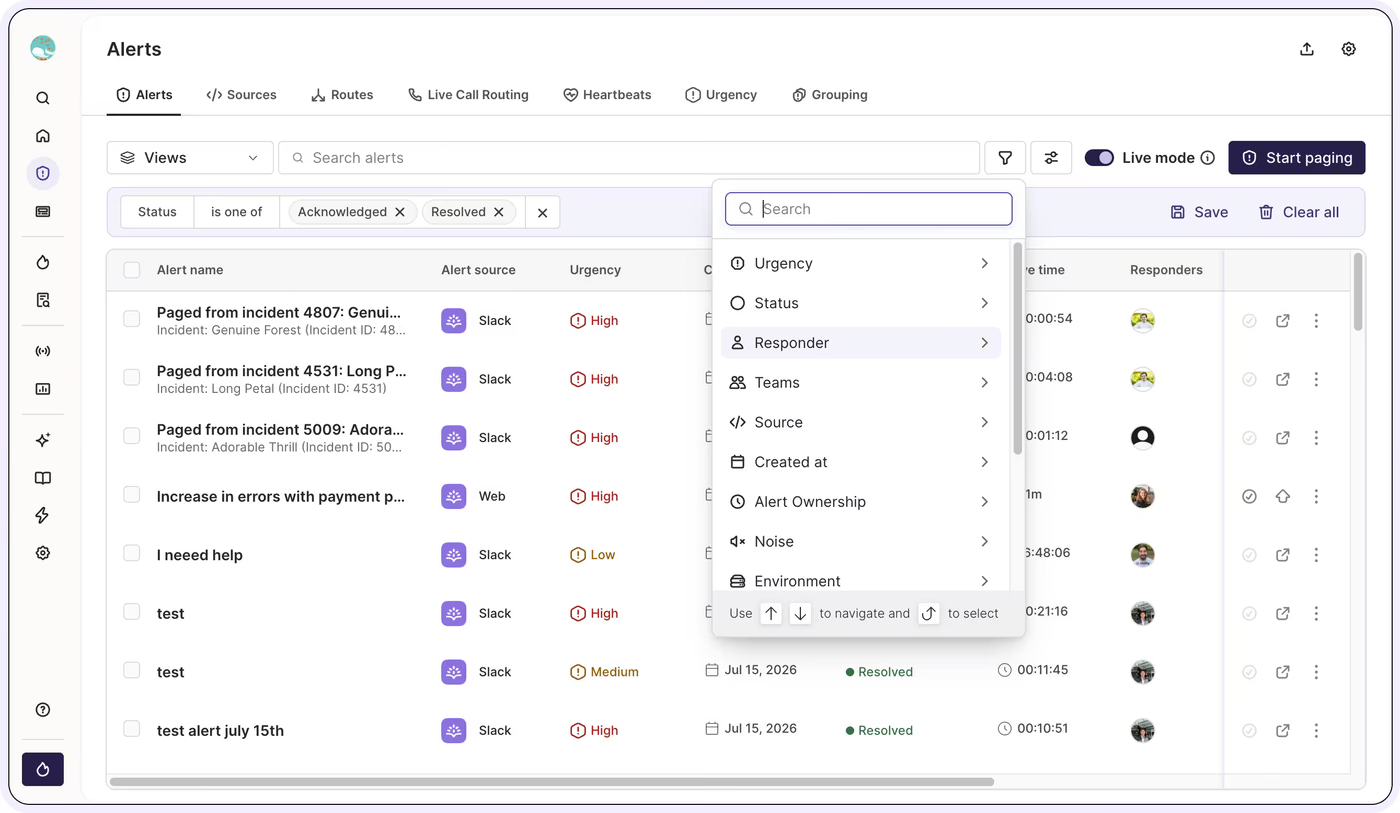
A view of the new Rootly Alert table UI.
Together, these three add up to a faster loop for responders: read your schedule in your own time format, see your status and pages from anywhere in the app, and cut through alert noise to act on what matters.
What else shipped
Improvements
On-Call
- Escalation policies can now automatically skip a level when no one on that level can be paged, so alerts reach an available responder sooner.
- Live call routing alerts can now also send informational SMS and push notifications, and acknowledgement can be required to happen on the call itself.
- Schedule Slack notifications can now include shadowing users, so people shadowing a shift see it too.
- Alert source screens now load faster and are paginated.
- Slack channel pickers now show the workspace name only when more than one workspace is connected.
- A new opt-in checkbox lets you choose whether a new alert should be created.
- Added an AWS SNS alert source integration.
- Holiday calendar events can now be mapped only to users who are on call.
Incident Response
- AI-generated retrospective drafts now pull richer incident data and write cleaner timelines, with several usability improvements in the editor.
- Workspace pickers now support filtering on Slack Enterprise Grid.
- SCIM group updates now run fully in the background, so large syncs complete reliably.
- Incident creation naming is now consistent across the product.
API & CLI
On-Call
- JSON:API filter operators are now supported on the alerts and incidents endpoints.
- Team API keys now work for team-owned alert routes and routing rules.
- Fixed team API keys returning empty data from the get alerts endpoint and 404s when acknowledging or resolving alerts.
- The
/v1/alert_routesendpoint now returns a clearer error when a route can’t be used by a team.
Incident Response
GET /v1/teamsnow returns the teams a user belongs to, even when they lack the Teams read permission.- Fixed a 404 on the
/v1/oncallsendpoint when using a team API key. - Team admin API keys can now query incidents.
- The update incident endpoint now updates the incident’s Slack channel name.
Fixes
On-Call
- Fixed an error on the routes page when a linked functionality had been deleted.
- Fixed alert grouping rules not applying to Zabbix alerts.
- Fixed incomplete alert exports to CSV.
Incident Response
- Fixed Slack incident creation failing when the new incident form was empty.
- Fixed alert search missing results for partial words.
- Fixed alerts created by workflows not triggering “alert created” workflows.
- Fixed filtered CSV exports returning fewer incidents than the list on screen.
- Fixed alert variables missing service, functionality, and label values.
- Fixed the mitigated-at time not carrying over from a sub-status.
- Fixed retrospective status updates not following the configured formatting.
- Fixed labels missing from the condition options in the incident workflow builder.
- Fixed deleted form fields still displaying on forms.
- Fixed the shadow-user Slack message still showing AM/PM when 24-hour time is turned on.
- Terraform now rejects duplicate positions for workflow actions.
Related changelogs

On-Call Paging in Microsoft Teams.
Rootly On-Call now pages responders, posts alerts, and lets them acknowledge, escalate, and resolve right in Microsoft Teams.

Pay calculator for global teams.
The On-Call Pay Calculator now supports global teams: run pay reports in any timezone or per user, filter by team and schedule, and export the results.

Paging based on Functionalities.
Page by what's broken: once a Functionality has an escalation policy, you can page it from the manual paging modal on web, Slack, and mobile.