The Rootly Claude and Cursor plugins.
Rootly now has official plugins for Claude Code and Cursor — so you can check on-call, investigate incidents, and generate retrospectives without leaving your editor.

On this page
The Rootly Claude Code and Cursor plugins are now available. Both are backed by Rootly’s hosted MCP service and bring incident management into the tools where engineers already work.
Why it matters
Incident response has always required switching contexts, from your editor to Slack, to your incident tool, back to your terminal. By the time you’ve caught up on what’s happening, you’ve already lost the thread of what you were building. The Rootly plugins close that gap: incident context, on-call state, and retrospective generation are now available from the same environment where you write and ship code.
What you can do
The Claude Code plugin ships with nine slash commands:
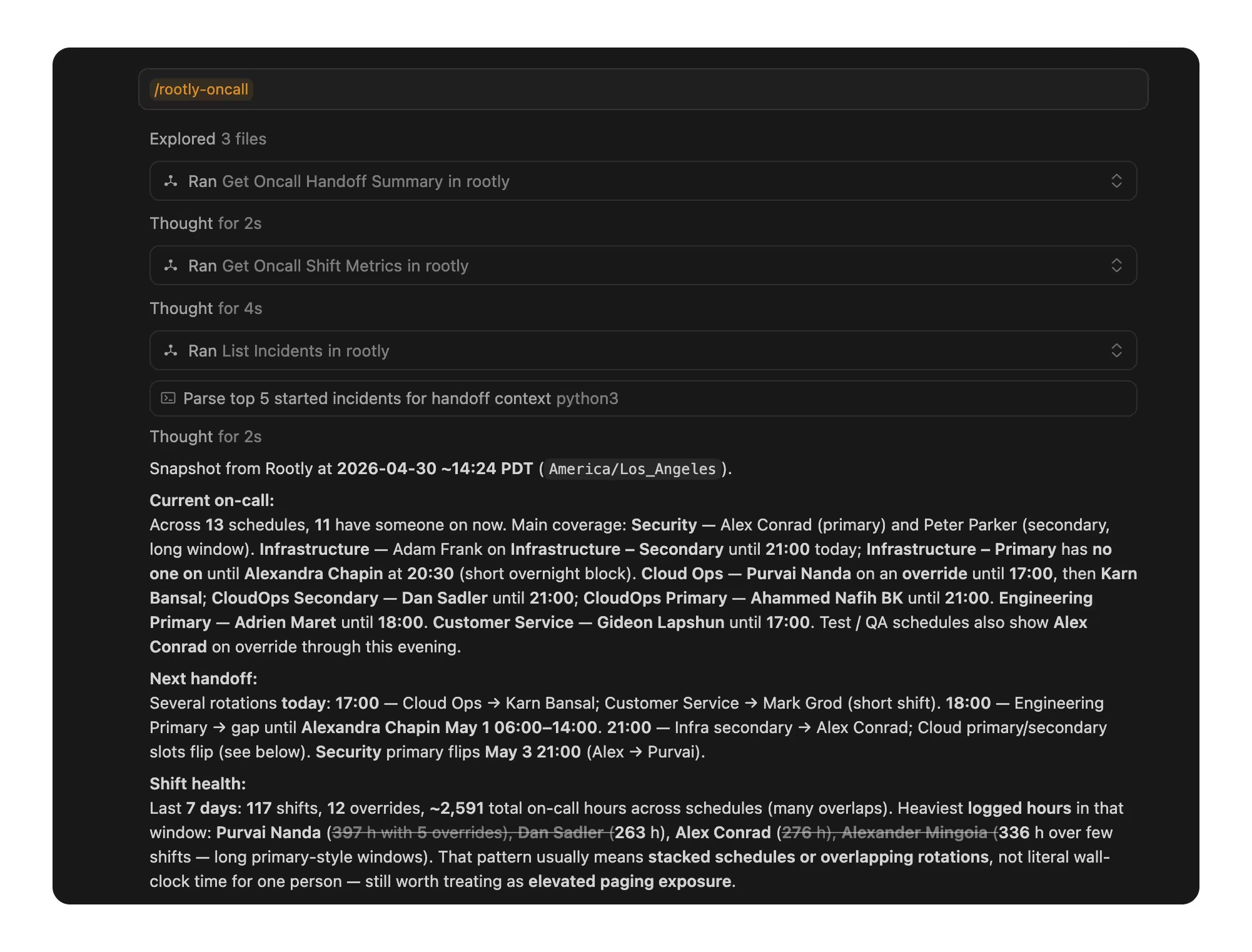
/rootly:deploy-check— analyzes your git diff against past incidents and warns if similar changes caused outages before/rootly:respond [id]— pulls full incident context, finds similar past incidents, and shows who’s on-call/rootly:oncall— on-call dashboard with shift metrics, upcoming handoffs, and health risk indicators/rootly:retro [id]— generates a structured retrospective from incident data/rootly:status— all services with active incidents grouped by severity/rootly:ask [question]— natural language queries over your incident history/rootly:brief [id]— executive-ready incident summary for stakeholder updates/rootly:handoff— structured handoff document for incident commander transitions/rootly:setup— first-run configuration and API token validation
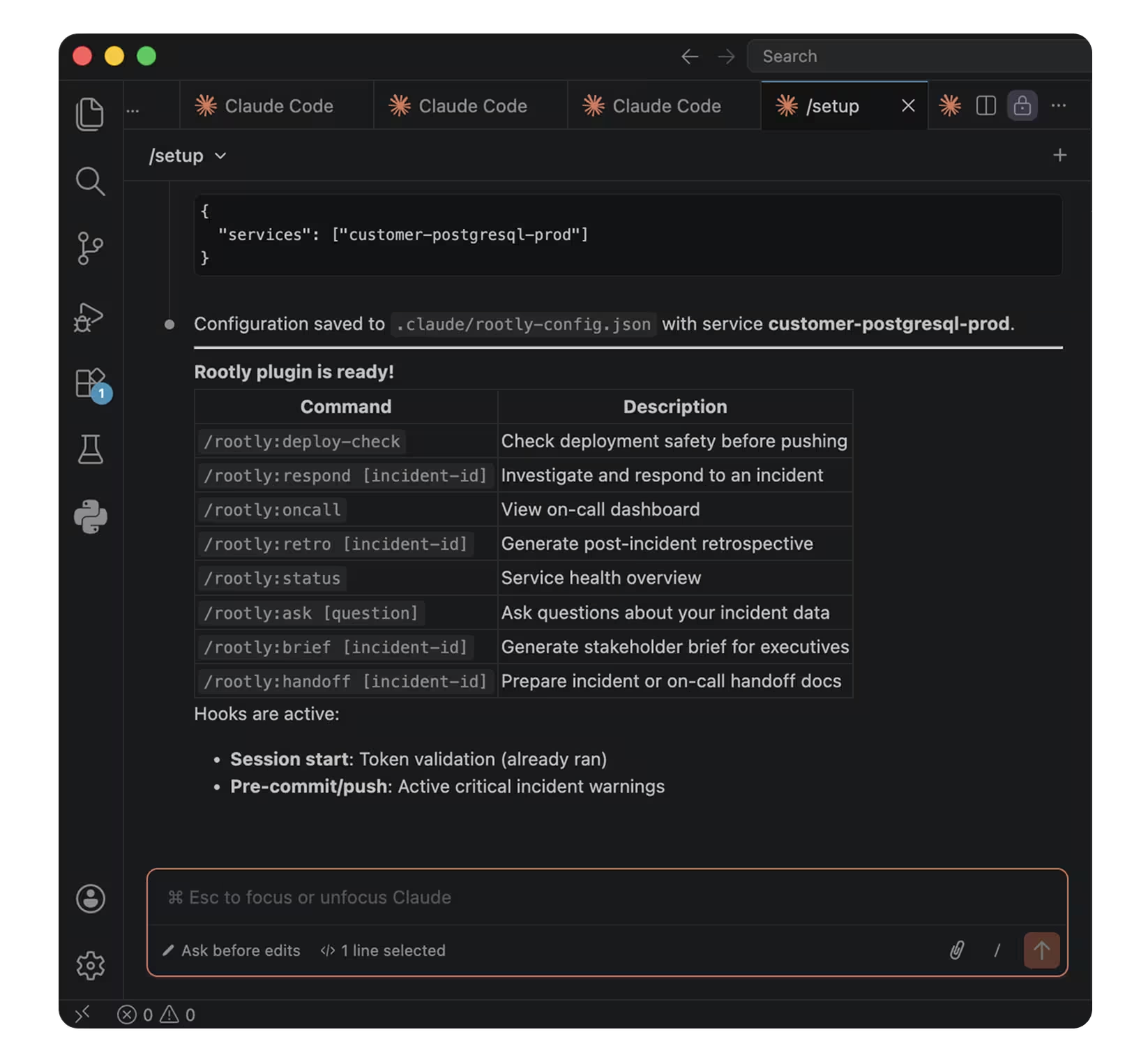
The plugin also ships with two automatic hooks: a session-start token check, and a pre-commit/push warning if there’s an active critical incident in progress.
The Cursor plugin brings the same Rootly workflows into Cursor, so incident investigation, on-call context, status drafting, handoffs, retrospectives, and deploy checks are available directly in the editor.
Getting started
For Claude Code, install Rootly through Rootly’s custom plugin marketplace:
/plugin marketplace add Rootly-AI-Labs/rootly-claude-plugin
/plugin install rootly@rootly-plugins
/reload-plugins
Then run /rootly:setup with your Rootly API token to complete configuration.
Then open /plugin, find Rootly in the Discover tab, and install to your preferred scope. Run /rootly:setup with your Rootly API token to complete configuration.
For Cursor, install Rootly from the public GitHub plugin source in the rootly-cursor-plugin repository. Make sure ROOTLY_API_TOKEN is available in the environment Cursor launches with, then run /rootly-setup to validate connectivity.
Direct MCP configuration for Claude Desktop and other MCP-compatible clients is also available separately. See the Rootly MCP Server repo or the Rootly MCP Server docs for setup details.
What else shipped
Improvements
On-Call
- When no valid paging targets exist for a given configuration (for example, when Functionality is enabled but none have an escalation policy assigned), the paging modal now shows contextual guidance instead of a blank empty state.
Incident Response
- The
{{ incident.meeting_transcript }}Liquid variable now returns live transcription content while a call is still in progress — so workflow templates referencing meeting transcripts work during active incidents, not only after the recording ends. - Slack channel dropdowns now filter by workspace ID when multiple Slack workspaces are connected, preventing channels from different workspaces with identical names from appearing as duplicate options.
- The incident digest email now aligns action item, assignee, due date, and status columns consistently across all incidents, making multi-incident digests easier to scan.
MCP Server
- Incident timeline events can now be created through MCP without extra configuration — the capability is enabled by default as of v2.3.4.
Fixes
On-Call
- The schedule edit form no longer shows a false “unsaved changes” banner when the page loads or the date picker initializes.
- Schedule rotation handoff times now update correctly for future shifts when changed, including transitions across midnight and to 12:00 AM.
- The Routes page no longer crashes with a “Something went wrong” error when an associated Functionality has been deleted.
- The alerts index no longer returns a 500 error when the request contains an invalid filter value.
- Alert source email addresses are now matched case-insensitively, so emails sent with mixed-case addresses are correctly routed.
- Emails sent to unconfigured alert source addresses now bounce with a delivery failure instead of disappearing silently.
- Slack shift-start notifications now correctly include the fallback assignee when the primary on-call user is unavailable.
- Users can no longer be assigned as both primary and shadow within the same schedule.
Incident Response
- Pasting tables from Google Docs into retrospective templates no longer strips the table formatting on save.
- Status page RSS feeds now include scheduled maintenances as soon as they are created, not only when they are marked complete.
- Status pages now use the customer’s configured favicon in Google search results instead of the Rootly logo.
- The “Update Google Docs” workflow task no longer prepends the default retrospective template when no template is configured.
- The Slack
/rootly taskmodal no longer overwrites the selected task priority with the default medium priority on submission. - Pinning Slack messages containing long URLs no longer truncates or breaks the URL in the incident timeline.
- Dashboard panels grouped by service owner no longer return 500 errors.
- The alerts page no longer 500s when a cached filter state contains an invalid status enum value.
- SLA item order numbers now update correctly after reordering.
Related changelogs
Control AI output across your organization.
AI Instructions guide Rootly Agents on how to carry out tasks and respond to requests, so every automated interaction works the way your teams do.

Never lose the call transcript.
Scribe joins your incident call, transcribes live with speaker labels, and makes every call part of your incident record.
Related Incidents detected automatically.
Rootly's agent posts the most relevant past incidents into your incident channel, before anyone thinks to go looking.