

A comprehensive guide to incident postmortems
On this page
An incident postmortem is a structured review conducted after an incident to understand what happened, why it happened, and how similar issues can be prevented in the future.
If you’re operating a system with real users, incidents are inevitable. A failed deployment, a missed alert, or an unexpected third-party outage can happen at any time. What separates high-performing teams is not avoiding incidents altogether, but responding effectively, learning from every failure, and continuously improving.
That is where postmortems become essential. More than a meeting or a document, they provide a repeatable process for analyzing incidents, uncovering contributing factors, and turning lessons into measurable improvements. Reliable on-call software supports this workflow by improving alert routing, escalation, incident coordination, and timeline capture, giving teams the accurate data and shared context they need to conduct meaningful reviews.
When practiced consistently, postmortems strengthen both technical operations and organizational culture. They align engineering, product, support, and leadership around a shared understanding of each incident while promoting accountability, transparency, and continuous learning. Whether you’re creating your first postmortem process or refining an existing one, every incident becomes an opportunity to build more reliable systems and more resilient teams.
What Is an Incident Postmortem?
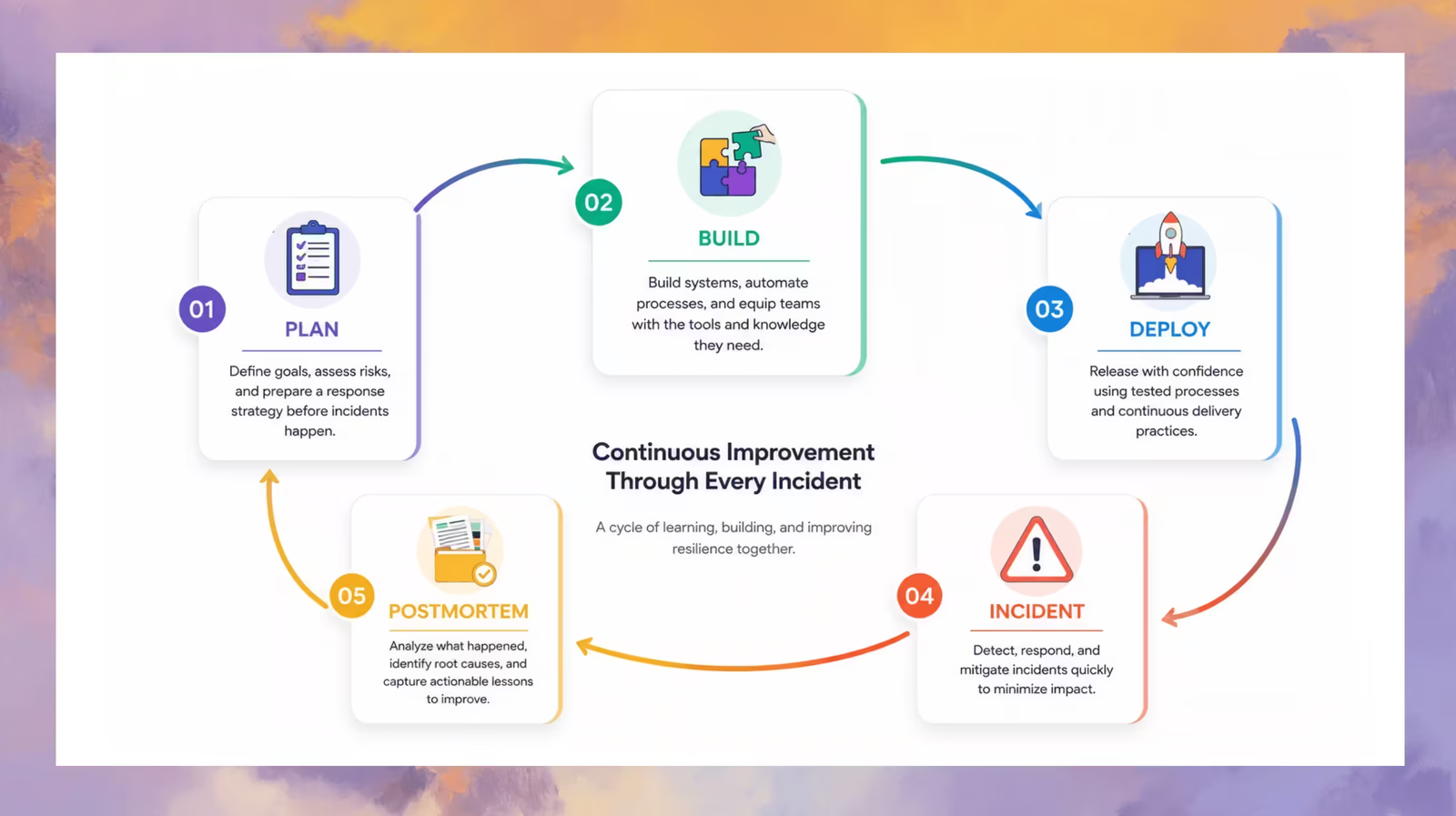
A postmortem (sometimes called an incident review or retrospective) is a formal review that takes place after an incident has occurred. The process involves gathering the team to discuss the incident in a blameless, structured format. The document serves as a record of the timeline, root cause, impact, resolution steps, and follow-up actions.
Postmortems are not about assigning blame. They exist to uncover system weaknesses, process gaps, and organizational blind spots so that similar issues can be prevented or better mitigated next time.
Benefits of Running Postmortems
Whether you’re running a small startup or a global infrastructure team, postmortems offer immense value:
Internal Benefits
- Foster team trust through transparency and psychological safety
- Drive faster incident resolution through knowledge sharing
- Create consistent processes for learning and accountability
- Prevent recurrence by surfacing root causes, not symptoms
External Benefits
- Improve transparency with stakeholders through structured reporting
- Build user trust by demonstrating a culture of continuous improvement
- Show compliance with SLAs, SLOs, and industry standards
Postmortems are not just operational tools—they are cultural anchors for engineering resilience.
Why Run a Postmortem?
Your infrastructure isn’t just made of servers and code—it’s a living, breathing system that includes people, vendors, software, users, and the most unpredictable element of all: time. That complexity makes failure inevitable. But if treated correctly, failure becomes a teacher, not just a setback.
Systems that learn from disruption are considered antifragile—they grow stronger in the face of uncertainty, disorder, and error. Postmortems are your pathway to antifragility.
Every incident reveals something new. Often, what emerges is a hidden interdependency that wasn’t visible until stress exposed it. For example:
Imagine a system where:
- Component A connects to both B and C
- There’s no apparent connection between B and C
- Each process from A opens simultaneous connections to B and C
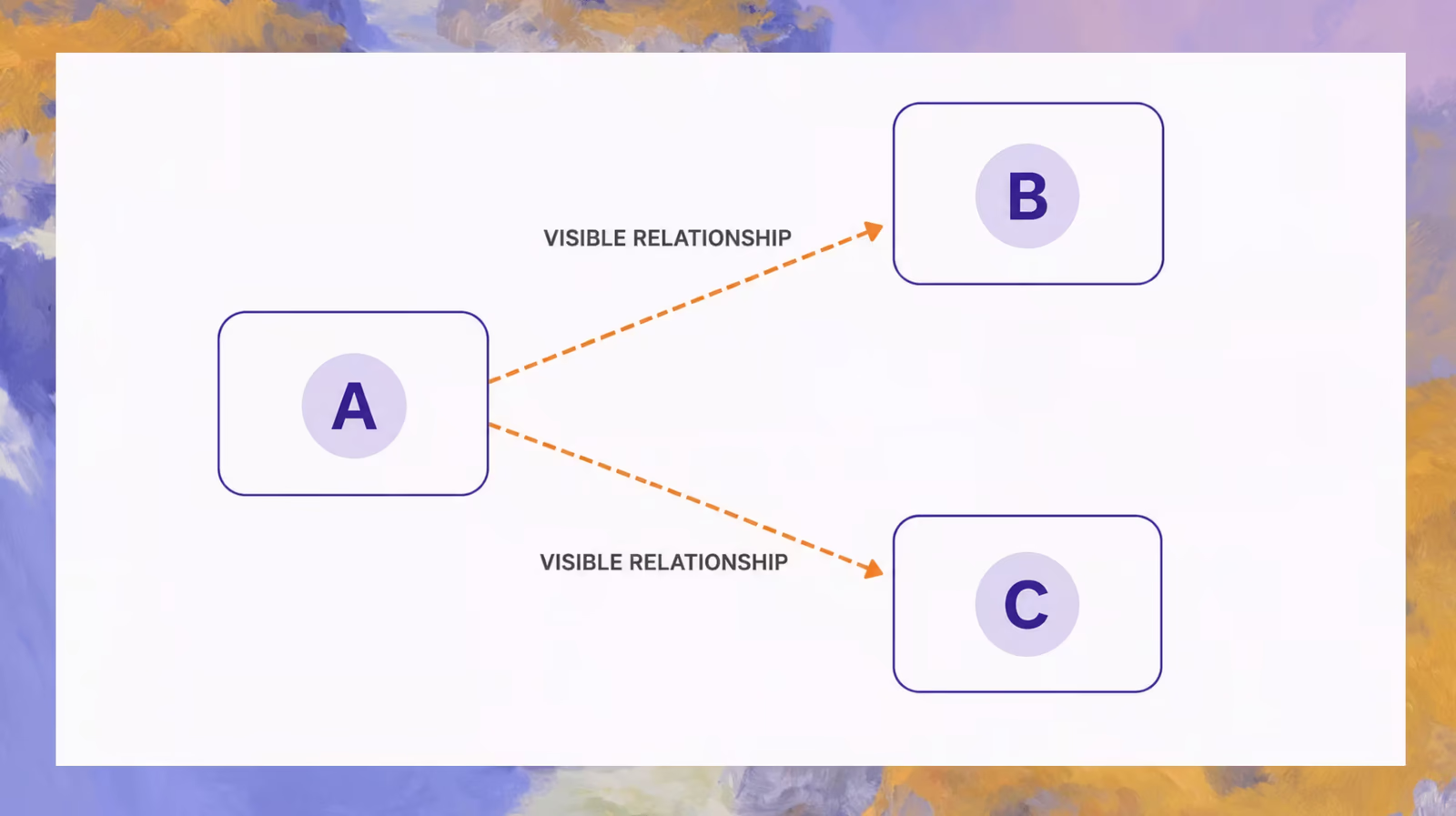
Now suppose B slows down. A queues more processes, each opening connections to C. Eventually, C gets overwhelmed—even though it was B that faltered. You’ve now uncovered a hidden link between B and C that didn’t exist in your mental model before.
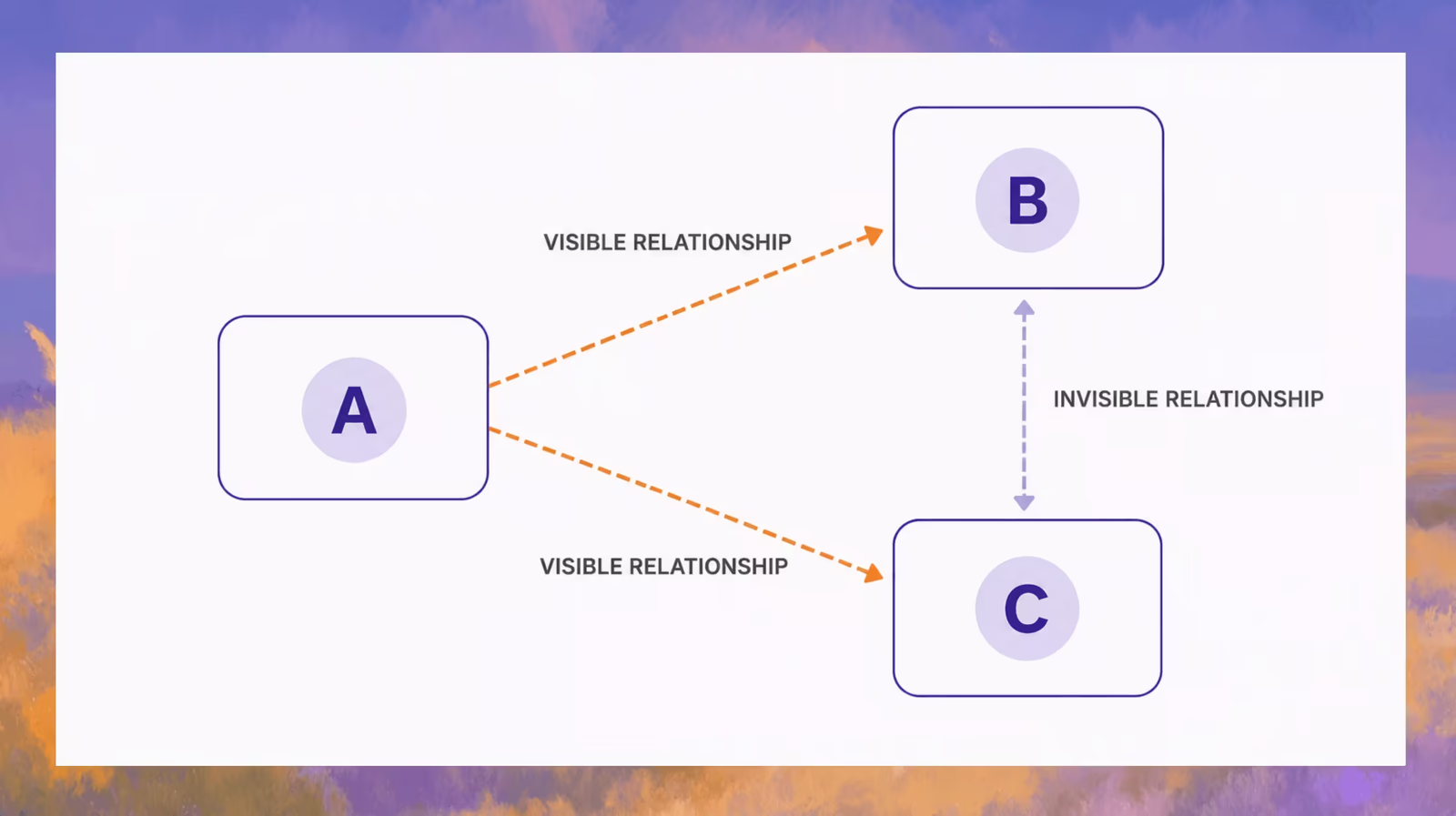
That’s the power of a postmortem. It gives you the opportunity to update your understanding of the system and document not only how to prevent the incident, but how to respond faster and more effectively if it happens again.
A good postmortem isn’t just a record—it’s a mechanism for evolving your model of reality.
An effective incident postmortem plan
A strong postmortem process doesn’t happen by accident. It’s designed, documented, and continuously refined. The most effective postmortem plans are clear enough to be followed under pressure and flexible enough to adapt to different types of incidents.
Here’s what to include in your postmortem plan:
1. Define When a Postmortem Is Required
Establish clear criteria for when a postmortem must be triggered—based on severity level, SLA breach, user impact, or operational disruption. This avoids ambiguity and ensures consistent follow-through.
2. Assign Ownership Early
Designate a postmortem facilitator—typically someone from the incident response team, such as the incident commander, SRE, or engineering lead—responsible for guiding the process. Make it clear who documents the event, collects inputs, and drives follow-up.
3. Use a Standard Template
Standardize your postmortem structure with a shared template. This keeps documentation consistent across teams and ensures important elements like timeline, impact, and action items are never missed.
4. Schedule the Review Promptly
Time matters. Add postmortem reviews to the calendar within 24 to 48 hours after incident resolution. Choose a time when all key stakeholders can attend and the event is still fresh in memory.
5. Encourage Blameless Participation
Reinforce a no-blame culture throughout the process. Frame questions around system behavior and process design—not individual decisions. Create psychological safety so contributors feel comfortable sharing openly.
6. Focus on Actionable Outcomes
Every postmortem should result in a small set of clear, prioritized action items. Assign ownership, set deadlines, and follow up regularly. Avoid vague conclusions like “be more careful” or “monitor more closely.”
7. Review and Iterate Regularly
Treat your postmortem process like any other part of your system. Hold periodic retrospectives on how well it’s working. Are documents being written? Are follow-ups happening? Is the process helping teams learn and improve?
When Should You Run a Postmortem?
Not every incident warrants a full postmortem, but many do. A good rule of thumb:
Run a postmortem when an incident:
- Breaches SLAs/SLOs (e.g., uptime, latency, availability)
- Impacts a significant number of users or key stakeholders
- Requires cross-functional coordination or emergency escalation
- Could recur if underlying causes aren’t addressed
Optional but useful postmortems include:
- Near-misses where luck prevented major damage
- Recurring minor incidents that point to systemic issues
- Major planned interventions (e.g., infrastructure overhauls)
Best practice: Run the postmortem within 48 hours of incident resolution. The closer to the event, the fresher the memory and the more accurate the timeline.
Proactive vs. Reactive Postmortems
Most teams think of postmortems as reactive: something you do after a failure. But proactive postmortems are just as valuable.
Reactive Postmortem
- Triggered by an actual incident
- Focuses on recovery, root cause, and future prevention
Proactive Postmortem
- Triggered by a near-miss, emerging trend, or recurring issue
- Helps surface systemic vulnerabilities before they escalate
Running both types gives your team a more complete picture of risk, helping you stay ahead of future problems.
Do’s and Don’ts of Running Postmortems
Do:
- Foster a blameless environment: Focus on the process, not the person
- Involve the right stakeholders: Engineers, ops, and business teams
- Use data and logs to reconstruct the timeline objectively
- Assign clear, actionable takeaways with owners and due dates
Don’t:
- Point fingers or assign blame
- Skip the write-up—verbal discussions alone don’t scale
- Delay the postmortem until memory fades
- Overcomplicate: Keep the format consistent and lightweight
Examples:
- Poor behavior: “Alice deployed broken code.”
- Ideal behavior: “A lack of automated tests allowed faulty code to be deployed without detection.”
Key Components of a Postmortem Document
A well-structured postmortem should include:
- Summary: What happened in 1-2 sentences
- Timeline: Chronological account with timestamps
- Impact: Who/what was affected and how badly
- Root Cause Analysis: Technical and process-level causes
- Resolution Steps: How the issue was identified and fixed
- Action Items: Preventative tasks with clear ownership
- Metrics: MTTR, duration, severity level, incident cost (if applicable)
Optional additions:
- Screenshots or logs
- Charts or metrics snapshots
- Links to Slack threads, Jira tickets, or runbooks
What to Do With the Postmortem Document
Creating the document is only half the job. To make it impactful:
- Store in a central, searchable location (e.g., Confluence, Notion, Rootly)
- Tag with relevant metadata (incident type, affected system, date, severity)
- Circulate internally to stakeholders (product, support, leadership)
- Review in monthly ops or engineering review meetings
External sharing: Only share externally if it’s properly anonymized, reviewed by comms/legal, and framed constructively. Transparency builds trust but must be handled with care.
Tools, Templates, and Automation
Speed and consistency matter. Use:
- Incident postmortem templates to standardize structure
- Incident management tools (e.g., Rootly, PagerDuty)
- Automated timeline builders to pull Slack, logs, and alerts
- Checklists for facilitators and participants
- Recurring calendar reminders to review past postmortems monthly
Automation ensures nothing gets missed when adrenaline is high.
Turning Incidents Into Insight
Postmortems aren’t about fault. They’re about building better systems and stronger teams. By leaning into incident reviews with a blameless, consistent process, you create a culture of curiosity, learning, and resilience.
Every incident is an opportunity to improve. Don’t let that opportunity go to waste. Start small, stay consistent, and let your postmortem process evolve with your team.