
When engineers first work with observability, it is natural to focus on collecting more signals: metrics, logs, traces, events, and profiles. Those signals make systems easier to understand, but they also create more conditions that could notify someone. A useful alerting system needs a way to decide which conditions require action, who owns that action, and what context they need when the page arrives.
That is the role of alert management. It connects observability to on-call and incident response, turning raw signals into a smaller number of actionable, owned interruptions. A good implementation helps responders act quickly without asking them to watch every dashboard or interpret every fluctuation in production.
This guide explains that path from first principles. It is for engineers who understand telemetry and monitoring but are beginning to design how alerts should be evaluated, routed, escalated, and improved.
Explore the alert management guides
- Improve signal quality: understand alert fatigue, reduce alert noise, and combine repeated signals through deduplication and correlation.
- Reach the right responder: design dependable alert routing and escalation policies.
- Connect and automate the workflow: evaluate alert management integrations, workflow automation, and AI-powered alert management.
- Operate and improve the system: apply alert management best practices and track alert management metrics.
- Evaluate platforms: learn how to choose alert management software, then compare the leading alert management platforms.
What is alert management?
Alert management is the process of receiving signals from monitoring and observability tools, deciding which ones require action, adding useful context, and directing that work to the correct responder or automated workflow.
At its core, alert management answers a short set of operational questions:
- Does this condition require action?
- How urgent is it?
- Who owns the affected service?
- What evidence does the responder need?
- Can a safe automation handle it?
- What happens if nobody responds?
- When should this become an incident?
Monitoring and observability help engineers understand a system. Alert management applies operational policy to that information. Incident management coordinates the response after a disruption needs people, communication, decisions, and recovery work.
| Layer | Primary job | Typical output |
|---|---|---|
| Observability and monitoring | Collect and analyze system signals | A dashboard, query result, event, or triggered condition |
| Alert management | Evaluate, enrich, group, route, notify, and escalate | An owned alert, ticket, automation, or incident trigger |
| Incident management | Coordinate investigation, communication, mitigation, and recovery | A resolved incident with a timeline and follow-up work |
This boundary matters because an alert is not automatically an incident. Some alerts are suppressed during maintenance, grouped into an existing problem, handled by automation, or recorded as a ticket for later work. Incidents can also begin without an alert—for example, when a customer or support engineer reports a problem before monitoring detects it.
Understanding events, alerts, and incidents
Events, alerts, and incidents describe different points in the path from system behavior to human response:
- An event is an observable occurrence, such as a deployment completing, a request timing out, or a database changing leadership. Events can be routine, useful for investigation, or evidence of a problem.
- An alert is a condition that an operational policy has selected for action. The action might be paging a person, opening a ticket, starting an automation, or adding context to an existing alert.
- An incident is a disruption that requires a coordinated response. It has an owner, impact, decisions, communication, and a defined resolution process.
OpenTelemetry describes signals as system outputs that reveal underlying application and platform activity. Alert management is one of the places where a team turns those signals into decisions.
The goal of alert management
The goal is not to deliver every notification faster. It is to make each interruption worth a responder’s attention.
A healthy alert-management practice should:
- Detect conditions that threaten users or important service behavior
- Keep transient and non-actionable activity out of the paging path
- Attach ownership, severity, dashboards, runbooks, and recent-change context
- Group duplicate or causally related signals
- Deliver actionable alerts through a dependable on-call path
- Escalate when the first responder is unavailable
- Feed what the team learns back into monitors and alert policies
Google’s discussion of practical alerting makes a useful distinction: page-worthy conditions go to the on-call rotation, important but subcritical conditions become tickets, and informational data stays available for dashboards. Alert management provides the controls needed to enforce that distinction consistently.
Why alert management matters
Most alerting failures happen after a monitor detects something. The signal exists, but the path from detection to action breaks down.
A database latency alert might reach a general engineering channel with no service owner attached. A regional dependency failure might page five downstream teams independently. A responder might receive an error-rate threshold without a dashboard, recent deploy, or runbook. Another alert may go unacknowledged because its escalation policy ends with an unavailable person.
These failures create practical costs:
- Slow ownership: responders spend the first minutes finding the team responsible for the service.
- Duplicate work: multiple people investigate symptoms of the same underlying failure without realizing it.
- Lost context: engineers reconstruct deploys, dependencies, and past incidents while the problem is active.
- Missed alerts: unclear schedules or incomplete escalation paths leave important work unattended.
- Responder fatigue: repeated low-value pages teach engineers that an alert probably does not matter.
- Inconsistent response: the outcome depends on who happens to be on call and what they remember.
Alert management addresses these gaps by turning the response path into an explicit system. The result should be fewer unnecessary interruptions and more confidence that a page represents work the responder can begin immediately.
For the deeper failure modes, see alert fatigue, alert noise reduction, and alert deduplication and correlation.
Where alert management fits within incident management
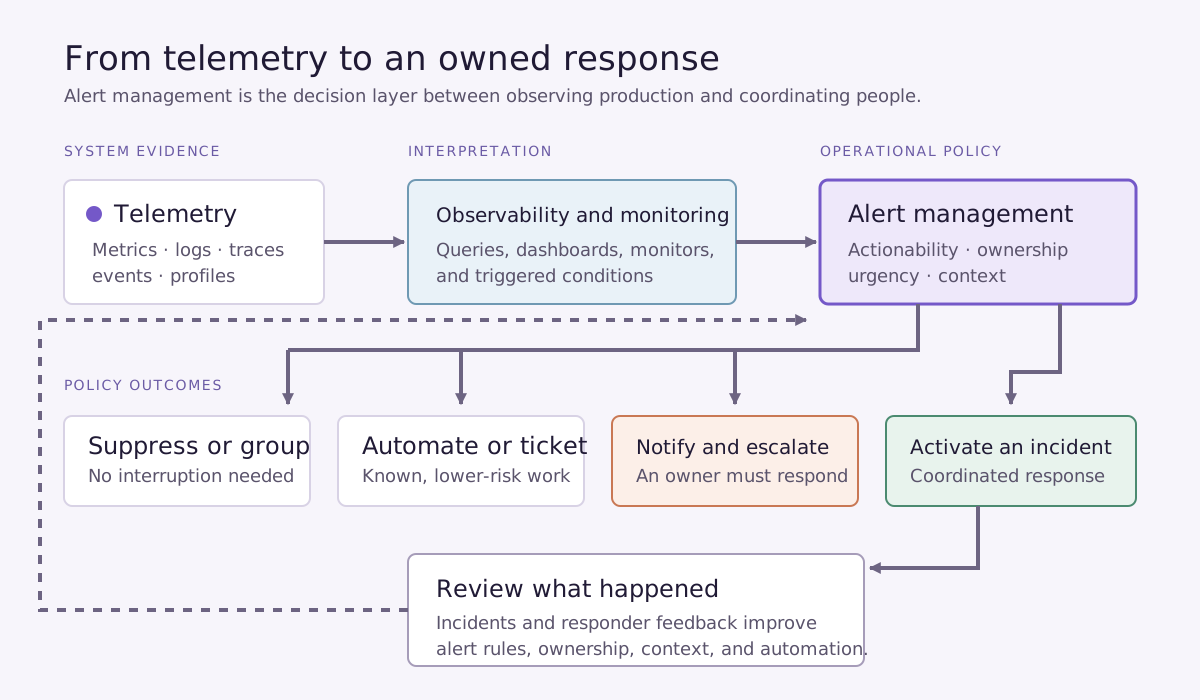
Alert management sits between the systems that observe production and the systems that coordinate people.
A simplified flow looks like this:
- Applications and infrastructure emit telemetry.
- Observability and monitoring tools evaluate that telemetry.
- Alert management applies rules for actionability, ownership, severity, grouping, and urgency.
- On-call systems notify and escalate to the responsible responder.
- Incident response begins when the disruption needs coordinated investigation and recovery.
- The incident timeline and postmortem reveal which alert rules, ownership records, and automations should change.
The boundary is intentionally permeable. An alert can create an incident automatically when impact is clear, or a responder can promote it after investigation. Resolution data should travel in the other direction as well, closing alerts and giving future correlation or automation better evidence.
The alert-management integrations guide explains how this information moves between tools. The incident-response lifecycle covers the coordinated work that follows once an incident is declared.
How modern alert management works
Implementations vary, but a useful end-to-end model has eight stages.
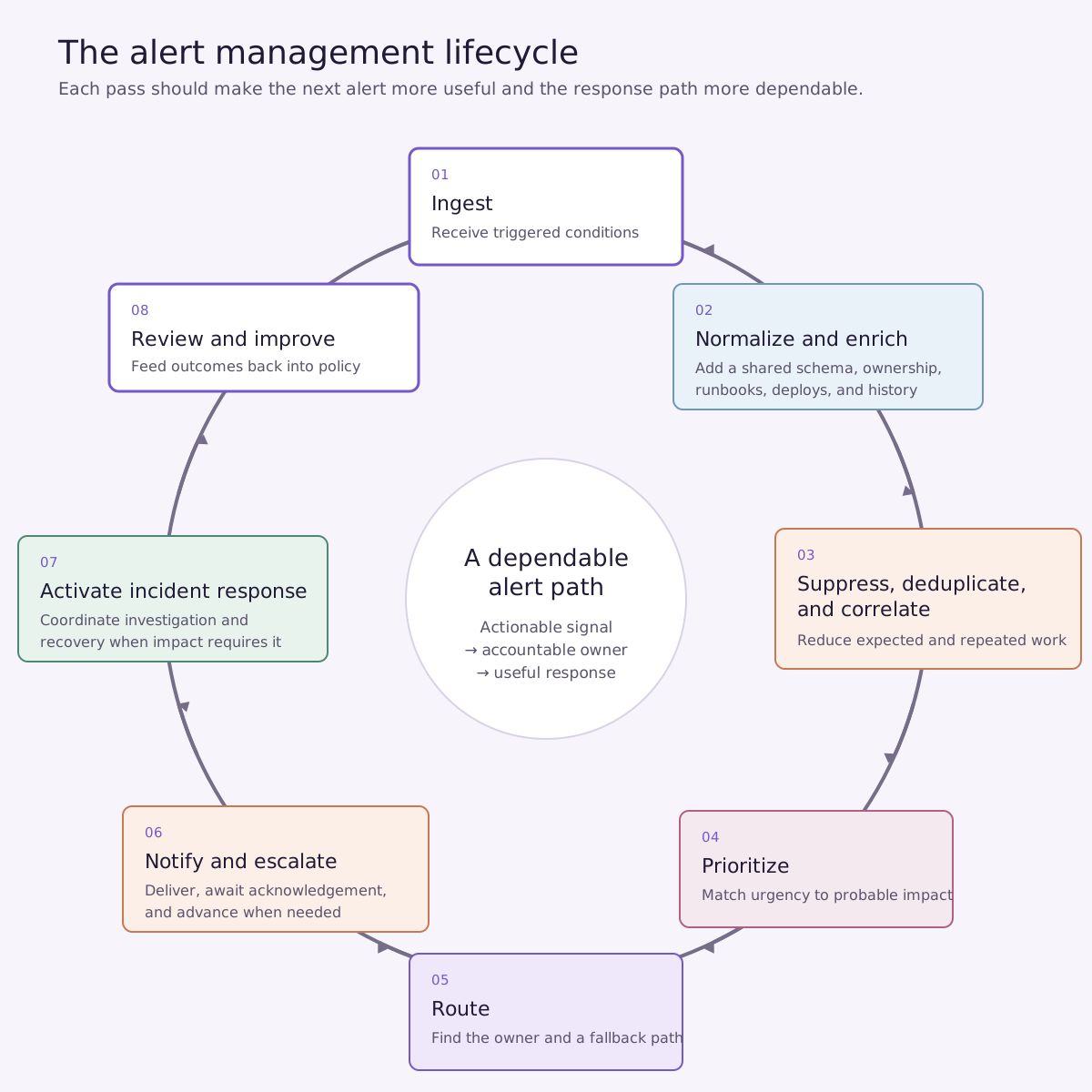
1. Ingest
The alert-management system receives triggered conditions from infrastructure monitoring, application performance monitoring, logs, cloud services, synthetic checks, security tools, and other operational sources.
2. Normalize and enrich
Incoming payloads rarely use the same fields. Normalization establishes a shared representation for service, environment, severity, source, timestamps, and status. Enrichment adds ownership, dependency, dashboard, runbook, recent-deploy, and incident-history context.
3. Suppress, deduplicate, and correlate
Maintenance windows and known conditions can suppress expected activity. Deduplication removes repeated copies of the same alert. Correlation groups different signals that appear to share a service, dependency, change, or underlying failure.
4. Prioritize
Urgency should reflect probable user and business impact, not just the size of a metric. This stage determines whether the condition belongs on a dashboard, in a ticket queue, with an automation, or on a responder’s pager.
5. Route
Routing uses service ownership, environment, severity, source, and schedule data to find the responsible team or responder. A fallback path handles missing or stale ownership rather than silently dropping the alert.
6. Notify and escalate
The system delivers the alert through the appropriate channel and waits for acknowledgement. If the responder is unavailable, an escalation policy advances to another person, schedule, team, or communication channel.
7. Activate incident response
When impact requires coordinated work, the alert becomes or joins an incident. Automation can create the incident, open a collaboration channel, assign roles, collect diagnostics, and begin stakeholder communication.
8. Review and improve
After resolution, teams review which alerts were useful, duplicated, late, misrouted, or missing context. The resulting changes improve thresholds, ownership, runbooks, correlation, and automation.
The automation guide goes deeper into executable workflows. The integrations guide covers the event flow and reliability requirements between systems.
Common challenges in alert management
The first version of an alerting system usually works for a small service and a small team. Problems become visible as the number of services, owners, tools, and deploys grows.
- Alert fatigue: repeated non-actionable interruptions reduce attention and increase on-call strain.
- Alert noise: transient, low-severity, expected, and non-production conditions enter the same path as real service threats.
- Duplicate alerts: one failure creates many pages or incident records across tools and dependencies.
- Incorrect routing: ownership data is missing, stale, or expressed differently across systems.
- Escalation gaps: alerts have no dependable fallback after the first notification fails.
- Low-quality context: the responder receives a symptom without the evidence needed to investigate it.
- Disconnected tools: state changes in one system do not propagate to monitoring, chat, tickets, or incident response.
- Rules that never improve: teams resolve incidents without feeding what they learned back into alert configuration.
These are system-design problems. Asking responders to pay closer attention may help briefly, but it does not repair the alert path.
Core capabilities of modern alert management platforms
A platform should support the lifecycle rather than functioning as a notification relay. For someone evaluating the category for the first time, the essential capabilities are:
- Reliable ingestion from the team’s monitoring and observability tools
- A common alert schema with service and environment context
- Suppression, maintenance windows, deduplication, and correlation
- Ownership-based alert routing
- On-call schedules, acknowledgement, and multi-step escalation
- Enrichment from service catalogs, deploy systems, dashboards, and runbooks
- Automation for incident creation and repeatable first-response work
- Bidirectional status updates so resolved work does not remain open elsewhere
- Access controls and an audit trail for alert and policy changes
- Reporting on alert quality, responder load, routing, and escalation
The important question is how these capabilities behave together. Excellent routing cannot compensate for missing ownership data, and automation cannot make a low-quality alert actionable.
Who is responsible for alert management?
Alert management is shared infrastructure with distributed ownership. One team may operate the platform, but alert quality depends on the engineers closest to each service.
- Service owners decide which conditions require action, supply service context, and maintain the relevant dashboards and runbooks.
- Platform and reliability engineers establish alerting standards, shared schemas, routing infrastructure, integrations, and safe automation patterns.
- On-call responders validate whether pages were actionable and identify missing context, incorrect ownership, and noisy conditions.
- Incident commanders take over coordination when an alert becomes a significant incident and capture decisions that affect future alerting.
- Engineering managers watch responder load, after-hours interruptions, ownership gaps, and recurring operational work.
The review loop matters as much as the initial configuration. Responders see where alert policy meets production reality; the system improves when their findings reach service owners and platform teams.
The role of AI in modern alert management
Alert management already contains a great deal of deterministic automation. Rules can normalize payloads, attach ownership, suppress expected conditions, route by service, and escalate after a timeout. Those behaviors should remain predictable and testable.
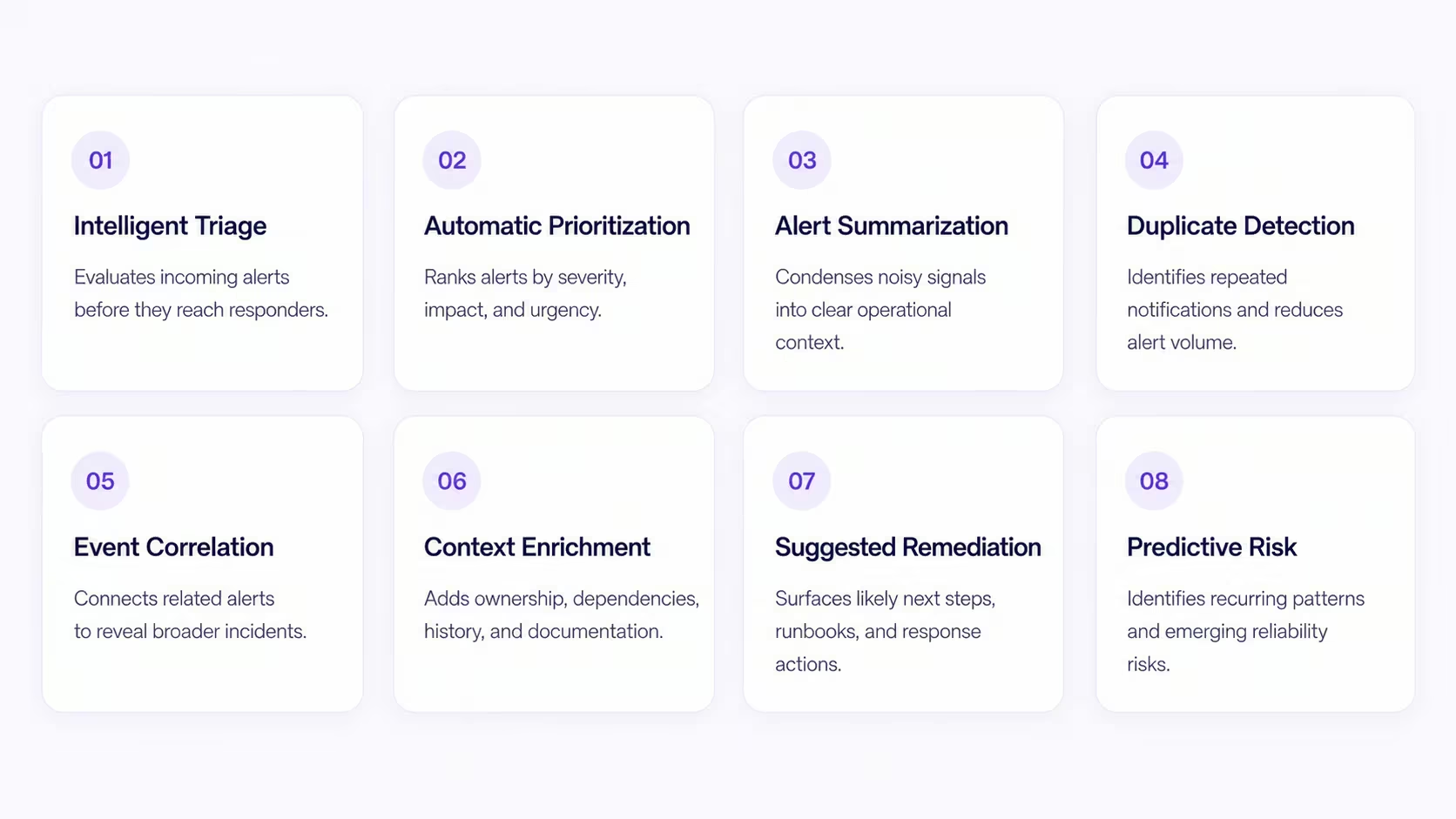
AI becomes useful where the inputs are less uniform and the decision needs more context. It can:
- Summarize a noisy alert and the evidence attached to it
- Group signals that are related but do not share an exact fingerprint
- Rank alerts using service impact, history, dependencies, and current changes
- Retrieve similar incidents and the mitigations that worked previously
- Correlate an alert with recent deploys or configuration changes
- Suggest investigation steps while showing the evidence behind them
AI output should not silently become production action. Teams need visibility into the evidence, confidence, and policy behind a recommendation, with approval controls for consequential changes.
The AI-powered alert management guide covers triage, correlation, and adoption in more detail. The AI SRE guide explains the broader investigation model: gathering evidence, testing hypotheses, and proposing or executing controlled remediation after an alert fires.
Characteristics of effective alert management
Effective alert management is easier to recognize by its operating behavior than by the number of features configured.
- Alerts are actionable. A responder can see the affected service, observed symptom, urgency, evidence, owner, and useful next step.
- Urgency follows impact. Paging policy reflects user and business risk rather than treating every technical threshold equally.
- Ownership is explicit. Every production service has a maintained team and fallback path.
- Automation is observable. Engineers can see what ran, why it ran, what changed, and how to stop or reverse it.
- Critical signals remain protected. Suppression and correlation reduce noise without hiding important user-facing symptoms.
- The system learns. Incidents and responder feedback lead to changes in alerts, ownership, runbooks, and workflows.
Key metrics every engineering team should track
Alert-management metrics should reveal signal quality and responder load. They should help a team decide which alert or service to investigate next—not simply produce a faster-looking aggregate.
- Total alerts by service: shows where operational work is concentrated.
- Alerts per on-call shift: reveals how much interruption a responder actually experiences.
- After-hours alert percentage: distinguishes ordinary operational work from sleep-disrupting pages.
- Actionable-alert rate: measures how often an alert leads to a useful investigation or action.
- Duplicate-alert rate: tracks repeated copies of the same underlying condition.
- Alert compression rate: measures how many raw signals become grouped, actionable alert instances.
- Unacknowledged-alert rate: reveals delivery, schedule, ownership, or escalation failures.
- Escalation rate: shows how often the first notification path fails to reach an available owner.
- Alert-to-incident ratio: helps distinguish routine alert work from conditions requiring coordinated response.
- Repeat-alert rate: identifies alerts that return without a lasting fix or useful policy change.
There is no universal healthy number for every metric. Establish a baseline, segment it by service and severity, and look for sustained improvement without a rise in missed incidents. The alert-management metrics guide provides the formulas and review framework.
Choosing alert management software
If you are new to the category, begin with the path an alert follows today. List the monitoring sources, ownership records, schedules, notification channels, escalation rules, incident tools, and review process. The gaps in that map are more useful than a generic feature checklist.
Decide what kind of system you need
Monitoring-native alerting may be enough for a small team with a limited number of services. Dedicated on-call tooling adds schedules, acknowledgement, and escalation. A full-lifecycle incident-management platform connects that alert path to incident coordination, communication, automation, and post-incident learning.
Test the fundamentals first
Before evaluating advanced capabilities, verify that the platform can ingest your real sources, normalize their fields, find the current service owner, group duplicates, route by impact, and escalate reliably. Test missing ownership and integration failures as deliberately as the happy path.
Use real alert traffic in the evaluation
A clean demonstration does not reveal how a platform handles flapping monitors, inconsistent service names, duplicate signals, stale schedules, or a burst during a dependency failure. A useful proof of concept includes representative noisy sources and the responders who will receive them.
Evaluate automation and AI separately
Deterministic workflows should be predictable, testable, and auditable. AI features should show their evidence, confidence, limits, and approval model. A compelling summary does not make up for unreliable routing or escalation.
Check how the platform improves over time
Teams need reporting that connects alerts to owners, services, incidents, and responder load. They should be able to identify noisy rules, recurring failures, missing runbooks, and alerts that never produce action.
For a full scorecard and proof-of-concept plan, see how to choose alert management software. The software comparison covers the current market separately.
Build an alert path engineers can trust
Collecting telemetry is the beginning of operational awareness. Alert management turns that awareness into a dependable response path: decide what deserves action, add the context needed to start, find the owner, escalate when necessary, and learn from the result.
Start with one production service and map the path from a triggered condition to resolution. Remove an alert that never leads to action. Add ownership and a runbook to one that does. Test what happens when the primary responder is unavailable. Those small changes create a system engineers can trust before more sophisticated automation or AI enters the picture.
Frequently asked questions
What is the difference between alert management and incident management?
Alert management evaluates signals, adds context, groups related alerts, and routes actionable work to the right responder. Incident management begins when a disruption requires coordinated investigation, communication, decisions, and recovery. An alert may trigger an incident, but many alerts are suppressed, automated, ticketed, or resolved without one.
How do I know when my team has outgrown basic alerting tools?
Common signs include alerts going to broad channels, responders manually finding service owners, duplicate pages for one failure, missing escalation paths, and no reliable way to measure alert quality or responder load.
How can a team reduce false-positive alerts without missing incidents?
Start by measuring which alerts lead to action. Tune thresholds around user impact, require conditions to persist long enough to exclude transient failures, suppress expected maintenance, and correlate related signals. Keep critical customer-facing symptoms outside aggressive suppression rules.
What should every production alert include?
Include the affected service and environment, observed symptom, current value or evidence, severity or urgency, owner, relevant dashboard and runbook links, recent changes, and the condition that will resolve the alert.
How often should alert rules be reviewed?
Review alerts after incidents and whenever service ownership, architecture, traffic patterns, or deployment behavior changes. A recurring review is useful, but operational changes should trigger review sooner than a fixed calendar date.
Alert management: a practical guide for engineering teams (2026)