Cover shifts, find out who's on call, and start retros with @Rootly.
Rootly AI can now create overrides, look up who's on call, create retrospectives, and answer questions about Rootly.

Rootly AI acquired four new skills this week to help you and your teams work on your incident faster in Slack. Mention @Rootly in Slack and it can find who’s on call, create a schedule override, create an incident’s retrospective, or explain how a Rootly feature works. Each one is a plain-language request, and Rootly AI acts with the same permissions you already have in Rootly.
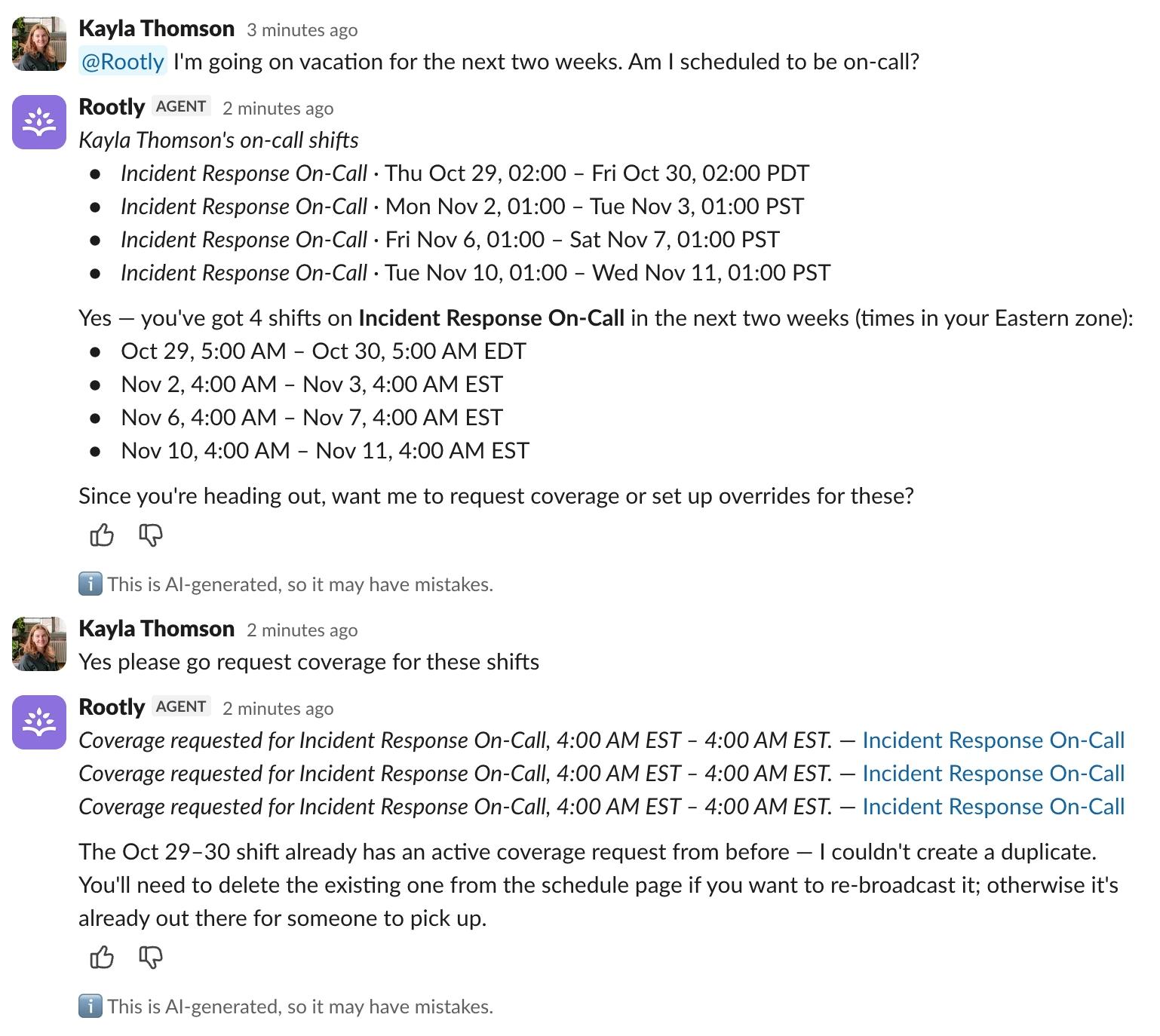
Find who’s on call
Ask for any team and Rootly AI looks up the current on-call responder. It can also answer historical questions, such as who was on call when an incident started.
@Rootly who’s on call for the Security team?
On-call lookups require an Incident Response role in Rootly.
Get a shift covered
Need someone to take your shift? Tell Rootly AI who’s covering and when, and it creates the schedule override for you. If you don’t know who can take it yet, ask Rootly AI to request coverage instead, and it posts the shift so a teammate can pick it up. Both work from incident channels, the Slack assistant pane, and DMs, so you can manage your shifts from anywhere.
@Rootly have Sam cover my on-call shift on Friday.
Create the retrospective
When an incident wraps up, ask Rootly AI to create its retrospective. It confirms which template to use first, then creates the retrospective using context from the incident, so the owner can start reviewing and learning from the incident right away.
@Rootly create the retrospective for this incident.
Ask how Rootly works
Rootly AI now answers product questions using Rootly’s documentation. Responders can ask how to do something in the middle of an incident instead of leaving Slack to search the docs. They can stay focused on the task at hand, and use Rootly to help stay on top of the incident process.
@Rootly how do I pin something to the incident timeline?
What’s included
- On-call lookups, current and historical, for any team
- Schedule overrides created from a plain-language request, including from the assistant pane and DMs
- Retrospective creation from the template you confirm
- Answers to how-to questions, sourced from Rootly’s product documentation
- Every action runs with your existing Rootly permissions, and Rootly AI replies in-thread so the channel sees what was done
Why it matters
Small on-call chores add up: digging through schedules to find who to ask, opening the web app to swap a shift, setting up a retro after a long incident, or searching docs for a feature you use twice a year. Each one pulls responders out of the conversation they’re already in. Now they can ask Rootly AI and keep working.
To get started, turn on the Rootly AI Agent in Slack toggle to begin @mentioning it in any incident channel, any channel Rootly is in, and in DMs with the bot. See Rootly AI in Slack for the full list of capabilities and how permissions work.
What else shipped
Improvements
On-Call
- Teams that use a single alert urgency no longer have to pick an urgency when creating an alert.
- Rootly now warns you when you add a phone number in a country where call or SMS delivery can be unreliable.
- Round-robin settings have clearer descriptions.
- The warning shown when deleting a schedule now accurately describes what happens to the escalation step.
Incident Response
- The “Auto-archive incident channel” Smart Default now includes cancelled incidents.
- Status page editors can change a page’s URL slug and see a live preview of the new link.
- Admins can set public-facing names for status page components.
- Status page incident durations show the time zone once and space out units for easier reading.
- Status page component uptime shows “100%” instead of “100.00%”.
API & CLI
Incident Response
- You can now assign a user to a retrospective through the API.
- The Rootly MCP server can now create catalog properties and read property definitions.
- A
+in a timezone offset on date filters and sorting is no longer read as a space. - Requests made with OAuth can now create and list dashboards.
Fixes
On-Call
- Datadog alert bodies with blank lines inside code blocks now display correctly in Slack.
- Escalation path filters on migrated escalation policies now match alert labels correctly.
- Pressing Enter in a rotation’s member search no longer collapses the rotations panel.
- The schedule delete dialog now names the escalation path that blocks the delete.
Incident Response
- Timeline and Follow Up blocks now show their content in the retrospective template preview.
- Private incident updates now change component status on private status pages.
- The Status Page Components catalog now appears in the status pages configure view.
Mobile
Fixes
- Fixed an issue where some users were signed out of the mobile app after a session refresh.
Related changelogs
Control AI output across your organization.
AI Instructions guide Rootly Agents on how to carry out tasks and respond to requests, so every automated interaction works the way your teams do.

Never lose the call transcript.
Scribe joins your incident call, transcribes live with speaker labels, and makes every call part of your incident record.
Related Incidents detected automatically.
Rootly's agent posts the most relevant past incidents into your incident channel, before anyone thinks to go looking.