
The ultimate guide to creating better incident status pages
Status pages are a way of driving trust with your users. Learn how to build a consistent status page strategy.

The ultimate guide to creating better incident status pages
On this page
You have to take a flight this evening, and you want to know if it’s scheduled to leave on time. The airline, though, asks you to call a landline to hear a recording about known delays and service disruptions. A quite terrible customer experience, right? Well, that’s how flight statuses used to work back in the ’90s. Nowadays, you expect to be able to just check online what’s the status of any flight anywhere in the world in a few seconds.
Your users have the same expectations about your systems. They want to be able to tell, easily, if your services are working as normal, especially if they’re critical to them. They don’t want to have to reach out to you through customer service to know if you’re experiencing issues.
What is an incident status page?
Status pages are a place where you share updates about your system status in real-time. Degraded service levels, scheduled maintenance windows, or full outages can all be communicated through the status page.
However, through the status page, you also explain what you’re doing to mitigate an incident and what users can expect. You’ll also update the status page when an event is resolved.
Thus, status pages are a privileged place to build trust with your users and partners. You’ll be able to feature that incidents are but exceptions in your operation, and that most of the time, your systems are up and running smoothly.
How do status pages help during incident response?
A status page gives customers one place to check what is affected, what you are doing about it and when they will hear from you next. That cuts “is it down?” tickets, keeps support from relaying half-understood engineering updates, and lets responders work without fielding questions. It also creates a public record of every incident and maintenance window, which is part of how customers judge your reliability. In Rootly, the status page is updated from the incident channel in Slack or Microsoft Teams, so it keeps pace with the response.
The page only helps if it is updated as the incident moves. That is why status updates belong inside the incident workflow rather than in a separate tool someone has to remember to open. In Rootly, responders update the status page from the incident channel in Slack or Microsoft Teams, templates and reminders keep updates on a regular cadence, and customers can subscribe so updates reach them without refreshing the page.
Status pages as trust centers
Status pages only became popular in the mid-2000s thanks to how critical online services became to the world. The reliability of web hosts, early Cloud providers, or online business solutions was directly tied to the revenue of their customers. Thus, a greater demand for transparency between providers and customers grew.
In 2006, Salesforce launched one of the first comprehensive status pages in the market. The company was offering a novel business model: run your operation through a web application instead of desktop software. Thus, it needed to consolidate how trustworthy this new approach could be. Salesforce’s status page was actually called a “trust center”.
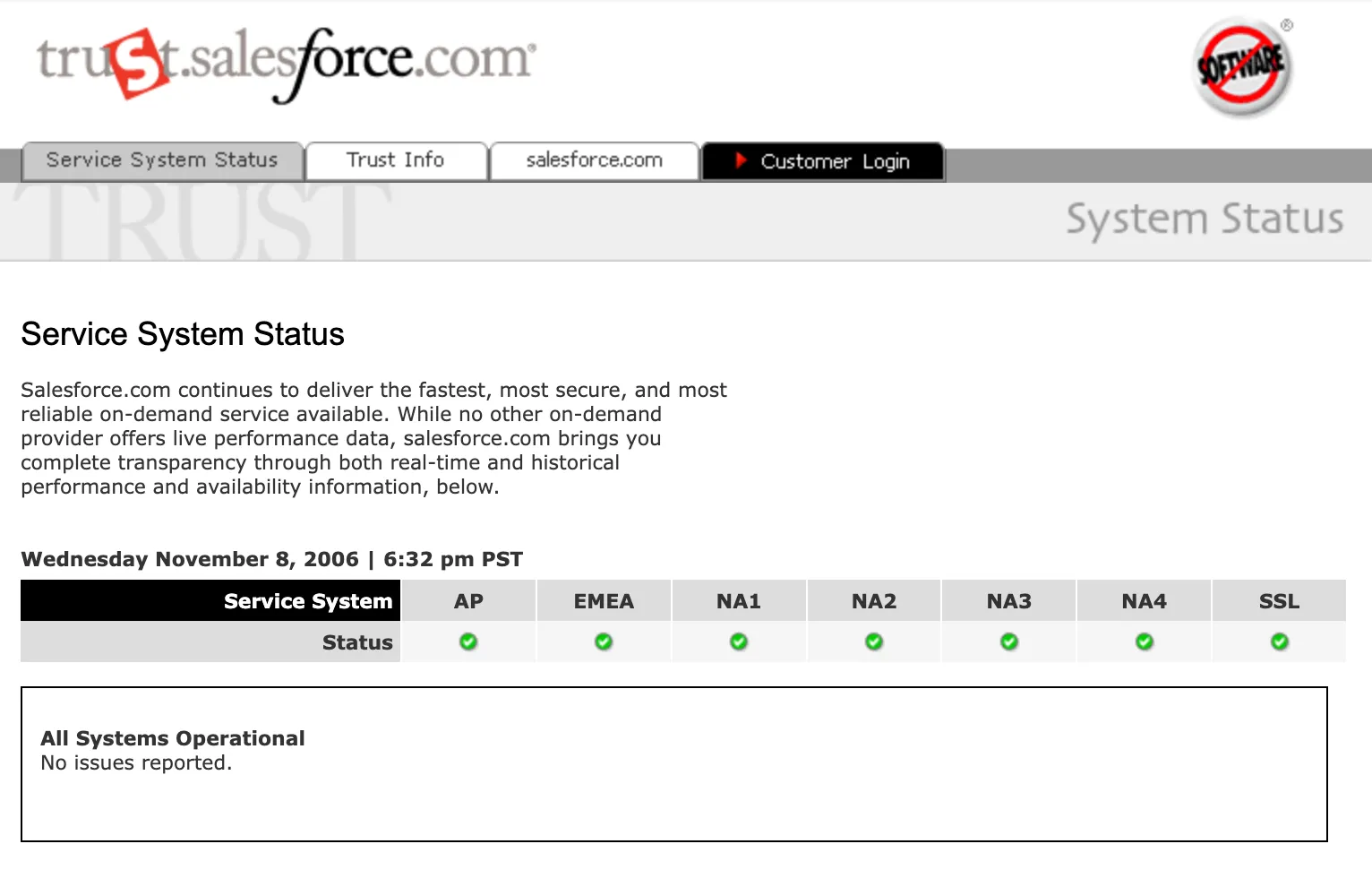
Salesforce Status page in 2006. Source: Wayback Machine
The transparency provided by status pages is a clear sign of trust to your users. They know that your systems are mostly running fine, and if an eventual incident breaks, they know you’ll let them know and that you’re doing everything you can to get things sorted.
Public vs. private/internal status pages
Most people are used to engaging with public status pages, but internal (or private) status pages also play a crucial role in organizations with distributed architectures.
Public status pages
- Public status pages communicate which services are running smoothly and which have any kind of disruption. However, public status pages do not dive into the details of what exactly the disruption is at a technical level. First of all, because it’s unlikely to be of interest to the user. But also because you may need to keep your implementation details private due to security concerns.
- You need to update your status page regularly. If you have an ongoing incident, a generic “We’re investigating the issue” won’t be enough if the impact is high and it is taking you longer to resolve. Users can misinterpret silence as inactivity or a lack of commitment on your side.
- How you phrase incidents, their impact, and what you’re doing about them must take into account what your users are likely to care about. If you’re an online fashion e-commerce, your users won’t likely care about whatever happened to your clusters.
- Make sure people who have access to updating your public status page have a clear understanding of the implications of their messages. Ideally, you’ll want to include how to write status pages as part of your incident communication playbook.
- You want your status page to be branded so it is recognized as a legitimate source of information about your services.
- Public status pages should be easily discoverable, either through your UI or a fixed URL. The Salesforce example above has lived at the same address for almost 20 years.
Private status pages
- Private status pages are collaboration tools in most organizations. When your organization relies on microservices, it is crucial to know which services are working as expected and which ones are experiencing issues.
- Private status pages live behind authentication and cannot be indexed. But those who can access it may have the option to subscribe to updates.
- You’ll want to provide more detailed statuses that are directly tied to the implementation of your system. You can include not only whether the system is down but who’s the owner of each service so teams can figure out who to ask if an incident is likely to impact their own service.
- Private status pages can offer availability details for different environments, not only production. It might be useful for frontend developers to know if the backend gateway they use is up in
development, and QA engineers can recognize their test cases are failing due to a disruption in an API instaging. - Private status pages are crucial for internal teams, enabling cross-functional transparency during incidents. These pages ensure that relevant employees and teams have real-time information to coordinate responses and stay aligned during incidents.
What should a status page include?
- Incident Summary: Clearly describe what is going on. Whether it’s a minor disruption or a major outage, your users want to know what is going on. The summary should give a short but insightful description of the incident without getting into the weeds of technical details. Ensure your users can easily understand the scope of the problem.
- Impact: Highlight who or what is affected. Are all users impacted, or is it limited to a specific group or region? If the incident affects a particular feature, be specific about what functionality is unavailable or degraded. This transparency helps set user expectations and reduces unnecessary support requests.
- Updates and Timeline: Provide frequent updates with timestamps to keep users informed on what you are doing to remediate the incident. Explain what you have done so far, what you’re currently doing, and the next steps. This shows that you are actively working on the problem and builds confidence in your commitment to resolving the incident.
- Steps Taken or Resolution Efforts: Detail the actions your team has taken to address the incident. Include whether a workaround is available or if the service has been restored. These updates can be technical if necessary but should still remain accessible to a non-technical audience.
- Estimated Time to Resolution (if available): While it’s not always possible to provide an exact timeframe for resolution, users appreciate having a rough estimate. If you’re unsure, be transparent about the uncertainty, and provide an estimated range or an update time for when more information will be available.
Status page best practices
Prioritize clarity and simplicity
Use simple language to ensure that both technical and non-technical users can understand the situation. Focus on how the incident affects users rather than the technical implications of the incident.
Keeping your message clear builds trust and reduces confusion and unnecessary distress. When updates are concise and easy to understand, users feel more confident and better informed about what to expect.
Provide real-time updates
Maintaining a regular cadence of updates hints that you’re dedicating appropriate attention to the incident. Even if there’s no material progress in a particularly messy incident, express that you’re trying different avenues towards a resolution.
Regular communication can help reduce the burden on your support team. You’ll need to find the balance between too many and too few updates to keep users informed without overwhelming them.
Automate updates
Link your incident management tools to your status page to automate updates, minimizing manual effort. This ensures users receive timely information without distracting your team from resolving the issue.
Automation also reduces the risk of communication gaps, helping users stay informed while your team focuses on fixing the problem.
Reduce support ticket load during incidents
Most tickets filed during an incident ask the same three things: is it down, am I affected, and when will it be fixed. Answer those on the status page before customers have to ask.
- Say who is affected and what to do. Name the regions, plans or features involved, and give a workaround if one exists. “Am I affected?” is the question that fills the queue.
- Put the status page where customers already look. Link it from the help center, the support auto-reply and any in-app notice, so customers land on the answer before they open a ticket.
- Give support the same words. Share each update with the support team when it goes live, so agents can paste it and link to the incident instead of writing their own version.
- Push updates to subscribers. Customers who get notified stop refreshing the page and stop asking for news.
- Close the loop in bulk. Tag incoming tickets to the incident, then answer them all with the resolved update.
In Rootly, subscribers are notified by default when you publish an update from the incident channel. For the full plan, including who updates support and how often, see the incident communication plan.
What should you do if customers learn about an outage before your status page is updated?
Post an acknowledgement right away, even before you know the cause. A short update that says what is affected and when the next update will come stops the flood of support tickets and social posts faster than a detailed explanation posted an hour later. Rootly lets responders post that first update from Slack or Microsoft Teams as soon as the incident is declared. Then fix the process so it doesn’t happen again:
- Publish when the incident is declared. Make “post an initial status update” a step that fires when a customer-facing incident is declared, with a template that needs no investigation to fill in.
- Give one person the job. A communications lead owns the status page for the whole incident, so the engineers debugging it are never the bottleneck.
- Set an update cadence and keep it. Every 30 minutes for a major outage is a common default, even when the update is “still investigating.”
- Watch the signals customers see first. Support tickets, social mentions and synthetic checks often move before internal alerts. Route them to whoever is on-call for communications.
- Review the gap in the retrospective. Measure the time between customer impact and the first public update, and treat a long gap as a contributing factor like any other.
Rootly’s status page workflow covers the first three steps: responders can post from Slack or Microsoft Teams as soon as an incident is declared, templates and pre-approved messaging make the first update quick to write, and reminders prompt the team when an update is overdue. Rootly AI can also draft updates at the right level of detail for engineers, leadership and customers, so writing them doesn’t pull a responder off the fix.
Status page tools that connect to incident response
- Rootly: status pages updated from the incident in Slack or Microsoft Teams, with templates, update reminders, subscriber notifications, private and password-protected pages, and AI-drafted updates for each audience.
- Atlassian Statuspage: a standalone hosted status page product, commonly paired with Jira Service Management or Opsgenie. Atlassian is retiring Opsgenie, with end-of-life scheduled for April 2027.
- PagerDuty Status Pages: status pages tied to PagerDuty’s on-call and incident workflows.
- incident.io Status Pages: status pages connected to incident.io’s Slack-based incident response.
- Better Stack: uptime monitoring with hosted status pages, often used by smaller teams.
Generate effective status pages with Rootly
Rootly is the leading alerting and incident response solution trusted by companies like LinkedIn, NVIDIA, Canva, and Webflow. Rootly offers status pages that you can update without having to leave Slack (or Microsoft Teams) as you coordinate a response there.
- Seamlessly integrate with the rest of your incident workflow so you can update customers directly from Slack or Rootly without fumbling around with other logins.
- Make it your own with rich customization and unlimited subscribers (Rootly’s status page gives you all of the features of Atlassian Statuspage Enterprise with none of the price tag).
- Create password-protected status pages, for special customers only.
- Monitor 3rd-party components you depend on like AWS, Twilio, etc., so customers know where downtime is coming from.
Book a demo with one of our reliability experts to see how status pages work with Rootly.
Frequently asked questions
How do status pages help during incident response?
They give customers one trusted place to see what is affected and when the next update is coming, which cuts support tickets and keeps responders focused on the fix. In Rootly, the status page is updated from the incident itself in Slack or Microsoft Teams.
What should we do if customers learn about outages before our team updates the status page?
Post an acknowledgement immediately, then make the first update a step that fires when an incident is declared. Rootly supports that with status page templates, update reminders and posting from the incident channel, so the first public update doesn’t wait on the diagnosis.
How do we manage customer-facing status updates during a service outage?
Assign one communications lead, use templates for the first and final updates, and publish on a fixed cadence. Keep the status page inside the incident workflow so updates can’t fall behind the response. Rootly does this with status page templates and reminders when an update is overdue.
How can we keep customers informed without distracting engineers during an outage?
Separate the roles: a communications lead owns the status page while engineers debug. Tools help here too. Rootly AI drafts status updates from the incident timeline, so the communications lead edits a draft instead of interrupting responders for details.
What incident management software supports automated status page updates?
Rootly, PagerDuty, incident.io and Atlassian Statuspage all offer status pages connected to incident workflows. Rootly’s are updated from Slack or Microsoft Teams during the incident, with templates, reminders, subscriber notifications and AI-drafted updates.
Related articles
Your customers will notice before your status page does
How to run a status page during an incident: post within minutes, update on a set cadence, separate facts from guesses, and give comms its own role.


The most common mistakes in incident management
Twelve incident management mistakes I see most, from declaring late to averaging MTTR, and what to do instead before the next incident starts.

The Titanic didn't sink for just one reason
Why Root Cause Analysis and the Five Whys stop short, told through the Titanic disaster, and what a contributing-factors approach to incidents reveals.