Investigate, page, and catch up with @Rootly in Microsoft Teams.
Mention @Rootly in Teams to investigate, check recent deploys, page responders, and catch up on the bridge.

Rootly AI is now in Microsoft Teams. Mention @Rootly in an incident channel, a team channel, or a chat, ask in plain language, and it answers right in the conversation. It’s the same agent your Slack teams already use, with the same tools, permissions, and confirmation cards, so responders on Teams can work the whole incident from the place they already are.
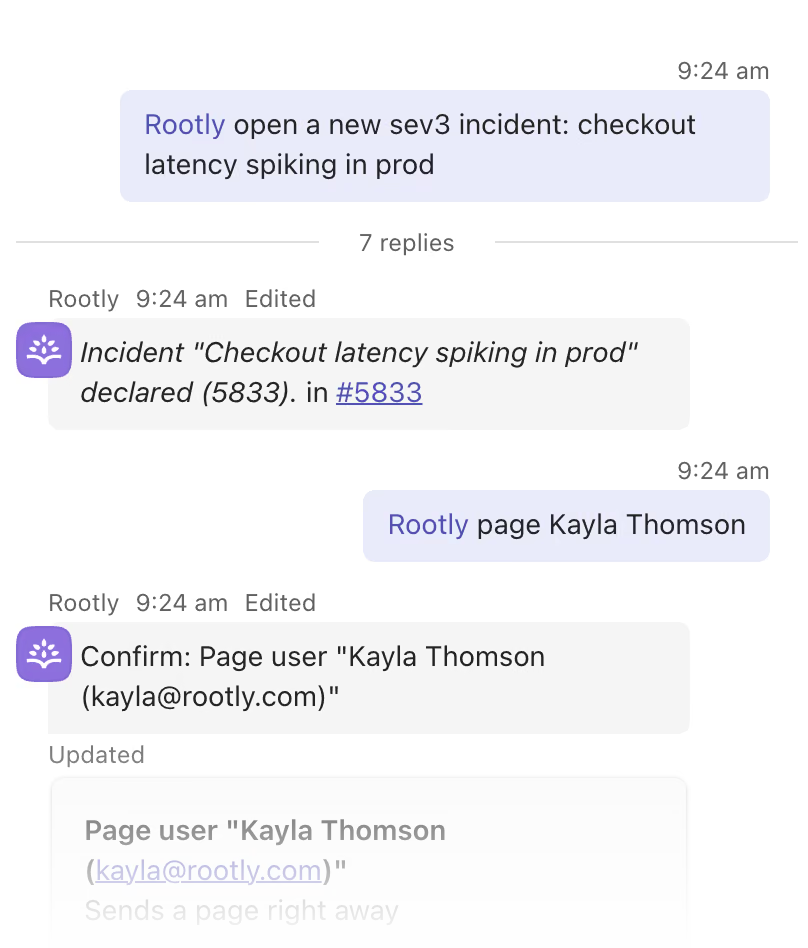
Declare an incident and page a teammate from the same Teams thread. Rootly AI confirms before it pages.
Support the investigation
Ask @Rootly what’s going on and it pulls the incident’s context together for you. Connect your observability, code, and docs sources, and Rootly AI investigates with them: ask “has anything changed on checkout-api?” to see recent deploys and feature flag changes next to the incident. It can also point you to related past incidents, so you’re not starting from zero.
Page and manage on-call
Find out who’s on call, check an escalation chain, or page a team without opening another tool. In Teams, you can page and create schedule overrides from incident channels, team channels, and chats with Rootly.
- “Who’s on call for payments?”
- “Page the SRE escalation policy”
- “Create an override so Sam covers my shift on Friday from 9 AM to 5 PM”
Rootly AI asks for confirmation before destructive actions and whenever it needs your sign-off.
Catch up on the bridge
Joining late? Ask “Catch me up” for a short brief on the problem, current status, working theory, open action items, and who’s involved. Rootly AI reads the channel conversation and bridge call transcripts when they’re available, so “What’s happened in the last hour?” gets you current without scrolling or asking someone to recap.
What’s included
- @Rootly in Teams incident channels, team channels, and chats
- Incident updates from the incident channel: severity, status, roles, and action items
- Declare new incidents from any team channel
- Paging, on-call lookups, and schedule overrides from channels and chats
- Catch-up briefs that draw on the channel and bridge call transcripts
- Deploy and change lookups through your connected sources
- The same permissions and confirmation cards as Rootly AI in Slack
Why it matters
Every time a responder leaves the incident to check a dashboard, look up a schedule, or ask what they missed, they lose focus and the team loses time. Teams-first organizations can now get the same AI help Slack teams have had, inside the tool they live in.
Get started
An Owner or Admin turns it on with one toggle: open AI & Agents and switch on Rootly Agent in Microsoft Teams. Then have responders link their Microsoft Teams account under Linked Accounts. Start with the Rootly AI in Microsoft Teams docs and see what to use Rootly AI for for more prompts.
What else shipped
Improvements
Incident Response
- Status page admins can now let subscribers follow a single incident, the whole page, or both, so people who aren’t affected don’t get every update.
- You can now notify subscribers when you edit a status page announcement, incident post, or maintenance post.
- Past on-call shifts are no longer crossed out. Dimmed colors already show they’re in the past.
- When Rootly is added to a Slack channel, it now posts a single intro message instead of a second message with incident quick actions.
API & CLI
Incident Response
- A new OAuth scope covers the
/v1/slasendpoints. - Outgoing webhooks now include an
incident.closedevent. - The public API now reads and writes form field condition groups.
filter[incident_id]onGET /v1/post_mortemsnow filters results.
Terraform
rootly_workflow_alertnow supportsgroup_assignment_ids, so you can set a workflow’s owning teams in Terraform.- Form field placements now support condition groups in Terraform.
Fixes
On-Call
- Time zone pickers now include America/Edmonton (Alberta and NWT, UTC-6 year-round) and America/Winnipeg (Manitoba, UTC-5 year-round).
Incident Response
- The Slack Update Incident form no longer pre-checks “Mark as Private” on public incidents.
- The incident announcement message now shows “Active” instead of “Started”.
- Confluence retrospective exports now keep header fields on one line.
- New form sets now keep the default form’s required-field rules.
Related changelogs
Catch up on any incident in seconds with AI Timelines.
AI Timelines pins a live AI summary and the key moments of every incident in Slack, so anyone can catch up in seconds. Now in early access.
Cover shifts, find out who's on call, and start retros with @Rootly.
Rootly AI can now create overrides, look up who's on call, create retrospectives, and answer questions about Rootly.
Control AI output across your organization.
AI Instructions guide Rootly Agents on how to carry out tasks and respond to requests, so every automated interaction works the way your teams do.