
How to build on-call rotations that don't burn people out
At least five people, 24-hour shifts, fewer pages, fair pay, recovery time and real onboarding.

How to build on-call rotations that don't burn people out
On this page
So, how has the pager felt lately?
Your phone went off six times last night between 2:14 and 4:12am. The first two were CPU on the same worker, and the third was a disk filling up on a database replica. None of them needed you. By the time the checkout errors started at 3:07, you’d half-decided the phone was crying wolf again. You’re back on call in two weeks, because there are only three of you on the rotation. You want to take a vacation but don’t feel like you can put that burden on your rotation mates. And when your manager asks how on-call is going, you say “fine,” because every incident technically got handled.
I’ve been in your shoes. I carried a pager for about a decade (my wife is very happy that I don’t anymore), and I said “fine” plenty of times too. Here’s what “fine” usually looks like underneath.
The same few people carry everything, so one sick day turns into a week of extra shifts that nobody talks about. People who get paged for noise learn to blindly ack and go back to sleep, and one night that page is a SEV1. Someone who worked an incident from 3am to 5am shows up at the office running on fumes. And the people who always grab the page are the first to burn out.
None of that shows up on a dashboard. Incidents still get resolved, so from the outside the rotation looks “healthy.” It keeps looking that way right up until someone gives notice, or a real SEV1 sits unacknowledged because the on-call was too tired to hear the pager.
It can get better. It’s not expensive, and it’s not as hard as you think. TL;DR first, then a breakdown of each:
- 5 people minimum on every rotation, with 5 to 10 as the sweet spot.
- Shifts of 24 hours if you can, a few days if you can’t. A full week is too long.
- Count secondary shifts as real on-call, because the secondary can’t make plans either.
- Two hurdles before anything pages a human. Is there an action, and does it have to happen immediately?
- Provide incentives, so that on-call feels fairly compensated rather than taken advantage of.
- Nobody takes the pager before they’re ready, which means about three months on the team first.
How many people should be on an on-call rotation?
Five, at minimum. A rotation with fewer than five people has zero absorption capacity, which means no slack for the normal things that happen to humans.
Walk through a bad month on a three-person rotation. Someone gets sick, so the other two alternate. Someone else takes a vacation that was approved months ago, and now you’re down to one. Then the last person has a family emergency and there’s nobody left to page. Run the same month on a five-person rotation and you still have two people. None of that is a worst case. Sick days, vacations and family emergencies all show up in a normal quarter.
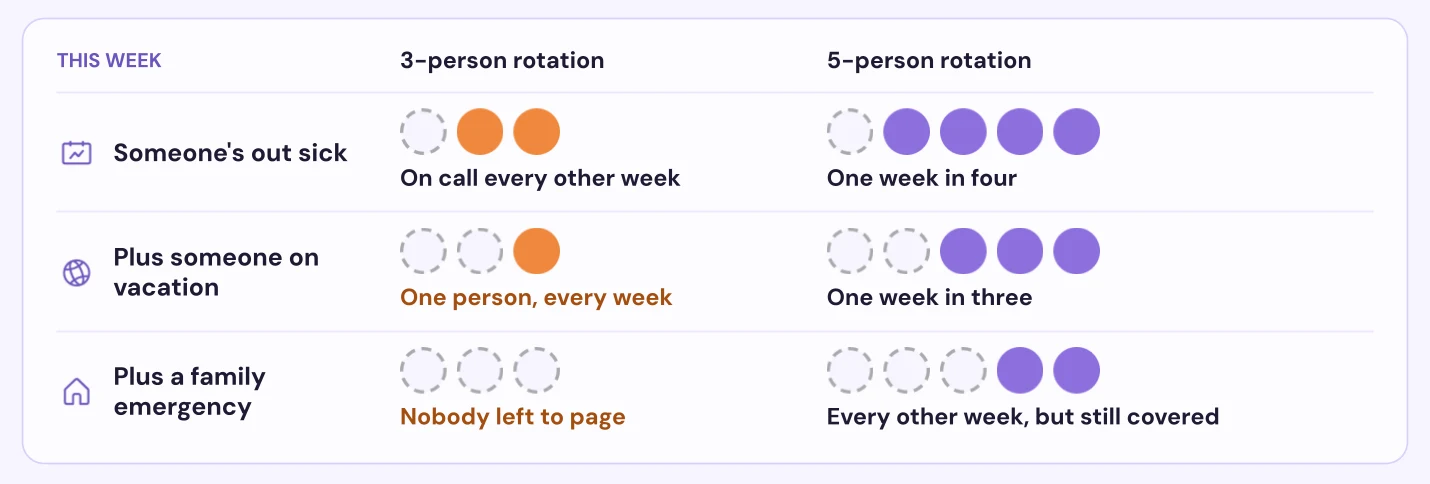
I’d cap a rotation at about ten. Past that, people go on call so rarely that they stop getting reps. The first page in two months is a rough way to remember how your own systems fail (though that’d be a nice luxury).
The Google SRE book puts the minimum for a single-site team at eight. It also caps on-call at 25% of anyone’s time and two incidents per 12-hour shift. The later SRE Workbook uses five per site for teams spread across sites. If you can get to eight, great. I use five because it’s the smallest rotation that can lose a person to illness, another to vacation and a third to an emergency at the same time and still have someone to page.
Plenty of teams are still below it. In Rootly’s October 2026 benchmark report, the median schedule has five people. Only 50.2% of those schedules have five or more, and 26% clear Google’s eight. 17.6% have a single person, though some of those are backup or manager tiers rather than a front line.
You don’t always need to hire your way to five:
- Put managers and directors on the rotation. This isn’t a punishment. It keeps them close to how the systems actually fail. A manager who feels the pages is also a lot more likely to find headcount (or time to fix the noisy alerts). Or get leadership to commit to being ON the rotation until it reaches five. That’ll motivate them.
- Merge teams with similar services into one shared rotation, as long as the combined page load stays reasonable. Then cross-train them on each other’s systems.
- Write the runbooks. A shared rotation only works if whoever gets paged knows what to do at 3am. That includes your most senior engineers, because everyone forgets things at 3am.
Do this today: Look at the people on every rotation you have. If any has fewer than five, add managers first and then merge with a sister team. Then ask the question I use for every rotation: if two of us were out next week, who covers on-call?
Is a week-long on-call shift too long?
Yes. I think seven days is too long, even on a small team. A seven-day primary shift is still the default at most companies I’ve seen, and that’s barely changed in the last decade.
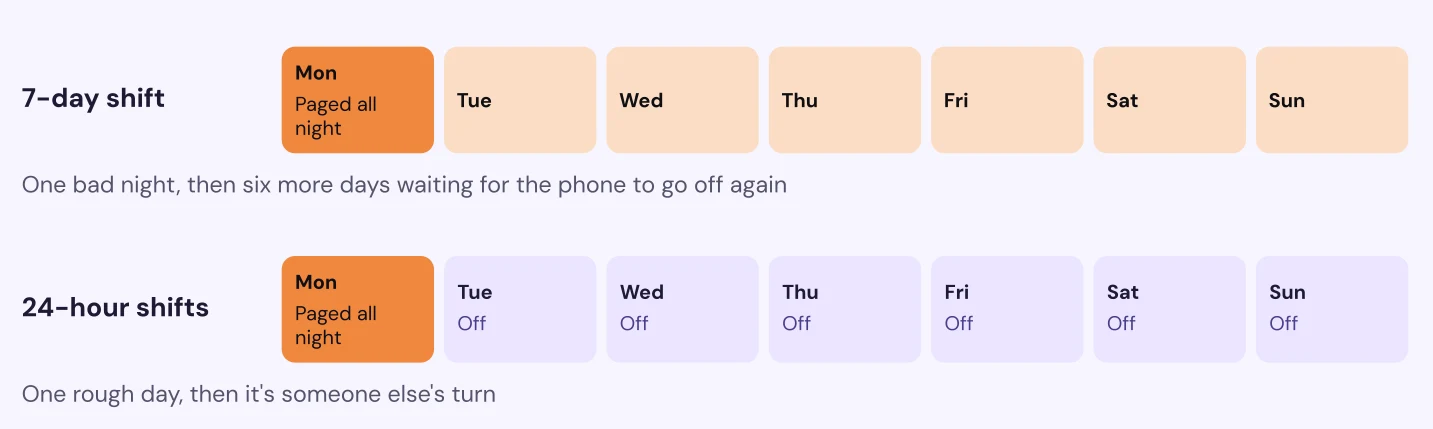
At Chime we ran 24-hour shifts, and I loved them immediately. If you get a bad day with a few rough pages or a nasty incident, you know you’re off tomorrow and you get time to recharge. On a seven-day shift, a bad Monday means you spend the rest of the week waiting for the pager to go off again. Either that person grinds through it and burns out, or teammates start swapping shifts on the fly to cover. That’s really hard to plan around.
The fair objection is handoffs. More shifts mean more handoffs, and every handoff is a chance to lose context. But fixing handoffs is easy. A good one covers what fired and how it ended, which alerts need tuning and anything still open. It also covers what’s coming next (deploys, maintenance windows, a launch). AI is great at automating contextual handoffs. The person coming on should never be surprised by something the person going off already knew about.
If 24 hours isn’t in the cards, try three days. You don’t have to pick between a day and a week. I also wouldn’t force every team onto the same rotation. Standardize the expectations instead, like an org-wide “ack in 5, respond in 10,” and let each team pick the schedule that meets them.
Someone in the webinar I ran recently asked how to keep one person from getting stuck with every Friday. We had that exact problem at Chime, with seven people on 24-hour shifts. Our fix was two layered rotations with the same seven people. One covered Monday through Thursday and the other covered Friday through Sunday. Nobody ended up with every Friday. As a bonus, my shifts clustered nicely. I’d be on for a day, off for a day, on again, and then off for something like ten days in a row.
Do this today: Move to 24-hour shifts (or three days as a first step). Automate a handoff that lists upcoming deploys and maintenance along with every alert that fired.
Why do constant secondary on-call shifts burn people out?
Because secondary is still on call. They might not get a single page all week. They still can’t leave their phone in the car or go somewhere without signal, and that weight is the same whether the phone rings or not.
Small rotations make it worse. Say you have three people and staff a primary and a secondary every week. Each person is on call two weeks out of every three, and the one week off sits in between. Most teams only count primary weeks when they look at load, so this never shows up anywhere.
Here’s what to do about it:
- Count secondary in the load. When you look at who’s carrying too much, include secondary weeks and any night someone got woken up on one.
- Back the rotation with managers. Intercom cut its on-call from 30+ engineers to six or seven volunteers with an engineering-manager escalation tier behind them, and out-of-hours pages dropped below 10 a month. A manager tier keeps engineers out of the primary-then-secondary loop.
- Treat a busy secondary as a symptom. If secondary keeps getting paged, the primary isn’t acknowledging. Usually they’re buried in a page storm or can’t respond without a laptop. Fix those and secondary goes quiet. In Rootly’s benchmark report, the median team sees only 7.8% of acknowledged pages escalate past the first level.
Do this today: Put secondary shifts in the same load numbers as primary. Then back the rotation with a manager tier so no engineer is on call two weeks out of three.
A common mistake: fixing the schedule and ignoring the pages
Pages burn people out faster than schedules do. When teams tell me their on-call is rough, they usually want to talk about the schedule. Add a person, change the shift length. Hardly anyone looks at how many pages each shift is getting. When I asked the webinar audience who reviews page counts per shift on a regular basis, very few hands went up.
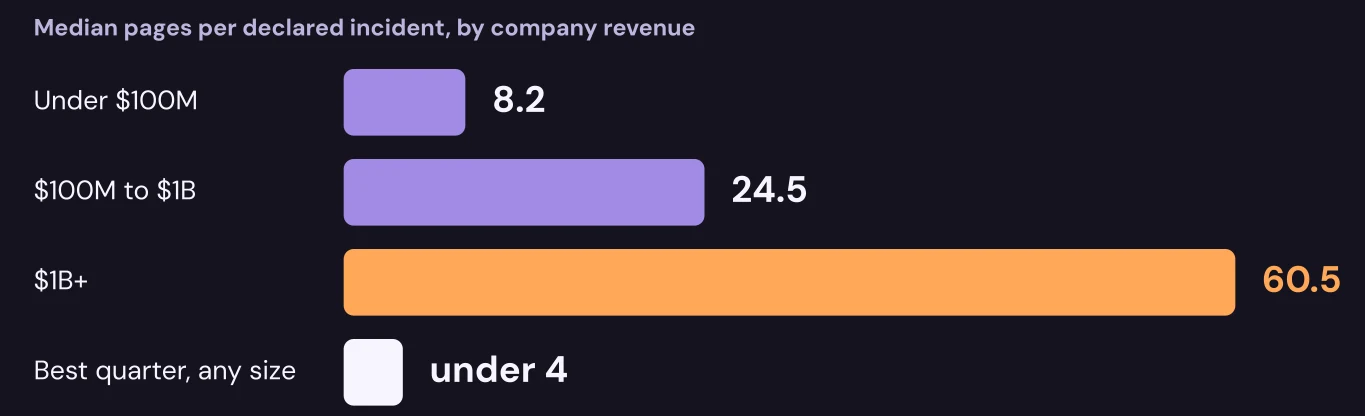
The numbers are big. In Rootly’s benchmark report, the median team sends 8.2 pages for every declared incident at companies under $100M in revenue, 24.5 at $100M to $1B and 60.5 at $1B+. That’s per incident, not per day. The good news is that the best quarter of teams at every size stays under 4, so it is possible! One page per incident isn’t realistic, because many pages get handled without an incident. Under 4 is a practical target.
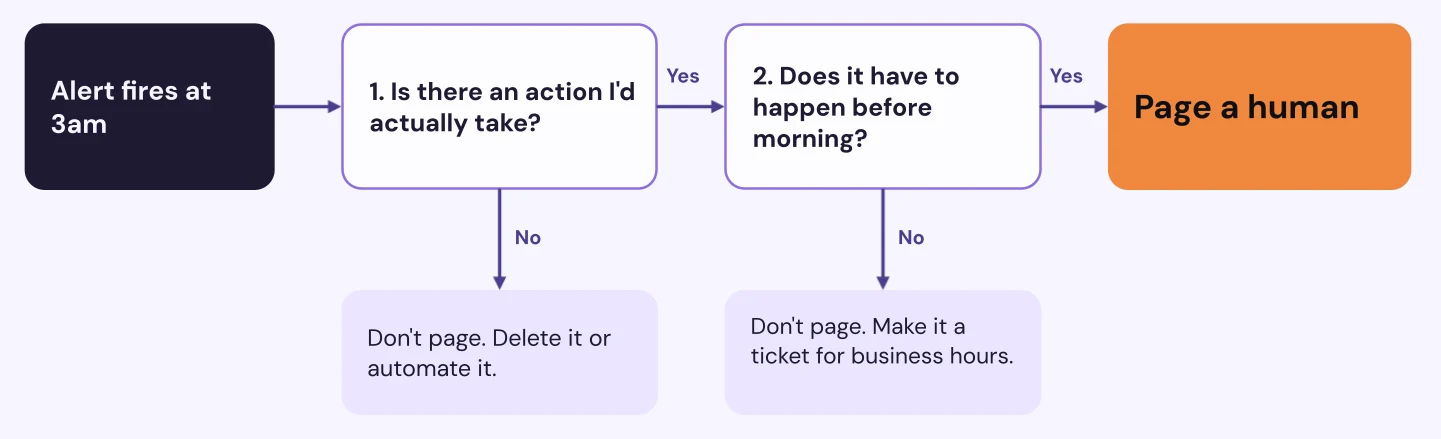
I run every alert through two hurdles before it’s allowed to page a human. Picture it firing at 3am, when you have to drag your brain out of a deep sleep and get it working well enough to respond to an incident. The hurdles:
- Is there an action I’d actually take? If not, it shouldn’t page. Make it an email or a Slack message, automate it, or delete it. People get nervous about deleting alerts, so check the monitor’s history first. If nobody has acted on it in months, it can probably go.
- Does that action have to happen before morning? Data pipelines are the classic offender. If nobody reads that pipeline’s output until a 9am report, the failure can wait. Alert against the real deadline instead of the moment something breaks.
Context still matters, and the answers aren’t always the obvious ones. A primary database disk at 92% that grows 1% a day sounds scary, but that’s about a week of runway, so it’s a ticket for the morning. Login latency that tripled in 30 minutes with a normal error rate sounds fine. Customers are already waiting three times longer and it’s still climbing, so that one pages. Zero signups for 20 minutes at 3am on a Sunday depends on what normal looks like for that service at that hour. If you usually get a trickle of signups at 3am, that’s your smoke detector and it should page. If Sunday at 3am is always dead, it’s noise.
My favorite one is the 2am error spike that shows up for the third night in a row and clears on its own by 2:20. Don’t page anyone for it tonight, since nobody would do anything at 2am. Don’t ignore it either. Make it a ticket and dig in during business hours. Nobody gets paged, so nobody looks, and that repeated blip is often the early version of next month’s big incident.
Do this today: Review your paging alerts. Anything that fails either hurdle gets downgraded, automated or deleted. It’s the cheapest way to make on-call better.
Should on-call be paid?
Yes. You’re asking people to stay reachable and work outside business hours, and most companies have comp bands that do not factor in on-call. Flat stipends are fairly common and work great.
Standby pay plus hours also works. That’s a flat rate for being on call plus pay for the time actually spent working out of hours. The one I’d avoid is pay per page. It sounds like a nice bounty system, but it rewards more pages when the whole goal is fewer.
Most companies still pay nothing extra. In Gergely Orosz’s 2022 roundup at The Pragmatic Engineer, Google was the only Big Tech company paying cash for on-call. Among the 80 employers in his pay data, the range ran from about $100 to around $1,250 a week, and a flat rate was the most common model among companies that pay at all. Some countries don’t leave it up to you. Brazil and Spain both regulate on-call pay. In the EU, time spent actually working an incident counts as working time under 2021 court rulings.
When I was at PayPal we got $50 for every 24 hours on primary (as long as you remembered to claim it). It wasn’t life-changing money, but it made being on-call feel a lot better.
If cash isn’t happening (or even if it is), cheap perks make a bad shift less bad. A perk should give the on-call person back time, sleep or headspace on a bad day. If it doesn’t, it’s swag. A few ideas:
- Food. At Chime the company paid for DashPass. My manager also made it clear that if a page ran through a meal, we could order in and expense it. Hangry responders are worse responders, and I can attest to that.
- A phone stipend. Most companies make people use their personal phones for on-call. We had a cell phone stipend at my last two jobs, and $50 to $100 goes a long way.
- Holiday shift bonuses. Nobody wants to be on call for Thanksgiving or Christmas.
- Rides home after late nights in the office, and a Calm or Headspace subscription for getting back to sleep after a 2am page.
- Babysitter hours or a dog walker credit when an incident eats your evening.
The cheapest perk is letting people respond from a phone. If on-call means carrying a laptop, a hotspot and a charger to your kid’s soccer game, it feels like a leash. If most pages can be handled from a phone, it doesn’t. This is one place I part ways with the mainstream. PagerDuty’s on-call guide still tells responders to keep a laptop with them, but most tools have solid mobile apps now. Test your own setup. Can someone ack, triage, pull in help and post an update without opening a laptop? Every step that needs one makes on-call feel more like a leash.
Try this: Pay a flat stipend per shift, add a meal and phone allowance, and make sure most alerts can be handled from a phone.
Mistake: expecting people at 9am after a 3am page
If I worked an incident from 3am to 5am, you don’t want me starting real work at 9. My rule of thumb is that every hour worked overnight comes off the next day. Two hours overnight means you start two hours late. Anything over four hours, take the whole next day off. Make it the default so nobody has to ask. PagerDuty’s guidance is to “cut them some slack,” and I’d rather write the rule down. After a rough night I check in with the responders and tell them to go rest. Then I tell their manager that’s what I recommended, so the time off actually happens.
There’s research behind it. A 2000 study in Occupational and Environmental Medicine found that after 17 to 19 hours awake, performance on some tests matched or fell below a 0.05% blood alcohol level. That isn’t legally drunk, but it’s also not someone you want touching production.
You can usually see burnout coming in the data before anyone says a word. These are the signals I watch:
- Nights in a row they’ve been woken up. Someone paged at 2am every night for a week is a risk no matter how today looks.
- Pages this shift, weighted by priority. Twenty noisy pages aren’t the same as one SEV1, and a page storm is worse than both.
- Incidents they still have open. Those carry cognitive load even when they’re quiet.
- Time on call above 25%. That’s the cap Google sets for its own SREs, and it’s a good gold standard.
Then watch the person. The WHO’s ICD-11 definition of burn-out comes down to three signs: exhaustion, mental distance from the job and reduced effectiveness. On a rotation that looks like someone running on empty for days, someone acking pages without looking (“just ack it, it’s flaky”) and slips they’d usually catch. A 3am mistake after a week of no sleep is a system problem. And ask, both after the rough shifts and in 1:1s. Stick to what people tell you themselves, like PTO, an out-of-office or a status they set. Reading someone’s Slack messages to guess whether they’re struggling is surveillance, and it teaches people to stop sharing.
If you want a head start, On-Call Health pulls these signals together for you. It’s a free, open-source tool from Rootly AI Labs (full disclosure) that looks at incident volume and severity, after-hours pages, consecutive days with incidents, ticket load from Linear or Jira, commit patterns in GitHub and optional Slack check-ins. It works with Rootly or PagerDuty, and you can use the hosted version or self-host it.
Do this instead. Write the hour-for-hour rule into your on-call policy. Once a week, check nights woken and weighted page counts for everyone on the rotation.
Another common mistake: handing someone the pager in their second week
It’s tempting to put a new hire on-call in their first couple of weeks, especially a senior one. A few people can handle it. Most can’t, and it isn’t fair to them or your customers.
On-call deserves practice and repetition. Here’s the path I recommend:
- Spend at least three months on the team.
- Find the runbooks and actually read them (bonus points for editing and updating stale ones).
- Shadow someone who’s on call. A lot of teams skip this step, and it’s one of the most useful.
- Run game days or tabletop exercises, which are practice incidents with no real impact.
- Then take the pager.
Three months is on the long end of published practice. Google’s on-call training moves from checklists to shadowing to reverse shadowing, and one Google team trained for two months before anyone shadowed. I’d still rather wait a few extra weeks than have someone’s first real page be their first real look at the system.
Runbooks are what make a mixed-seniority rotation work, especially once managers and other teams join it. Every page should be workable by anyone on the rotation at 3am. That means it says what broke against what normal looks like (error rate at 8%, normally under 0.5%), who’s affected, where to look first and a link to a runbook written for anyone on the rotation. The Google SRE book puts a playbook written ahead of time at “roughly a 3x improvement in MTTR.”
Do this today: Write the readiness path down. Nobody joins the rotation until they’ve done all five. Then, pull your five noisiest alerts and check each one against that list.
Where to start
None of this needs a reorg. If I only had one week, I’d do three things:
- Count the people on every rotation, secondary included.
- Pull last month’s pages per shift and per person.
- Run every paging alert through the two hurdles and downgrade or delete what fails.
That gets you most of the way, because healthy on-call mostly comes down to headcount and page volume. Get at least five people on the rotation and keep the shifts short. Then make sure the pager only goes off when a human actually has to do something before morning.
The best on-call setup I’ve had was at Chime, with seven people on 24-hour shifts. A bad night was over by the next morning, and then I’d get a week or more off. I want that for every team.
If you run on-call in Rootly, the on-call pay calculator and shadow shifts are already there to help with this. (And if you want help with your rotation, shoot me a DM.)
Related articles
Your on-call team is burning out: here's how to see it coming
Introducing On-Call Health, a free open-source tool that connects to Rootly, PagerDuty, Slack and GitHub to detect responder overload before it becomes burnout.


Navigating on-call compensation for SREs: strategies and insights
Five models of on-call compensation for SREs, including stipends, time off, differential pay, tiered levels and bonuses, plus wellness programs.

Top 3 on-call scheduling strategies every SRE should know
Three on-call scheduling strategies that spread load fairly, keep coverage predictable, and give responders real time to recover.