Never lose the call transcript.
Scribe joins your incident call, transcribes live with speaker labels, and makes every call part of your incident record.
On this page
Rootly Scribe joins your incident call on its own when the incident gets started, but sometimes after that initial call, your team will need to join again days after the initial conversation ended. Now, the Rootly scribe can be added back so your team’s conversations will always be transcribed, and context doesn’t get lost on the bridge. Ask @Rootly in the incident channel to add the Scribe back when your team rejoins the call, or summon it yourself with /rootly scribe.
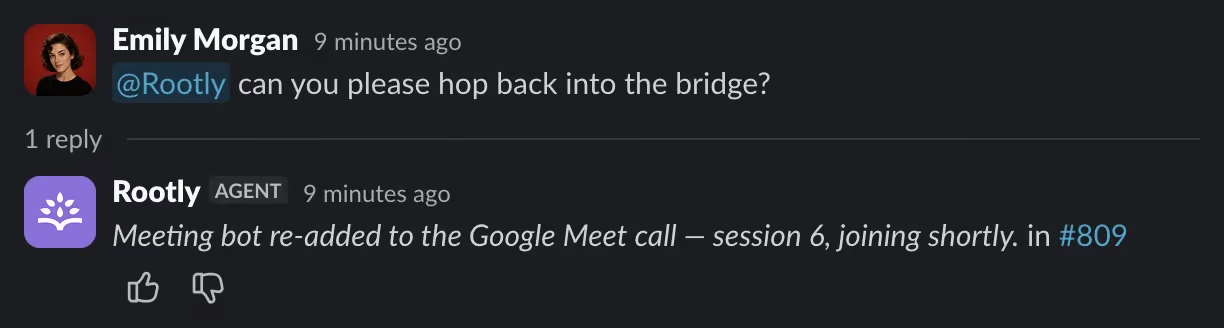
Ask the Rootly Slack Agent at anytime to add the Scribe back into your bridge.
What it captures is sharper too. Scribe now runs on a higher accuracy transcription engine and labels who said what, so the transcript reads like a conversation instead of a wall of text. Every call on the incident is captured as its own session and stitched into one continuous transcript, and the AI summary that follows the call is more legible, with speaker attribution.
Then Rootly holds onto it. The transcript and the summary live on the incident next to your timeline, alerts, and action items, so the call is part of the incident record instead of someone’s private notes. Ask @Rootly what was decided on the bridge weeks later, or pull the same context into a retrospective in Rootly when it is time to write things up.
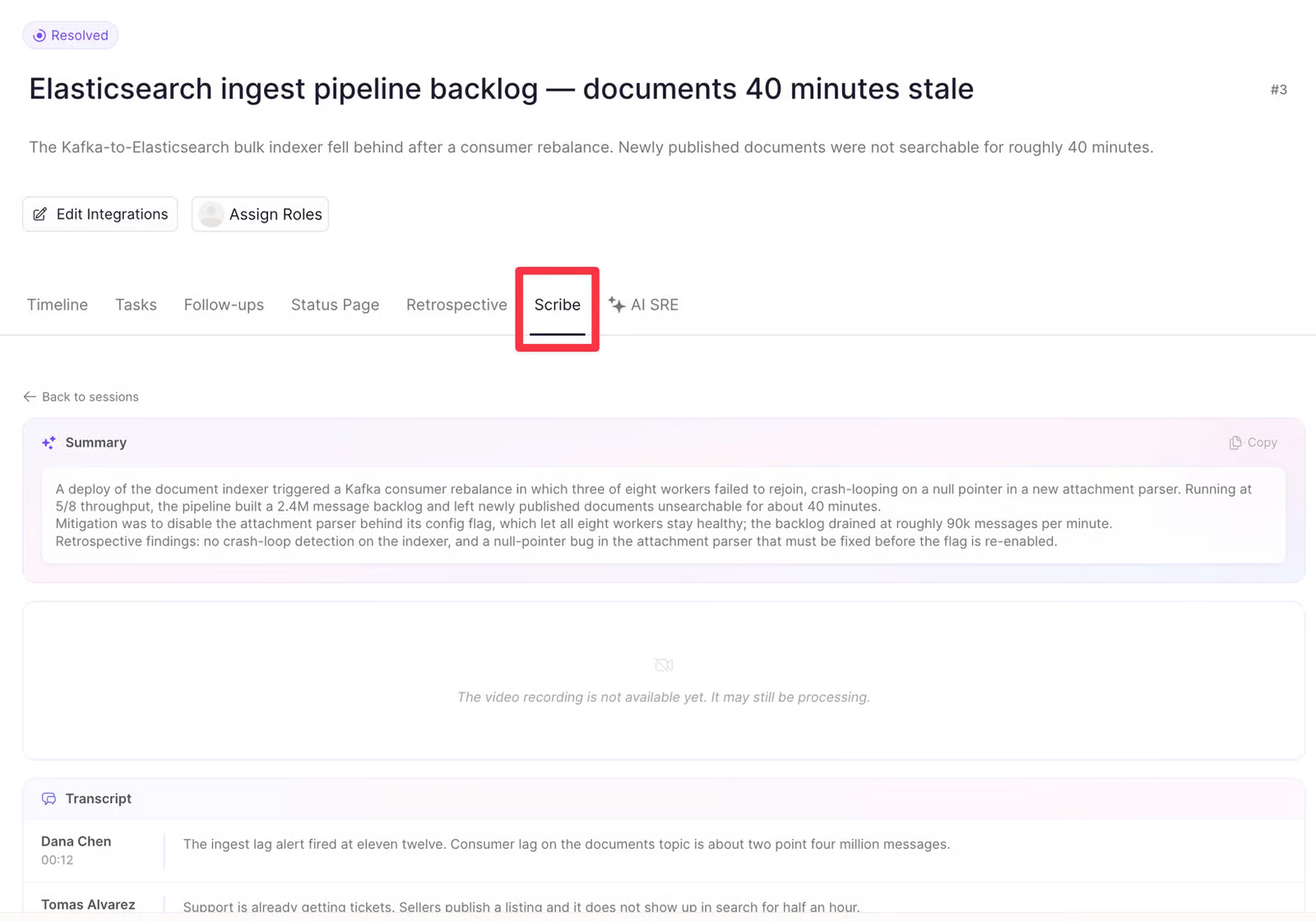
Review your incident’s bridge transcript live in the Rootly Web application.
What’s included
- Ask the
@Rootlyagent in Slack or run/rootly scribeto add the Scribe back to the call after the initial call ends. - Live transcription streamed back to the incident as the call happens, with speaker labels applied automatically.
- A higher accuracy transcription engine behind every recorded incident call, so nothing gets missed.
- Each call captured as its own session and stitched into a single transcript for the incident.
- A more accurate AI summary after the call, with speaker attribution.
Why it matters
Someone on every incident call ends up as the note taker, and it is usually the person who should be looking at the problem instead. Notes taken that way are thin, and the details that matter get lost between the call ending and the write-up starting.
Letting Scribe hold the record gives that person back to the response. The team talks through the problem, and Rootly keeps what was said, who said it, and what was decided. Later, anyone can ask the Rootly agent what happened on the bridge, or write the retrospective in Rootly with the call already in front of them.
Scribe is set up under your AI & Agent settings. Learn more in the Meeting Scribe documentation.
What else shipped
Improvements
On-Call
- The “no upcoming shift” banner now says which time window users are not scheduled for.
Incident Response
- You can now use tables in a retrospective template.
- The ServiceNow sync class picker now shows each table’s name in the dropdown and in search.
- Classes already picked for ServiceNow sync now show their full display name.
- You can now search and page through every CMDB table when picking ServiceNow classes.
API & CLI
On-Call
POST /v1/alertsnow returns thededuplication_keyin its response.POST /v1/alertsnow appliesdeduplication_keyto alerts that do not page anyone.- A new
shift.endedwebhook event fires when an on-call shift finishes.
Incident Response
- The form field option data source now exposes
form_field_id, so it can be looked up from Terraform.
Terraform
- Updating an escalation level no longer resets its delay to zero when the delay was not part of the change.
Fixes
On-Call
- An alert moving into Deferred now fires the alert status updated workflow trigger.
- Changing a filter after a search now keeps the search term you typed.
- An escalation run now finishes and reports reaching the end of the policy after a deferred alert wakes up.
Incident Response
- You can now edit and delete your own replies in a retrospective comment thread, not just the first comment.
- The Google Doc picker is now available on the Update Google Doc workflow task.
- The order you set for custom catalog entries is now respected everywhere in the app and through the API.
- A workflow that creates a Linear subtask now links the incident to the parent issue.
- You can now open the command palette with the keyboard on Windows and Linux.
- The create API key steps now have a Previous button in the UI to go back a step.
Related changelogs
Control AI output across your organization.
AI Instructions guide Rootly Agents on how to carry out tasks and respond to requests, so every automated interaction works the way your teams do.
Related Incidents detected automatically.
Rootly's agent posts the most relevant past incidents into your incident channel, before anyone thinks to go looking.
Meeting Scribe speaks your language.
Meeting Scribe now detects the language spoken on your incident call and transcribes it automatically — no setup needed.