Catch up on any incident in seconds with AI Timelines.
A live AI summary and the key moments of every incident, pinned in Slack. Now in early access.
AI Timelines are now in early access for Slack. Every incident channel gets a live block, pinned at the top, with an AI summary of what’s happening and the key moments curated right below it. Anyone pulled into an incident can get current in under a minute, without scrolling the channel or asking someone for a recap.
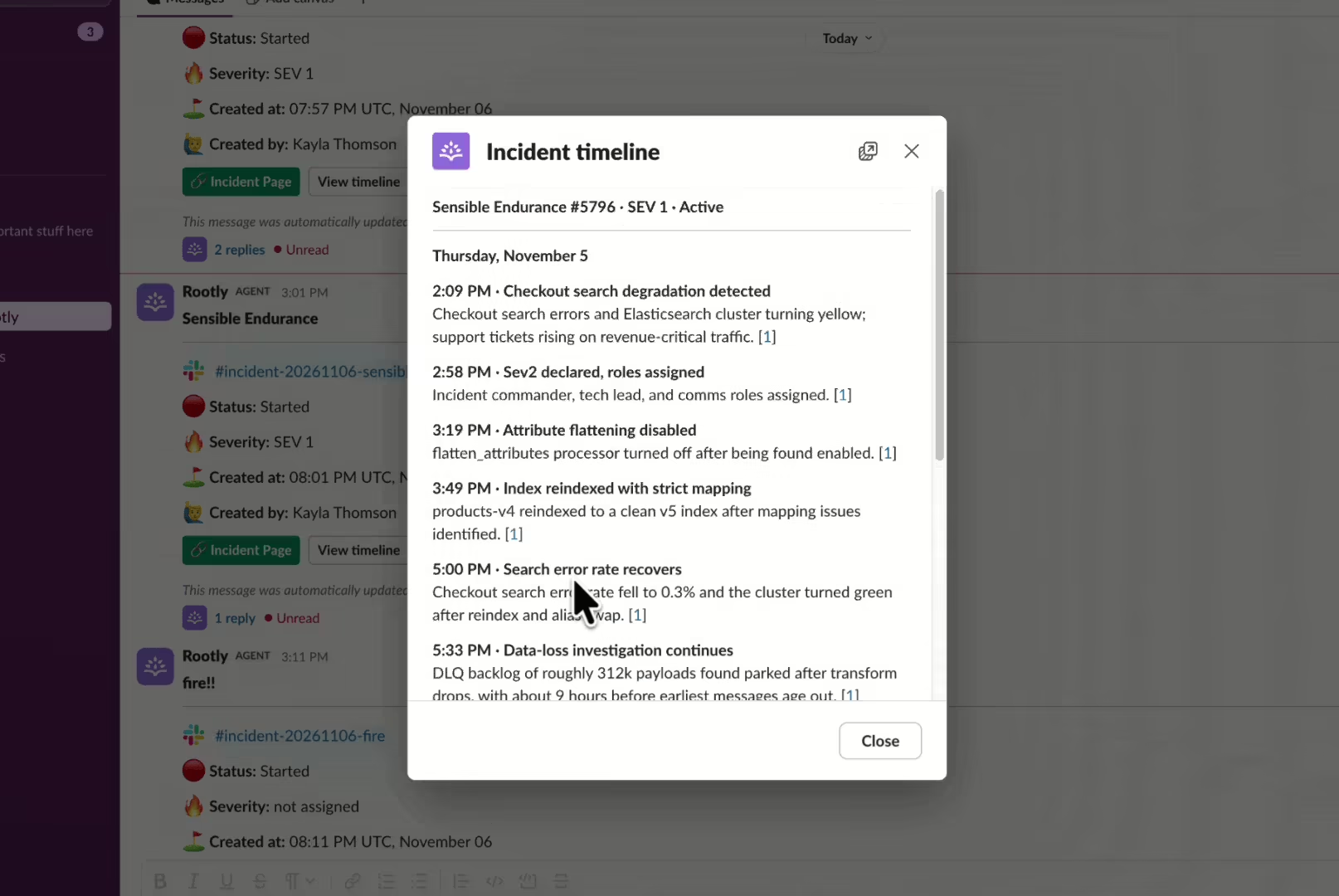
One shared picture of the incident
During an incident, the story is spread across Slack threads, Scribe notes, chat, system events, and alerts. AI Timelines pulls all of it into one live view. Responders, incident leads, and stakeholders all see the same up-to-date summary, so less time goes to “what did I miss?” and more goes to fixing the problem.
How it works
- Declare an incident as usual. The live block is created and pinned with the incident channel.
- Read the block to catch up. The summary sits on top, with curated key moments below. Rootly checks for updates every 5 minutes and updates the block in place as the incident moves.
- Open the full timeline. Click View timeline on the live block or the announcement message to see every moment, with links back to its sources.
- Join mid-incident. Rootly sends you a private message in the incident channel once you join with the current incident summary.
If you take incident calls with Scribe, the conversation on the call also feeds the timeline.
You stay in control
- Pin the moments that matter most. React with 📌 or use Pin to channel on any message to make sure it’s always on the timeline, placed at the time it was posted.
- Tune the summary to your team. Set your organization’s AI instructions so every summary follows your team’s preferred format and focus, and mention @Rootly to regenerate it anytime.
- Turn it on or off. AI summary, AI curated timeline, and proactive timeline updates at key moments, like status or severity changes, each have their own switch in your AI settings.
What’s included
- A live, pinned block in every incident channel with an AI summary and curated key moments
- A View timeline button that opens the full timeline in Slack
- Automatic catch-up for anyone who joins mid-incident
- Pinning messages to the timeline straight from the channel
- Settings to control AI summaries, curated timelines, and proactive updates
Get early access
AI Timelines are available today in Slack for early access customers, with the web experience coming soon. Want it for your team? Reach out to your Rootly account representative to get access.
What else shipped
Improvements
Incident Response
- Status page component descriptions now show in a tooltip.
- You can now generate retrospectives as pageless Google Docs.
API & CLI
On-Call
- The
oc.shift_overrides:writeOAuth scope now lets apps create override shifts. - Team admins can now create allowlisted alert source types through the API.
Incident Response
- Status page
PATCHrequests now savepublic_description. - Listing status page events now respects
sort=-created_at. - OAuth apps can now read a single incident or meeting recording.
PUT /v1/users/:idnow works for custom On-Call roles that can update members.- Organization API keys with custom roles can now rotate themselves with
/v1/api_keys/:id/rotate. POST /v1/incident_typesno longer requires adescriptionon trial workspaces.- The Rootly MCP Server can now create dashboard panels.
Terraform
rootly_workflow_task_send_slack_blockscan now update its own earlier Slack message, and API updates no longer clear aparent_message_thread_taskset in the UI.
Fixes
On-Call
- Schedules now offer a time zone for British Columbia’s year-round UTC-7.
- Auto-resolving an acknowledged alert no longer runs status-change workflows twice.
- Datadog alerts no longer briefly re-open when a monitor notifies more than one Rootly webhook.
Incident Response
- Helper text now shows on the new incident form when you create an incident from an alert.
- The Slack status page form now defaults “Notify subscribers” to on.
- Maintenance status page templates now offer Cancelled as a status.
- Starred alert events on the incident timeline now show the star icon.
- You can now highlight and double-click text in dropdown search boxes.
Related changelogs
Cover shifts, find out who's on call, and start retros with @Rootly.
Rootly AI can now create overrides, look up who's on call, create retrospectives, and answer questions about Rootly.
Control AI output across your organization.
AI Instructions guide Rootly Agents on how to carry out tasks and respond to requests, so every automated interaction works the way your teams do.

Never lose the call transcript.
Scribe joins your incident call, transcribes live with speaker labels, and makes every call part of your incident record.