ServiceNow CMDB is now your Rootly catalog.
Import your ServiceNow CMDB into Rootly and keep it in sync, so you run incidents off one source of truth.
On this page
Rootly’s Catalog now syncs directly with ServiceNow. Connect your instance, pick the CMDB classes you care about, and Rootly imports those configuration items into your catalog, continuously syncing to keep them current. ServiceNow groups and their members come across too, so the teams that own those services exist in Rootly with the right people already in them.
Setup lives in the ServiceNow integration settings you already have. Turn on sync, choose the classes to bring over, and Rootly handles the rest on an ongoing basis. Records you add, rename, or retire in ServiceNow follow through to Rootly without anyone re-entering them.
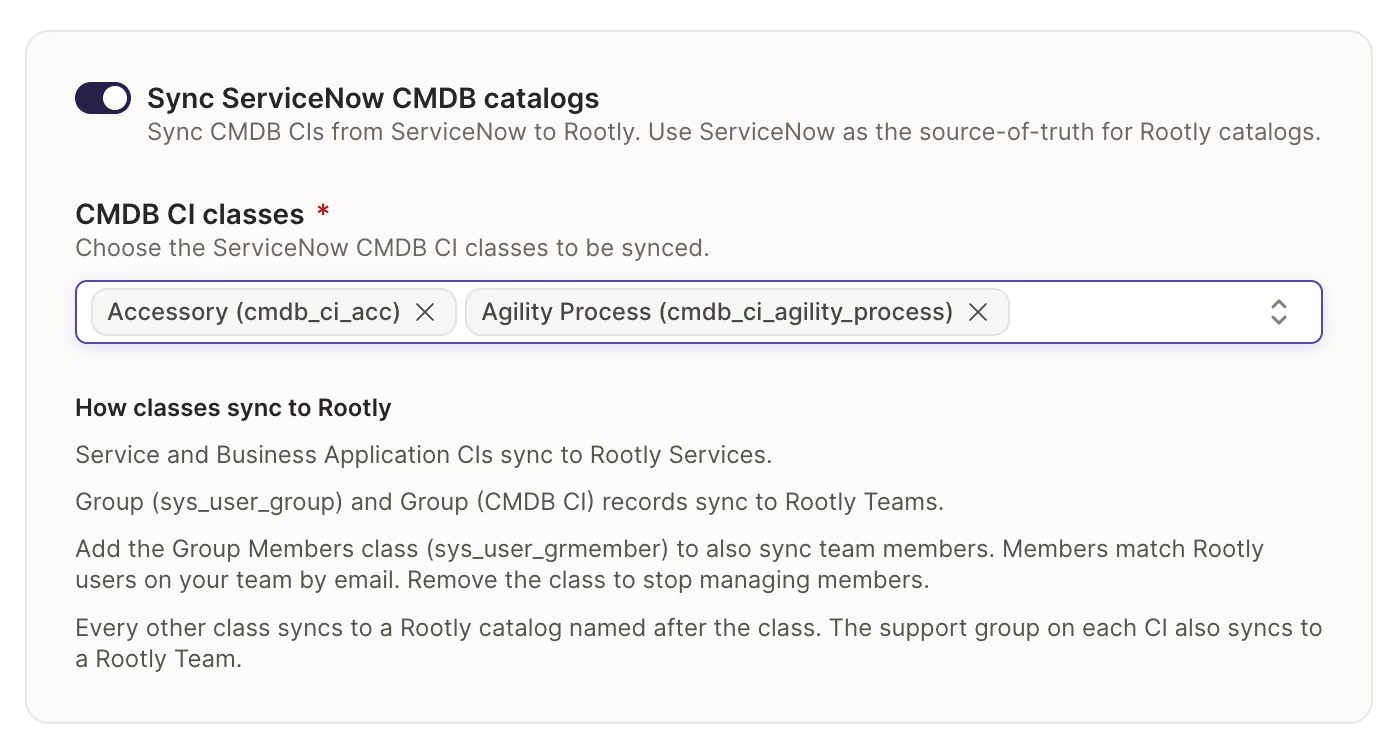
Sync settings in Rootly’s ServiceNow integration.
What’s included
- Import any CMDB class into your Rootly catalog, with search and pagination across every table in your instance.
- Ongoing sync, so what changes in ServiceNow is reflected in Rootly without manual upkeep.
- ServiceNow groups and their members imported as Rootly teams.
- Setup from the ServiceNow integration settings page, with instructions inline.
- Synced entities usable everywhere catalog data already is: alert routing, ownership, workflows, and incident impact.
Why it matters
If ServiceNow is already where your organization records what runs in production and who owns it, standing up a second catalog in Rootly means maintaining both, often leading to data drift. Alert routes point at services that were renamed, ownership reflects a team structure from two reorgs ago, and responders stop trusting what Rootly tells them.
Syncing from the CMDB removes the second source of truth. Your incident response process runs off the business catalog you already maintain, your catalog stays as accurate as ServiceNow is, and Rootly scales as your organization does instead of drifting from it.
Turn it on in your ServiceNow integration settings. Learn more in the ServiceNow sync documentation.
What else shipped
Improvements
On-Call
- SMS acknowledgements now have a longer window before they time out.
Incident Response
- You can now sync your Backstage catalog into Rootly.
- When a workflow posts to Slack, you can now choose which workflow run its messages thread onto.
- Timestamp order checks can now be relaxed for backfilled incidents only, instead of for your whole organization.
- The “Powered by Rootly” branding on status pages is now less prominent.
linear_issue_keyis now available as a Liquid variable on action items, matchingjira_issue_key.
API & CLI
On-Call
- The teams API now exposes the schedule override policy, and no longer ignores it when you write to it.
Incident Response
POST /v1/workflowsnow leaves a workflow ungrouped when no workflow group is given, instead of putting it in the first group.- The Go SDK incident response type now includes its
includeddata. - The form field options API no longer returns duplicates or drops options.
Terraform
send_slack_blocksnow exposes the cross-workflow threading option.- The
secreton an alert source is no longer presented as writable when setting it had no effect. - The
rootly_serviceandrootly_servicesdata sources accept lookup arguments again, so a service can be found by name or slug instead of only by ID. rootly_serviceand the services API now accept an escalation policy, so services managed in Terraform can point at policies managed in the UI.- The
rootly_servicesdata source now returns Slack channels, Slack aliases, and catalog properties in the shape the API sends, so plans no longer fail.
Fixes
On-Call
- Changing a schedule’s owner now updates search results.
- Disconnecting a linked Slack or Microsoft account now asks you to confirm first.
- The last shift of a rotation is now stored when the handoff time matches the rotation’s end time.
Incident Response
- Liquid now returns the label of a selected option instead of its internal ID.
- Retrospective PDF exports no longer overflow table cells or separate headings from their content.
- The audit log records a status change as one action, whichever surface it came from.
- Creating a scheduled incident from Slack now checks required custom fields before the incident is created.
Related changelogs

Sync your catalog, and mute pages during Alert storms.
A new CLI syncs your catalog from GitHub, Backstage, and more. Plus: mobile alert muting and an Upwind integration.

Build incident response around your live Cortex catalog.
Sync Cortex entities into Rootly so responders always work from the current state of your services, teams, and owners.
Automatically sync incident fields from Catalog data.
Catalog custom fields now cascade automatically. Your catalog already knows that a product area owns certain services, that a region maps to specific clusters, that a customer tier corresponds to a set of accounts. That context lives in Rootly Catalogs—but until now, none of it carried over into inc