
When systems fail or critical services go down, the technical fix is only half the battle. The other half, often more visible, is how well you communicate. A well-timed update can calm anxious customers, align executives, and prevent small missteps from becoming reputational crises. Poor communication, on the other hand, fuels confusion, damages trust, and can even prolong recovery by sending teams in the wrong direction.
A structured incident response communication plan provides the blueprint for what to say, who to say it to, and when to say it. The three pillars of effective incident communication are internal updates, external messaging, and public status updates. Understanding how to approach each one is the key to reducing chaos, restoring confidence, and strengthening trust during critical events.
What is an incident response communication plan?
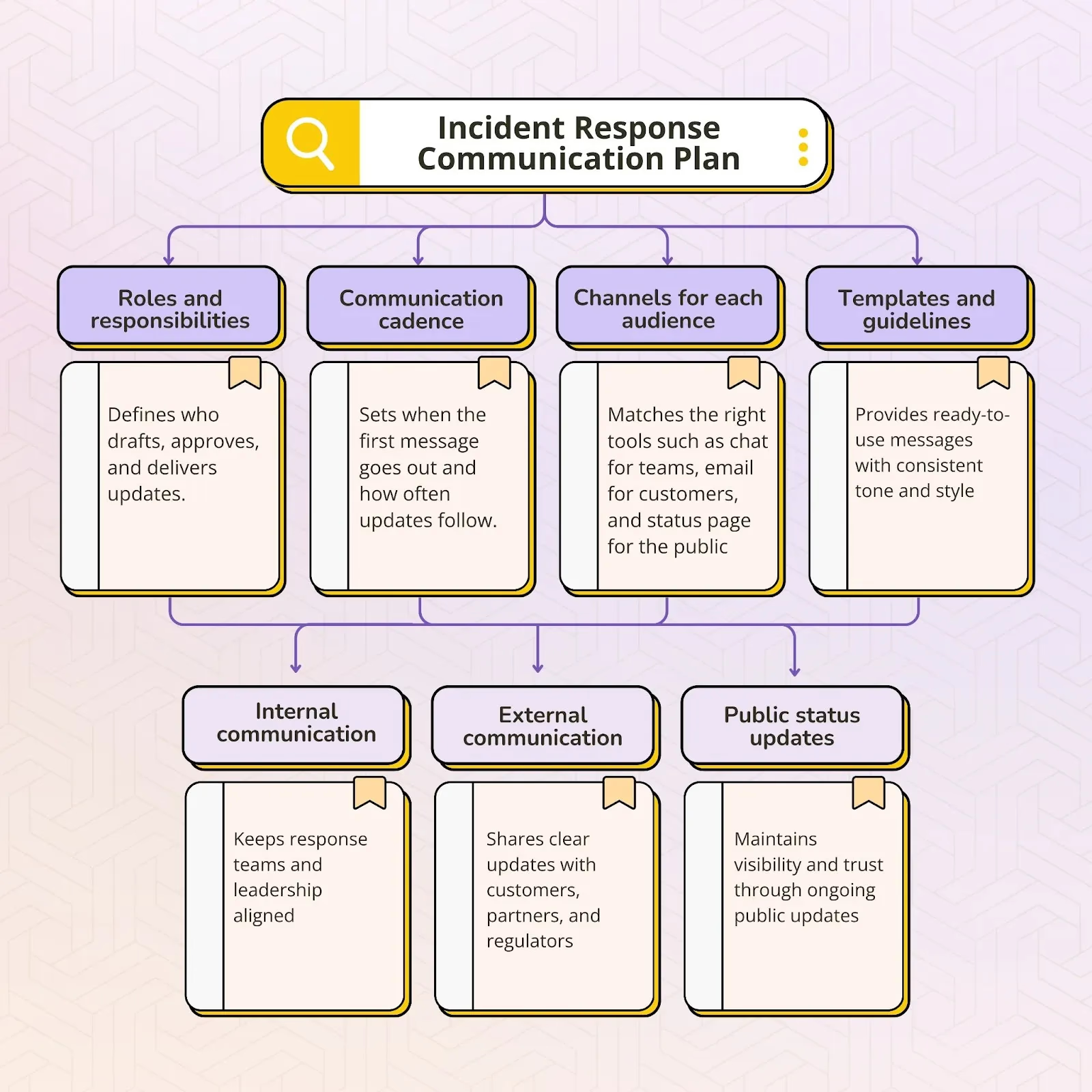
An incident response communication plan is a structured framework that guides how information is shared during a crisis or disruption. It ensures that everyone, from internal teams to customers and external stakeholders, receives clear and timely updates. Rather than relying on improvisation, the plan provides direction so that communication remains consistent, accurate, and aligned across all channels.
The main goals of an incident response communication plan include:
- Providing clarity and order when systems or services fail
- Ensuring updates reach the right people at the right time
- Reducing confusion and preventing conflicting information
- Preserving trust with employees, customers, partners, and regulators
- Supporting faster recovery by keeping everyone aligned
A strong plan also defines:
- Roles and responsibilities so it is clear who leads, who approves, and who delivers updates
- Communication cadence so stakeholders know when to expect the next message
- Channels for each audience such as internal chat tools, customer email, or public status pages
- Templates and guidelines that can be quickly adapted to different scenarios
Every effective communication plan addresses three essential layers:
- Internal communication to keep response teams and leadership aligned
- External communication to reassure customers, partners, and regulators
- Public status updates to provide ongoing visibility and transparency
More than a set of talking points, an incident response communication plan is a strategic tool. It demonstrates accountability, professionalism, and transparency, while also showing that the organization values trust as much as technical recovery.
Why communication plans matter in incident response
When an incident occurs, the instinct is often to focus only on technical recovery. Restoring systems, patching vulnerabilities, or rerouting services becomes the first priority. Yet what people remember most is not just how quickly the problem was fixed but how well the situation was communicated. Effective communication often determines whether an organization emerges from a crisis with trust intact or with its reputation damaged.
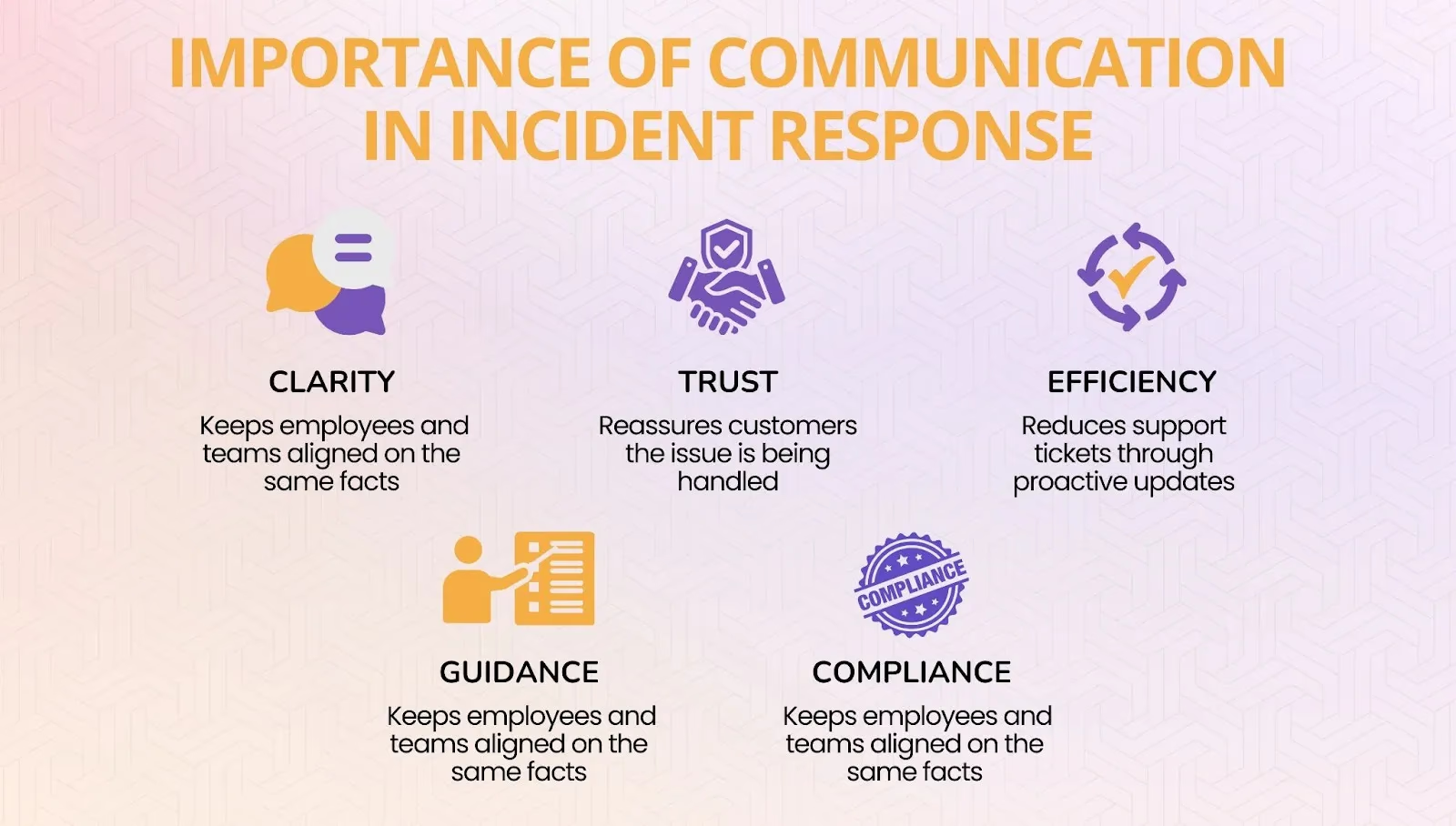
Strong communication during incidents provides several critical benefits:
- Minimizes confusion by aligning employees, leadership, and technical teams on a single version of the truth
- Preserves customer trust by providing reassurance that the problem is acknowledged and being resolved
- Reduces support load by addressing common questions through proactive updates rather than fielding thousands of individual requests
- Supports decision making by giving executives reliable information to guide strategy and response
- Ensures compliance with industry regulations that require timely disclosures about outages or breaches
Aviation, finance and healthcare carry some of the strictest disclosure rules, and incident response in those industries shows how they coordinate communication under that pressure.
The absence of a clear communication plan often leads to preventable mistakes such as delayed acknowledgments, inconsistent messages across channels, or vague updates that raise more questions than they answer. Even if the technical fix is fast, poor communication can leave a lasting impression of disorganization and unreliability.
On the other hand, organizations that communicate clearly and consistently during incidents often come out stronger. Customers are more forgiving when they feel informed, employees remain focused when they know the plan, and leadership can show accountability through transparency. Communication is therefore not an accessory to incident response but a central part of it, shaping how the organization is perceived long after the incident ends.
How should teams communicate during a major outage?
Acknowledge fast, update on a fixed cadence, and keep one voice per audience. Within minutes of declaring a major incident, post an initial update internally and on the status page that says what is affected and when the next update will come. From then on, update on a schedule (every 30 minutes is a common default), even when there is no progress to report. A communications lead owns every message, so the engineers debugging aren’t interrupted. Rootly posts status page updates from the incident channel and drafts each audience’s update with Rootly AI.
A major outage has at least three audiences, and each needs a different message:
| Audience | What they need | Where it goes |
|---|---|---|
| Responders | Technical detail, hypotheses, who is doing what | The incident channel or bridge |
| Leadership and customer-facing teams | Customer impact, business risk, expected timeline, what to tell customers | A stakeholder channel or email summary |
| Customers | What is affected, what to do meanwhile, when the next update comes | The status page and subscriber notifications |
Close the loop at the end: a resolution update for every audience, then the retrospective, which should review the communication timeline as closely as the technical one.
Rootly runs this from the incident itself. Responders declare and coordinate the incident in Slack or Microsoft Teams, the status page is updated from the same channel, reminders prompt the team when an update is overdue, and Rootly AI drafts updates at the right level of detail for responders, leadership and customers, so nobody has to leave the incident to write them.
How do you keep executives and customer-facing teams updated during major incidents?
Give them their own channel and their own cadence, and never make them read the responder thread. A stakeholder update should answer four questions in plain language: what customers are experiencing, how many are affected, what the team is doing, and when the next update will come. Support and account teams also need the exact wording to use with customers, so they aren’t improvising. Rootly drafts stakeholder updates from the incident timeline for a leadership audience.
Send stakeholder updates on the same schedule as the status page, and have the communications lead write them from the incident timeline rather than by interrupting responders. In Rootly, stakeholder updates are drafted from the timeline for a leadership audience and posted to the channels you choose, and anyone who joins late can ask @Rootly in Slack for a summary instead of pinging the incident commander.
Internal communication during incidents
Internal communication is the foundation of effective incident response. When teams are under pressure, every message must reduce uncertainty and keep people aligned. Clear internal updates ensure that employees, leaders, and responders are all working from the same information and pursuing the same priorities.
Objectives
Internal updates are designed to keep the organization coordinated and moving in the right direction. They:
- Establish a single source of truth for facts and progress so that all teams reference the same information
- Ensure leadership has real-time visibility into the situation and can make confident decisions
- Prevent duplicate work or conflicting fixes that slow down recovery
Best practices
- Assign an incident commander to lead the response and make final decisions
- Designate a scribe to document events, decisions, and timestamps for accuracy
- Identify functional leads such as network, security, or product owners to manage their specific areas of responsibility
Centralize channels
- Use a dedicated incident war room in platforms such as Slack, Microsoft Teams, or Zoom
- Keep sensitive communication out of email threads to ensure speed and visibility for all participants
Use templates for speed
- Provide predefined formats for quick updates, for example: “Incident ID, time detected, impact, teams involved, next update at…”
Set cadence expectations
- Tell participants when the next check-in or update will be delivered, even if there are no new developments
- This prevents people from filling the silence with speculation or side conversations
Avoid common pitfalls
- Do not overwhelm teams with unnecessary chatter; focus on verified facts and immediate next steps
- Do not allow discussions to split across side channels, which creates confusion and inconsistency
A disciplined approach to internal communication ensures that the response effort runs smoothly and that every person involved can act with clarity and confidence.
External communication during incidents
Internal alignment is critical, but so is communicating with those outside the organization. Customers, partners, regulators, and sometimes the public will want to know what is happening when services are disrupted. External communication shapes how your organization is perceived and can either build or erode trust depending on the clarity and timeliness of your updates.
Who needs to be informed
Not every incident requires a public statement, but when external communication is necessary, the following groups may need updates:
- Customers and clients who are directly experiencing the impact and need reassurance that the issue is being addressed
- Partners and vendors whose own operations may depend on your systems and services
- Regulators or authorities if disclosure is required by law, contract, or industry standards
- Media and the public in the case of high-profile or large-scale incidents that draw attention beyond your customer base
Best practices
Prepare holding statements
- Draft acknowledgement templates in advance so you are not writing from scratch during a crisis
- Use plain, accessible language that communicates awareness and a commitment to provide further updates
Pick the right channels
- Choose communication methods that reach the right audience quickly, such as customer emails, official blogs, press releases, or social media posts
- For ongoing updates, direct people to a dedicated status page or help center
Be transparent, but prudent
- Share only confirmed facts and avoid speculation
- Provide enough information to reassure stakeholders without exposing sensitive details that could create additional risk
Work with PR and legal teams
- Collaborate closely with communications, legal, and compliance leaders to ensure that messaging is accurate, consistent, and aligned with organizational responsibilities
Example of an effective external statement
- “We are aware of a service disruption affecting some customers. Our engineering team is investigating, and we will share updates every 30 minutes on our status page.”
Proactive external communication does more than acknowledge the issue. It demonstrates accountability, reduces speculation, and reassures stakeholders that your organization is managing the incident responsibly.
Status updates: frequency, content and delivery
Status updates are one of the most visible elements of incident response. They not only keep internal and external stakeholders informed but also serve as the official record of how your organization handled the event. Consistent, structured updates reduce anxiety, limit speculation, and reinforce trust.
When and how often to update
- First acknowledgement: Provide an initial update within 15 to 30 minutes of detecting the incident, even if details are limited. Acknowledging the issue quickly is more important than having all the answers.
- Regular cadence: Share progress updates every 30 to 60 minutes, or sooner if there is a significant development. Setting expectations for the next update helps reduce pressure on support teams and reassures customers.
- Final communication: Once the incident is resolved, confirm restoration of service, thank affected users for their patience, and outline any planned follow-up actions such as a root cause analysis or future improvements.
What to include in each update
Every update should follow a clear and consistent structure so that stakeholders know what to expect. Effective updates usually include:
- Acknowledgment of the incident so it is clear that the issue is recognized and being addressed
- Known scope and impact such as which regions, products, or customers are affected
- Current mitigation or recovery actions describing what teams are doing to fix the problem
- Estimated time for the next update rather than promising exact resolution times, which can lead to disappointment if missed
- Contact point or reference link directing users to a status page, support team, or help desk for further information
Status page management
Public status dashboards have become the standard across industries, with tools such as Atlassian Statuspage or custom-built platforms providing transparency during disruptions. A well-managed status page serves as the single, authoritative source of truth for incident updates.
Tips for effective status pages include:
- Use clear, human language that avoids heavy technical jargon and focuses on what the audience needs to know
- Include timestamps and versioned updates so readers can follow the sequence of events and see progress over time
- Avoid vague statements like “we’re working on it” without additional detail, as these erode trust instead of building it
A thoughtfully maintained status page demonstrates accountability, reduces the volume of inbound support requests, and shows that your organization takes communication as seriously as resolution.
Building an effective communication framework
A communication plan is only as strong as the systems and preparation that support it. Building a reliable framework ensures that when an incident occurs, teams can act quickly and confidently instead of wasting valuable minutes deciding what to say or how to say it. The goal is to make communication repeatable, predictable, and seamless across every type of disruption.
Create reusable templates
- Prepare internal incident briefs that summarize impact, actions, and next steps for leadership and technical teams
- Draft customer-facing emails that acknowledge disruptions and set expectations for updates
- Develop executive summaries that provide high-level context for board members, investors, or external partners
Templates save time, reduce errors, and create consistency in tone and structure across all communication channels.
Establish escalation paths
- Define who has the authority to approve external messages such as a customer email or social media update
- Decide who will serve as the spokesperson for the press or external stakeholders
- Clarify which leaders must be informed before public announcements are made
Clear escalation paths prevent delays and ensure that updates reach stakeholders quickly without getting stuck in approval bottlenecks.
Run tabletop exercises
- Simulate outages or security incidents and practice communication alongside technical resolution
- Test how teams respond to unexpected scenarios and identify weaknesses in messaging or process
- Use these exercises to refine cadence, roles, and message clarity before a real incident occurs
Practicing communications under controlled conditions prepares teams for the stress and urgency of live situations.
Integrate tools
- Take advantage of platforms such as PagerDuty, Rootly, or Opsgenie that integrate communication workflows directly into incident response
- Automate routine notifications and ensure updates are pushed to the right channels at the right time
- Link communication logs with technical runbooks so that both response and messaging remain aligned
From panic to professionalism
When frameworks are in place, teams can shift immediately into action instead of scrambling. Templates, escalation rules, rehearsals, and integrated tools remove guesswork and reduce stress. Preparedness is what transforms communication from reactive panic into a demonstration of professionalism and accountability.
Editor’s note: Atlassian is retiring Opsgenie, with end-of-life scheduled for April 2027—factor a migration path into any evaluation.
Common mistakes in incident communication
Even well-prepared teams sometimes make errors that weaken trust during an incident. The following are some of the most common mistakes and why they matter.
Delayed acknowledgement
Customers and partners expect to hear from you quickly, even if very little is known at the start. A slow response creates the impression that the organization is unaware of the issue or is not treating it as a priority. The longer the silence, the more likely rumors will spread and create unnecessary concern.
Inconsistent updates
When different channels are not aligned, customers may read one message in an email and a completely different version on social media. Conflicting information causes confusion and erodes trust. Updates should always be coordinated and point back to a single source of truth such as an official status page.
Overpromising
Telling customers that the issue will be resolved soon sets unrealistic expectations. If the problem takes longer than expected, credibility suffers and stakeholders become frustrated. It is more effective to commit to the timing of the next update rather than to an uncertain resolution.
Failing to close the loop
Some teams resolve the technical issue but forget to confirm resolution with stakeholders. Without a final message, customers are unsure whether it is safe to resume normal operations. A closing update that thanks users for their patience and shares lessons learned demonstrates accountability and professionalism.
Avoiding these pitfalls comes down to discipline. Consistent processes, reliable templates, and predictable update cadences help organizations communicate clearly and maintain trust even under pressure.
At Rootly, we make this discipline easier by automating communication workflows, ensuring every incident ends with clear resolution and renewed trust.
Frequently asked questions
How should teams communicate during a major outage?
Acknowledge within minutes, update on a fixed cadence, and give each audience its own message: technical detail for responders, impact and timeline for leadership and customer-facing teams, and plain status for customers. Rootly posts status page updates from the incident channel and drafts audience-specific updates with Rootly AI.
How do you keep executives and customer-facing teams updated during major incidents?
Use a separate stakeholder channel with the same cadence as the status page, and answer four questions each time: customer impact, scope, current action and next update time. Rootly drafts these updates from the incident timeline for a leadership audience.
What software helps teams manage incident communications across internal and external stakeholders?
Look for incident response software that keeps internal updates, stakeholder summaries and the status page in one workflow. Rootly does this from Slack or Microsoft Teams, with status pages, update reminders, subscriber notifications and AI-drafted updates for each audience.
Incident communication plans: internal and external