

AI SRE is officially a category now. In January 2026, Gartner published its first Market Guide for AI Site Reliability Engineering Tooling. Gartner now lists the category as “AI Site Reliability Engineering Tooling” and defines it as a market that “enables and supports the adoption of SRE practices, and focuses on improving reliability, resilience and the customer experience.”
Rootly helped popularize the term, so Gartner’s recognition should feel like pure validation. It does… and it makes the problem with the name harder to ignore.
I recently wrote “Borrowed gravity: words worth changing” with SRE Sebastian Vietz. His objection was simple: the name shrinks SRE to its most visible incident-time task. SRE also means reliability design, SLOs, error budgets, capacity planning, risk reduction, observability, and making systems more dependable. An investigation tool can be useful. It still is not an SRE.
That leaves me in an awkward but useful place. I want people to find this category because I think the underlying tools can help. I do not want the category name to become permission to underinvest in SREs or pretend we have stuffed an experienced engineer into a box.
What I have found is a narrower, more credible use. At 2:47 a.m., the evidence behind an alert is scattered across telemetry, deployments, code, runbooks, ownership catalogs, tickets, and old incident channels. Collecting it is repetitive work at the moment an on-call engineer has the least attention to spare.
I use “AI SRE” because that is the term people search for, but with a firm boundary. Here it means software that gathers operational evidence, tests likely causes, and recommends or performs tightly guarded actions. It can shorten the path to a decision. It does not replace the people accountable for reliability.
What is AI SRE?
In practical terms, AI SRE uses language models and other analysis techniques to investigate production incidents. It connects an alert with logs, metrics, traces, recent changes, code, ownership, runbooks, and previous incidents. It can then rank likely causes, suggest the next check, recommend a mitigation, and record what happened.
You will also see this capability described as AI incident management, AI incident response, AI incident investigation, or automated root cause analysis. The terms overlap, but they are not identical:
- Observability tools collect and expose signals about a system. An AI investigation layer works across those signals and other operational systems to help decide what to inspect next.
- Deterministic automation follows a predefined rule: when X happens, do Y. AI-assisted investigation is useful when the path is less structured, but that flexibility also makes its output less predictable.
- AIOps is a broad category spanning event correlation, anomaly detection, noise reduction, and IT operations. AI SRE is usually positioned more narrowly around reliability and incident workflows. The history and ambiguity of that distinction are covered in “What does AIOps mean for SREs? It’s complicated”.
- An SRE is a person practicing an engineering discipline. No product can own an SLO, negotiate an error budget, understand every business risk, or take organizational accountability for reliability.
I find one question much more useful than “Can this replace an SRE?”: Can this system give an SRE trustworthy context and a safer next move while an incident is unfolding?
For a deeper treatment of the terminology and boundaries, see AI SRE concepts.
Why traditional SRE is breaking
I do not think traditional SRE is necessarily breaking, but one assumption about how it is practiced is.
The principles still hold: define reliability objectives, instrument the system, reduce toil, learn from failure, and use automation where it makes operations safer. What is breaking is the assumption that a responder can manually assemble all the context behind a modern service quickly enough, every time, while under pressure.
Three conditions make incident investigation especially expensive:
- Evidence is fragmented. The alert may be in one tool, the useful trace in another, the deployment event in a third, and the explanation for an odd configuration choice in a six-month-old incident channel.
- Ownership is ambiguous. A customer-facing symptom can cross several services and teams. The engineer who gets paged may own the symptom but not the change that produced it.
- Working memory is the bottleneck. Responders have to compare timestamps, dependencies, logs, diffs, known failure modes, and mitigation risks while coordinating with other people.
AI does not remove these problems. Weak operational foundations put a hard ceiling on it. Ganesh Datta, co-founder and CTO of Cortex, argues that AI amplifies the systems beneath it. Good monitors, usable logs, accurate ownership, and maintained runbooks help. Missing or stale context gives it more ways to be confidently wrong.
Core capabilities of AI SRE systems
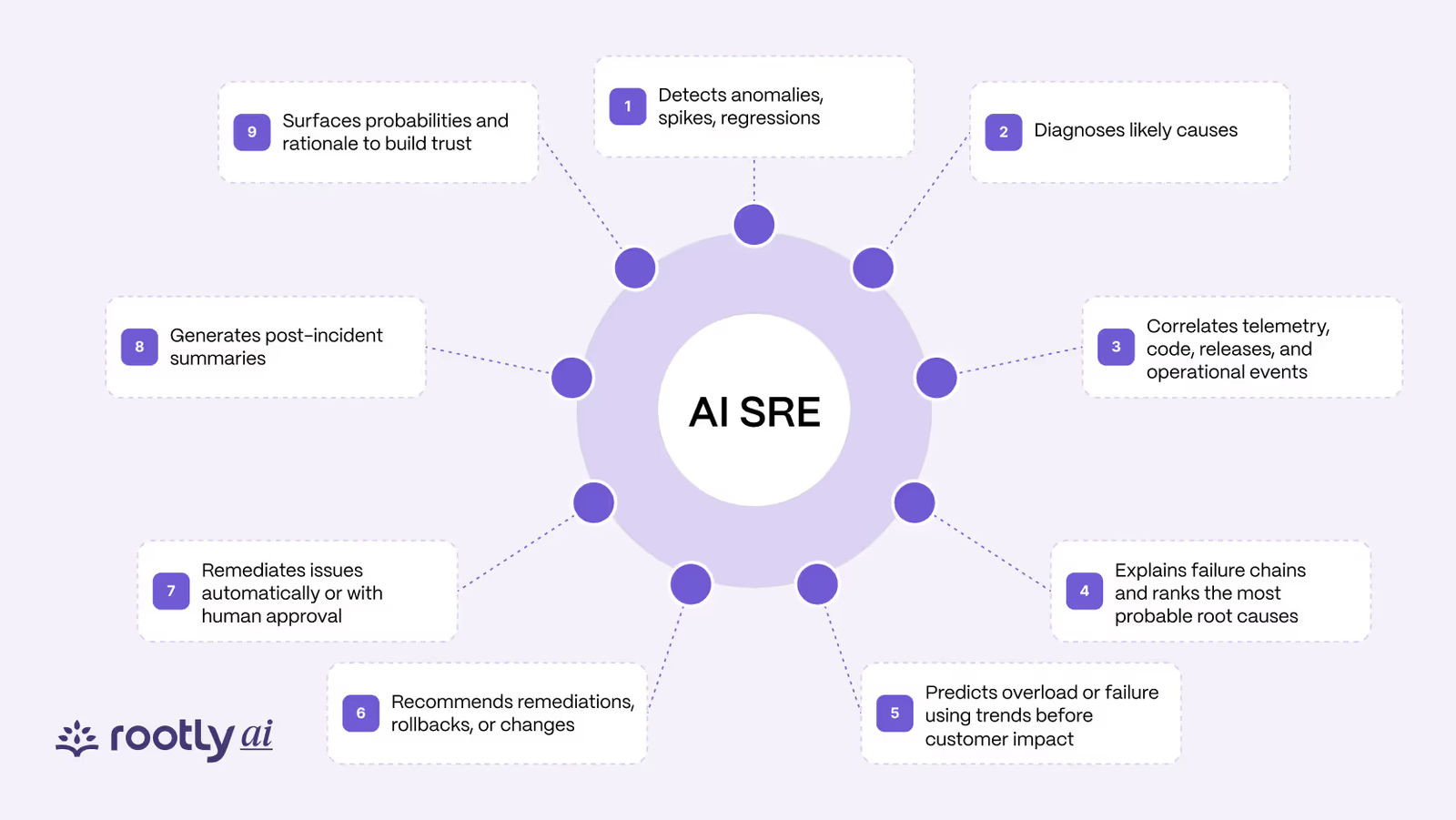
After looking at enough feature lists, I stopped finding them useful. They all sound the same: detect, diagnose, correlate, predict, remediate. I prefer to evaluate an AI SRE system as an investigation loop and ask what a responder can inspect at each step.
| Stage | Useful behavior | Evidence a responder should see |
|---|---|---|
| Collect | Pull the signals relevant to the affected service and time window | Source links, timestamps, query scope, and missing data |
| Correlate | Connect symptoms with changes, dependencies, and similar incidents | Why two events may be related, not merely that they occurred together |
| Form hypotheses | Rank plausible explanations for the observed behavior | Supporting and conflicting evidence for each hypothesis |
| Test | Run targeted queries or checks that distinguish one hypothesis from another | The check performed, its result, and how the ranking changed |
| Recommend | Propose the smallest useful diagnostic or mitigating action | Expected outcome, risk, permissions, and rollback path |
| Act | Execute only within an explicit policy and approval boundary | Approver, action log, scope, result, and abort condition |
| Preserve | Add the investigation trail to the incident record | Evidence, decisions, corrections, and unresolved questions |
I am especially cautious when a product claims it has “found the root cause.” Root cause is rarely a fact a model can read directly from a dashboard. During an incident, the more defensible output is a likely-cause hypothesis supported by evidence. I want the system to show how it got there and what would disprove it.
Detection can be part of the workflow, but it is not investigation. If an alert has paged the on-call engineer, the incident has been detected. The value from that point is useful context, a credible hypothesis, the correct owner, and a safe mitigation—not a retroactive claim that investigation time was MTTD.
What is an AI SRE agent and what can it do today?
An AI SRE agent is software that investigates a production incident alongside the on-call engineer: it gathers the relevant signals, forms hypotheses about the likely cause, tests them with targeted queries, and recommends the next check or mitigation, with the evidence attached. The useful ones work inside the tools responders already use and act only within the permissions a human sets. Rootly AI SRE is one example: it starts investigating the moment an alert fires and ranks probable causes with confidence scores.
Here is what that looks like, using Rootly AI SRE as the concrete example:
- Starts when the alert fires. The investigation begins before the responder has finished reading the page, pulling in related alerts, recent deploys and code changes, and past incidents on the same service.
- Ranks probable causes with confidence scores. Each hypothesis comes with the evidence for it, so the responder can check the reasoning instead of trusting a verdict.
- Suggests fixes and next steps with the reasoning shown. The recommendation arrives with how and why it was reached.
- Matches similar past incidents. It surfaces earlier incidents that look like this one, the fixes that worked and the people who handled them.
- Works in the incident channel. Tagging @Rootly in Slack gives a responder a personalized catch-up summary, and it can draft communications, assign tasks and set severity from the same thread.
- Captures the incident bridge. A meeting bot transcribes the call in real time so decisions don’t get lost.
- Writes the updates and the retrospective. It drafts status updates pitched at responders, leadership and customers, then generates the retrospective from the full timeline.
- Reaches the editor. The Rootly MCP server brings incident context into Cursor, Windsurf and Claude.
What an AI SRE agent can’t do matters as much. It can’t own an SLO or make the reliability trade-offs an SRE is accountable for. It can’t be more right than the context it is given, which is why the limitations section below matters. And it shouldn’t take an action nobody approved. I’d judge any agent, ours included, on whether it shows its evidence and stays inside that boundary. How an AI SRE agent differs from the AIOps tools that sit upstream of it is covered in AI SRE vs AIOps.
How LLMs power incident operations
What makes language models interesting for incident operations is not that they “know reliability.” It is that so much of the relevant context is semi-structured or written for humans. Runbooks, code diffs, deployment notes, incident timelines, tickets, and chat transcripts do not fit neatly into one query language.
An LLM can help by:
- translating a responder’s question into searches across operational tools;
- summarizing the evidence returned by those tools;
- comparing a current incident with previous incidents and documented failure modes;
- generating competing hypotheses and suggesting checks that separate them;
- drafting status updates, handoffs, and incident records from facts already established.
I think of the model as an interface over operational truth, not the source of it. Telemetry, code, change records, identity systems, and human decisions remain the sources of truth. The model selects, compares, and explains evidence from them.
That is why I do not put much weight on general-purpose model benchmarks here. Incident investigation requires reading noisy logs, selecting relevant context, using tools correctly, and staying within permission boundaries. Rootly’s SRE-focused benchmark work with Groq OpenBench evaluates those operational tasks instead of generic question answering.
Under-the-hood mechanics
Behind the agent diagrams, an AI SRE system usually sits above the tools a team already uses. I look for six practical parts:
- Connectors retrieve scoped data from observability, cloud, deployment, code, catalog, ticketing, and incident systems.
- Retrieval and normalization organize the returned context around the affected services, entities, and time window.
- A reasoning and tool-use layer decides which query or diagnostic check to run next.
- Policy and identity controls determine what the system may read, recommend, or change.
- An action workflow handles approvals, execution, rollback, and audit logging.
- Evaluation and feedback record whether the context was useful, the hypothesis held up, and a human corrected the result.
Whatever terminology a vendor uses, I expect the internal loop to keep returning to five questions:
- What changed?
- What evidence supports this explanation?
- What competing explanation still fits?
- What check would disprove the leading hypothesis?
- What is the smallest reversible action that would reduce impact or uncertainty?
The AI SRE architecture guide covers this system in more detail, while the integrations guide explains the data and permission surface.
The 2:47 AM test: where AI SRE shines
This is the test I keep coming back to. Almost any AI incident tool can look impressive in a prepared demo at 2:00 p.m. I care about what it gives a tired responder at 2:47 a.m., when the evidence is incomplete and the safe next move is not obvious.
Imagine a checkout alert fires at 2:47 a.m. Error rates have climbed in one region, but the dashboard does not explain why. The on-call engineer opens traces, searches logs, checks deploys and feature flags, finds the owning team, and looks for a similar incident. The toil is in assembling all of it while customers wait.
A useful machine-assisted investigation might return this:
| Finding | Evidence | Effect on the investigation |
|---|---|---|
| Checkout failures began three minutes after a connection-pool configuration rollout | Deployment record and error-rate timeline | Raises the configuration change as a hypothesis |
| Failures appear only on instances with the new value | Instance configuration and request traces | Strengthens the hypothesis |
| The payment provider’s latency is normal | Dependency telemetry and status data | Weakens a plausible competing hypothesis |
| A previous incident produced the same exhaustion pattern | Linked incident record and matching log signature | Suggests a known diagnostic check and mitigation |
| Rolling back one canary instance is available and reversible | Deployment permission, rollback plan, and health criteria | Offers a bounded next action |
This is what “good” looks like to me. The system has not discovered an unquestionable “root cause.” It has produced an evidence packet: a leading hypothesis, a competing hypothesis it tested, the sources behind both, and a limited action that can generate more evidence or reduce impact.
The responder still reviews the scope, checks that rollback will not corrupt in-flight work, approves the canary, and watches the success and abort conditions. If the evidence conflicts or the action cannot be bounded safely, the right output is: insufficient evidence, no action taken, page the service owner.
Eran Kampf, co-founder of Monday.com, uses AI for initial triage across runbooks, logs, and Kubernetes context while keeping people in the loop according to the judgment and risk involved. I trust that standard more than a demo in which the agent is always right.
Human in the loop reliability model
I have heard “human in the loop” used loosely enough that I now want to see the loop. It should describe a real control system, not a reassuring label added to an autonomous workflow.
Authority should come in stages:
- Read-only investigation: the system gathers evidence and shows its work. A human performs every operational action.
- Recommended action: the system proposes a diagnostic or mitigation with rationale, scope, and rollback steps.
- Approval-gated execution: an authorized responder approves a specific action before the system runs it.
- Policy-bounded execution: the system may perform a narrow class of pre-approved actions when explicit conditions are met, with complete logging and automatic abort criteria.
These levels should apply to individual actions, not the product as a whole. Querying logs, restarting a stateless canary, failing over a database, and rotating credentials do not carry the same risk. “Low risk” means bounded, reversible, pre-approved, observable, and backed by a tested rollback, not merely familiar.
Dana Lawson, CTO at Netlify, warns that AI tools have looser boundaries than deterministic automation. Calling one an SRE can make the profession sound reducible to a set of incident tasks. A credible implementation has to preserve both technical control and respect for the people accountable for the system.
The AI SRE maturity model provides a fuller path from assisted investigation to carefully bounded automation.
Current limitations and considerations
This is where I think the guide has to get blunt. AI SRE agents can be useful today, but they work inside strict limits. I trust products more when they expose those limits instead of hiding them behind a confidence score.
| Failure mode | What a credible system should do |
|---|---|
| Missing telemetry or inaccessible systems | Identify the gap and reduce the scope of its conclusion |
| Stale runbooks or ownership data | Show the source and age so a responder can discount it |
| Correlation presented as causation | Offer competing hypotheses and disconfirming checks |
| Hallucinated commands, resources, or explanations | Ground claims in retrieved evidence and prevent unapproved execution |
| Permission sprawl | Use least-privilege, scoped credentials and separate read from action authority |
| Nondeterministic output | Evaluate repeated runs and constrain critical steps with deterministic policy |
| False confidence | Report uncertainty and unresolved evidence, not only a numeric score |
| Sensitive operational data | Define retention, model-provider, regional, and audit boundaries before rollout |
I do not accept confidence as a substitute for correctness. A 92% label is meaningless if I cannot inspect the evidence, understand the missing context, or see which alternative explanations were tested.
I am skeptical of “the agent learns from every incident,” too. Feedback matters only when it changes something the system will use later: a runbook, retrieval source, policy, prompt, regression test, or evaluation set. Whenever I hear the claim, I ask: where is that learning stored and tested?
For shorter answers to common evaluation questions, see the AI SRE FAQ.
Implementation strategies and best practices
If I were evaluating an AI SRE system, I would start with a replay—not a live autonomous pilot.
Use a representative set of recent incidents and give the system only the information available at the time. Include routine and ambiguous incidents, stale documentation, false leads, and at least one case where the correct action was to wait or escalate.
Score the result on operational usefulness:
- Did it surface the evidence that mattered?
- Did it identify the correct service and owner?
- Did it distinguish observation from inference?
- Did it preserve plausible competing hypotheses?
- Did it recommend a safe next check or action?
- Did it know when the evidence was insufficient?
- How much human correction was required?
Adopt a phased maturity model
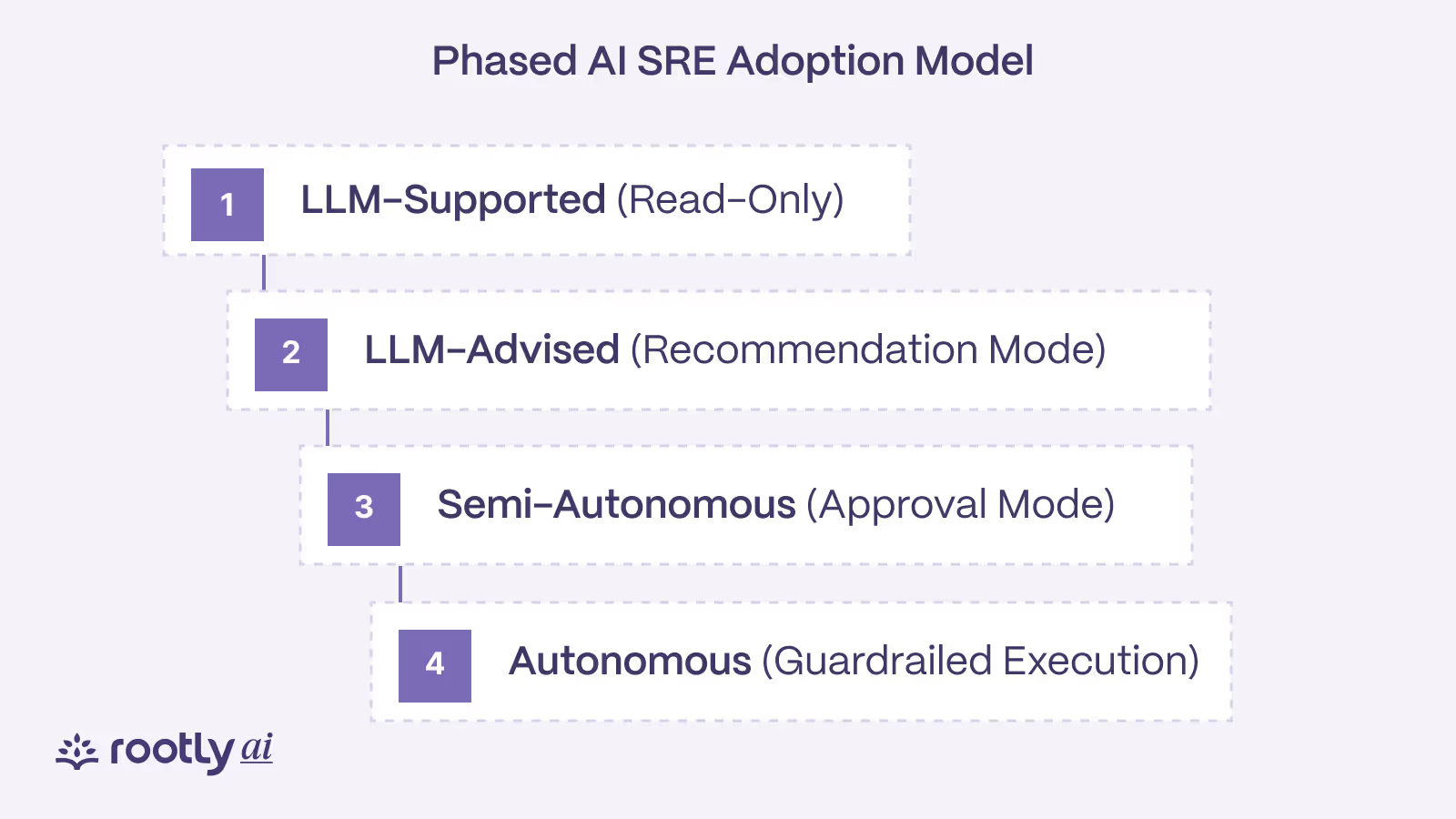
After replay evaluation, move through a narrow sequence:
- Observe: run read-only during live incidents and compare its investigation with the responder’s.
- Assist: let it post evidence and recommendations into the existing incident workflow.
- Approve: enable a small set of actions that always require explicit human approval.
- Bound: permit selected actions only when scope, health checks, rollback, identity, and audit requirements are satisfied.
- Expand deliberately: add incident classes and actions based on evaluated performance, not a general feeling that the agent is “ready.”
Start with one service family or incident class where telemetry is strong, ownership is clear, and enough past cases exist to evaluate. Keep the system inside the tools responders already use; a separate interface can add toil instead of removing it.
The implementation guide turns this into a rollout plan. The integrations guide can help teams inventory the data and controls required before a pilot.
Economic outcomes and reliability metrics
I would not justify an AI SRE pilot with a promise to “cut MTTR by X%.” Averages flatten incident severity, hide the spread of results, and can reward quick but risky action. As “Beyond MTTX” argues, time-based metrics need qualitative context.
Track a small set of measures across comparable incidents:
- time until the responder receives useful, relevant context;
- time until the correct service owner is engaged;
- percentage of claims linked to inspectable evidence;
- percentage of recommendations accepted, modified, or rejected;
- unsafe, irrelevant, or overconfident recommendations;
- number of manual searches and tool switches required;
- responder assessment of whether the system reduced cognitive load;
- customer-impact duration and recurrence, interpreted alongside incident severity.
For actions, also track rollback success, policy violations, approval behavior, and cases in which the system correctly declined to act. A non-action can be a successful outcome when the alternative is a fast, wrong mitigation.
The metrics and ROI guide offers a more complete evaluation framework.
Organizational and role impacts
This is the claim I am most careful with. AI-assisted incident investigation can help a team handle operational growth without increasing repetitive investigative work at the same rate. That is not the same as proving a company can operate reliably with fewer SREs.
The leverage appears when software takes on context collection, evidence organization, record keeping, and well-bounded procedural work. The people still define acceptable risk, set SLOs, design failure modes, improve observability, decide where automation is safe, and turn incident learning into system change.
That division matters. Introduce the tool as a headcount replacement and experienced responders have good reason to distrust it. Make a bounded promise—reduce repetitive investigation while preserving human judgment—and the team can test whether it helps.
The outcome I want is not fewer humans on the incident channel at any cost. It is fewer humans spending their time reconstructing facts that software could have assembled, and more attention available for decisions only they can own.
How Rootly AI SRE compares
Four kinds of product come up when engineers evaluate AI SRE: an agent built into an observability platform, an agent built into an incident management platform, a standalone AI SRE agent, and an AIOps platform that has added agents. The descriptions below come from each vendor’s own public pages, checked on October 14, 2026, and from Rootly’s product pages. Names and features in this category change quickly, so check the linked pages before you decide.
| Product | How the vendor describes it | Where an investigation starts | What it works from |
|---|---|---|---|
| Rootly AI SRE | An investigation and response engine built into Rootly’s incident management platform | The moment an alert fires | The tools you connect, plus past incidents in Rootly |
| Datadog Bits AI SRE (now Bits Investigation) | An always-on SRE agent | Datadog monitor alerts | Datadog telemetry |
| incident.io Investigations | An AI SRE inside incident.io’s software reliability platform | When an incident is declared, by condition or on demand | Telemetry, code changes, change events and past incidents |
| Resolve AI | An AI SRE platform that goes on-call for you | Alerts, as primary on-call | Your production tools, with context passed to coding agents |
| BigPanda | An agentic IT operations platform | Correlated alerts from monitoring tools | Monitoring, service desk, change and past-incident data |
Rootly AI SRE and Datadog Bits AI SRE
Datadog launched its agent as Bits AI SRE and now calls it Bits Investigation. Datadog describes it as “an always-on SRE agent built to handle complex troubleshooting and late-night alerts”. Its documentation says investigations start from monitor alerts, work from Datadog telemetry and are billed through Datadog AI credits.
Where it fits: teams whose metrics, logs, traces and deploy data mostly live in Datadog. The agent sees that data in depth without another integration.
How Rootly differs: Rootly AI SRE reads across the tools you connect, Datadog among them, and runs inside the incident: it ranks probable causes with confidence scores and the evidence for each, then stays with responders in Slack or Microsoft Teams through status updates and the retrospective. The two can run together, with Datadog as a data source and Rootly as the place the incident is coordinated.
Rootly AI SRE and incident.io
incident.io describes itself as a software reliability platform that unifies on-call, agentic root cause analysis, incident response and status pages. Its AI SRE is called Investigations. incident.io’s AI SRE page says Investigations starts the moment an incident is declared and connects telemetry, code changes and incident history to name a root cause, “with a confidence score and sources behind every finding.” The same page says the only change it can make to your systems is a pull request you review and merge. Its documentation lets teams run investigations automatically, by condition or on demand, and says each one posts its root cause, evidence and next steps into the incident channel.
Where it fits: teams that already run on-call and incident response in incident.io and want the agent in the same place.
How Rootly differs: the two products are close in shape. Each agent runs inside an incident management platform that also handles on-call and status pages, attaches confidence scores and evidence to its findings, and leaves changes to a person. The clearest difference is the starting point. Per Rootly’s AI SRE page, Rootly AI SRE starts investigating the moment an alert fires, before your team has finished reading the notification, and it never auto-remediates without human sign-off. Because each agent comes with its platform, teams comparing the two usually decide on the wider incident management platform.
Rootly AI SRE and Resolve AI
Resolve AI calls itself an “AI SRE platform” that “goes on-call on your behalf and autonomously resolves incidents.” Its site lists primary on-call that “triages and mitigates alerts” and “escalates to engineers when needed,” issue remediation that gives production context to coding agents, and custom SRE agents for production automation.
Where it fits: teams that want an agent to take first response on alerts and to hand recurring fixes to coding agents.
How Rootly differs: Rootly AI SRE sits inside the incident workflow responders already run, with on-call, incident channels, status pages and retrospectives in one platform. It recommends fixes with its reasoning shown and, per Rootly’s AI SRE page, never auto-remediates without human sign-off. Teams that want an agent to act alone on first response will weigh that differently from teams that want an on-call engineer to approve each action.
Rootly AI SRE and BigPanda
BigPanda presents itself as an agentic IT operations platform. It correlates signals from monitoring tools, and its AI agents “gather insights from service desk activity, past incidents, change data, and external observability sources.” Its AI Incident Assistant, Biggy, adds root-cause analysis to the incident workflow. Depending on which capabilities an admin has enabled, Biggy also covers parts of the response: it can open an incident channel, suggest which teams to page, write executive summaries and produce post-mortem reports.
Where it fits: enterprises with large monitoring estates and IT operations teams, where alert volume and correlation are the first problem to solve.
How Rootly differs: BigPanda is built around the event stream, and Biggy extends it into the response. Rootly AI SRE is built around the incident. Once an alert pages someone, it investigates across alerts, deploys, code changes and past incidents, then works with responders through coordination, stakeholder updates and the retrospective. If you already run Biggy’s incident features, compare the two step by step. If you use BigPanda mainly for correlation, the two run together: AIOps upstream for noise reduction, the AI SRE on the incidents that still reach a person. AI SRE vs AIOps covers that split in more detail.
Conclusion
After spending the past year digging into this category, I keep coming back to the same conclusion: the name may be awkward, but the evaluation does not have to be.
At the next incident review or product demo, I would ask:
- What changed?
- Which source supports each claim?
- What other hypothesis fits the evidence?
- What check would disprove the leading hypothesis?
- What is the smallest reversible next action?
- Who can approve it, and how is it rolled back?
- What will the system record if the recommendation is wrong?
If the product cannot answer those questions, it may still produce an impressive summary. I would not trust it as an incident investigation partner.
AI SRE is most useful when it makes the work visible instead of pretending it has disappeared: evidence before certainty, bounded action before autonomy, and augmentation before replacement. That is narrower than an “autonomous SRE.” It is also a promise an on-call engineer can test, which is where it has to survive.
Frequently asked questions
What is an AI SRE agent and what can it do today?
An AI SRE agent investigates production incidents alongside the on-call engineer. It gathers alerts, deploys, code changes and past incidents, ranks likely causes with the evidence for each, and recommends the next step within limits a human sets. Rootly AI SRE does this from the moment an alert fires, with confidence scores on each probable cause, similar-incident matching, drafted status updates and generated retrospectives.
Do AI SRE agents actually work, or are they just hype?
They work when they show their evidence and the operational foundations underneath them are sound: usable logs, accurate ownership and maintained runbooks. Judge an agent on the investigation trail it leaves. Treat any product that can’t show why it reached a conclusion as unproven. Rootly AI SRE attaches the evidence to every probable cause it ranks, so responders can check the reasoning.
Is Datadog Bits AI enough, or do we need a dedicated AI SRE?
If nearly all of your metrics, logs, traces and deploy data live in Datadog, its agent (Bits AI SRE, now called Bits Investigation) may cover much of the investigation. If the evidence is spread across several tools, an AI SRE that reads across them and works in the incident channel will see more of it. Rootly AI SRE connects to Datadog and your other tools, ranks probable causes with the evidence for each, and works the incident in Slack or Microsoft Teams.
How is Rootly AI SRE different from incident.io’s AI SRE?
incident.io’s AI SRE, called Investigations, runs inside incident.io’s platform and starts when an incident is declared, or by condition or on demand. Rootly AI SRE runs inside Rootly’s incident management platform and starts the moment an alert fires. Both attach confidence scores and evidence to their findings and leave changes to a person, and Rootly AI SRE never auto-remediates without human sign-off.
How is Rootly AI SRE different from Resolve AI?
Resolve AI describes itself as an AI SRE platform that goes on-call for you and resolves incidents autonomously. Rootly AI SRE runs inside Rootly’s incident management platform, alongside on-call, status pages and retrospectives. It starts investigating when the alert fires, shows its reasoning, and never auto-remediates without human sign-off.
Do we need an AI SRE if we already use BigPanda?
It depends on which BigPanda capabilities you have enabled. BigPanda centers on alert correlation and root-cause analysis, and its AI Incident Assistant, Biggy, can also open incident channels, suggest teams to page, write executive summaries and draft post-mortems. List what your responders still do by hand after the page: checking code changes and deploys, matching past incidents, coordinating responders, updating stakeholders and writing the retrospective. The longer that list, the more an AI SRE such as Rootly adds. Many teams keep AIOps for noise reduction and send what still gets through to the AI SRE.
What is AI SRE? A practical guide to AI-powered incident response