Investigate, coordinate, and respond to incidents in Google Chat with @Rootly.
Incident Response and the Rootly AI Agent are now available for use right in the channels your team already uses: Google Chat.
Investigate, coordinate, and respond to incidents in Google Chat with @Rootly.
On this page
Teams can now declare, investigate, collaborate, and resolve incidents all in Google Chat. When an incident starts, Rootly creates a dedicated space, invites the responders, and posts a live overview card.
From there, your team declares, pages, updates, mitigates, and resolves the whole incident right in Google Chat. Manage your incident using slash commands or @Rootly, your new incident response agent to support you throughout the investigation. It’s the full Rootly toolkit, in the channel your team already works in.
Rootly AI, in the thread with you
@Rootly is your incident response agent, right in the Google Chat space. Mention it and ask in plain language — it answers in the same thread, acts with your existing Rootly permissions, and identifies you by your Google account, so there’s no separate linking step. It works in the incident space, in team spaces, and in a direct message with Rootly.
Ask it to run the incident with you:
- Declare an incident: “@Rootly declare a SEV1, we’re seeing an increase in errors.” It proposes the severity, title, and summary, confirms with you, then opens the incident’s space.
- Take a role: “@Rootly assign me as the commander.” It confirms the role and updates the incident.
- Update the record: “@Rootly update the title, description, and impacted services — suggest the changes, then make the update.” It drafts them from the channel discussion and applies them for you.
- Catch up: “Catch me up” for a quick brief on status, the working theory, and the open action items.
- Check on-call: “Who’s on call for payments?” or “When am I next on call?”
It asks for confirmation before it pages or takes any destructive action, so you stay in control.
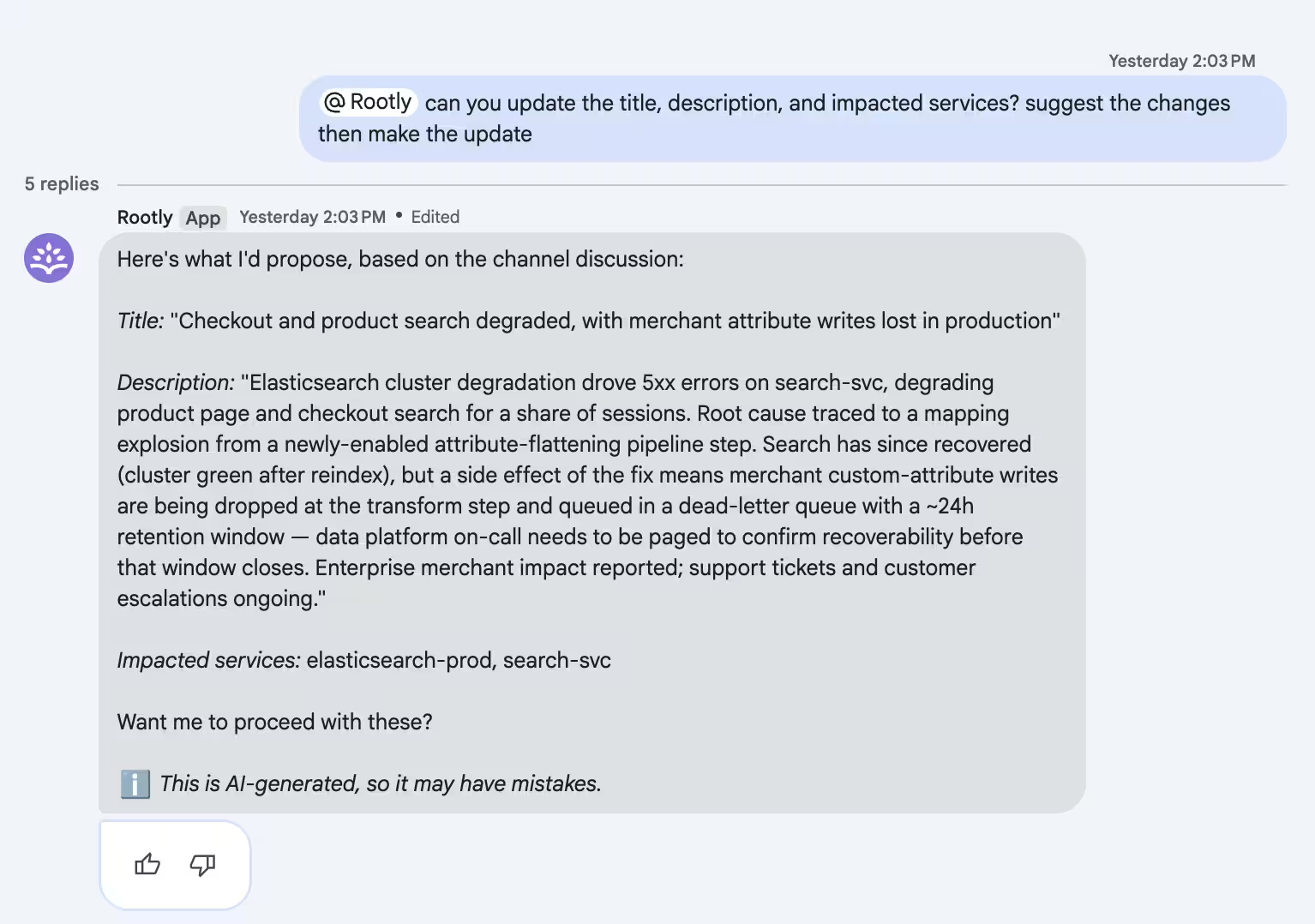
Ask @Rootly to update the title, description, and impacted services — it proposes the changes, then applies them.
Manage the whole incident from the space
When an incident starts, Rootly creates a dedicated Google Chat space, invites the responders, and posts a live overview card, so everything you need to run the incident is in one place. Update status and severity, assign roles, add timeline notes, create tasks and follow-ups, publish to your status pages, escalate, mitigate, and resolve — all without leaving the conversation. Drive it with the @Rootly agent, with /rootly slash commands, or by reacting to any message with an emoji to turn it into a timeline event, follow-up, or task.
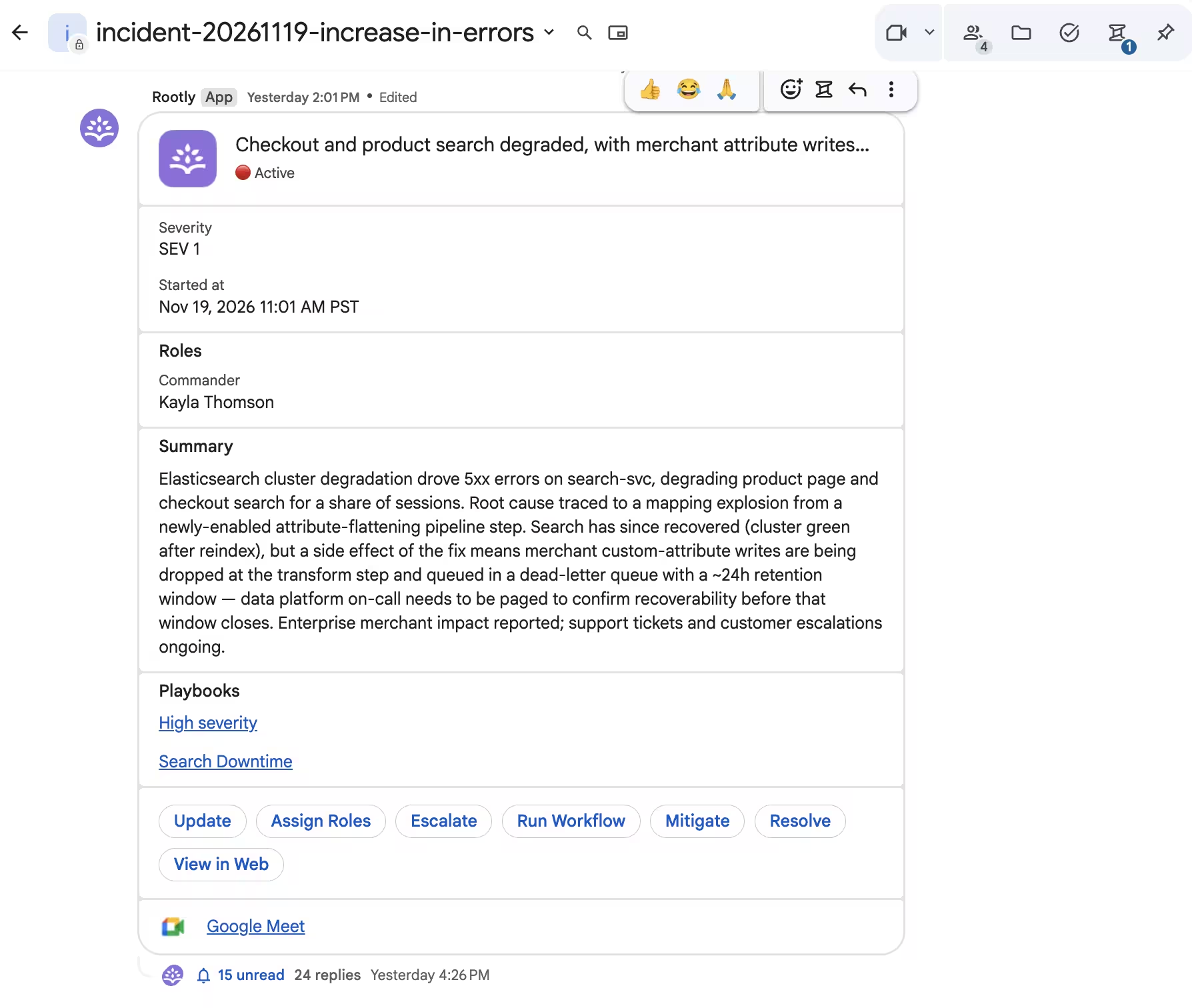
Every incident gets its own Google Chat space with a live overview card and one-tap actions — update, assign roles, escalate, mitigate, or resolve.
Learn from every incident
When an incident wraps up, ask @Rootly to create its retrospective, and it uses context from the incident so the owner can start reviewing right away. Lifecycle updates post back into the space as they happen — roles assigned, action items added, meeting recordings, and the retrospective when it’s published — so the learnings land where the team already is, and the next incident starts from what the last one taught you.
What’s included
- A dedicated Google Chat space per incident, created automatically, with a live overview card
/rootlyand/incidentslash commands to declare, update, mitigate, resolve, assign roles, set severity, add notes, create tasks and follow-ups, and publish status page updates- Emoji reactions that turn a message into a timeline event, follow-up, or task
- On-call paging from Google Chat: alert cards with acknowledge, resolve, escalate, and snooze, plus
/rootly oncall,/rootly escalate,/rootly override, and shift and coverage notifications - The Rootly AI agent (@Rootly) in incident spaces, team spaces, and DMs, with your existing Rootly permissions and confirmation cards
- Lifecycle notifications for roles, action items, meeting recordings, and published retrospectives
- Workflow actions to create, rename, invite to, and manage Google Chat spaces automatically
Why it matters
Reliability isn’t one tool’s job, and it shouldn’t force your team into one chat app. Teams that run on Google Chat can now get full incident response and the Rootly AI agent without adopting a new process or a new place to work. Responders mitigate and resolve faster because every action is one message away, and they keep learning from each incident so the same one is less likely to come back.
Get started
Install the Rootly app from the Google Workspace Marketplace, add the bot to a space, and run /rootly to connect that space to your Rootly team. To turn the agent on, an Owner or Admin opens AI & Agents and switches on Rootly Agent in Google Chat. Start with the Google Chat integration docs and Rootly AI in Google Chat.
What else shipped
Improvements
On-Call
- Deferred alerts now show their “deferred until” time in your own time zone, with the zone labeled.
Incident Response
- The status page incident picker now sorts newest first.
API & CLI
Incident Response
- The Rootly CLI adds an
escalateverb to page a team, status page commands, andworkflows listandworkflows run;incidents createandincidents updatenow accept--servicesand--types. - The MCP server now accepts the
claude://redirect, so Claude Desktop and the Claude Code SDK can connect.
Terraform
- The Terraform provider now supports granular incident permission sets, including severity-based rules and resource or field restrictions, not just create, read, update, and delete.
Fixes
On-Call
- Copying several rotations in quick succession now gives each one a unique name so the schedule saves.
Incident Response
- Exporting a retrospective to Notion no longer creates duplicate “Incident Retrospectives” databases.
Related changelogs

Investigate, page, and catch up with @Rootly in Microsoft Teams.
Mention @Rootly in Teams to investigate, check recent deploys, page responders, and catch up on the bridge.
Catch up on any incident in seconds with AI Timelines.
AI Timelines pins a live AI summary and the key moments of every incident in Slack, so anyone can catch up in seconds. Now in early access.
Cover shifts, find out who's on call, and start retros with @Rootly.
Rootly AI can now create overrides, look up who's on call, create retrospectives, and answer questions about Rootly.