
Alert management automation uses predefined rules, integrations, and workflows to turn monitoring signals into coordinated response actions. Instead of requiring someone to review every notification manually, automation can group related alerts, add operational context, apply routing rules, follow escalation policies, and launch an incident response workflow.
This shortens the time between detection and action. It also reduces repetitive work during incidents, allowing on-call teams to focus on diagnosis and recovery instead of administrative tasks.
Effective automation does not remove people from incident response. It gives responders a faster, more consistent starting point while preserving human judgment for complex or high-risk decisions.
What is alert management automation?
Alert management automation is the process of automatically handling alerts as they move from monitoring systems to responders and incident management workflows.
A typical automated process can:
- Collect alerts from monitoring and observability tools
- Normalize incoming alert data
- Deduplicate repeated notifications
- Correlate related signals
- Add service and diagnostic context
- Route alerts to the responsible team
- Escalate alerts that are not acknowledged
- Create an incident and response channel
- Assign incident roles
- Notify stakeholders
- Execute approved runbooks
- Record the incident timeline
Without automation, engineers may need to review a notification, identify the affected service, find its owner, locate the relevant dashboard, contact the on-call responder, and create a communication channel manually. Each step creates another opportunity for delay or error.
Automation performs many of these predictable tasks immediately and consistently.
Why alert management automation matters
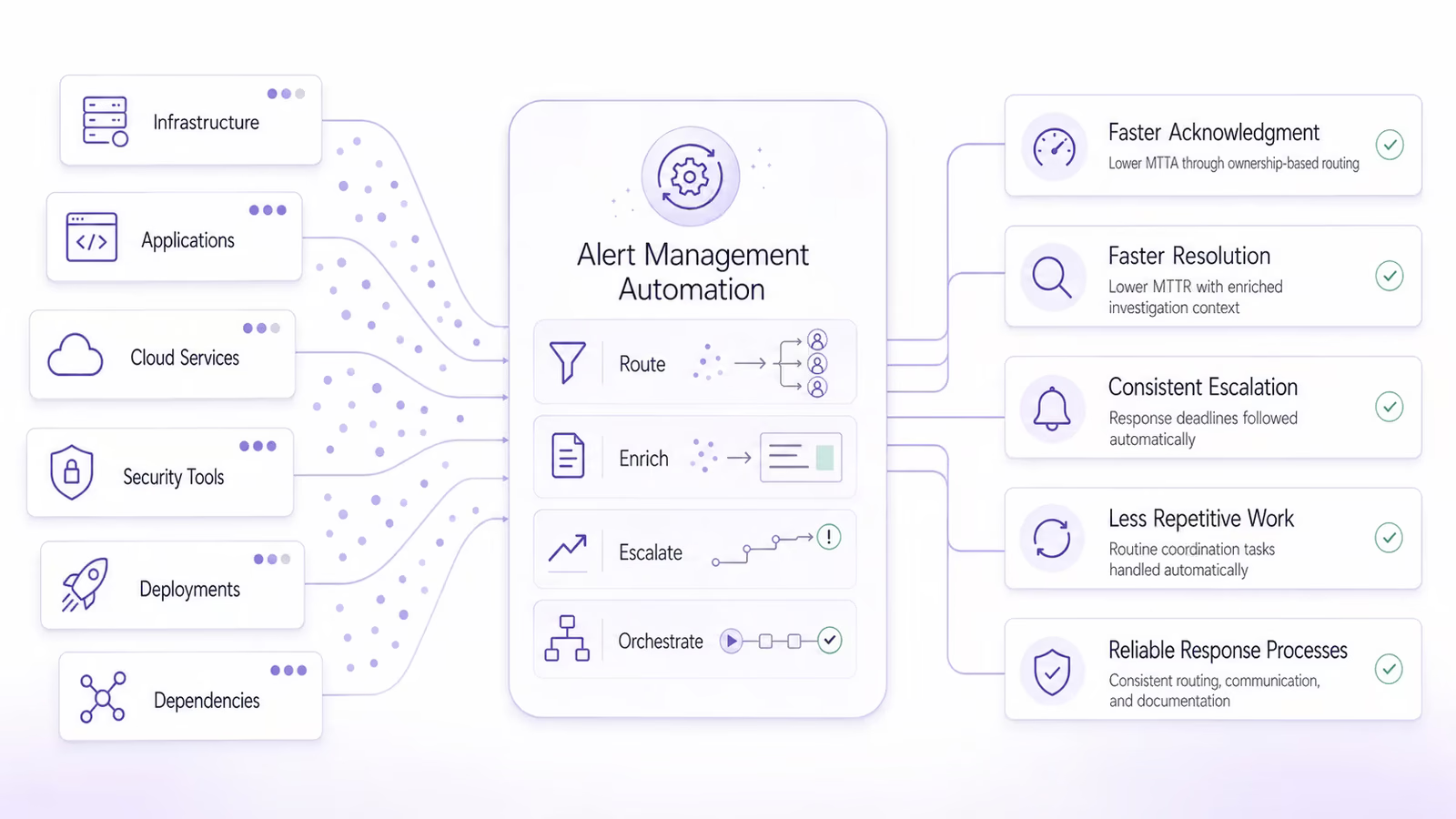
Modern systems generate alerts from infrastructure, applications, cloud services, security tools, deployment pipelines, and third-party dependencies. As monitoring coverage expands, alert volume often grows faster than the team responsible for responding to it.
A high volume of alerts does not necessarily improve reliability. If alerts are repetitive, poorly routed, or missing context, responders spend more time separating meaningful signals from operational noise.
Alert management automation helps address this problem by turning raw notifications into structured actions.
Faster acknowledgment
Automated routing sends an alert directly to the person or team responsible for the affected service. This reduces the time spent forwarding notifications or identifying ownership.
The result can be a lower Mean Time to Acknowledge (MTTA), which measures how long it takes for a responder to acknowledge an alert after it is triggered.
Faster resolution
Enriched alerts can include logs, dashboards, deployment information, dependencies, and runbooks. Responders begin their investigation with useful context instead of searching for it across multiple tools.
Automated workflows also reduce coordination delays, which can help lower Mean Time to Resolution (MTTR).
More consistent escalation
An automated escalation policy follows the same response deadlines every time. If the primary responder does not acknowledge an alert, the platform contacts the next responder without waiting for someone to intervene manually.
Less repetitive work
Creating incident channels, inviting responders, opening tickets, recording events, and sending status updates are necessary tasks. However, they can distract engineers from diagnosing and resolving the underlying issue.
Automating these actions allows responders to concentrate on recovery.
More reliable response processes
Manual response procedures can vary depending on who receives the alert. Automation makes routing, escalation, communication, and documentation more consistent across incidents.
How alert management automation works
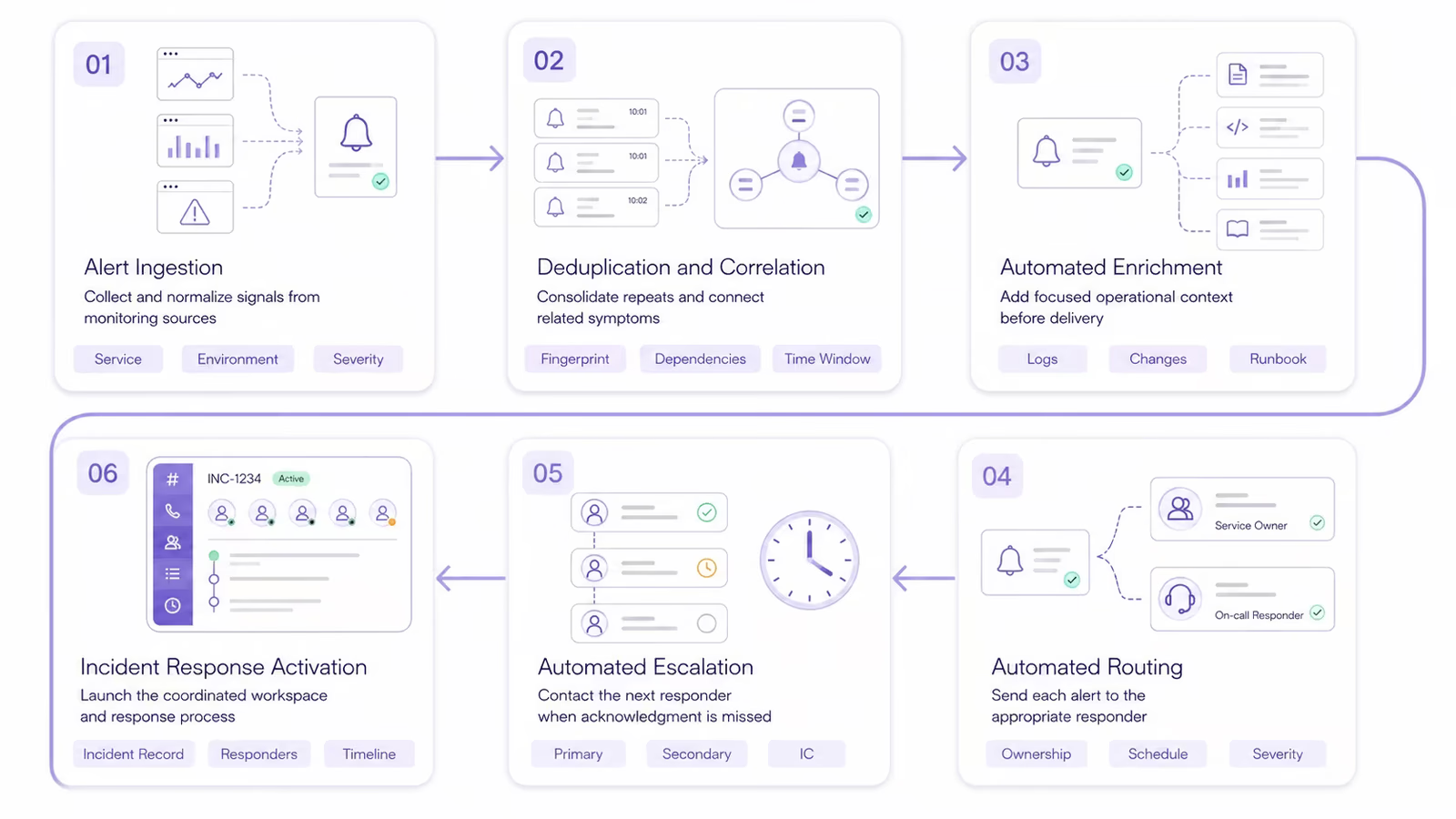
Alert automation connects monitoring signals to a series of decisions and actions. Although the exact workflow varies between organizations, most systems follow the same general stages.
1. Alert ingestion
Monitoring and observability tools identify abnormal system behavior and send signals to an alert management platform.
These signals may come from tools such as:
- Datadog
- Prometheus
- Grafana
- Splunk
- Cloud monitoring services
- Application Performance Monitoring (APM) tools
- Security platforms
- Deployment systems
- Custom monitoring scripts
Because different tools use different data formats, the alert management platform may normalize incoming information into a consistent structure. Common fields include the service, environment, severity, resource, region, alert type, and creation time.
Normalization allows the same routing and automation rules to work across multiple monitoring sources.
2. Deduplication and correlation
A single failure can generate many notifications. For example, an unavailable database may cause application errors, failed health checks, slow response times, and connection warnings across several dependent services.
Without deduplication, each notification may create a separate page or incident.
Automated deduplication identifies repeated alerts using attributes such as:
- Alert fingerprint
- Service name
- Resource identifier
- Error message
- Monitoring source
- Environment
- Time window
Matching alerts can be grouped into one active alert while a counter records how often the condition has occurred.
Correlation goes further by identifying different alerts that may share the same cause. It can use timing, topology, service dependencies, recent changes, or historical incident patterns to connect related events.
Instead of receiving dozens of disconnected warnings, responders receive a smaller number of actionable alert groups.
3. Automated enrichment
Raw monitoring signals often state what crossed a threshold but provide little guidance about the wider situation.
Automated enrichment adds relevant operational context before the alert reaches a responder. This may include:
- Affected service
- Service owner
- Production environment
- Severity level
- Current system health
- Relevant logs and traces
- Monitoring dashboards
- Recent deployments
- Configuration changes
- Upstream and downstream dependencies
- Previous related incidents
- Runbook instructions
- Customer or business impact
For example, a high error-rate alert becomes more useful when it also shows that a new deployment occurred five minutes earlier and links to the rollback procedure.
Enrichment should remain focused. Attaching every available log, dashboard, and document can replace missing context with information overload. The goal is to surface the information most likely to help the responder make the next decision.
4. Automated routing
Routing rules determine who should receive an alert.
Instead of sending every notification to a shared channel, the platform can evaluate fields such as:
- Affected service
- Service owner
- Environment
- Severity
- Region
- Alert source
- Customer impact
- Time of day
- Current on-call schedule
The alert can then be sent to the appropriate team or individual.
For example, a critical production database alert may immediately page the database team’s primary on-call engineer. A non-critical staging warning may create a ticket for review during working hours.
This makes the notification method proportional to the urgency of the problem.
5. Automated escalation
Routing identifies the initial responder. Escalation determines what happens if that responder does not acknowledge the alert.
An automated escalation workflow may:
- Notify the primary on-call engineer.
- Wait for a defined acknowledgment period.
- Notify the secondary responder if the alert remains unacknowledged.
- Escalate to the team lead or Incident Commander (IC).
- Notify additional technical or business stakeholders if required.
Escalation deadlines should reflect severity and service criticality. A customer-facing outage may require acknowledgment within minutes, while a low-priority operational warning may be handled during normal working hours.
The workflow should stop when the alert is acknowledged, resolved, suppressed, or identified as a duplicate.
6. Incident response activation
Some alerts can be resolved by a single responder. Others require coordination across several teams.
When an alert meets defined incident criteria, automation can:
- Create an incident record
- Assign an initial severity
- Open a Slack or Microsoft Teams channel
- Invite the relevant responders
- Start a conference bridge
- Assign or suggest incident roles
- Create a ticket
- Attach dashboards and runbooks
- Notify stakeholders
- Update an internal or public status page
- Begin recording the incident timeline
This gives responders an organized workspace as soon as the incident begins.
Automated alert routing
Automated routing works best when the organization has clear service ownership. The platform needs to know which team is responsible for each application, infrastructure component, and dependency.
Ownership data may be maintained in a service catalog, internal directory, or Configuration Management Database (CMDB).
Routing by service ownership
Service-based routing sends an alert directly to the team that can act on it.
For example:
- Database alerts go to the database team.
- Payment processing alerts go to the payments team.
- Authentication alerts go to the identity team.
- Network alerts go to the infrastructure team.
This prevents alerts from circulating through broad channels while teams determine who should respond.
Every service should also have fallback ownership. If the primary team cannot be reached, the platform needs a clear secondary destination.
Routing by severity
Not every alert requires an immediate page.
Severity-based rules can send:
- Critical alerts through phone, Short Message Service (SMS), and mobile push notifications
- High-severity alerts to the active on-call responder
- Medium-severity alerts to a team channel or ticket
- Low-severity alerts to a review queue or scheduled report
Severity should reflect customer and business impact, not only technical measurements. A high Central Processing Unit (CPU) reading on an unused development instance should not receive the same treatment as a failed payment service.
Routing by environment
Production systems usually require stricter notification rules than staging or development environments.
Environment-based routing helps teams prevent test failures and temporary development issues from unnecessarily paging on-call responders. It also allows production alerts to use shorter acknowledgment deadlines and broader escalation paths.
Routing by schedule and location
On-call rotations tell the platform who is currently responsible for a service.
Global organizations can also use follow-the-sun schedules to route alerts to a team working during local business hours. Schedule overrides, holidays, time off, and temporary replacements should be reflected automatically so notifications do not go to unavailable responders.
Automated alert enrichment
Alert enrichment gives responders the information they need to begin triage.
A useful enriched alert should answer several immediate questions:
- What failed?
- Which service is affected?
- Is the issue occurring in production?
- How severe is the impact?
- Who owns the service?
- What changed recently?
- Which systems depend on it?
- Has this happened before?
- Is there a documented response procedure?
The exact context should depend on the alert type.
A deployment-related alert may include the release version, commit, deployment owner, and rollback instructions. An infrastructure alert may include capacity graphs, instance details, and regional health. A security alert may require user, device, and access information.
Good enrichment reduces context switching. Responders do not need to open several systems and repeat the same searches during every incident.
However, enrichment data must remain current. An outdated runbook or incorrect service owner can create more confusion than an alert with no enrichment at all.
Automated escalation policies
An escalation policy defines who should be contacted, when they should be contacted, and what happens when an alert is not acknowledged.
Set acknowledgment deadlines
Each escalation level should have a clear acknowledgment period.
Critical outages may require a response within a few minutes. Lower-severity alerts may allow more time or create a ticket without paging anyone.
If deadlines are too short, backup responders may be contacted before the primary responder has a reasonable opportunity to act. If they are too long, customer impact may continue without an active response.
Add multiple escalation levels
A typical escalation policy may include:
- Primary on-call responder
- Secondary responder
- Team lead
- Incident management team
- Business or executive stakeholder
The policy should end with someone who has the authority and context to coordinate a broader response.
Use appropriate notification channels
Escalation workflows can use multiple methods, including:
- Mobile push notifications
- Phone calls
- SMS messages
- Slack
- Microsoft Teams
Urgent incidents often require more persistent channels than low-priority alerts. Teams should also test whether every responder can receive notifications through the configured methods.
Prevent escalation loops
Poorly designed policies may repeatedly notify the same people or continue paging after the issue has been addressed.
Escalation workflows should include:
- Clear stop conditions
- A final escalation owner
- Limits on repeated notifications
- Timeouts
- Duplicate suppression
- Rules for resolved or acknowledged alerts
Regular testing helps teams identify expired contact information, missing schedule coverage, and unreachable fallback responders before a real incident occurs.
Workflow automation for incident response
Alert management does not end when someone receives a notification. Major incidents require coordination, communication, documentation, and structured decision-making.
Workflow automation handles the predictable parts of this process.
Automatically create an incident
Organizations can define the conditions that convert an alert into an incident.
These conditions may include:
- Critical severity
- Confirmed customer impact
- Multiple correlated alerts
- Failure of a business-critical service
- Regional or global impact
- Security or compliance risk
- Sustained error or availability thresholds
Incident creation rules should be selective. Automatically creating an incident for every warning can overwhelm responders and recreate the same noise problem at a different stage of the process.
Establish communication channels
Once an incident is declared, automation can create a dedicated communication channel and invite the appropriate responders.
The channel can begin with a structured summary containing:
- Incident title
- Severity
- Affected service
- Known impact
- Current responder
- Relevant dashboards
- Recent changes
- Runbook link
- Conference bridge
- Status update schedule
This gives everyone a shared operational picture from the beginning.
Assign incident roles
Complex incidents benefit from clearly defined responsibilities.
Common roles include:
- Incident Commander (IC), who coordinates the response
- Operations Lead, who directs technical investigation and recovery
- Communications Lead, who manages stakeholder updates
- Subject Matter Expert (SME), who provides service-specific knowledge
- Scribe, who records decisions and important events
Automation can assign initial roles based on schedules, services, and team responsibilities. Responders should still be able to confirm, reassign, or remove roles as the incident develops.
Automate stakeholder communication
Stakeholders need accurate information, but responders should not have to rewrite the same update for several channels. A defined incident communication process gives the automation clear audiences, approval boundaries, and update expectations.
Workflow automation can:
- Send an initial incident notification
- Remind the Communications Lead when an update is due
- Publish approved updates to internal channels
- Update a public status page
- Notify customer support
- Inform leadership when severity increases
- Send a resolution notice when service is restored
Sensitive or external communications may still require human approval. Automation can prepare and distribute updates without deciding what the organization should say in high-risk situations.
Record the incident timeline
Incident documentation is often incomplete when responders rely on manual note-taking during a stressful event.
Automation can record:
- Alert creation
- Initial notification
- Acknowledgment
- Escalation
- Incident declaration
- Role assignments
- Severity changes
- Important messages
- Status updates
- Remediation actions
- Resolution
The resulting timeline supports handoffs during the incident and provides evidence for the post-incident review.
Runbook automation
A runbook is a documented sequence of steps used to diagnose or resolve a known operational problem.
Runbook automation allows a platform to execute some or all of those steps when specific conditions are met.
Common automated runbook actions include:
- Gathering diagnostic logs
- Running health checks
- Restarting an unhealthy service
- Scaling infrastructure
- Clearing a queue
- Rolling back a deployment
- Rotating traffic to another region
- Creating a backup before remediation
The safest starting point is diagnostic automation. Collecting logs, checking dependencies, and retrieving system health information can save time without changing production systems.
Remediation requires stronger controls.
When human approval is necessary
Teams should require approval for actions involving:
- Database changes
- Data deletion or restoration
- Production failovers
- Security containment
- Broad infrastructure changes
- Customer-facing configuration changes
- Actions without a reliable rollback procedure
A predictable task is not automatically a safe task. The possible impact, access requirements, and reversibility should determine the level of human oversight.
Runbook safety controls
Automated runbooks should include:
- Role-Based Access Control (RBAC)
- Approval requirements
- Audit logs
- Execution timeouts
- Rate limits
- Stop conditions
- Rollback procedures
- Testing in non-production environments
Responders should be able to see which action was executed, who approved it, what the result was, and whether any follow-up step is required.
Rule-based and AI-assisted automation
Most alert management automation begins with predefined rules.
A rule might state that if a critical production alert affects the payment service, the platform should notify the payments on-call engineer, create an incident, and open a Slack channel.
Rule-based automation works well when conditions and desired actions are clear. It is predictable, explainable, and relatively easy to audit.
Artificial Intelligence (AI) can support workflows where fixed rules are less effective.
AI-assisted alert management may:
- Identify similarities among alerts
- Correlate signals across monitoring tools
- Recommend the likely service owner
- Summarize incident activity
- Highlight recent deployments
- Suggest relevant runbooks
- Draft stakeholder updates
- Generate a post-incident review summary
AI can help teams process large amounts of operational data, but its recommendations should remain visible and reviewable. Responders need to understand what the system recommends and retain control over high-impact decisions.
Alert management automation use cases
Production service outage
A monitoring platform detects an increase in errors and failed health checks.
Automation groups the duplicate signals, identifies the affected service, and pages its on-call owner. It creates an incident channel, attaches recent deployment information, adds the relevant dashboards, and begins the escalation timer.
If the responder does not acknowledge the alert, the secondary responder and team lead are notified automatically.
Failed deployment
Application telemetry shows that error rates increased immediately after a new release.
The alert is enriched with the release version, deployment time, owner, and affected services. The deployment team is notified, and the relevant rollback runbook is attached.
If the organization permits automated rollback, the platform can request approval or execute the rollback when predefined safety conditions are satisfied.
Security alert
A security platform identifies suspicious access to a sensitive system.
Automation enriches the alert with user, device, location, and access information before routing it to the Security Operations Center (SOC). A restricted incident channel is created, and approved containment workflows are made available.
Because security actions can affect access and evidence, human authorization may be required before accounts are disabled or systems are isolated.
Capacity threshold breach
Infrastructure monitoring detects high resource utilization.
Duration rules determine whether the condition is a temporary spike or a sustained capacity issue. Short-lived alerts are suppressed, while persistent demand triggers an infrastructure workflow.
The system may automatically collect capacity data, recommend scaling, or perform an approved scaling action.
Risks and limitations of alert automation
Automation can accelerate response, but poorly designed workflows can also accelerate mistakes.
Incorrect routing
Outdated ownership data may send an alert to the wrong team. Service catalogs, schedules, and fallback ownership must be reviewed whenever organizational responsibilities change.
Over-automation
Automating every possible step can make workflows difficult to understand and maintain. It can also allow a minor detection error to trigger a series of unnecessary actions.
Teams should prioritize automation that removes clear, repetitive work.
Automation loops
An automated action may produce another alert, which triggers the same action again.
Rate limits, execution limits, cooldown periods, and stop conditions can prevent these loops from consuming resources or repeatedly changing a system.
Poor alert quality
Automation cannot fully correct vague alerts, inaccurate thresholds, or missing severity information.
If an alert does not represent an actionable condition, routing it faster will not make it more useful. Teams should improve alert quality before adding complex response workflows.
Unclear ownership
Every automated workflow needs an owner who is responsible for testing, approving, and updating it.
Without ownership, workflows can remain active long after the systems and teams they reference have changed.
Alert management automation best practices
Start with repetitive manual work
Review recent incidents to find tasks responders perform repeatedly. Common starting points include routing, enrichment, channel creation, stakeholder notifications, and timeline capture.
Prioritize automation that saves time without introducing significant operational risk.
Automate incrementally
A practical order is:
- Improve alert quality.
- Add deduplication and grouping.
- Automate routing.
- Add alert enrichment.
- Configure escalation policies.
- Create incident response workflows.
- Introduce approved runbook automation.
This sequence allows teams to establish reliable inputs before automating high-impact actions.
Keep humans in control
Responders should be able to pause, override, or cancel automated workflows.
The platform should clearly show:
- Which rule triggered
- Which action was performed
- What data influenced the decision
- Who approved the action
- Whether the action succeeded
- How to reverse the change when possible
Maintain a reliable source of truth
Automation depends on accurate operational data.
Teams should keep the following information current:
- Service ownership
- On-call schedules
- Escalation contacts
- Service dependencies
- Runbooks
- Severity definitions
- Notification preferences
- Stakeholder lists
An automated workflow is only as reliable as the information used to drive it.
Test workflows regularly
Escalation paths and incident workflows should be tested before they are needed.
Testing should confirm that:
- The correct responder receives the alert
- Backup responders can be reached
- Schedule overrides work
- Channels and tickets are created correctly
- Enrichment links remain valid
- Runbooks execute safely
- Stop conditions prevent repeated actions
- Failed automation produces a visible error
These checks can be included in scheduled incident response exercises.
Measure performance
Teams should evaluate whether automation is improving response rather than simply increasing activity.
Useful metrics include:
- Mean Time to Acknowledge (MTTA)
- Mean Time to Resolution (MTTR)
- Alert volume
- Deduplication rate
- Escalation frequency
- Percentage of correctly routed alerts
- Percentage of incidents created automatically
- Failed automated actions
- Manually overridden workflows
- Responder feedback
A high automation rate is not the goal by itself. The goal is faster, safer, and more consistent incident response.
How to implement alert management automation
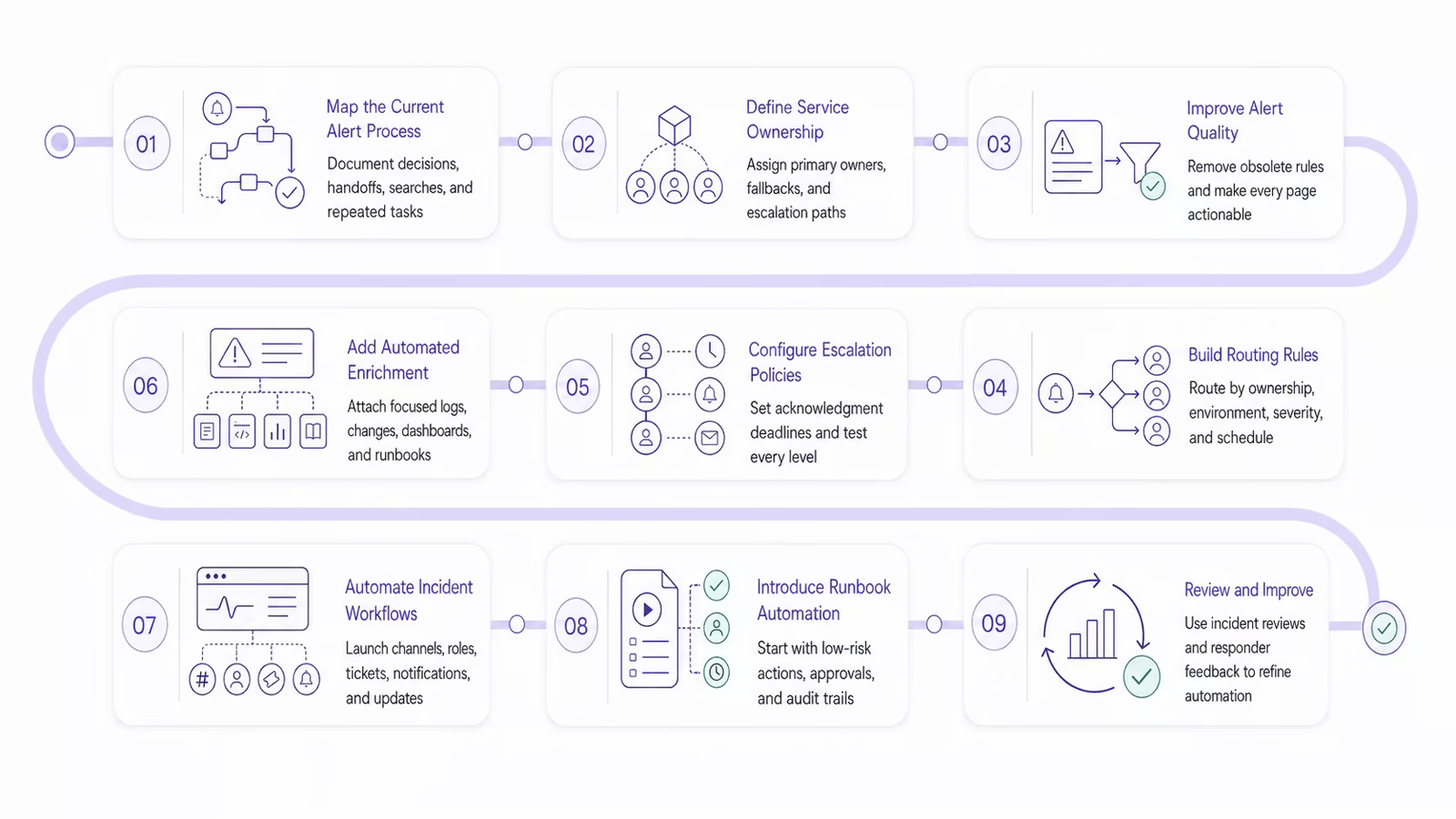
Step 1: Map the current alert process
Document what happens from the moment an alert is created until the underlying issue is resolved.
Identify where responders need to make decisions, search for information, transfer ownership, or repeat administrative tasks.
Step 2: Define service ownership
Assign every production service to a responsible team. Document the primary owner, fallback owner, escalation path, and communication channels.
Step 3: Improve alert quality
Remove obsolete alerts, adjust unreliable thresholds, and ensure every page represents an actionable condition.
Alerts should clearly state the affected service, environment, severity, and expected responder action.
Step 4: Build routing rules
Create rules based on service ownership, environment, severity, region, and schedule.
Include fallback behavior for alerts with incomplete ownership data or unavailable responders.
Step 5: Configure escalation policies
Set acknowledgment deadlines and define each escalation level.
Test the entire path, including phone calls, SMS messages, mobile notifications, and fallback contacts.
Step 6: Add automated enrichment
Connect alerts to logs, dashboards, deployment systems, service catalogs, dependency data, and runbooks.
Keep the attached context relevant to the specific alert.
Step 7: Automate incident workflows
Define when alerts should create incidents. Configure incident channels, role assignments, tickets, stakeholder notifications, and status updates.
Step 8: Introduce runbook automation
Begin with diagnostic steps and low-risk actions. Add approval requirements and audit trails before introducing production remediation.
Step 9: Review and improve
Use incident reviews and responder feedback to identify routing failures, unnecessary escalations, missing context, and unsafe actions.
Automation should evolve with the systems and teams it supports.
How Rootly supports alert management automation
Rootly helps teams connect alerts with structured incident response workflows.
Teams can use Rootly to centralize incident operations, coordinate responders, automate communication, and capture important incident activity. Customizable workflows can create incident channels, notify stakeholders, assign responsibilities, update status pages, and record timelines based on the conditions defined by the organization.
By bringing automation into the incident response process, Rootly helps teams reduce coordination delays while maintaining visibility and human control.
The result is a more consistent path from detection to acknowledgment, response, and resolution.
Frequently asked questions
How long does it take to implement alert management automation?
Implementation time depends on the number of monitoring tools, services, teams, and workflows involved. Basic routing and escalation rules may be configured quickly, while organization-wide automation involving service catalogs, runbooks, and complex integrations can require several phases. Starting with one service or alert type allows teams to demonstrate value before expanding.
Can small engineering teams benefit from alert management automation?
Yes. Small teams can use automation to reduce interruptions, route alerts according to limited on-call coverage, and handle repetitive coordination tasks. Even simple workflows, such as enriching alerts and escalating missed notifications, can help a small team respond more efficiently without adding operational staff.
What tools integrate with alert management automation platforms?
Alert management platforms commonly integrate with monitoring tools, observability platforms, service catalogs, ticketing systems, chat applications, status pages, deployment tools, and cloud services. The right integrations depend on where a team detects issues, communicates during incidents, and records operational activity.
What happens if an automated alert workflow fails?
A failed workflow should generate a visible error and follow a predefined fallback process. This may include notifying an operations channel, routing the alert through a secondary method, or assigning it to a default response team. Teams should test fallback paths regularly so automation failures do not cause critical alerts to be missed.
How often should alert automation rules be reviewed?
Teams should review automation rules regularly and whenever services, ownership assignments, monitoring tools, or on-call schedules change. Incident reviews can also reveal outdated routing logic, unnecessary escalations, missing context, or workflows that no longer reflect the current response process.
How can teams calculate the ROI of alert management automation?
Teams can compare implementation and maintenance costs with reductions in MTTA, MTTR, manual response work, unnecessary pages, and incident-related downtime. Responder feedback, routing accuracy, escalation frequency, and the number of administrative tasks eliminated can also help demonstrate the operational value of automation.
Build a faster, more consistent response process
Alert management automation connects detection to action. It ensures meaningful alerts reach the correct responders, contain useful operational context, follow reliable escalation paths, and activate structured incident response workflows when necessary.
The strongest automation programs begin with accurate alerts and clear service ownership. From there, teams can gradually automate routing, enrichment, escalation, communication, documentation, and safe runbook actions.
When supported by regular testing and human oversight, automation reduces operational overhead without sacrificing control. Responders spend less time coordinating routine tasks and more time understanding impact, restoring service, and preventing the incident from happening again.
Alert management automation: automating routing, escalation, and incident response