
Alert management software should help teams act faster when a service, application, or infrastructure component fails. The right platform turns monitoring signals into actionable notifications, routes them to the responsible person, and escalates them until someone takes ownership. For organizations managing complex rotations and after-hours coverage, a reliableon-call response process helps ensure urgent alerts reach the right responder.
Choose alert management software by evaluating how well it reduces alert noise, reaches the correct responder, supports on-call workflows, integrates with existing systems, and improves incident response without adding unnecessary complexity.
The buying process should start with operational requirements rather than vendor feature lists. A platform may offer hundreds of integrations or advanced artificial intelligence, but those capabilities provide little value if critical alerts are delayed, routed incorrectly, or buried in noise. After defining the requirements, use the alert management software comparison to evaluate the likely shortlist.
What is alert management software?
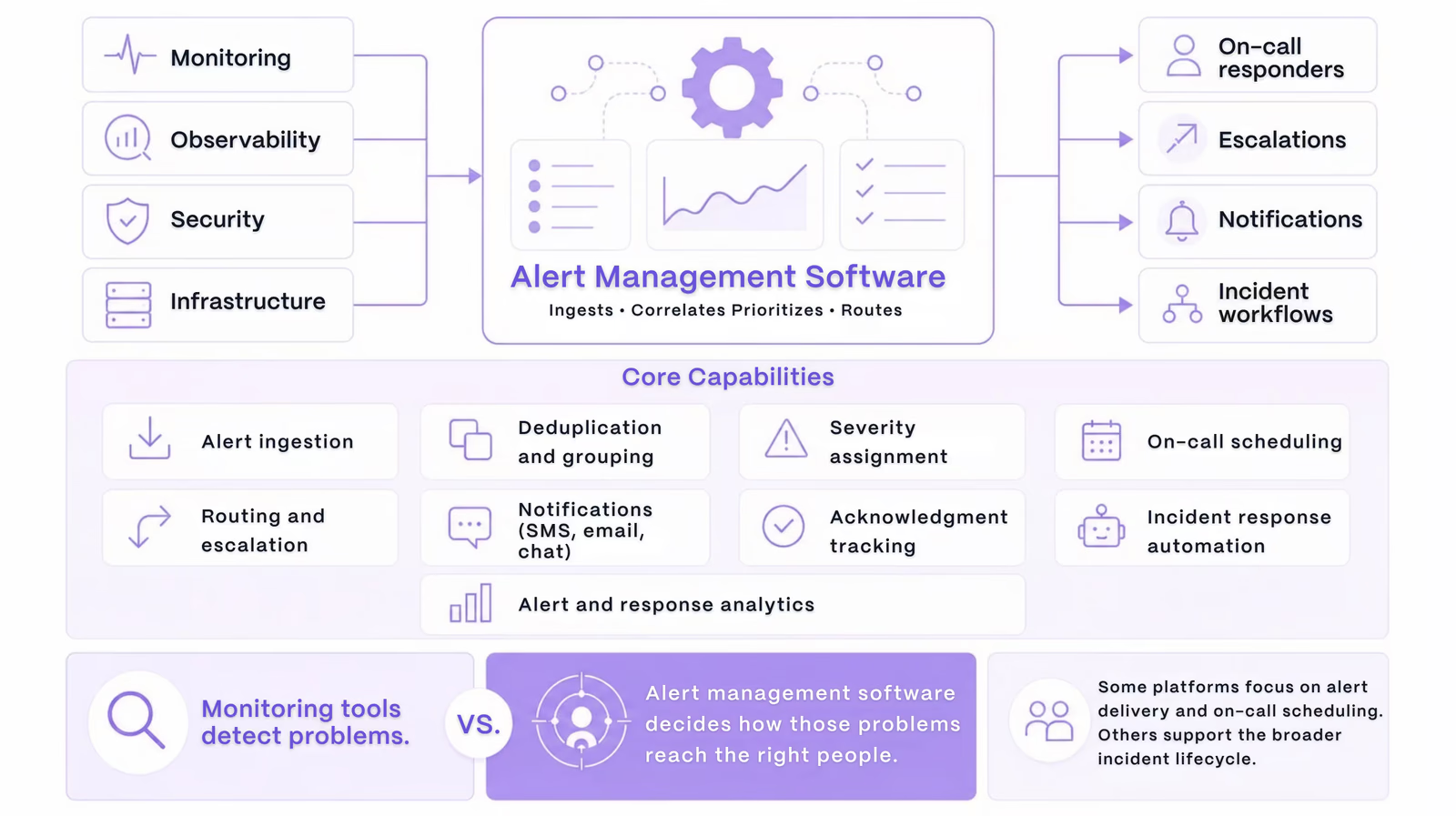
Alert management software receives events from monitoring, observability, security, and infrastructure tools and determines which alerts require human attention.
It commonly handles:
- Alert ingestion
- Deduplication and grouping
- Severity assignment
- On-call scheduling
- Routing and escalation
- SMS, voice, push, email, and chat notifications
- Acknowledgment tracking
- Incident response automation
- Alert and response analytics
Monitoring tools detect problems. Alert management software decides how those problems should reach the people responsible for resolving them.
Some platforms focus primarily on alert delivery and on-call scheduling. Others support the complete incident lifecycle, including incident declaration, collaboration, stakeholder communication, automation, and post-incident reviews.
Start with your operational requirements
The right platform depends on how the organization currently handles alerts and where that process breaks down.
Before reviewing products, identify the main buying trigger. Common problems include:
- Critical alerts are missed.
- Responders receive too many unnecessary notifications.
- Alerts are repeatedly routed to the wrong team.
- On-call schedules are managed manually.
- Escalation policies are inconsistent.
- Incident coordination begins too slowly.
- Multiple tools create fragmented workflows.
- Alerting costs are difficult to predict.
- Reporting does not reveal recurring operational issues.
Translate these problems into measurable goals.
Instead of stating that the organization needs “better alerting,” define a result such as reducing nonactionable after-hours notifications, improving acknowledgment times, or decreasing the number of alerts sent to the wrong team.
Requirements should also be divided into three categories:
- Mandatory: The platform cannot be selected without the capability.
- Important: The capability provides meaningful value but may allow a workaround.
- Optional: The capability would be useful but is not required initially.
This prevents attractive but unnecessary features from controlling the final decision.
Decide which type of platform you need
Alert management platforms generally fall into three broad categories.
Standalone Alerting and On-Call Management
This option is suitable for organizations that already have effective systems for incident collaboration, ticketing, status communication, and post-incident reviews.
The platform mainly needs to receive alerts, manage schedules, notify responders, and execute escalation policies.
Full-Lifecycle Incident Management
A broader platform is more appropriate when teams want alerting and incident response in one workflow.
These systems may also:
- Declare incidents
- Create collaboration channels
- assign responder roles
- Notify stakeholders
- Launch automated workflows
- Capture incident timelines
- Support post-incident reviews
A unified platform can reduce manual handoffs and prevent incident information from becoming scattered across several tools.
Monitoring-Native Alerting
Built-in alerting from a monitoring or observability platform may be enough for smaller environments with simple schedules and limited alert sources.
It may become restrictive when the organization operates several monitoring systems, complex team structures, follow-the-sun rotations, or cross-functional escalation paths.
Evaluate alert routing and escalation
Reliable routing is the core function of alert management software.
The platform should identify the correct responder based on factors such as:
- Affected service
- Alert severity
- Team ownership
- Environment
- Region
- Time of day
- Customer impact
- Incident type
It should also support schedules that reflect how the organization operates.
Look for support for:
- Primary and secondary rotations
- Round-robin schedules
- Follow-the-sun coverage
- Business-hours and after-hours coverage
- Temporary overrides
- Vacation substitutions
- Service-specific schedules
- Cross-team escalation
Escalation policies should define what happens when the first responder does not acknowledge an alert. The platform may notify a secondary responder, contact a manager, use another communication channel, or transfer the alert to another team.
Test whether acknowledgment confirms genuine ownership. Opening a notification should not automatically stop escalation unless the responder has accepted responsibility.
Compare notification channels and delivery reliability
Critical alerts should reach responders through the channels they actually use.
Common delivery options include:
- Mobile push notifications
- SMS
- Voice calls
- Slack
- Microsoft Teams
- Desktop notifications
Multiple channels provide redundancy. For example, the system may begin with a push notification and fall back to SMS or voice if the alert is not acknowledged.
During the evaluation, ask:
- Can delivery be confirmed?
- Are failed notifications retried?
- Can channels be prioritized?
- Can escalation bypass silent or focus modes?
- Are international SMS and voice calls supported?
- Are telecommunications fees included?
- What happens when the mobile application is offline?
Delivery should be tested on real devices under normal and poor connectivity conditions. A notification system that works during a controlled demonstration may behave differently during an actual outage.
Assess noise reduction and alert quality
Alert fatigue occurs when responders receive too many duplicate, irrelevant, or low-priority notifications. Over time, excessive noise makes teams slower to respond and less likely to trust alerts.
Effective alert management software should provide:
Capability 01
Deduplication
Combine repeated events representing the same condition.
Capability 02
Alert Grouping
Organize related alerts into one issue.
Capability 03
Suppression
Prevent expected conditions from creating unnecessary pages.
Capability 04
Prioritization
Rank alerts using customer and business impact.
Capability 05
Alert Enrichment
Add the context responders need to decide what to do next.
Responder Context
Useful Context
Surface service, owner, deployments, logs, dashboards, and runbooks.
Measurement
Noise Reduction
Reduce unnecessary alerts without hiding important incidents.
Actionable alerts Repeated alerts Suppressed alerts Wrong-team alerts After-hours pages
Review integrations and extensibility
Integration count is less important than integration quality.
Start with the systems already used by the organization:
- Monitoring and observability platforms
- Cloud infrastructure
- Log management tools
- Security platforms
- Ticketing systems
- Collaboration tools
- Status pages
- CI/CD platforms
- Customer support systems
Determine whether each required integration is native, webhook-based, email-based, or custom.
A strong integration should reliably transfer the fields needed for routing, prioritization, and diagnosis. More advanced integrations may support bidirectional actions, such as acknowledging an alert from a collaboration channel or updating a ticket when incident severity changes.
Ask vendors:
- What happens when an integration fails?
- Are events queued and retried?
- Can failed events be replayed?
- Are integration errors visible to administrators?
- What rate limits apply?
- How frequently are integrations maintained?
- Is API access included in the standard plan?
Extensibility also matters. APIs, webhooks, infrastructure-as-code support, and configuration exports make the platform easier to manage as the organization grows.
Evaluate automation and AI capabilities
Automation should remove predictable manual work without creating uncontrolled risk.
Useful automation can:
- Declare an incident
- Create a collaboration channel
- Invite the correct responders
- Open a ticket
- Attach alert context
- Start a response checklist
- Notify stakeholders
- Update a status page
- Collect diagnostic information
- Launch an approved remediation workflow
High-risk actions should support approval requirements, role-based permissions, audit logs, failure handling, and rollback.
Artificial intelligence can assist with alert grouping, summarization, triage, timeline creation, responder recommendations, and suggested remediation.
These features should be evaluated carefully. Ask:
- Which data can the AI access?
- Are recommendations connected to visible evidence?
- Is customer data used for model training?
- Can administrators restrict AI access?
- Can suggestions be reviewed before execution?
- How are AI features priced?
- How often are recommendations accepted by responders?
AI should improve decision-making. It should not replace reliable routing, escalation, security, or human judgment.
Review security, governance, and reliability
Alert management software can contain sensitive operational data and may have permission to trigger actions in production systems.
Security requirements may include:
- Single sign-on
- Multifactor authentication
- Role-based access control
- Automated user provisioning
- Audit logs
- Encryption
- Data retention controls
- Data residency
- Secure credential storage
- Vendor access restrictions
- Compliance documentation
Configuration changes should also be traceable. Administrators should be able to identify who changed an escalation policy, schedule, integration, automation, or routing rule.
The reliability of the alert management platform itself is equally important.
Ask vendors about:
- Multi-region availability
- Backup notification providers
- Event queueing and retries
- Disaster recovery
- Service-level commitments
- Status history
- Notification delivery reporting
- Behavior during platform outages
An alerting platform becomes part of the organization’s reliability infrastructure. It must continue working when other systems are under stress.
Compare analytics and reporting
Analytics should reveal whether alerts are reaching the right people and whether the response process is improving.
Important response metrics include:
- Mean time to acknowledge
- Mean time to engage
- Mean time to mitigate
- Mean time to resolve
- Escalation frequency
- Notification delivery success
- Acknowledgment rate
- Wrong-team routing
Alert-quality metrics include:
- Alerts per service
- Alerts per responder
- Duplicate-alert rate
- Actionable-alert percentage
- Suppressed alerts
- Repeat alerts
- Alerts without owners
On-call health metrics should also be considered:
- After-hours pages
- Interruptions per responder
- Workload distribution
- Schedule overrides
- Repeated escalation
- Services generating the most toil
Ask vendors to explain how they calculate each metric. Two platforms may use different starting points for mean time to acknowledge or mean time to resolve.
Raw-data export is also valuable for organizations that want to combine alert data with engineering, service, or business reporting.
Calculate the total cost of ownership
The advertised subscription price may not include the full cost of the platform.
Common pricing factors include:
- Responder licenses
- Administrator licenses
- Stakeholder access
- Number of teams
- Number of services
- Alert volume
- Incident volume
- API usage
- Automation usage
- SMS messages
- Voice calls
- Data retention
- Advanced analytics
- AI features
- Premium integrations
- Support plans
Implementation also creates internal costs. These may include migration, integration development, alert cleanup, training, configuration, and parallel operation with the existing system.
Build a three-year cost estimate that accounts for headcount growth, increasing alert volume, telecommunications use, premium features, and expected contract increases.
A low initial license price can become expensive when critical features or notification usage are billed separately.
Use a weighted evaluation scorecard
A weighted scorecard keeps the decision aligned with operational priorities.
A practical scoring model may include:
| Category | Suggested Weight |
|---|---|
| Routing and escalation | / 20% / |
| Noise reduction | / 15% / |
| Integrations | / 15% / |
| Responder experience | / 10% / |
| Automation and workflows | / 10% / |
| Reliability | / 10% / |
| Security and governance | / 10% / |
| Analytics | / 5% / |
| Cost | / 5% / |
Score each platform from one to five in every category and record the evidence supporting each score.
Mandatory requirements should remain separate. A product should not remain under consideration if it cannot meet essential security, routing, data residency, or integration requirements.
Run a realistic proof of concept
A proof of concept should test difficult operational conditions rather than repeat a standard vendor demonstration.
Recommended scenarios include:
- A duplicate alert storm
- An unreachable primary responder
- A schedule override
- A failed monitoring integration
- A cross-team incident
- A mobile notification under focus mode
- A failed automation
- A regional service disruption
Define success criteria before the trial.
For example:
- A critical alert reaches the correct responder within two minutes.
- An unanswered alert reaches the secondary responder within five minutes.
- Duplicate events create only one responder notification.
- Failed integrations are visible to administrators.
- Responders can acknowledge alerts and open the correct runbook from mobile.
- Schedule and routing changes appear in the audit log.
Include actual responders in the trial. Administrators may understand how the system is configured, but responders can reveal whether alerts are clear, actionable, and easy to manage during stressful conditions.
Questions to ask during vendor evaluation
Ask each vendor:
- How is notification delivery confirmed?
- What happens when the first notification channel fails?
- How does alert deduplication work?
- Can grouping and suppression rules be tested before deployment?
- Which integrations are bidirectional?
- How are failed integration events handled?
- Can schedules support multiple teams and time zones?
- Which configuration changes are logged?
- What reliability commitments apply?
- Which features require additional licensing?
- How are SMS, voice, API, and AI usage billed?
- Can all incident and configuration data be exported?
- What migration support is included?
- What happens to stored data when the contract ends?
Vague answers about delivery, pricing, reliability, or data access should be treated as warning signs.
Frequently asked questions
What is the most important alert management feature?
Reliable routing and escalation are the most important capabilities. Critical alerts must reach the correct responder and continue escalating until ownership is confirmed.
What is the difference between alert management and incident management?
Alert management receives, prioritizes, and routes notifications. Incident management coordinates the broader response, including investigation, communication, remediation, and post-incident review.
How does alert management software reduce alert fatigue?
It reduces alert fatigue through deduplication, grouping, suppression, prioritization, contextual routing, and alert-quality analytics.
How many integrations should a platform support?
The platform should support the systems the organization actually uses. Integration depth, reliability, and maintainability matter more than the total number of available connectors.
How long should an alert management trial last?
A trial should last long enough to test after-hours routing, schedule changes, alert storms, integration failures, and cross-team incidents. Two to four weeks is often sufficient when the tests are planned carefully.
Is AI required in alert management software?
No. AI can improve summarization, grouping, triage, and documentation, but it does not replace reliable delivery, routing, escalation, security, or responder judgment.
Choose alert management software with confidence
Choosing alert management software requires more than comparing feature lists. The platform must reliably receive alerts, separate urgent signals from noise, identify the correct owner, and support fast action during real incidents.
The strongest buying process starts with measurable requirements, evaluates total cost, and tests each platform under realistic failure conditions. The final decision should reflect operational evidence, responder feedback, security requirements, and the organization’s ability to manage the system over time.
Rootly connects alert management with on-call scheduling, incident coordination, automation, and post-incident learning. Teams evaluating a unified incident response workflow can explore Rootly and test it against their own alert sources, escalation policies, and response requirements.
How to choose alert management software: a buyer’s guide