
Modern infrastructure rarely depends on a single monitoring platform or communication channel. Engineering teams may receive signals from application performance monitoring tools, cloud platforms, log management systems, synthetic tests, security tools, and service-level objective tracking. Without a unified integration layer, responders must manually gather context, identify the correct owner, open communication channels, and update multiple systems while an incident is already unfolding.
Alert management integrations connect monitoring and observability signals with on-call software, collaboration, automation, and incident response systems. They preserve severity, affected services, ownership, diagnostic evidence, escalation status, and resolution progress as a signal moves through the response.
A well-designed integration architecture removes those delays. It creates a reliable path from detection to triage, routing, collaboration, remediation, stakeholder communication, and post-incident learning. The objective is not to generate more notifications, but to ensure that every actionable alert reaches the right responder with the context and workflows needed to act quickly.
What are alert management integrations?
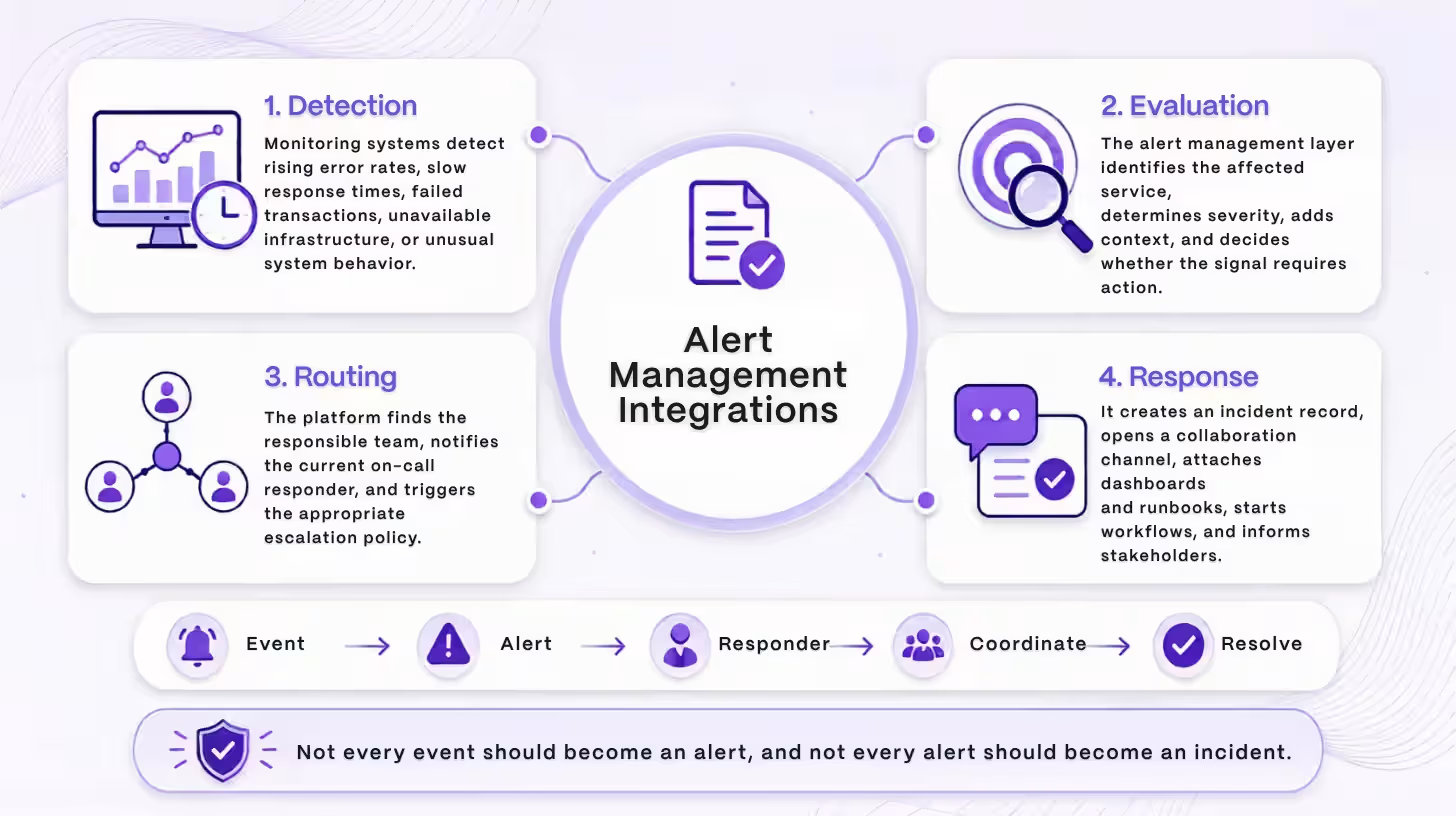
Alert management integrations are connections between monitoring systems and the tools responsible for evaluating, routing, escalating, coordinating, and resolving operational alerts.
A monitoring system may detect rising error rates, slow response times, unavailable infrastructure, failed transactions, resource exhaustion, or unusual system behavior. The alert management layer receives that signal and determines what should happen next.
Depending on the alert, the platform may:
- Identify the affected service
- Determine the severity
- Find the responsible team
- Notify the current on-call responder
- Trigger an escalation policy
- Create an incident record
- Open a collaboration channel
- Attach dashboards and runbooks
- Start an automated diagnostic workflow
- Notify internal or external stakeholders
This process is more sophisticated than forwarding a notification from one tool to another. An effective integration preserves the operational meaning of the signal as it moves through the response workflow.
Events, Alerts, and Incidents Are Different
An event is an observable occurrence within a system. It may represent a deployment, configuration change, failed request, threshold breach, or status transition.
An alert is a notification that an event or collection of events may require attention.
An incident is a service disruption or operational condition that requires coordinated investigation and response.
Not every event should create an alert, and not every alert should become an incident. Alert management integrations help organizations make those distinctions consistently.
How the alert management integration ecosystem works
A mature alert management ecosystem connects four operational layers: detection, decision-making, coordination, and learning.
Each layer has a different responsibility. When the boundaries are clear, information moves between tools without creating conflicting records or duplicate work.
Monitoring and Observability: The Detection Layer
The detection layer collects evidence about the health and behavior of applications, infrastructure, networks, databases, cloud services, and user experiences.
Common signal types include:
- Metrics
- Logs
- Distributed traces
- Error events
- Synthetic test results
- Infrastructure changes
- Security findings
- Dependency failures
- Service-level objective violations
Monitoring systems identify conditions that may indicate a problem. They should include enough context for downstream systems to understand what happened, but they should not always decide who gets paged or whether a formal incident should be declared.
Alert Management and On-Call: The Decision Layer
The decision layer determines whether a signal is actionable and who should respond.
Its responsibilities may include:
- Authenticating incoming events
- Normalizing source-specific fields
- Removing duplicate signals
- Grouping related alerts
- Suppressing expected conditions
- Mapping severity levels
- Identifying service ownership
- Applying routing rules
- Checking on-call schedules
- Triggering escalation policies
- Tracking acknowledgment
- Updating alert status
This layer acts as the operational control point between monitoring noise and human attention.
Collaboration and Incident Response: The Coordination Layer
The coordination layer brings responders together when an alert requires investigation or a formal incident response.
An integration may automatically:
- Declare an incident
- Create a dedicated collaboration channel
- Invite the relevant service owners
- Assign incident roles
- Open a conference bridge
- Attach dashboards and runbooks
- Record status changes
- Capture decisions and actions
- Notify stakeholders
- Build an incident timeline
This reduces context switching and gives responders a shared workspace for managing the incident.
Ticketing and Post-Incident Processes: The Learning Layer
The learning layer connects alert data to the broader incident postmortem process, turning findings into tracked improvements.
After resolution, integrations may create:
- Remediation tasks
- Engineering tickets
- Problem records
- Follow-up assignments
- Retrospective documents
- Reliability reports
- Recurring incident reviews
This closes the loop between detection and long-term improvement. An incident response process is incomplete when the immediate service issue is resolved but the underlying risk remains unaddressed.
The end-to-end alert integration workflow
A reliable alert integration converts a raw technical signal into an owned and synchronized response process.
A typical workflow follows these steps:
- A monitoring rule detects an abnormal condition.
- The monitoring system generates an event.
- The event is delivered through a native connector, webhook, application programming interface, or messaging layer.
- The receiving platform authenticates and validates the payload.
- Source-specific data is converted into a common alert structure.
- A correlation key identifies repeated or related events.
- Service ownership, environment, severity, and business impact are added.
- Routing rules determine the appropriate responder or team.
- The alert is delivered through the selected notification channels.
- The responder acknowledges, reassigns, or escalates the alert.
- A formal incident is declared when defined criteria are met.
- Collaboration, communication, automation, and ticketing workflows begin.
- Status changes are synchronized across connected systems.
- The alert is resolved when the underlying condition clears.
- Incident data is preserved for reporting and post-incident analysis.
The integration should maintain continuity across this entire sequence. Missing identifiers, inconsistent status models, or incomplete resolution handling can break the workflow even when individual tools are functioning correctly.
Essential alert management integration categories
The most useful alert management architecture connects every system that contributes to detection, ownership, action, communication, or learning.
Monitoring and Observability Integrations
Monitoring integrations provide the original operational signals.
These may include systems responsible for:
- Application performance monitoring
- Infrastructure monitoring
- Log analysis
- Distributed tracing
- Network monitoring
- Cloud resource monitoring
- Synthetic testing
- Error tracking
- Database monitoring
- Data pipeline monitoring
- Security detection
- User experience monitoring
A strong monitoring integration should send more than an alert name. It should include the affected service, current value, triggering condition, environment, region, diagnostic links, and source event identifier.
On-Call and Escalation Integrations
On-call integrations determine who is responsible at the moment an alert occurs.
They may synchronize:
- On-call schedules
- Team rotations
- Temporary overrides
- Time-off coverage
- Escalation levels
- Acknowledgment status
- Responder availability
- Fallback contacts
Routing should rely on current ownership and schedule information rather than static lists that quickly become outdated.
Collaboration and ChatOps Integrations
ChatOps brings operational actions into the collaboration environment where responders already communicate.
A mature integration may support:
- Incident channel creation
- Responder invitations
- Interactive alert acknowledgment
- Incident declaration
- Severity updates
- Role assignment
- Escalation commands
- Runbook access
- Meeting creation
- Timeline notes
- Action-item creation
- Channel archiving
These capabilities allow responders to act without repeatedly moving between tools.
Chat should not become the only record of the incident. Important actions, decisions, and status changes should also be stored in the incident management system.
Service Catalog Integrations
A service catalog connects technical signals to organizational context.
It can identify:
- The service owner
- The responsible team
- The current on-call policy
- Business criticality
- Upstream dependencies
- Downstream dependencies
- Relevant dashboards
- Runbooks
- Source repositories
- Stakeholder groups
- Service-level objectives
This enrichment makes routing more accurate and reduces the time responders spend searching for basic service information.
Ticketing and Work Management Integrations
Ticketing integrations connect real-time response with structured follow-up work.
They may:
- Create incident or problem records
- Assign remediation work
- Map severity to priority
- Synchronize status
- Track due dates
- Link incidents to engineering tasks
- Preserve audit history
The integration should clearly define which system controls status, ownership, and closure. Otherwise, one system may show an active incident while another shows the same issue as completed.
Deployment and Change Management Integrations
Recent changes often provide essential incident context.
Deployment integrations can show:
- Recent releases
- Code changes
- Configuration updates
- Infrastructure modifications
- Feature flag changes
- Database migrations
- Rollback options
This information helps responders determine whether an incident began after a specific change and whether reverting that change is appropriate.
Runbook and Automation Integrations
Runbook integrations connect alerts to predefined diagnostic or remediation steps.
Automated workflows may:
- Gather logs and system information
- Check dependency health
- Restart a service
- Clear a cache
- Roll back a deployment
- Disable a feature
- Scale infrastructure
- Create a diagnostic snapshot
Low-risk and reversible actions may run automatically. Destructive or privileged actions should require approval, limited permissions, and complete audit logging.
Status Communication Integrations
Incident communication integrations connect the response workspace to internal updates and public status pages, so approved information can move without responders copying it between tools.
Status communication integrations keep internal teams, customers, and other stakeholders informed.
They may:
- Create an internal service update
- Map incidents to affected components
- Publish approved messages
- Notify subscribers
- Schedule follow-up updates
- Mark the issue as resolved
Internal and external communication should draw from the same incident record, even when the level of detail differs.
Documentation and Knowledge Integrations
Knowledge integrations place relevant guidance directly into the response workflow.
Useful resources may include:
- Runbooks
- Architecture diagrams
- Troubleshooting guides
- Previous incident reports
- Known error records
- Dependency documentation
- Escalation procedures
The goal is to help responders find the next useful action without conducting a separate search during an active incident.
Identity and Access Integrations
Identity integrations keep access and responder information current.
They may support:
- User provisioning
- Account removal
- Team membership updates
- Single sign-on
- Role-based permissions
- Access reviews
- Audit logging
These integrations are especially important when alert workflows expose sensitive operational data or allow responders to trigger automated actions.
Native integrations, webhooks, APIs, and event buses
The right integration method depends on the required workflow depth, reliability, customization, and operational scale.
Native Integrations
Native integrations are maintained as built-in connections between platforms.
They are usually the fastest to configure and may provide deeper capabilities such as:
- Automatic field mapping
- Bidirectional synchronization
- Interactive actions
- User interface configuration
- Credential management
- Vendor-supported updates
Their limitations may include restricted customization, licensing requirements, or dependence on the vendor’s release schedule.
Webhooks
A webhook sends an HTTP request when a specific event occurs.
Webhooks are useful for:
- Sending newly triggered alerts
- Delivering status changes
- Starting workflows
- Posting notifications
- Reporting deployment events
They are relatively simple and work well for event-driven delivery. However, they are often one-directional and may require additional logic for acknowledgment, resolution, or data retrieval.
A production webhook implementation should account for:
- Authentication
- Signature validation
- Duplicate delivery
- Retry behavior
- Ordering
- Rate limits
- Invalid payloads
- Failed-message recovery
Application Programming Interfaces
An Application Programming Interface (API) allows systems to request information or perform actions in another platform.
APIs are useful when an integration needs to:
- Retrieve service information
- Look up an on-call responder
- Update an alert
- Change incident severity
- Add notes
- Resolve a record
- Create or update tickets
- Manage users
API integrations must handle permissions, token rotation, rate limits, pagination, version changes, and partial failures.
Event Buses and Message Queues
Event buses and queues are useful in high-volume or highly distributed environments.
They can provide:
- Buffering
- Event retention
- Replay
- Delivery guarantees
- Decoupling between systems
- Multiple event consumers
They also introduce another operational dependency. The messaging layer must have monitoring, security controls, capacity planning, and failure recovery of its own.
Why bidirectional integrations matter
A bidirectional integration keeps alert and incident information synchronized across connected tools.
A one-way integration may send a new alert into an on-call or collaboration system. A bidirectional integration can also return changes to the source or update other destinations.
Synchronized information may include:
- Acknowledgment
- Assignment
- Escalation
- Severity changes
- Incident declaration
- Responder notes
- Mitigation
- Resolution
- Closure
- Reopening
Without bidirectional synchronization, responders may resolve an incident in one system while notifications continue elsewhere. Stakeholders may see outdated status information, tickets may remain open, or a cleared monitoring condition may fail to close the associated alert.
Every integration also needs loop prevention. A status change sent from one system should not return as a new event that repeatedly triggers both systems.
Clear source-of-truth rules help prevent this problem. The monitoring platform may own the condition state, the incident system may own the response state, and the ticketing platform may own remediation work.
What should a context-rich alert include?
A context-rich alert tells the responder what failed, where it failed, how serious it is, who owns it, and what to do next.
Useful alert fields include:
- Clear alert title
- Human-readable summary
- Current state
- Severity
- Affected service
- Deployment environment
- Region or cluster
- Customer impact
- Start time
- Duration
- Observed value
- Triggering threshold
- Service owner
- Current on-call responder
- Dashboard links
- Relevant logs
- Related traces
- Recent deployments
- Related alerts
- Previous incidents
- Runbook
- Suggested first action
- Source event identifier
- Correlation key
This information should be attached before the responder is notified whenever possible. The first minutes of an incident should be spent investigating the problem, not determining which service generated the alert.
How integrations reduce alert fatigue
Alert management integrations reduce alert fatigue by improving signal quality before notifications reach responders.
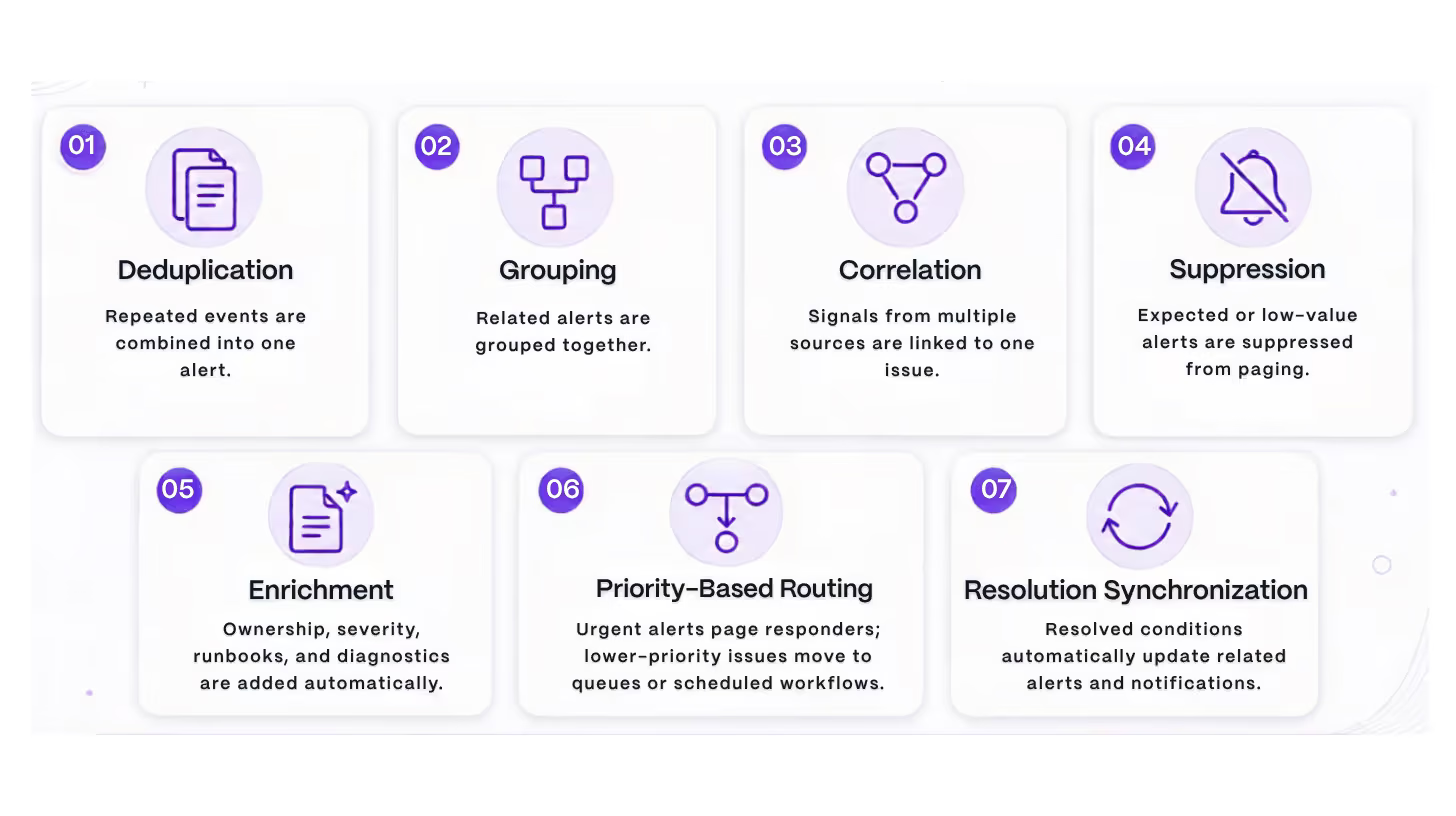
Forwarding every monitoring event into a collaboration channel does not reduce alert fatigue. It simply moves the noise from one system to another.
Routing alerts to the right responder
Effective routing combines technical ownership, severity, responder availability, expertise, and escalation state.
Routing rules may consider:
- Affected service
- Owning team
- Production environment
- Alert severity
- Customer impact
- Geographic region
- Business hours
- Current on-call rotation
- Responder specialty
- Regulatory sensitivity
- Previous acknowledgment attempts
The first notification should reach the person or team most capable of acting.
When the initial responder does not acknowledge the alert within the required period, the system should escalate to a backup responder, specialist, incident commander, or management contact.
Fallback rules are also essential. The workflow should define what happens when:
- No service owner is listed
- The on-call schedule is empty
- The primary notification channel fails
- The assigned responder is unavailable
- The escalation policy is incomplete
Using ChatOps without creating another alert feed
ChatOps is most effective when the collaboration platform becomes a structured incident workspace rather than an unrestricted stream of notifications.
A well-designed incident channel should include:
- A consistent channel name
- Current severity
- A concise incident summary
- The affected service
- Assigned roles
- Relevant dashboards
- Runbooks
- A meeting link
- Stakeholder update controls
- Interactive response actions
- A synchronized timeline
Responders may be able to acknowledge alerts, declare incidents, assign roles, change severity, escalate, create action items, or trigger approved workflows directly from chat.
The collaboration channel supports communication, but the incident management platform should remain the authoritative source for incident status, ownership, timeline events, and resolution details.
Integration security and governance
Alert integrations should be treated as production infrastructure because they carry sensitive operational data and may trigger privileged actions.
Important controls include:
- Least-privilege access
- Role-based access control
- Secure credential storage
- Token rotation
- Webhook signature validation
- Replay protection
- Encrypted connections
- Audit logs
- Data minimization
- Private incident controls
- User deprovisioning
- Vendor access reviews
- Emergency credential revocation
Automation permissions require particular care. A workflow that only gathers diagnostic information should not receive broad permission to modify production infrastructure.
Every integration should also have a named owner responsible for:
- Credentials
- Documentation
- Testing
- Schema changes
- Vendor updates
- Deprecation notices
- Failure response
- Access reviews
Unowned integrations often become invisible production dependencies.
Common alert integration failures
Most integration failures result from incomplete state handling, inconsistent data, unclear ownership, or weak monitoring of the integration itself.
Duplicate Alerts
Retries create new records because the system does not recognize the original event.
Missing Resolution Events
Resolved alerts are ignored, leaving notifications and incidents open.
Inconsistent Severity Mapping
Connected systems use different priority scales without a documented mapping.
Stale Ownership Data
Alerts are routed to a team that no longer owns the affected service.
Expired Credentials
Expired tokens or certificates stop events from flowing without warning.
Out-of-Order Events
Delayed events arrive after resolution and incorrectly reopen the alert.
Synchronization Loops
Connected systems repeatedly update each other because they cannot identify where changes originated.
Channel Sprawl
Too many alert channels overwhelm responders and reduce the value of incident workspaces.
Excessive Automation Permissions
Automated workflows have broader access than their actions require.
Unmonitored Integration Failures
Alert delivery failures go unnoticed because the integration path is not monitored.
How to implement alert management integrations
Alert management integrations should be implemented incrementally, beginning with one critical service and one measurable response workflow.
1. Map the Existing Toolchain
Document the monitoring sources, alert destinations, collaboration systems, on-call schedules, service catalogs, ticketing tools, automation platforms, and communication channels currently in use.
For each connection, record:
- Owner
- Trigger
- Authentication method
- Data direction
- Payload
- Destination
- Failure behavior
- Business criticality
2. Define a Common Alert Schema
Create consistent fields for:
- Service
- Environment
- Severity
- Status
- Source identifier
- Summary
- Owner
- Region
- Start time
- Dashboard
- Runbook
- Correlation key
A shared schema reduces custom mapping and makes alerts easier to route and analyze.
3. Establish Sources of Truth
Determine which system owns:
- Monitoring condition state
- Alert acknowledgment
- Incident status
- On-call schedules
- Service ownership
- Stakeholder communication
- Remediation work
- Historical reporting
This prevents conflicting updates.
4. Build the Minimum Critical Path
Start with the essential workflow:
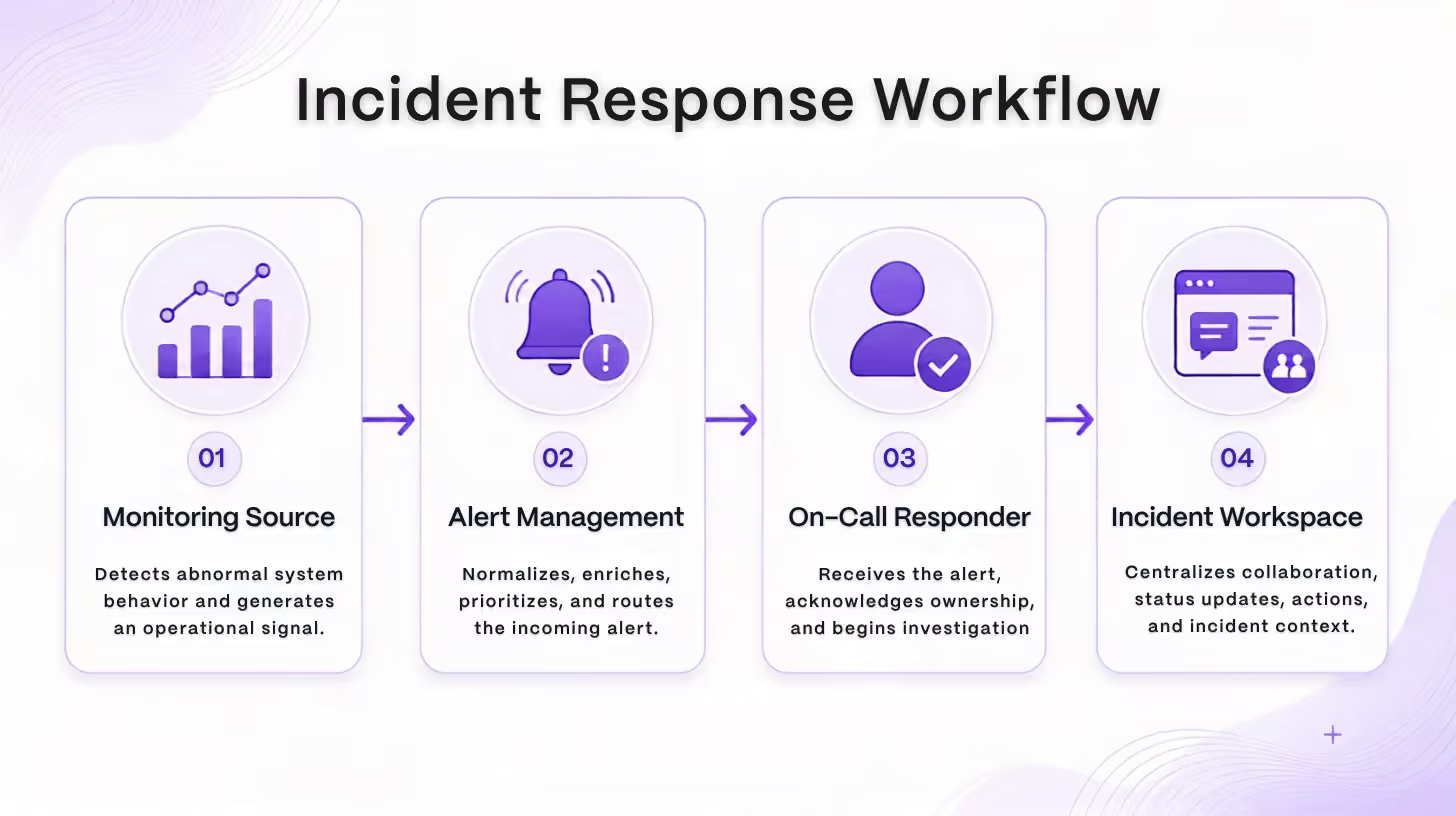
Test whether the alert reaches the correct responder, includes sufficient context, escalates correctly, and resolves when the source condition clears.
5. Add Contextual Enrichment
Connect service ownership, deployment history, dashboards, logs, traces, and runbooks.
Use stable service identifiers rather than relying on alert titles or manually maintained routing lists.
6. Add Downstream Workflows
After the core path is reliable, connect:
- Ticketing
- Status communication
- Documentation
- Analytics
- Remediation automation
- Post-incident review workflows
7. Test Failure Conditions
Test more than the successful path.
Include:
- Duplicate events
- Invalid payloads
- Expired credentials
- Unavailable endpoints
- Rate limits
- Missing service owners
- Empty on-call schedules
- Delayed events
- Out-of-order updates
- Notification provider outages
- Failed resolution synchronization
8. Expand by Service Tier
Begin with critical or high-noise services. Measure the results, correct field mappings, and refine routing before expanding across the organization.
How to evaluate alert management integration capabilities
Integration quality should be evaluated by workflow depth, reliability, and maintainability rather than the number of connectors listed in a catalog.
Important evaluation questions include:
- Is the integration native or webhook-only?
- Does it support bidirectional synchronization?
- Can fields and severity levels be mapped?
- Can it route by service, team, schedule, and priority?
- Does it preserve source event identifiers?
- Can it deduplicate and group alerts?
- Does it process resolution events?
- Are delivery attempts and failures visible?
- What retry behavior is supported?
- Can failed events be replayed?
- Are rate limits documented?
- Can responders act from collaboration tools?
- Does it connect to service ownership data?
- Are automation actions controlled and audited?
- Is a test or sandbox environment available?
- Who maintains the integration?
- Can incident and alert data be exported?
- Are important capabilities restricted by pricing tier?
Integration count demonstrates breadth. It does not guarantee that each connection preserves context or supports the full alert lifecycle.
How artificial intelligence supports alert integrations
Artificial intelligence provides the most value after alert data has been normalized, enriched, and connected to reliable operational context.
Potential uses include:
- Grouping related alerts
- Summarizing active incidents
- Identifying similar historical incidents
- Suggesting likely service owners
- Highlighting recent changes
- Recommending relevant runbooks
- Drafting stakeholder updates
- Generating incident timelines
- Suggesting diagnostic queries
- Proposing low-risk remediation steps
Artificial intelligence should not replace deterministic routing, access controls, or incident state management. It cannot compensate for stale ownership data, inconsistent severity definitions, missing service identifiers, or unreliable event delivery.
High-impact actions should remain bounded by predefined workflows, approval requirements, permission controls, and complete audit trails.
Create a connected incident response workflow
Alert management integrations do more than connect individual tools. They preserve operational context as information moves from detection to ownership, coordination, action, communication, and learning.
Monitoring identifies an abnormal condition. Alert management determines whether it requires attention. On-call routing assigns responsibility. Collaboration systems coordinate responders. Incident management preserves decisions and status. Ticketing and post-incident workflows turn findings into measurable improvements.
The strongest integration strategy prioritizes workflow depth, reliable synchronization, actionable context, security, and maintainability. Every alert should reach the correct responder with enough information to make the next decision quickly.
Rootly brings monitoring, alert routing, collaboration, automation, service ownership, ticketing, and communication workflows into a connected incident response process. Explore Rootly to reduce context switching, automate repetitive response tasks, and keep every stage of the incident lifecycle synchronized.
Frequently asked questions
What are alert management integrations?
Alert management integrations connect monitoring and observability systems with on-call schedules, collaboration platforms, incident response workflows, ticketing systems, automation tools, and communication channels. They convert technical signals into coordinated operational actions.
Which alert management integrations should be implemented first?
Start by connecting the primary monitoring source, alert management platform, on-call schedule, and collaboration environment. Add service catalogs, deployment data, runbooks, ticketing, status communication, and analytics after the core workflow is reliable.
Should monitoring alerts go directly to collaboration channels?
Critical alerts should usually pass through an alert management layer first. This allows the organization to deduplicate, enrich, prioritize, suppress, and route signals before they enter the collaboration environment.
What makes an alert integration bidirectional?
A bidirectional integration can receive alerts and return updates such as acknowledgments, assignments, severity changes, incident declarations, notes, resolution, closure, and reopening.
How do alert integrations reduce alert fatigue?
They reduce alert fatigue through deduplication, grouping, correlation, suppression, enrichment, ownership-based routing, maintenance windows, and automatic resolution synchronization.
How should alert management integrations be tested?
Test triggering, field mapping, ownership, paging, escalation, acknowledgment, incident creation, collaboration workflows, and resolution. Also test duplicate delivery, expired credentials, missing responders, rate limits, delayed events, unavailable endpoints, and provider outages.
Alert management integrations: connecting monitoring, collaboration, and incident response tools