
Engineering teams rely on monitoring systems to detect infrastructure failures, application errors, security threats, and performance degradation within seconds. However, detecting a problem is only the first step. An alert creates value only when it reaches the right responder quickly enough for action to be taken. If an alert is missed, ignored, or delayed, even the most sophisticated monitoring tools cannot prevent downtime.
Alert escalation policies solve this problem by automatically forwarding unacknowledged alerts to additional responders based on predefined rules.
Rather than assuming the first notification will always be seen, escalation policies continue notifying engineers, team leads, or incident commanders until someone acknowledges the issue. When supported by reliable on-call software, this automation eliminates single points of failure in the notification process and helps organizations maintain dependable incident response around the clock.
As modern systems become more distributed across cloud infrastructure, microservices, Kubernetes clusters, and third-party platforms, manual paging processes become increasingly unreliable. Automated alert escalation policies ensure critical incidents continue progressing toward resolution regardless of shift changes, unavailable responders, or unexpected communication failures. Combined with emerging AI SRE capabilities, escalation systems can also use incident context, ownership data, and historical patterns to engage the most appropriate responders faster.
What is an alert escalation policy?
An alert escalation policy is a predefined set of rules that determines what happens when an alert is not acknowledged or resolved within a specified timeframe. Rather than sending a single notification and waiting indefinitely, the policy automatically escalates the alert to additional responders until someone takes ownership.
The primary goal is to eliminate situations where critical alerts remain unseen because an engineer is asleep, away from their device, in another meeting, or unavailable for any other reason.
An alert escalation policy typically defines:
- Who receives the initial alert
- How long to wait for acknowledgment
- Who receives the next notification
- Which communication channels to use
- When to stop escalating
- How severity affects escalation behavior
Unlike manual escalation, automated policies execute immediately without requiring someone to notice that a response has been delayed.
Alert Notification vs. Alert Routing vs. Alert Escalation
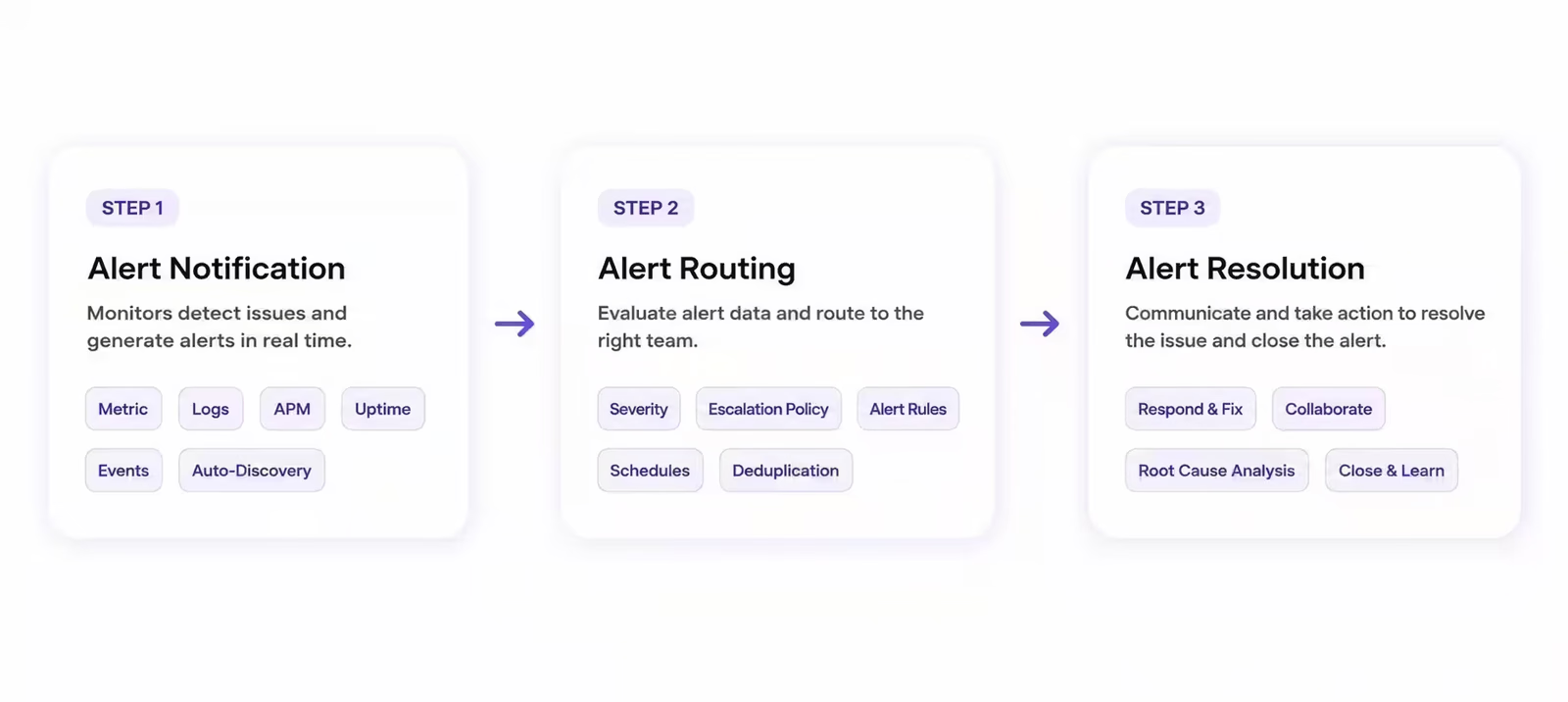
These concepts are closely related but serve different purposes within alert management.
Alert notification refers to delivering an alert through one or more communication channels such as Slack, Microsoft Teams, SMS, email, voice calls, or mobile push notifications.
Alert routing determines who should receive the alert first. Routing decisions are typically based on service ownership, application, environment, severity, or on-call schedules.
Alert escalation begins only if predefined conditions are met, such as a missed acknowledgment or lack of progress. Instead of ending after the first notification, the alert continues moving through an escalation chain until an appropriate responder takes action.
A simplified workflow looks like this:
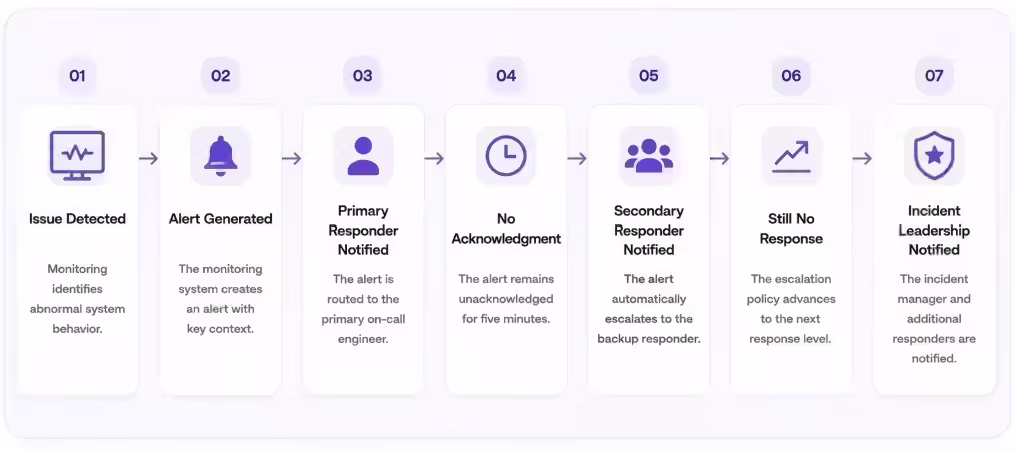
This continuous progression significantly reduces the risk of critical incidents remaining unnoticed.
Why alert escalation policies matter
Production systems operate continuously, but engineers do not. Teams work across multiple time zones, rotate on-call schedules, attend meetings, travel, and occasionally experience technical issues that prevent them from receiving notifications.
Without escalation policies, organizations depend on the assumption that every alert will immediately reach an available responder. In reality, that assumption often fails.
Common situations include:
- Mobile phones losing signal
- Devices running out of battery
- Engineers sleeping through notifications
- Notifications accidentally dismissed
- Incorrect on-call schedules
- Network outages affecting communication
- Vacation coverage mistakes
- Notification overload causing important alerts to be overlooked
Any one of these situations can delay incident response by several minutes or even hours.
Automated escalation policies reduce this risk by assuming that responders may occasionally be unavailable and building redundancy into the notification process.
The business benefits include:
- Faster Mean Time to Acknowledge (MTTA): Alerts automatically advance to another on-duty engineer when the first responder does not acknowledge them.
- Lower Mean Time to Resolve (MTTR): Incidents reach the correct owners sooner, allowing teams to begin triage and follow the appropriate runbooks without unnecessary delays.
- Reduced downtime: Faster acknowledgement and response decrease the risk of prolonged service disruptions.
- Better Service-Level Agreement (SLA) compliance: Escalation policies help teams respond within defined service-level targets and reduce the likelihood of violations.
- Improved customer experience: Critical incidents are addressed more quickly, minimizing user impact and protecting customer trust.
- Stronger operational resilience: Escalation data reveals missed notifications, coverage gaps, and recurring response delays that teams can use to improve their processes.
The alert escalation lifecycle
Alert escalation is not a single event but part of a larger alert management workflow.
1. Monitoring Detects an Issue
Monitoring platforms continuously evaluate system health using metrics, logs, traces, uptime checks, synthetic monitoring, and infrastructure telemetry.
Examples include:
- CPU spikes
- Memory exhaustion
- High API latency
- Failed deployments
- Database failures
- Network interruptions
When thresholds are exceeded, an alert is generated.
2. Alert Is Created
The monitoring platform packages important information, including:
- Service name
- Severity
- Timestamp
- Impact
- Error details
- Links to dashboards or logs
This information provides responders with immediate context before investigation begins.
3. Alert Is Routed
Routing policies determine the appropriate destination based on factors such as:
- Service ownership
- Team responsibility
- Environment
- Region
- Severity
- On-call schedule
Only the appropriate responders receive the initial notification, reducing unnecessary interruptions.
4. Primary Responder Is Notified
The alert reaches the assigned engineer through one or more communication channels.
Common notification methods include:
- Mobile push
- Slack
- Microsoft Teams
- SMS
- Voice call
The responder is expected to acknowledge receipt within the organization’s response target.
5. Acknowledgment Window Begins
A timer starts immediately after notification.
If the responder acknowledges the alert within the defined window, escalation usually stops.
If no acknowledgment occurs, the escalation policy continues automatically.
6. Alert Escalates
Additional responders receive notifications according to predefined rules.
Escalation may involve:
- Secondary on-call engineers
- Service owners
- Platform teams
- Incident commanders
- Engineering managers
Each escalation step increases the probability that someone begins responding.
7. Incident Response Begins
Once acknowledged, responders investigate the issue, coordinate with other teams, and work toward restoring service.
Depending on severity, a formal incident may also be declared.
8. Resolution and Review
After the issue is resolved, organizations often review:
- Whether escalation occurred appropriately
- Response times
- Missed notifications
- Policy improvements
- Alert tuning opportunities
These reviews help continuously improve escalation effectiveness.
Components of an alert escalation policy
Well-designed escalation policies balance speed with precision. Escalating too aggressively creates unnecessary interruptions, while escalating too slowly delays recovery.
Several core components determine how a policy behaves.
Escalation Targets
Policies define exactly who receives notifications during each escalation stage.
Targets may include:
- Individual engineers
- On-call rotations
- Service owners
- Infrastructure teams
- Database administrators
- Security teams
- Incident commanders
- Engineering leadership
Different services often have entirely different escalation paths based on ownership and expertise.
Escalation Order
Organizations typically use one of several escalation strategies.
Sequential escalation notifies one responder at a time until acknowledgment occurs.
Parallel escalation notifies multiple responders simultaneously to maximize response speed during high-impact incidents.
Some organizations also use conditional escalation, where different paths are chosen based on alert characteristics such as severity or affected service.
Escalation Timing
Every escalation policy defines waiting periods between notification stages.
Examples include:
- Immediate escalation for critical incidents
- Two-minute acknowledgment windows
- Five-minute secondary escalation
- Ten-minute management notification
Timing should reflect business impact rather than arbitrary intervals.
Critical production outages generally require much faster escalation than lower-priority maintenance alerts.
Escalation Conditions
Policies specify the exact events that trigger additional notifications.
Common triggers include:
- No acknowledgment received
- Incident severity increases
- Service health deteriorates further
- Automated diagnostics detect additional failures
- Resolution exceeds expected timelines
Using multiple conditions allows escalation behavior to adapt as incidents evolve rather than relying solely on fixed timers.
Communication Channels
Modern escalation policies rarely rely on a single communication method.
Instead, organizations combine multiple channels to maximize the likelihood that responders receive critical alerts.
Typical channels include:
- Slack
- Microsoft Teams
- Mobile push notifications
- SMS
- Voice calls
Critical incidents often begin with push notifications and automatically progress to SMS or voice calls if earlier notifications remain unanswered.
Maximum Escalation Level
Every policy should define where escalation ends.
Possible endpoints include:
- Incident commander
- Engineering manager
- Operations director
- Executive leadership
- Organization-wide incident channel
Without clear limits, alerts may continue escalating unnecessarily, creating confusion instead of accelerating resolution.
How to create an alert escalation policy
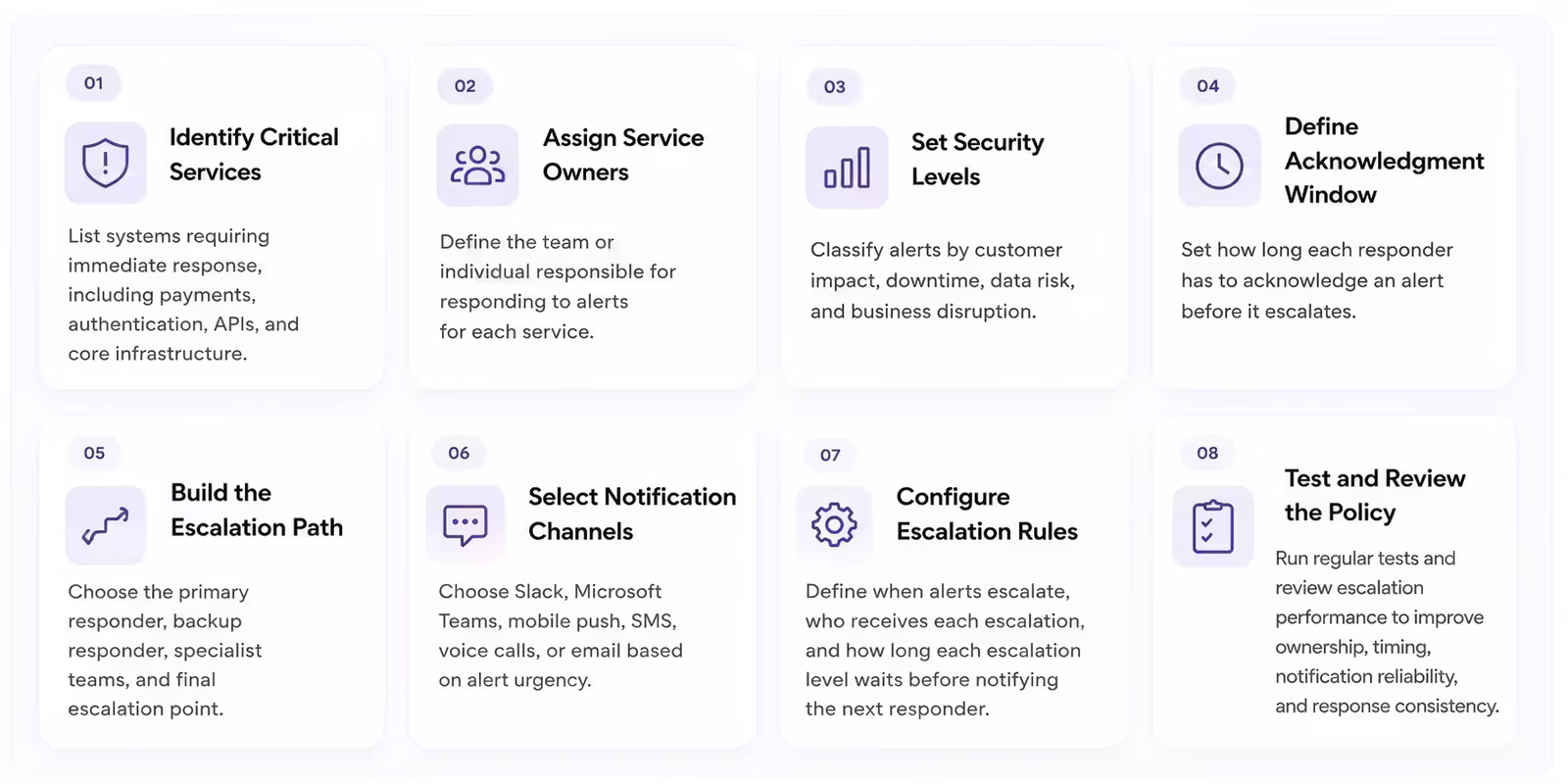
A clear escalation policy should connect alert severity, service ownership, acknowledgment deadlines, notification channels, and fallback responders. The goal is to ensure every actionable alert has a defined path from initial notification to confirmed ownership.
Follow these steps to create an effective policy:
- Identify critical services: List the systems that require an immediate response, such as payment processing, authentication, customer-facing APIs, databases, and core infrastructure.
- Assign service owners: Define the team or individual responsible for responding to alerts from each service. Include secondary owners for systems shared across several teams.
- Set severity levels: Classify alerts according to customer impact, downtime, data risk, and business disruption. Clear severity definitions help determine which alerts require immediate escalation.
- Define the acknowledgment window: Set how long each responder has to acknowledge an alert before it advances to the next level. Critical alerts should generally have shorter acknowledgment windows than lower-priority alerts.
- Build the escalation path: Choose the primary responder, backup responder, specialist teams, engineering leadership, and final escalation point. Each level should have a clear owner.
- Select notification channels: Choose channels based on the alert’s urgency. Options may include Slack, Microsoft Teams, mobile push, SMS, voice calls, and email. Critical alerts may require multiple channels.
- Configure escalation rules: Define when the alert escalates, who receives each escalation, and how long the platform waits before notifying the next responder. The policy should stop escalating once someone acknowledges the alert.
- Test and review the policy: Run regular tests to confirm that notifications reach the intended responders. Review alert history and escalation performance to improve ownership, timing, notification reliability, and response consistency.
Escalation policies should evolve alongside services, team structures, and operational risks. Reviewing them after organizational changes and major incidents helps prevent outdated schedules, ownership gaps, and ineffective notification paths.
Common types of alert escalation policies
Not every alert requires the same response. A temporary increase in CPU utilization does not demand the same urgency as a complete production outage or a security breach. Modern alert management platforms allow organizations to create multiple escalation policies that match the criticality of different services, applications, and business functions.
Choosing the right escalation strategy helps engineering teams respond faster while minimizing unnecessary interruptions.
1. Time-Based Escalation
Time-based escalation is the most widely used escalation strategy. If an alert is not acknowledged within a predefined period, it is automatically forwarded to the next responder in the escalation chain.
For example:
- Immediately notify the primary on-call engineer
- Escalate to the secondary responder after five minutes
- Notify the incident commander after ten minutes
- Alert engineering leadership after fifteen minutes
This approach works well because it removes uncertainty. Instead of relying on someone to manually decide when additional help is needed, the escalation policy executes automatically based on measurable response times.
Time-based escalation is particularly effective for high-priority production incidents where every minute of downtime increases customer impact.
2. Acknowledgment-Based Escalation
Some organizations escalate alerts only when no acknowledgment has been received, regardless of how much time has passed.
This approach focuses on ensuring that someone has accepted responsibility for the incident before additional responders are notified.
For example, once an engineer acknowledges the alert, the escalation timer stops, allowing them to investigate without triggering unnecessary notifications.
Acknowledgment-based escalation reduces alert noise while still protecting against missed pages and unavailable responders.
3. Severity-Based Escalation
Critical incidents require faster and broader escalation than routine operational issues.
Severity-based escalation allows organizations to apply different escalation policies based on the business impact of an incident.
For example:
SEV-1
- Immediate notification
- Multiple responders paged simultaneously
- Incident commander automatically engaged
- Executive visibility enabled
SEV-2
- Notify primary responder
- Escalate after five minutes
- Notify secondary responder if needed
SEV-3
- Notify primary responder
- Longer acknowledgment window
- Limited escalation
By aligning escalation speed with business impact, teams reduce unnecessary interruptions while ensuring major incidents receive immediate attention.
4. Service-Based Escalation
Different services often require different expertise.
A database failure should notify database engineers, while an authentication issue belongs with identity or security specialists.
Service-based escalation policies route alerts according to ownership and automatically involve responders with the appropriate technical knowledge.
Examples include:
- Payments service → Payments Engineering
- Kubernetes cluster → Platform Engineering
- Authentication platform → Identity Team
- Cloud infrastructure → Infrastructure Operations
Service ownership becomes especially valuable as organizations adopt microservices, where dozens or hundreds of independently owned services operate simultaneously.
5. Schedule-Based Escalation
Engineering teams rarely maintain the same staffing levels throughout the day.
Schedule-aware escalation policies adjust notification behavior based on active on-call schedules.
Examples include:
- Business hours
- Overnight coverage
- Weekend rotations
- Holiday schedules
- Regional support teams
Instead of paging unavailable engineers, schedule-based policies ensure alerts are always delivered to the individual currently responsible for responding.
This significantly reduces missed alerts caused by outdated contact lists or manual schedule changes.
6. Dynamic Escalation
Modern alert management platforms increasingly support dynamic escalation, where policies adapt automatically using operational context instead of fixed rules.
Factors influencing dynamic escalation may include:
- Current on-call assignments
- Service ownership
- Active deployments
- Historical incident patterns
- Incident severity
- Team workload
- AI recommendations
Rather than following a rigid escalation chain, dynamic policies intelligently select the responders most likely to resolve the issue quickly.
As systems become more complex, this adaptive approach helps engineering organizations reduce response time without increasing alert fatigue.
Best practices for designing alert escalation policies
An effective escalation policy is not simply about notifying more people. Poorly designed policies can overwhelm responders, generate unnecessary interruptions, and create confusion during critical incidents.
Successful organizations regularly review and refine escalation policies to ensure they remain aligned with operational realities.
1. Keep Policies Simple
Clearly define who receives the alert first, when escalation begins, who is notified next, and when the process stops.
2. Match Escalation to Business Impact
Use faster escalation for customer-facing outages and longer acknowledgment windows for lower-priority alerts.
3. Automate Escalation
Automated policies reduce human error and ensure alerts continue progressing when the first responder does not acknowledge them.
4. Maintain Accurate Ownership
Regularly review service owners, on-call schedules, team assignments, and escalation contacts.
5. Test Policies Regularly
Verify that notifications, timers, communication channels, and backup responders work as expected.
6. Review Policies After Incidents
Use incident reviews to identify delayed notifications, incorrect responders, and opportunities to improve escalation timing.
7. Prevent Escalation Loops
Set a clear endpoint so alerts do not repeatedly notify the same responders or cycle between teams.
When should alert escalation stop?
Escalation should end when continuing to notify additional responders no longer improves incident response.
1. The Alert Is Acknowledged
Escalation usually stops once a responder accepts ownership of the alert.
2. The Incident Is Resolved
All active notifications should stop when monitoring confirms that the affected service has recovered.
3. The Alert Is Suppressed or Deduplicated
Duplicate alerts should be grouped under the active incident instead of creating new escalation chains.
4. The Incident Is Reclassified
If the severity is reduced, the escalation path may switch to a less urgent policy.
5. A Major Incident Workflow Begins
Once an incident commander and response team are active, alert escalation may transition into a broader incident management workflow.
6. The Final Fallback Is Reached
Every policy should define a final responder, team, or incident channel so escalation does not continue indefinitely.
Common mistakes to avoid
Even well-intentioned escalation strategies can become ineffective if they are not carefully designed.
Some of the most common mistakes include:
1. Escalating Too Slowly
Long acknowledgment windows can increase downtime. Critical alerts should escalate quickly when no one responds.
2. Escalating Everyone Immediately
Paging too many people creates alert fatigue. Escalation should match the incident’s severity.
3. Ignoring Ownership Changes
Outdated service ownership and schedules can send alerts to the wrong responders.
4. Using One Policy for Every Service
Critical customer-facing systems need faster escalation than lower-priority internal services.
5. Failing to Review Performance
Track acknowledgment time, missed notifications, escalation frequency, MTTA, and MTTR to improve policies over time.
How AI improves alert escalation policies
As modern infrastructure becomes more distributed, static escalation policies become increasingly difficult to manage. Engineering teams are responsible for hundreds or even thousands of services, each with different owners, dependencies, and operational priorities. Maintaining manual escalation rules for every possible scenario is time-consuming and often results in outdated or ineffective policies.
Artificial intelligence is changing how organizations manage alert escalation by making policies more adaptive, context-aware, and data-driven. Instead of relying solely on predefined rules, AI can analyze historical incidents, responder behavior, service health, and operational patterns to recommend or automatically execute smarter escalation decisions.
AI makes escalation policies more adaptive by analyzing incident history, service ownership, responder availability, and operational patterns.
Intelligent Responder Selection
AI can identify the most suitable responder based on expertise, current on-call schedules, workload, recent deployments, and previous incidents.
Predictive Escalation
Historical patterns help AI recognize when additional teams will likely be needed, allowing them to be engaged earlier.
Alert Correlation
AI groups related alerts into one incident so responders focus on the underlying problem instead of multiple duplicate notifications.
Dynamic Policy Optimization
AI reviews MTTA, MTTR, missed pages, escalation frequency, and responder workload to identify policies that escalate too slowly or create unnecessary noise.
Frequently asked questions
What should happen if every responder in the escalation chain is unavailable?
The policy should route the alert to a final fallback, such as a broader responder pool, incident commander, operations lead, or emergency incident channel. Every escalation path should have a defined endpoint to prevent critical alerts from remaining unowned.
Should escalation policies differ between production and non-production environments?
Yes. Production alerts usually require shorter acknowledgment windows and more aggressive escalation because they can affect customers and revenue. Development and staging alerts can often use longer delays and fewer escalation levels.
Can an alert escalate through multiple communication channels?
Yes. A policy may begin with mobile push or Slack, then escalate to SMS and voice calls if no acknowledgment occurs. Using multiple channels reduces the risk that a critical alert is missed because one notification method fails.
How can teams prevent duplicate alerts from starting separate escalation chains?
Teams should use alert grouping, deduplication, and correlation rules to combine related notifications into one incident. This prevents multiple responders from being paged for different symptoms of the same underlying failure.
What information should be included in an escalated alert?
An escalated alert should include the affected service, severity, customer impact, time triggered, current escalation level, previous notifications, relevant dashboards, logs, and any actions already taken. Clear context helps new responders contribute without repeating earlier investigation.
Improve incident response with smarter alert escalation
Alert escalation policies ensure that critical incidents never stall because of a missed notification or unavailable responder. By automatically advancing alerts through predefined escalation paths, organizations reduce response delays, improve reliability, and eliminate single points of failure in their incident response process.
As engineering environments continue to grow in complexity, escalation policies become an essential component of modern alert management. Well-designed policies ensure that the right people are engaged at the right time without creating unnecessary interruptions or contributing to alert fatigue.
At Rootly, alert escalation is part of a comprehensive incident management platform designed for modern engineering teams. Rootly combines intelligent alert routing, schedule-aware paging, service ownership, AI-assisted recommendations, and automated incident workflows to help teams respond faster and resolve incidents more efficiently. By replacing manual escalation processes with intelligent automation, organizations can build more resilient operations while reducing operational overhead.
Alert escalation policies: how automated escalation improves incident response