

The goal is not simply to generate fewer alerts. An alerting system that stays quiet by hiding important warnings is just as dangerous as one that pages constantly. Teams need to reduce unnecessary interruptions while ensuring that critical incidents remain visible, actionable, and routed to the right responders. Modern AI SRE systems can support this process by correlating operational signals and filtering noise before it reaches responders. This approach helps teams improve the signal-to-noise ratio without creating blind spots or missing critical incidents.
Alert noise reduction is the process of removing repetitive, irrelevant, or non-actionable notifications while preserving the signals that indicate genuine service impact.
Effective noise reduction uses deduplication and correlation, grouping, filtering, suppression, and carefully tuned thresholds to help responders focus on incidents that require action.
Key Takeaways
- Alert noise includes repetitive, irrelevant, low-value, and non-actionable notifications.
- Deduplication combines repeated alerts, while correlation connects different alerts that may share a root cause.
- Filtering and suppression should be based on severity, service ownership, dependencies, and user impact.
- Critical incidents need bypass rules that protect them from suppression, rate limits, and maintenance windows.
- Every paging alert should have a clear owner, defined severity, and expected response.
- Alert rules require continuous review as systems, dependencies, and operational priorities change.
What is alert noise?
Alert noise is the volume of notifications that does not help responders identify, understand, or resolve an incident. These notifications may be technically accurate, but they do not always require immediate human action.
For example, a monitoring system might send a page whenever Central Processing Unit (CPU) usage briefly exceeds 80 percent. If usage regularly reaches this level without affecting service performance, the alert is unlikely to help responders. It creates an interruption without identifying a meaningful operational problem.
Common forms of alert noise include:
- Repeated notifications for the same condition
- Alerts caused by temporary metric fluctuations
- Multiple downstream alerts generated by one upstream failure
- Informational events sent through urgent paging channels
- Alerts without a clear owner or response action
- Notifications from testing or non-production environments
- Obsolete alerts for retired services or dependencies
- Alerts that repeatedly open and resolve around the same threshold
Alert volume and alert noise are related, but they are not the same. A major outage may generate several valid signals that provide useful diagnostic information. Conversely, one poorly designed rule can become harmful noise if it repeatedly interrupts responders without requiring action and contributes to alert fatigue.
What is the signal-to-noise ratio in alert management?
The signal-to-noise ratio describes the proportion of meaningful alerts compared with irrelevant, redundant, or non-actionable notifications.
A strong alert signal usually identifies:
- A real or likely service impact
- The severity and urgency of the condition
- The affected service or component
- The team responsible for responding
- The context needed to begin an investigation
- The action the responder is expected to take
A poor signal-to-noise ratio makes it harder to distinguish critical events from routine system activity. Responders may need to review dozens of notifications before finding the one that represents genuine user impact.
Over time, this can reduce confidence in the alerting system. When alerts repeatedly prove to be unimportant, responders may begin delaying acknowledgments or assuming that the next notification is another false positive.
How alert noise affects incident response
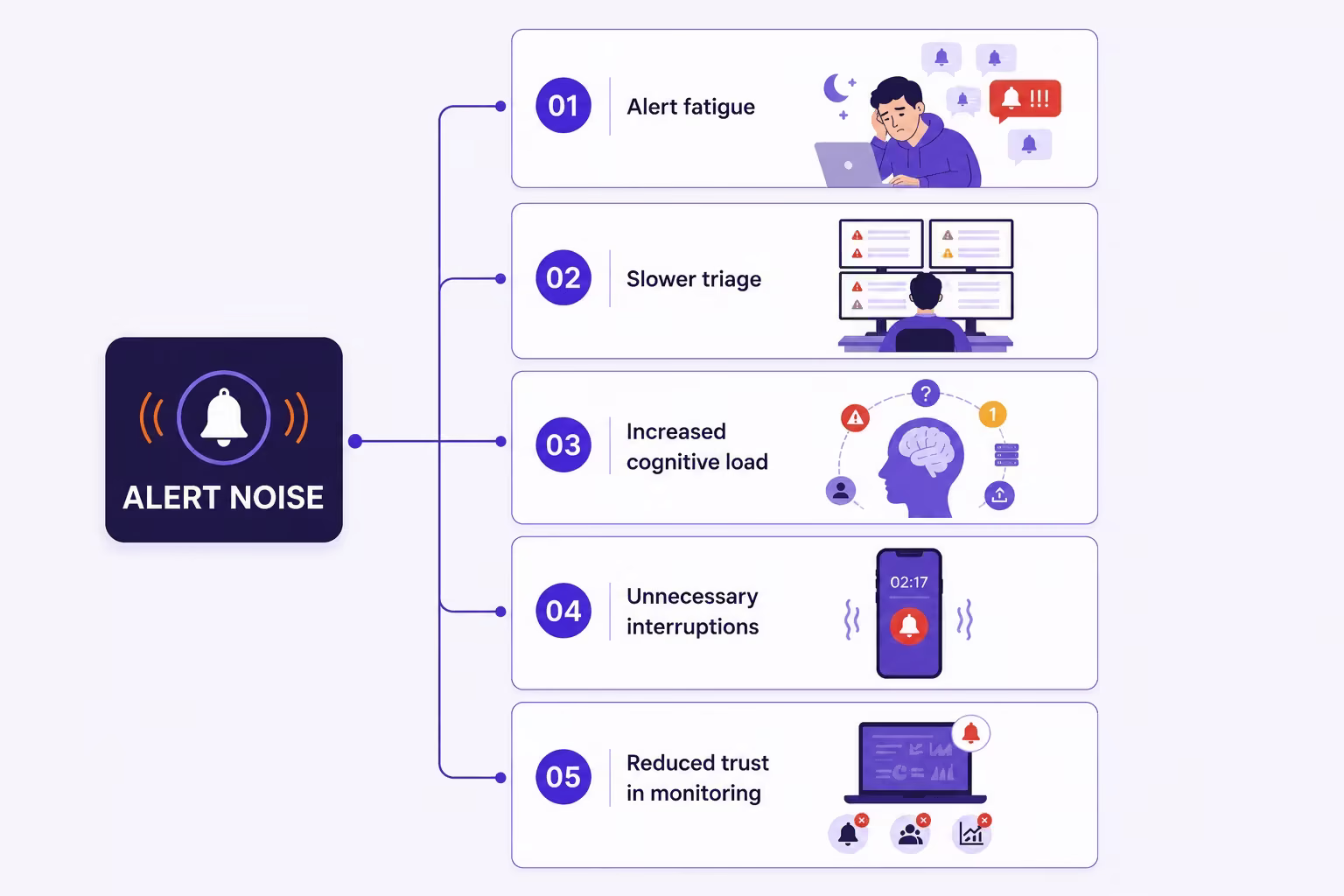
Alert noise is not only an inconvenience. It can directly affect how quickly and accurately teams respond to incidents.
Alert Fatigue
Alert fatigue occurs when responders become desensitized after receiving too many repetitive or low-value notifications. Every unnecessary page competes for the responder’s attention and makes the next alert easier to dismiss.
This is particularly dangerous during overnight on-call shifts. If an engineer has already been awakened several times for non-actionable conditions, they may respond more slowly when a critical incident occurs.
Slower Triage
A large number of alerts can obscure the initial failure. Responders may spend valuable time comparing notifications, checking multiple dashboards, and determining which symptoms belong to the same incident.
Instead of beginning with a clear incident record, the team must first reconstruct what happened from fragmented signals.
Increased Cognitive Load
Incident response requires engineers to make decisions under pressure. Excessive alerts add more information to evaluate, even when much of it is irrelevant.
Responders may need to determine:
- Which alert occurred first
- Which systems are genuinely affected
- Which notifications are duplicates
- Whether the condition is still active
- Who owns the affected service
- Whether a recent deployment caused the problem
Reducing unnecessary notifications gives responders more capacity to investigate the incident itself.
Unnecessary Interruptions
Not every monitoring event requires immediate human attention. Paging engineers for informational or low-severity events interrupts focused work, sleep, and recovery between incidents.
These interruptions also increase the operational cost of being on call. Even when an alert takes only a few minutes to review, repeated disruptions can reduce productivity and contribute to burnout.
Reduced Trust in Monitoring
An alerting system is only effective when responders trust it. If most pages do not require action, engineers may begin relying on dashboards, customer complaints, or other tools to determine whether an incident is real.
This creates a serious reliability risk. Critical incidents may be detected by the monitoring system but still receive a delayed response because the alerts are no longer considered credible.
Common sources of alert noise
Alert noise can originate from individual monitoring rules, routing configurations, service dependencies, or broader gaps in operational ownership.
Duplicate Alerts
Duplicate alerts occur when several tools or rules report the same condition. A persistent failure may also create a new notification every time the monitoring system evaluates the rule.
For example, a database outage might trigger separate alerts for connection failures, query errors, application latency, and failed transactions. Each signal may be accurate, but paging responders separately for every event can create unnecessary noise.
Poorly Tuned Thresholds
Static thresholds often fail to account for normal changes in system behavior. A traffic increase, scheduled batch process, or short resource spike may cross a threshold without creating a genuine reliability risk.
Rules become especially noisy when they respond to a single measurement rather than a sustained condition. An alert that triggers after one elevated metric is more likely to produce false positives than one that considers duration, frequency, and service impact.
Cascading Dependency Failures
A single upstream failure can generate alerts across every dependent service. If an authentication provider fails, multiple applications may report login errors, request failures, latency increases, and transaction problems.
Without dependency awareness, the alerting system may treat each symptom as a separate incident.
Low-Severity Events Sent as Pages
Informational and warning-level events are useful for analysis, but they do not always justify interrupting an engineer. Sending every event through the same urgent channel makes it difficult to distinguish immediate problems from conditions that can wait until working hours.
Flapping Alerts
A flapping alert repeatedly opens and resolves because a metric is moving around its threshold. For example, an alert may trigger when memory usage reaches 90 percent and resolve when it falls to 89 percent.
Without separate trigger and recovery conditions, this small change can produce repeated notifications even though the overall system state has not meaningfully changed.
Outdated Alert Rules
Services, infrastructure, ownership, and business requirements change over time. Alert rules created for an earlier version of the system may no longer reflect current risks.
Outdated rules can continue paging teams for retired resources, expected behaviors, or conditions that no longer require intervention.
Missing Maintenance Context
Planned maintenance, deployments, and load tests can produce expected monitoring events. If the alerting system does not account for these activities, responders may be paged for conditions the team already understands.
Alert noise reduction strategies
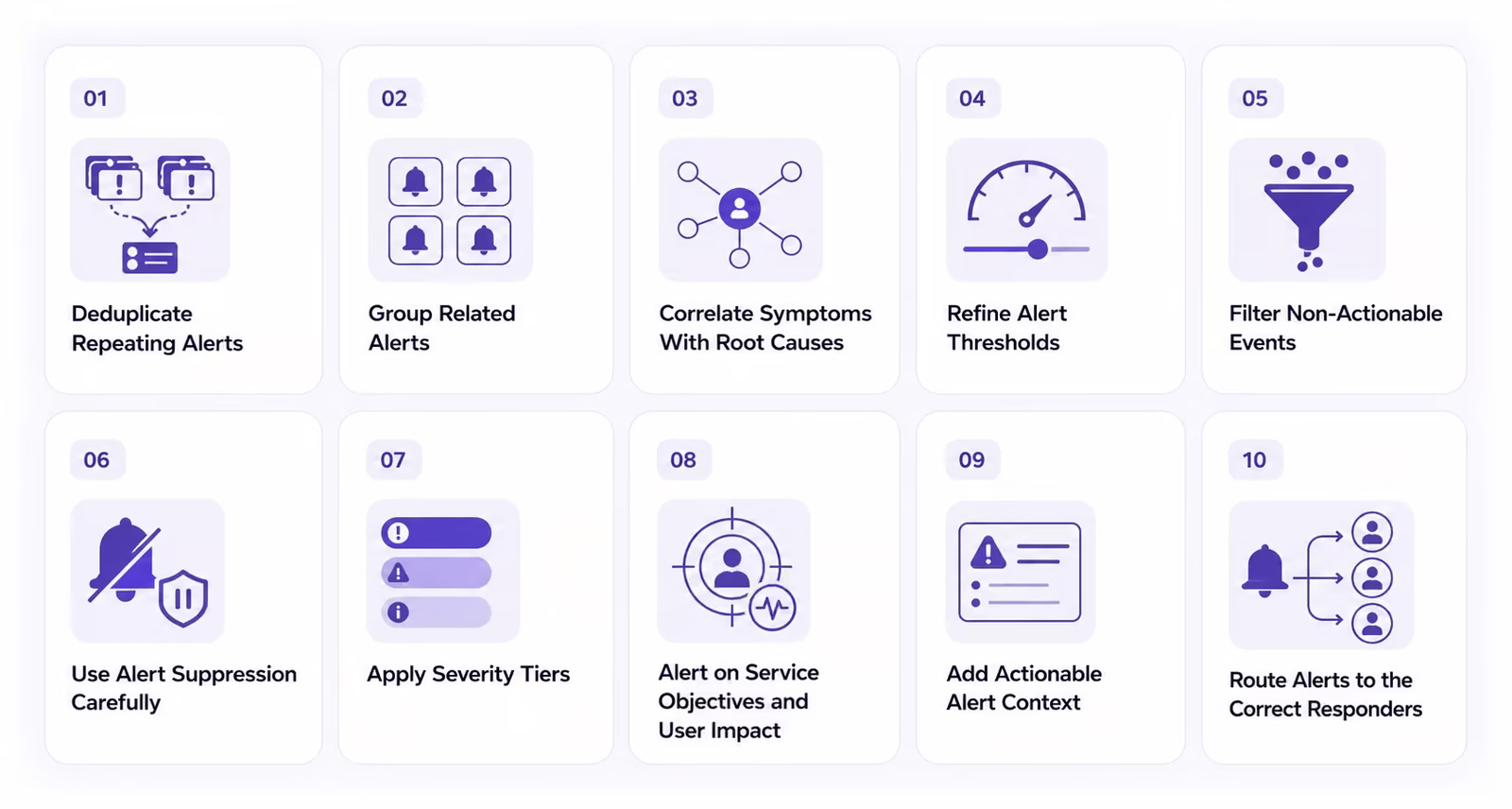
Reducing alert noise requires more than silencing individual rules. Teams need a structured approach that improves alert quality while preserving visibility.
1. Deduplicate Repeating Alerts
Deduplication combines identical or repeating notifications into one active alert or incident record. Instead of sending a new page every time a condition is detected, the system updates the existing record.
Deduplication can use attributes such as:
- Service
- Environment
- Alert source
- Resource
- Error type
- Incident fingerprint
The incident record should still preserve event counts, timestamps, and relevant changes. This allows responders to see whether the condition is continuing or becoming more frequent without receiving a separate notification for every event.
2. Group Related Alerts
Alert grouping bundles notifications that share a service, dependency, time window, or failure pattern.
Grouping differs from deduplication. Deduplication combines repeated instances of the same alert, while grouping organizes different but related alerts into a common incident.
For example, increases in latency, error rates, and failed database connections may be grouped when they occur within the same service and time window. Responders can then review one incident containing several signals instead of managing separate pages.
3. Correlate Symptoms With Root Causes
Alert correlation identifies relationships between alerts from different systems or services. It helps teams understand whether several symptoms are likely to share the same underlying cause.
Correlation may consider:
- Service dependencies
- Infrastructure topology
- Event timing
- Similar failure patterns
- Recent deployments or configuration changes
- Historical incident behavior
Consider an upstream network failure that causes errors across multiple applications. Correlation can connect these downstream alerts to the network event and identify it as the probable root cause.
The downstream signals should not disappear entirely. They provide useful information about the scope and impact of the incident. The goal is to organize them around the likely cause so responders know where to begin.
4. Refine Alert Thresholds
Thresholds should represent conditions that require action, not every departure from normal behavior.
Teams can improve thresholds by considering:
- How long the condition persists
- How frequently it occurs
- How far the metric has moved from its normal range
- Whether users are affected
- Whether another signal confirms the problem
- How the service behaves under different traffic levels
For example, high CPU usage may not justify a page if the service remains responsive. A stronger rule might trigger only when CPU usage remains elevated for five minutes and application latency also exceeds an acceptable level.
Dynamic baselines can also help teams account for normal changes throughout the day. Instead of comparing a metric with one fixed number, the monitoring system evaluates whether the current behavior is unusual for that service and time period.
5. Filter Non-Actionable Events
Alert filtering uses defined conditions to prevent irrelevant events from entering urgent response workflows.
Teams may filter events by:
- Environment
- Service
- Severity
- Resource type
- Event source
- Ownership
- Business hours
- Known event patterns
For example, a team may prevent low-severity events from development environments from reaching the production on-call schedule.
Filtering does not always mean deleting the event. Filtered events can remain searchable for debugging, trend analysis, and auditing. The important distinction is that they do not interrupt a responder when no immediate action is required.
6. Use Alert Suppression Carefully
Suppression temporarily prevents selected notifications from being delivered when predefined conditions apply.
Appropriate uses of suppression include:
- Planned maintenance
- Known incidents
- Active deployments
- Temporary testing
- Expected downstream symptoms
- Previously acknowledged conditions
Every suppression rule should have:
- A specific scope
- A clear reason
- An accountable owner
- A start and end time
- An audit trail
Open-ended suppression creates a risk that alerts will remain hidden after the original reason no longer applies. Automatic expiration helps prevent temporary changes from becoming permanent blind spots.
7. Apply Severity Tiers
Severity tiers help teams determine which events need immediate attention and which can be handled through less disruptive workflows.
A basic structure might include:
- Critical: Immediate response is required because a service is unavailable or users are significantly affected.
- High: Prompt investigation is required because service degradation may become critical.
- Medium: The issue should be reviewed during working hours but does not require an urgent page.
- Low: The event should be recorded for analysis without notifying the on-call responder.
Severity should influence routing, notification channels, acknowledgment deadlines, and escalation timing. A low-severity warning should not follow the same workflow as a payment outage or core database failure.
8. Alert on Service Objectives and User Impact
Infrastructure metrics are important, but they do not always indicate whether users are experiencing a problem.
Service Level Indicators (SLIs) measure specific aspects of service performance, such as availability, latency, and error rates. Service Level Objectives (SLOs) define the target reliability level for those indicators.
Connecting alerts to SLIs and SLOs can help teams focus on conditions that threaten user experience or business operations. Examples include:
- A sustained increase in failed transactions
- Availability falling below an acceptable target
- Latency affecting a meaningful percentage of requests
- Rapid error-budget consumption
Infrastructure alerts can still provide diagnostic context. However, not every resource fluctuation needs to generate a page if the service continues to meet its objectives.
9. Add Actionable Alert Context
An alert may be valid but still create operational noise if the responder cannot understand what it means.
Actionable alerts should include:
- The affected service and environment
- The current severity
- A summary of user or business impact
- Relevant metrics and logs
- Recent deployments or configuration changes
- The service owner
- A runbook
- A related dashboard
- A recommended next step
Rich context reduces the time responders spend searching across tools. It also helps them determine whether the alert represents a new incident, an existing problem, or an expected condition.
10. Route Alerts to the Correct Responders
A valid alert still creates unnecessary noise if it reaches people who cannot act on it.
Routing rules should consider:
- Service ownership
- Team expertise
- Alert severity
- Environment
- Time of day
- On-call schedules
- Escalation requirements
Sending a notification to an entire engineering organization may appear safer, but it creates unnecessary interruptions and unclear responsibility. Targeted routing makes it more likely that the right person will respond quickly.
Filtering vs. suppression vs. deduplication vs. correlation
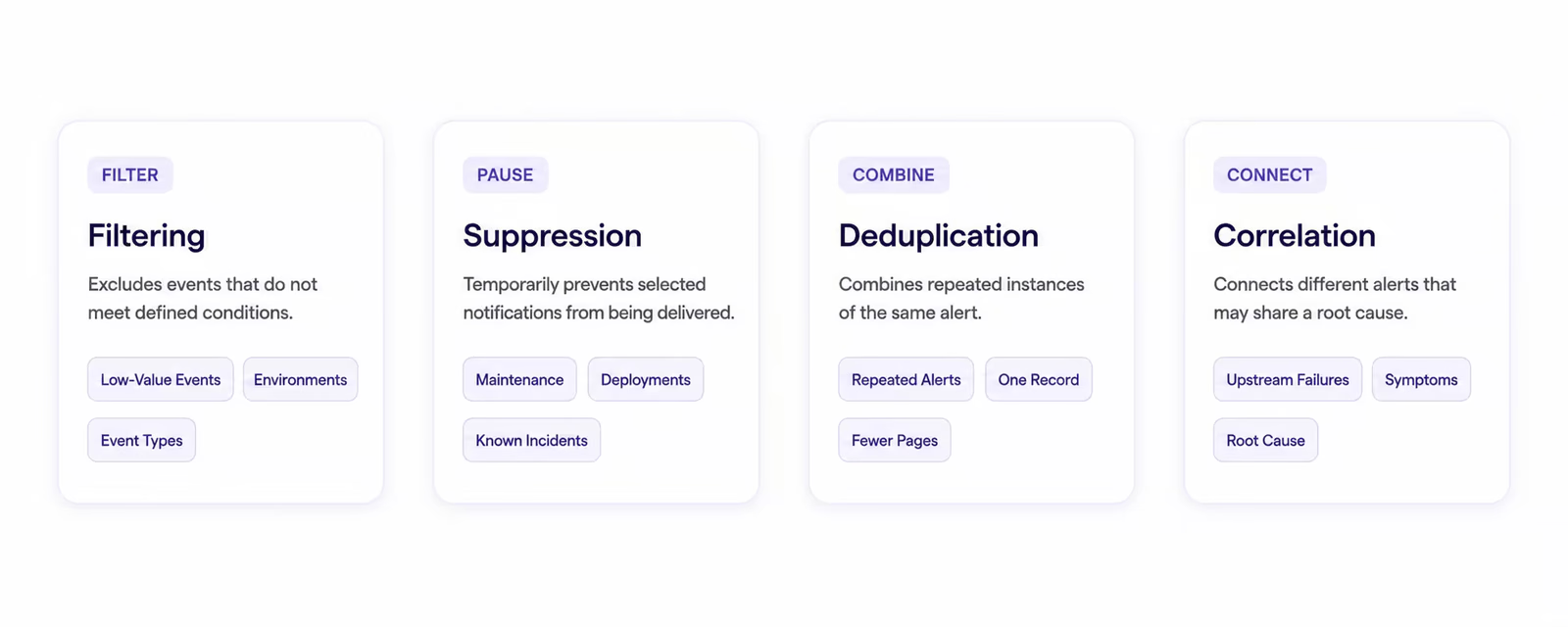
Filtering, suppression, deduplication, and correlation all reduce alert noise, but they serve different purposes.
Filtering excludes events that do not meet defined conditions. It is commonly used to keep low-value events, irrelevant environments, or specific event types out of urgent workflows.
Suppression temporarily prevents selected notifications from being delivered. It is useful during planned maintenance, deployments, and known incidents.
Deduplication combines repeated instances of the same alert. It prevents one persistent condition from generating multiple incident records or pages.
Correlation connects different alerts that may share a root cause. It helps responders understand the relationship between upstream failures and downstream symptoms.
These methods work best together. Filtering controls which events enter the alert workflow, suppression handles temporary exceptions, deduplication consolidates repetition, and correlation organizes related signals around the probable cause.
How to reduce alert noise without missing critical incidents
The greatest risk in alert noise reduction is removing a signal that responders genuinely need. Every noise-reduction rule should therefore include safeguards for critical services and high-impact conditions.
Create Critical Alert Bypass Rules
Critical alerts should be able to bypass controls that could delay or hide them, including:
- Suppression rules
- Rate limits
- Maintenance windows
- Non-urgent notification queues
- Standard grouping delays
Bypass rules should be reserved for clearly defined scenarios, such as core database failures, payment outages, major security events, or confirmed service unavailability.
If every alert receives critical status, bypass rules lose their purpose. Teams should use objective criteria based on impact and urgency.
Preserve Multiple Independent Signals
Critical services should not depend on a single metric or monitoring source.
Teams can use several independent indicators, such as:
- External availability checks
- Error rates
- Transaction failures
- Dependency health
- User experience metrics
- Synthetic tests
Independent signals provide a safety net if one monitoring rule is filtered, delayed, or incorrectly configured. They also help responders confirm whether an infrastructure issue is affecting users.
Set Safe Suppression Limits
Every temporary suppression rule should expire automatically. The system should also identify the person or team responsible for reviewing it.
Teams may require:
- A maximum suppression duration
- A documented reason
- Approval for critical services
- A notification before expiration
- A record of who created or modified the rule
These controls reduce the chance that an alert will remain hidden indefinitely.
Use Escalation Policies as a Safety Net
Escalation policies help ensure that critical alerts do not depend on one person seeing one notification.
A strong escalation policy defines:
- The primary responder
- The acknowledgment deadline
- The secondary responder
- The fallback team
- The communication channels used at each stage
If the primary responder does not acknowledge a critical alert, the system should escalate it automatically. Escalation protects incident response even when a device is offline, a notification is missed, or the scheduled responder is unavailable.
Test Alert Rules Before Deployment
Alert rules should be tested before they are applied to production systems.
Testing should confirm:
- The expected condition triggers the alert
- Normal behavior does not trigger unnecessary pages
- The correct team receives the notification
- Critical conditions bypass suppression when required
- Acknowledgment and escalation workflows function correctly
- The alert resolves only when the service has genuinely recovered
Teams should also retest alerts after major architectural, ownership, or routing changes.
Keep a Searchable Event Record
Filtering or suppressing a notification does not always mean the underlying event should be discarded.
A searchable event record helps teams:
- Investigate incidents
- Audit suppression decisions
- Identify recurring patterns
- Review false positives
- Discover conditions that should become alerts
- Confirm whether noise-reduction rules are working correctly
Preserving the event history allows teams to reduce interruptions without losing operational visibility.
A practical alert noise reduction workflow
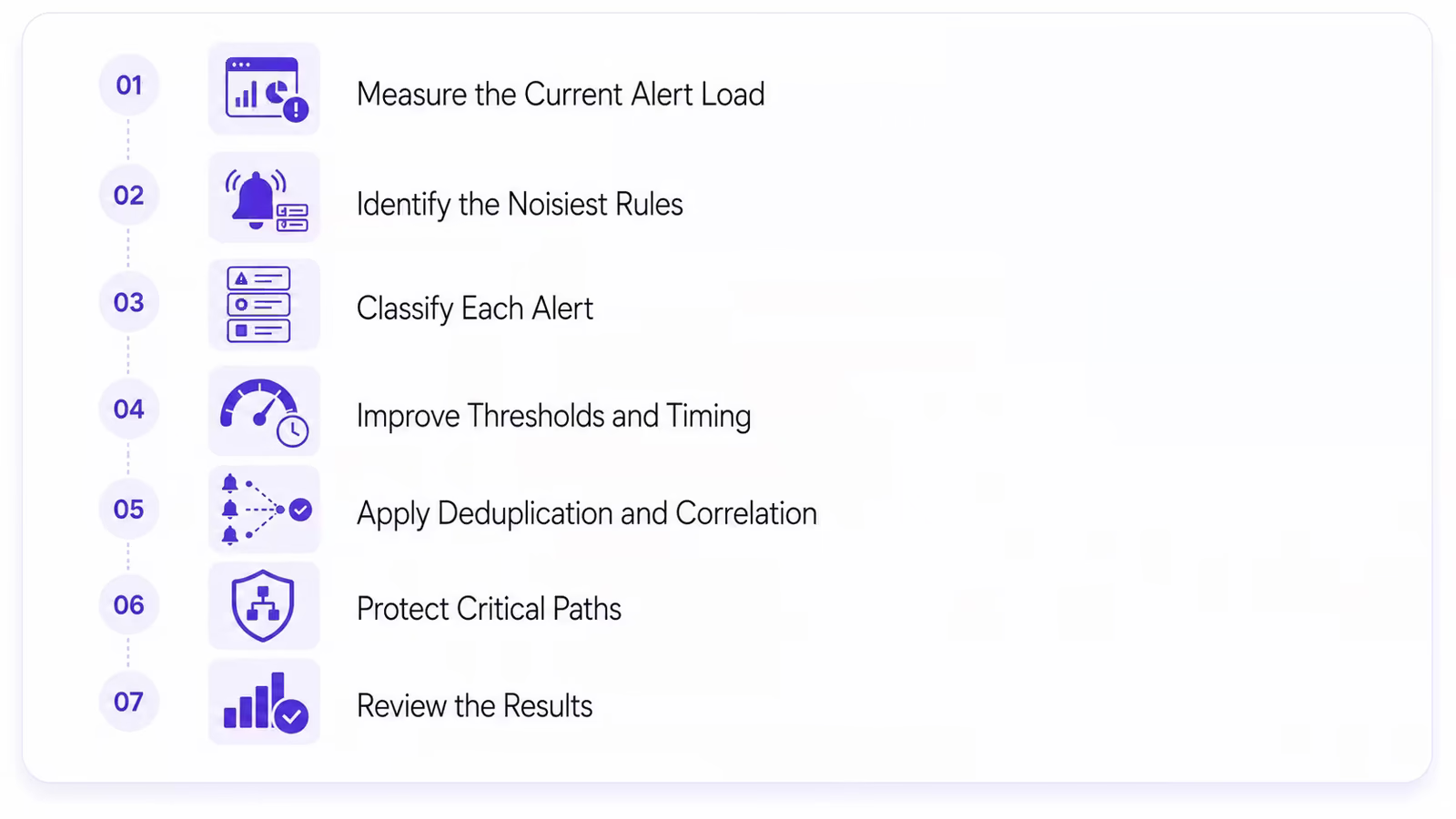
Alert noise reduction is easier to manage when it follows a repeatable process.
Step 1: Measure the Current Alert Load
Begin by establishing a baseline. Track how many alerts and pages each team receives, when they occur, and what happens after they are delivered.
Useful baseline data includes:
- Total alerts generated
- Pages per on-call shift
- Alerts by service and severity
- Repeat notifications
- Alerts acknowledged
- Alerts closed without action
- Alerts connected to confirmed incidents
This identifies where noise is concentrated and prevents teams from relying only on anecdotal feedback.
Step 2: Identify the Noisiest Rules
Rank rules by frequency, duplication, false-positive rate, and responder feedback.
A high-volume alert is not automatically a bad alert. Teams should examine whether it consistently identifies real problems and leads to useful action.
Rules that repeatedly generate pages without creating an investigation, mitigation, or escalation are strong candidates for review.
Step 3: Classify Each Alert
Every alert should have a clear destination and expected outcome.
Classify each condition based on whether it should:
- Page immediately
- Send a non-urgent notification
- Create a ticket
- Appear on a dashboard
- Remain searchable without notification
- Be removed entirely
This step separates urgent response signals from information that is useful but does not require interruption.
Step 4: Improve Thresholds and Timing
Review the logic behind each noisy alert.
Teams can add:
- Persistence windows
- Frequency requirements
- Dynamic baselines
- Separate trigger and recovery thresholds
- User-impact conditions
- Multi-signal confirmation
These controls help prevent temporary or insignificant changes from creating urgent notifications.
Step 5: Apply Deduplication and Correlation
Combine repeated notifications into one active record and group related symptoms around a common incident.
Use service ownership and dependency data to connect events that may share a cause. Preserve the individual signals as supporting context for the investigation.
Step 6: Protect Critical Paths
Identify services and workflows where a missed incident would have the greatest impact.
Add:
- Critical bypass rules
- Independent monitoring signals
- Explicit service ownership
- Tested escalation policies
- Short acknowledgment deadlines
- Fallback responders
Noise reduction should make critical incidents more visible, not subject them to the same treatment as routine events.
Step 7: Review the Results
Compare performance before and after changing the alert rules.
Look for improvements in alert quality, acknowledgment speed, and responder confidence. At the same time, confirm that critical incidents are still detected and escalated correctly.
If volume decreases but missed or delayed incidents increase, the configuration needs further adjustment.
Metrics for measuring alert noise reduction
Teams need more than total alert volume to determine whether noise-reduction efforts are working.
Useful metrics include:
- Total alerts generated
- Pages per on-call shift
- Duplicate alert rate
- False-positive rate
- Percentage of alerts acknowledged
- Percentage of alerts connected to real incidents
- Alerts closed without action
- Number of alerts generated per incident
- Number of suppressed alerts
- Number of missed or delayed critical incidents
- Mean Time to Acknowledge (MTTA)
- Mean Time to Resolve (MTTR)
- Responder feedback and on-call satisfaction
MTTA measures how long it takes for a responder to acknowledge an alert. MTTR measures how long it takes to restore service or resolve the incident.
A successful program should improve the usefulness of alerts, not only reduce their quantity. Lower volume is valuable when responders can recognize critical incidents faster and act with greater confidence.
How artificial intelligence improves alert noise reduction
Artificial Intelligence (AI) and machine learning can help alert management systems evaluate larger volumes of operational data and identify relationships that fixed rules may overlook.
AI-assisted capabilities may include:
- Identifying recurring alert patterns
- Establishing dynamic baselines
- Grouping related events
- Correlating alerts across services
- Detecting unusual behavior
- Prioritizing alerts by likely impact
- Connecting incidents with recent changes
- Suggesting probable root causes
For example, an AI-assisted system may recognize that a new deployment was followed by latency, error rate, and dependency alerts across related services. Instead of treating these events as separate problems, it can organize them into one incident and highlight the deployment as relevant context.
AI should support operational judgment rather than replace safeguards. Critical routing, suppression, and bypass decisions still need transparent rules, testing, and human review.
Alert noise reduction best practices
Effective alert noise reduction is a continuous operational discipline. The following practices help teams improve alert quality without creating monitoring blind spots:
- Page only when immediate human action is required.
- Give every paging rule a clear owner.
- Base severity on user impact and urgency.
- Use separate channels for critical, warning, and informational events.
- Require runbooks for high-severity alerts.
- Add expiration times to all temporary suppression rules.
- Preserve filtered and suppressed events for auditing.
- Review alert rules after major incidents and system changes.
- Remove alerts that repeatedly close without action.
- Use separate trigger and recovery thresholds to prevent flapping.
- Test routing, acknowledgment, and escalation workflows.
- Collect regular feedback from on-call responders.
- Track missed incidents alongside reductions in alert volume.
Teams should also review alerts during incident postmortems. If an alert arrived too late, lacked context, reached the wrong team, or created unnecessary noise, the alerting configuration should become part of the follow-up work.
How Rootly supports alert noise reduction
Rootly brings alerting and incident response into a coordinated workflow so responders can move from detection to action with less friction.
Teams can use Rootly to:
- Centralize alerts from monitoring and observability tools
- Group and deduplicate related events
- Route alerts based on service ownership and severity
- Apply on-call schedules and escalation policies
- Connect responders with runbooks and incident context
- Coordinate response through Slack and Microsoft Teams
- Maintain incident timelines and operational records
- Use incident data to improve future alerting decisions
By connecting alert activity with the broader incident response process, teams can reduce fragmented notifications while preserving the information responders need to understand impact and restore service.
Build a safer, quieter alerting system
Alert noise reduction does not mean reducing visibility. It means making important signals easier to recognize and act on.
Deduplication prevents one condition from creating repeated pages. Grouping and correlation connect related symptoms with a probable root cause. Filtering keeps irrelevant events out of urgent workflows, while carefully controlled suppression handles temporary exceptions. Severity tiers, bypass rules, and escalation policies protect critical incidents from being overlooked.
The strongest alerting systems are not the ones that generate the most notifications. They are the ones responders can trust.
At Rootly, we help teams connect alert management with on-call operations and incident response, providing the context, routing, and workflows responders need to act quickly. Book a demo to see how we can help reduce alert noise without losing sight of the incidents that matter most.
Alert noise reduction: how to eliminate alert noise without missing critical incidents